
7 Best PDF.js Alternatives for Web Apps: Embed APIs and Full PDF SDKs Compared

PDF.js renders PDFs well, but saved annotations, form data, branding, and security patches still land on your team. This guide compares 7 PDF.js alternatives, from hosted embed APIs to full browser SDKs and an open-source PDFium viewer, on saving model, pricing, and deployment. Use it to pick the route that removes the most work from your app.
You embedded PDF.js, got the renderer working, and then the product backlog grew. Annotations need to persist across sessions. Filled forms need to reach your server. Reviewer names need to be attached to comments.
The viewer needs your brand, not Mozilla’s default chrome. The library that took a weekend to integrate now needs months of infrastructure around it.
PDF.js v6.5.438 can already write form and annotation changes into the file with saveDocument(). Everything the library doesn’t give you (the upload endpoint, reviewer identity, permissions, the viewer UI, upgrades, and security patches) adds up. When those costs compound, you have 3 routes to compare. You can keep PDF.js and build the rest yourself, embed a hosted viewer API and hand the infrastructure to a vendor, or license a full SDK that runs in the browser.
In this article, we compare 7 PDF.js alternatives for web apps based on their features, pricing, saving model, and deployment options.
Top picks by reason for leaving PDF.js
If annotations and forms must save to your server, the decision comes down to a hosted embed API (no viewer to maintain, but confirm the save path) versus a full SDK (more features, self-hosted assets, a license).
| If you’re leaving PDF.js because… | Pick | Why it fits |
| You want annotations, form filling, and read aloud without building or hosting a viewer | Foxit PDF Embed API | Hosted viewer with text markup, shape, and stamp tools, form filling, and read aloud, included in every Foxit APIs plan alongside our other PDF APIs |
| You need a free hosted viewer that hands the saved PDF back to your app | Adobe PDF Embed API | Free, with a save callback that returns the updated PDF buffer and analytics for Adobe Analytics or Google Analytics |
| You want to start hosted and move to self-hosted later without changing the viewer | Nutrient Web SDK | The same viewer supports client-side, Document Engine, and DWS deployments; DWS has 250 free sessions/month, subject to commercial eligibility |
| Your users need to edit PDFs, Word files, and spreadsheets in one viewer | Apryse WebViewer | Client-side WebAssembly across 30+ formats; PDF, DOCX, and spreadsheet editing add-ons; WebViewer pricing by quote |
| You need a form designer and a published per-developer price | Syncfusion JavaScript PDF Viewer | $599 per developer per year, a built-in form designer, and a free Community License for qualifying small companies |
| Your viewer lives inside SharePoint, Teams, or Salesforce | ComPDF Web SDK | Standalone WebAssembly SDK with form and annotation authoring, a content editor, and integrations for SharePoint, Teams, OneDrive, and Salesforce |
| You want to stay open source and need redaction | EmbedPDF | Apache-2.0 viewer on PDFium with true redaction, form building, signing, and headless components for React, Vue, Svelte, and Angular |
Each tool appears once, under the reason it fits best. Several fit more than one reason, and the feature table in each entry shows their full coverage.
What PDF.js gives you today
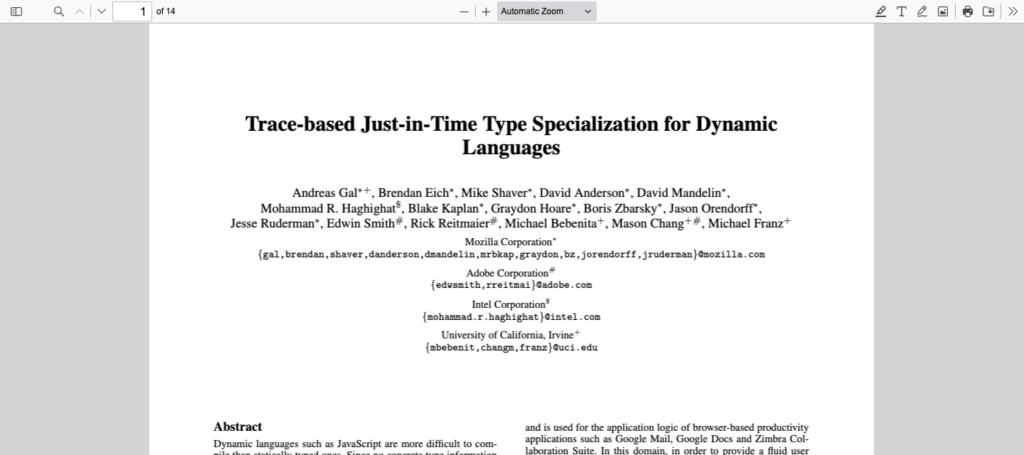
The PDF.js generic viewer, with its built-in annotation editors at the right end of the toolbar.
We use PDF.js v6.5.438, released 1 Nov 2026, as the baseline for comparing these alternatives.
| Area | What PDF.js v6.5.438 provides | What you still build or own |
| License | Apache-2.0, free, published as pdfjs-dist on npm | Upgrades and security patches |
| Rendering | Canvas with a worker, streaming and range requests enabled, with a 65,536-byte default range maximum | A worker that matches the library version exactly, with rendering limited to visible pages to save memory |
| Viewer UI | A generic viewer (viewer.html) and viewer components (PDFViewer, EventBus) | Your own skin; Mozilla asks embedders not to ship the viewer unmodified |
| Annotations | Renders existing annotations, plus editors for free text, highlight, stamp, ink, signature, and comment | Reviewer identity, threads across users, permissions, and sync |
| Forms | AcroForm filling through annotationStorage; XFA rendering is off by default in the getDocument() API (enableXfa) and on by default in the generic viewer | Field authoring, validation rules, and storage of submitted values |
| Saving | saveDocument() returns the full PDF with form and annotation changes as bytes | The upload, versioning, and conflict handling |
| Browsers | Modern build for current browsers, with a legacy build for Firefox ESR, Chrome 125+, and Safari 18+ | Testing on the browsers your users run |
Checked in November 2026.
Is PDFJS free?
Yes. PDF.js is Apache-2.0, free for commercial use, and maintained by Mozilla, with 6 releases between 30 May and 1 Nov 2026. Free to license is not free to run, though. The last column of the table above shows what your team still needs to build or maintain.
Is PDF JS good?
It’s a proven renderer. Firefox’s built-in PDF viewer has used it since Firefox 19, and it’s a reasonable starting point for annotation and form filling. PDF.js gives you a library and a sample viewer, not a finished product. Teams outgrow it when they need saved annotations with reviewer names, form authoring, redaction, Office files, or vendor support.
One concrete example of the patch burden appeared in May 2024, when CVE-2024-4367 let a malicious PDF execute JavaScript in pdfjs-dist up to 4.1.392 when isEvalSupported was true (its default). Version 4.2.67 fixed it. Whoever ships PDF.js owns patch tracking.
react-pdf, ngx-extended-pdf-viewer, vue-pdf-embed, and pdfjs-viewer-element all run PDF.js underneath, so switching wrappers doesn’t change the rendering or saving model. See the FAQ at the end for detail.
If your app only displays PDFs, PDF.js may be all you need. The alternatives below earn their place when saving, collaboration, authoring, or support start costing more than a license or a hosted API.
How we compared these alternatives
Every fact comes from public docs, API references, pricing pages, release notes, GitHub and npm. Each entry uses the same 8-row feature table so you can compare routes directly. The rows cover route and rendering, annotations, forms, saving changes, pricing, free option, deployment and data, and moving from PDF.js.
Capabilities are tied to the product surface and version named in each entry (PDF.js v6.5.438, Apryse WebViewer 12.2.1, EmbedPDF v3.1.0), because these products change frequently. Security, compliance, and data-handling statements are attributed to the vendor. We didn’t build a composite score or an overall ranking.
The 7 PDF.js alternatives in detail
Each entry below follows the same format, with a short introduction, an 8-row feature table, a paragraph on where the tool stands out, a paragraph on what to consider, then short Best for and Getting started notes. The Route and rendering row says whether the tool is a hosted embed API, a full SDK, or an open-source viewer, and where the PDF is drawn. The Moving from PDF.js row names the biggest change. The route analysis further below gives a side-by-side view.
Foxit PDF Embed API

Our PDF Embed API product page, which covers in-app viewing, form filling and annotations.
Our hosted Foxit PDF Embed API shares a developer account with our PDF Services API, Document Generation API, and eSign API. You load one script tag, initialize FoxitEmbed.View with your client ID, and call previewFile(). The viewer renders the PDF in the browser.
| Feature | Details |
| Route and rendering | Hosted embed API. Load our viewer script with your client ID, create FoxitEmbed.View, and call previewFile(). The viewer renders the PDF in the browser across 4 embed modes, including full window (default), sized container, in-line, and lightbox. |
| Annotations | Notes, typewriter text, highlight, underline, strikeout, squiggly, replace, and caret markup, pencil drawings with an eraser, shapes (rectangle, oval, polygon, cloud, arrow, line, and polyline), and stamps from Dynamic, Standard, and Sign Here sets, plus threaded replies. Users create annotations in the viewer toolbar, and the Save button writes them into the PDF. |
| Forms | Fill text fields, checkboxes, radio buttons, dropdowns, and list boxes. Input is saved into the PDF. Creating, editing, or deleting form fields, XFA forms, digital signature and barcode fields, file picker and RTF text fields, JavaScript validation, calculations, and actions, special field formats, and submit buttons with PDF actions are all unsupported. |
| Saving changes | The viewer’s Save button writes annotations and form input into the PDF. Users download the current file with the download button, which showDownloadPDF controls. The viewer menu also imports form data and exports filled form data as FDF, XFDF, or XML. Each export downloads to the user’s device. No server-side save callback is documented. |
| Pricing | PDF Embed comes with every Foxit APIs plan, including Startup at $1,750 a year with 5,000 shared credits, Business at $4,500 with 15,000, and Volume by quote. Credits are charged per API operation (1 per PDF operation, 5 per eSign envelope), and the rate card lists no per-view charge for Embed. See our pricing page for more info. |
| Free option | The free Developer plan includes PDF Embed with Foxit branding, plus 500 shared credits a year across PDF Services, Document Generation, and eSign. Branding removal, custom logos, theme and UI customization, and Embed analytics need Startup or higher. |
| Deployment and data | Cloud-delivered script only, with no self-hosted or offline option documented. Pass a URL (same origin or CORS headers required) or an ArrayBuffer or Blob. The viewer includes read aloud, search, bookmarks, and zoom controls, and addListener() reports viewer events such as file opened, page change, and text selection. |
| Moving from PDF.js | Replace getDocument(), the worker, and your viewer components with one script tag and previewFile(). Saved state moves from saveDocument() bytes you upload to a PDF the user saves and downloads in the viewer. |
Checked in November 2026.
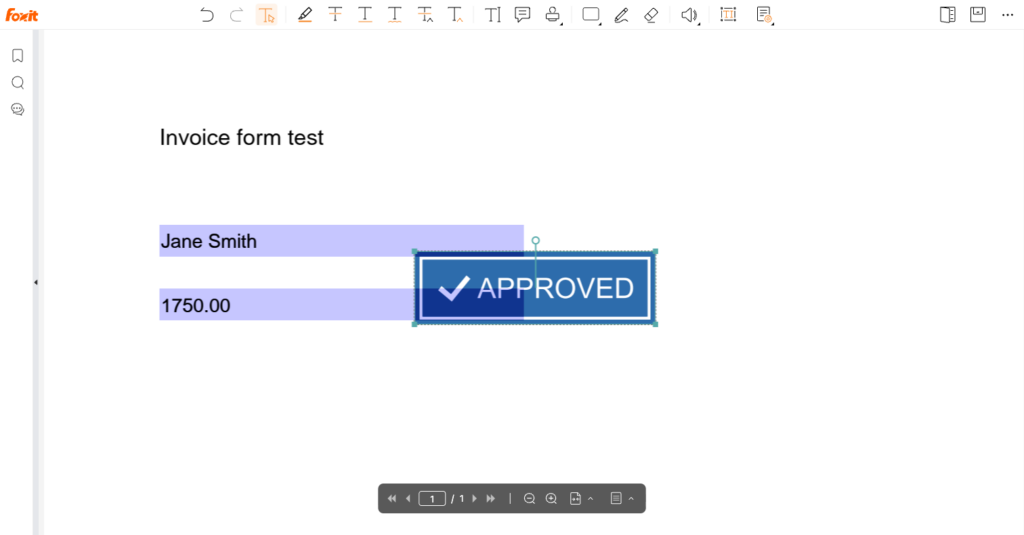
Our hosted viewer with 2 filled form fields, a stamp, and the annotation toolbar.
Where Foxit PDF Embed API stands out
You drop the viewer code, the worker version match, and the rendering engine from your active responsibilities entirely. Users get a full annotation toolbar out of the box, including text markup, shapes, Dynamic and Standard stamps, and Sign Here stamps that mark where someone should sign.
The Save button writes their work into the PDF without any save code on your side. Read aloud comes with the viewer without extra integration work.
The same client ID and account cover PDF Embed, PDF Services, Document Generation, and eSign, so the team managing conversions or signatures doesn’t need separate credentials.
What to consider
No server-side save callback is documented, so filled forms and annotations stay in the viewer until the user downloads the file or exports the form data. Form-field authoring, XFA forms, JavaScript calculations, and digital signature fields are unsupported.
There’s no drawn or certificate signature tool, and Sign Here stamps are image stamps, not signature fields.
Branding removal and UI customization require Startup or a higher plan. Self-hosting and offline use are not documented, so the viewer depends on network access to our hosted script on every load.
Best for
It’s best for SaaS apps that display, annotate, and fill existing PDFs and already use, or plan to use, our other APIs.
Getting started
To get started, create a free Foxit developer account, copy the Client ID from the application in your developer console, and follow the PDF Embed API reference to embed your first PDF.
Adobe PDF Embed API
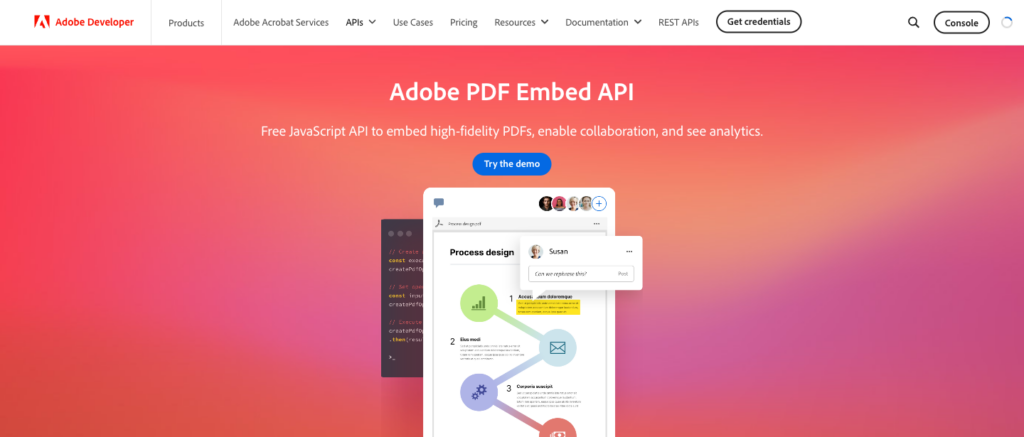
Adobe PDF Embed API product page, which describes it as a free JavaScript API for embedding and commenting on PDFs.
The Adobe PDF Embed API is a free hosted embed API. You load Adobe’s viewer script from acrobatservices.adobe.com, initialize AdobeDC.View with a client ID and a container ID, and call previewFile(). The viewer renders in the browser across 4 embed modes, including full window, sized container, in-line, and lightbox.
| Feature | Details |
| Route and rendering | Hosted embed API. Load Adobe’s viewer.js from acrobatservices.adobe.com, create AdobeDC.View with a client ID, and call previewFile(). The viewer renders in the browser across 4 embed modes, including full window, sized container, in-line, and lightbox. |
| Annotations | Text comments, sticky notes, highlight, strikethrough, underline, and freehand drawing in full window mode. The Annotations API (off by default) adds, gets, updates, and deletes annotations and fires events. A user profile callback names reviewers, who otherwise appear as Guest. |
| Forms | Form filling is on by default in full window mode. XFA forms, digital signature and barcode fields, file picker and RTF text fields, fields with JavaScript calculation or validation, and special field formats are unsupported. |
| Saving changes | Register a SAVE_API callback to receive the updated PDF buffer and store it. Options cover autosave frequency, focus polling, and a FILE_MODIFIED response when 2 users change the same file. Without a callback, users download the changed PDF. |
| Pricing | Free with no usage cap. |
| Free option | A free client ID, with no paid tier for Embed. |
| Deployment and data | Hosted script only. Pass a URL (same domain or CORS, with custom headers or cookie credentials if needed) or a promise that resolves to an ArrayBuffer. Rendering times out after 5 minutes. Linearized PDFs stream only in browsers with SharedArrayBuffer (desktop Chrome and Chromium-based Edge) when enableLinearization is true. Analytics go to Adobe Analytics or Google Analytics, and the UI comes in 20 locales. |
| Moving from PDF.js | Replace your viewer with AdobeDC.View, move the upload you built around saveDocument() into the SAVE_API callback, and register a client ID for each domain. |
Checked in November 2026.
Where Adobe PDF Embed API stands out
It’s free with no usage cap, which removes the cost conversation entirely for teams whose only requirement is a hosted viewer.
Of the 2 dedicated hosted embed APIs here (Foxit and Adobe), only Adobe documents a server-side save path. Its SAVE_API callback returns the full updated PDF buffer with configurable autosave intervals and a conflict signal when 2 users edit the same file simultaneously.
Analytics events integrate with Adobe Analytics and Google Analytics without any additional instrumentation.
What to consider
Client IDs are bound to the registered domain, and other domains receive an “Invalid client Id provided” error, so each environment (dev, staging, production) needs its own registration. Commenting and form filling work only in full window mode.
The same form exclusions apply as with other hosted viewers (XFA, signature fields, JavaScript calculations). Linearized streaming requires SharedArrayBuffer support, which limits fast loading to desktop Chrome and Chromium-based Edge. No self-hosted or offline option is documented, so the viewer depends on Adobe’s CDN.
Best for
It’s best for content sites, portals, and apps that need a free hosted viewer with comments and a server-side save callback, and can live within Adobe’s viewer UI.
Getting started
To get started, register at the Adobe Developer Console to get a free client ID.
Nutrient Web SDK
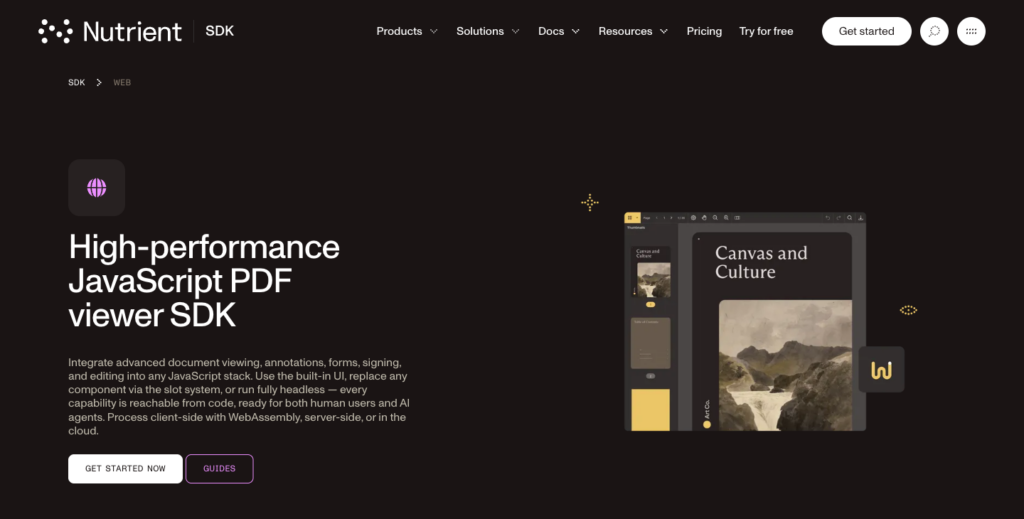
Nutrient Web SDK product page, which names client-side WebAssembly, server-side and cloud processing as deployment options.
Nutrient Web SDK (formerly PSPDFKit) is a commercial viewer with 3 deployment modes: a client-side WebAssembly build you self-host, a server-rendered Document Engine, and a managed cloud option called DWS Viewer API.
Because the same viewer API spans all 3 modes, you can start on DWS sessions and move in-house without rewriting your integration.
| Feature | Details |
| Route and rendering | Client-side WebAssembly, server-rendered Document Engine, or DWS Viewer API. DWS-managed files render in the cloud, while app-provided files render locally. Supports PDFs, Office files, and images. |
| Annotations | 17+ annotation types with import and export, threaded comments, measurement tools, and real-time Instant collaboration through Document Engine. |
| Forms | Form viewing and filling, plus a drag-and-drop Form Creator for new fields. |
| Saving changes | Export form data and annotations as XFDF or Instant JSON. Document Engine and DWS-managed documents use server storage, and DWS app-provided documents remain in the browser. |
| Pricing | Web SDK: annual subscription quoted on products, components, and use. DWS Viewer API: Starter at $199 a month for 5,000 sessions, or $1,988 a year billed annually; Growth at $399 a month for 20,000 sessions, or $4,299 a year; Custom by quote. |
| Free option | Watermarked 30-day SDK trial. DWS: 250 sessions/month, 100 documents, 500 MiB, with no commercial free use for enterprises over 20 staff or $1M annual revenue. |
| Deployment and data | With a license key and self-hosted assets the viewer works offline. With DWS Viewer API, each viewer load needs a connection. Nutrient states DWS is SOC 2 Type 2 audited and encrypts DWS-managed documents in transit and at rest. |
| Moving from PDF.js | Replace your viewer with NutrientViewer.load(), choose a deployment mode, and convert stored annotations to XFDF or Instant JSON. |
Checked in November 2026.
Where Nutrient Web SDK stands out
The same viewer API covers hosted, self-hosted, and fully client-side deployments, so your front-end code stays unchanged when the architecture changes underneath it. The Form Creator goes beyond what any hosted embed API provides, letting users drag new fields onto a PDF and then fill them.
Instant collaboration through Document Engine synchronizes edits in real time without you building a sync layer. Published per-session DWS prices make budgeting straightforward at the hosted tier.
What to consider
The Web SDK has no public price, and the trial watermarks PDFs, so an unwatermarked evaluation and a real budget number both start with a sales conversation. Instant collaboration needs Document Engine, self-hosted or managed, which is a separate architectural decision. The DWS free tier excludes commercial use for enterprises over 20 staff or $1M revenue, so eligibility narrows as the product grows.
Best for
It’s best for teams that expect to grow from viewing into authoring, collaboration, or Office file support, and want one viewer API for every deployment without rewriting the integration.
Getting started
To get started, sign up for a 30-day SDK trial or a DWS free tier from Nutrient’s site.
Apryse WebViewer
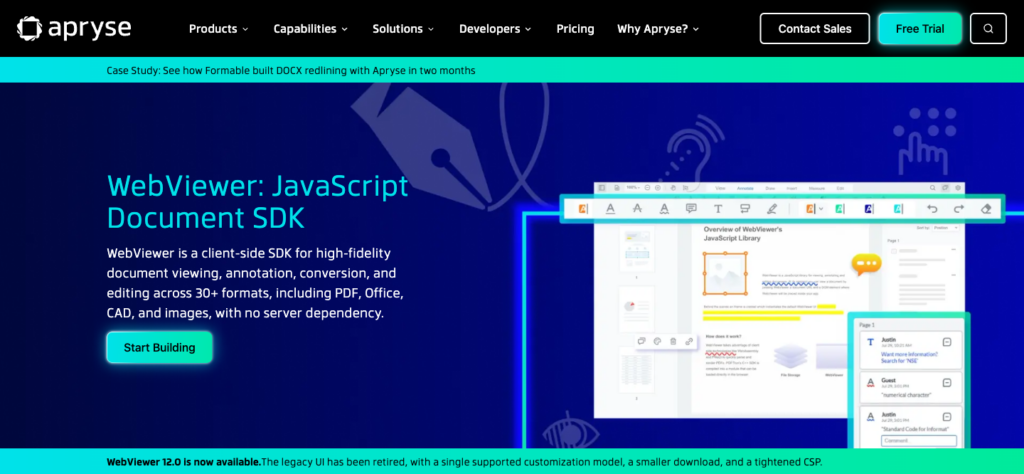
Apryse WebViewer product page, with the WebViewer 12.0 banner noting that the legacy UI has been retired.
Apryse WebViewer 12.2.1 is a full SDK that processes documents in the browser through a WebAssembly build of Apryse’s C++ core.
You self-host the static assets, and an optional Docker backend adds CAD support and server rendering. Documents are processed client-side, and Apryse states no document content reaches its infrastructure in the default deployment.
| Feature | Details |
| Route and rendering | Full SDK. WebViewer 12.2.1 processes documents in the browser through a WebAssembly build of Apryse’s C++ core. An optional Docker backend adds CAD support and server rendering. |
| Annotations | Annotation, measurement, comparison, and redaction tools beside the rendered document. |
| Forms | Form filling is in the base package, including filling from JSON data. Form building and certificate-based digital signatures both come with the Digital Signing add-on. The form builder adds, edits, and removes fields in the viewer. |
| Saving changes | getFileData({ xfdfString }) returns PDF bytes with exported annotations. |
| Pricing | WebViewer is priced by quote. Apryse packages start at $1,500, though scope and billing period for WebViewer specifically are not published. |
| Free option | A trial key with access to every add-on. |
| Deployment and data | You self-host the static assets. Apryse states no document content reaches its infrastructure in the default client-only deployment. Views and annotates PDF plus 30+ formats including DOCX, XLSX, PPTX, and images. |
| Moving from PDF.js | You swap the rendering engine and the UI. Teams that want to stay on PDF.js rendering can look at Apryse’s PDF.js Express, a commercial layer on PDF.js (see the FAQ at the end). |
Checked in November 2026.
Where Apryse WebViewer stands out
PDF, DOCX, and spreadsheet editing add-ons sit inside one browser viewer, so a user can open a Word file, annotate it, and save it without leaving your app.
Client-side processing in the default deployment means documents don’t leave the browser, which simplifies the data-handling conversation for regulated industries. It covers 30+ formats, including CAD through the optional backend. Apryse describes the interface as WCAG 2.2 AA compliant.
What to consider
Pricing past the entry package requires a quote, and add-ons cost extra, so the final number isn’t visible until late in the sales process. WebViewer 12.0 retired the legacy UI, so existing customizations built on that version need review before upgrading.
Best for
It’s best for products where users edit PDFs and Office files in the browser and documents must stay on the client.
Getting started
To get started, request a trial key from Apryse to access the full SDK with every add-on enabled.
Syncfusion JavaScript PDF Viewer
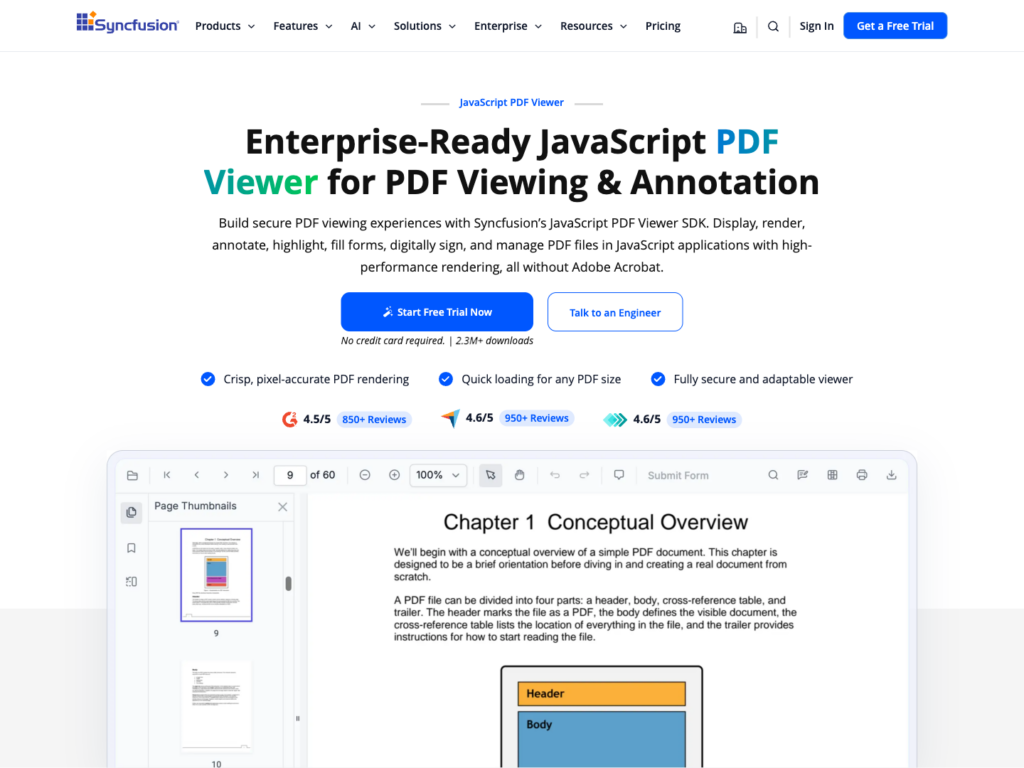
Syncfusion JavaScript PDF Viewer product page, with a live viewer showing the toolbar, thumbnails and a Submit Form button.
The Syncfusion JavaScript PDF Viewer is a full SDK component built on PDFium. Its standalone setup loads PDFium resource files into the browser from the URL you configure in resourceUrl. Syncfusion’s sample uses its CDN, but you can self-host the resources.
| Feature | Details |
| Route and rendering | Full SDK component. Standalone setup loads PDFium resource files into the browser from the URL you set in resourceUrl. Syncfusion’s sample points it at Syncfusion’s CDN. |
| Annotations | Highlights, sticky notes, stamps, freehand drawings, shapes, and ink, with annotation import and export. |
| Forms | Fill text fields, checkboxes, radio buttons, and dropdowns. A built-in form designer adds text boxes, checkboxes, and signature fields through the UI or code, with validation rules and default values. |
| Saving changes | saveAsBlob() returns the modified PDF for upload to your server. download() saves it locally. |
| Pricing | PDF Viewer SDK at $599 per developer per year with Business Support, on a minimum 1-year subscription. |
| Free option | A Community License for companies under $1 million in annual revenue with 5 or fewer developers and 10 or fewer employees. A free trial for everyone else. |
| Deployment and data | Self-hosted component. Point resourceUrl at your own copy of the PDFium resources or at Syncfusion’s CDN. Validating digital signatures relies on the Syncfusion PDF Library, server-side or with extra processing, not on the viewer alone. |
| Moving from PDF.js | Install the PDF Viewer package for your framework (JavaScript, React, Angular, Vue, Blazor, or ASP.NET), set resourceUrl, and move annotation storage to the viewer’s import and export. |
Checked in November 2026.
Where Syncfusion JavaScript PDF Viewer stands out
It’s the only pick here with a published per-developer price, which lets you plan costs before any sales call.
The built-in form designer means users can create new fields on existing PDFs without a separate authoring tool.
The Community License makes it free for small teams that meet the eligibility criteria, and framework packages cover JavaScript, React, Angular, Vue, Blazor, and ASP.NET in one purchase.
What to consider
Cost grows with developer count, and Community License eligibility ends as the company grows past the thresholds.
Digital signature validation needs a separate Syncfusion PDF Library, adding integration work beyond the viewer itself. You’re responsible for hosting or fetching the PDFium resources, and loading them from Syncfusion’s CDN creates a dependency on that CDN.
Best for
It’s best for small teams that qualify for the Community License, and larger teams that want a fixed per-developer cost and a form designer.
Getting started
To get started, check eligibility and download at Syncfusion’s pricing page.
ComPDF Web SDK
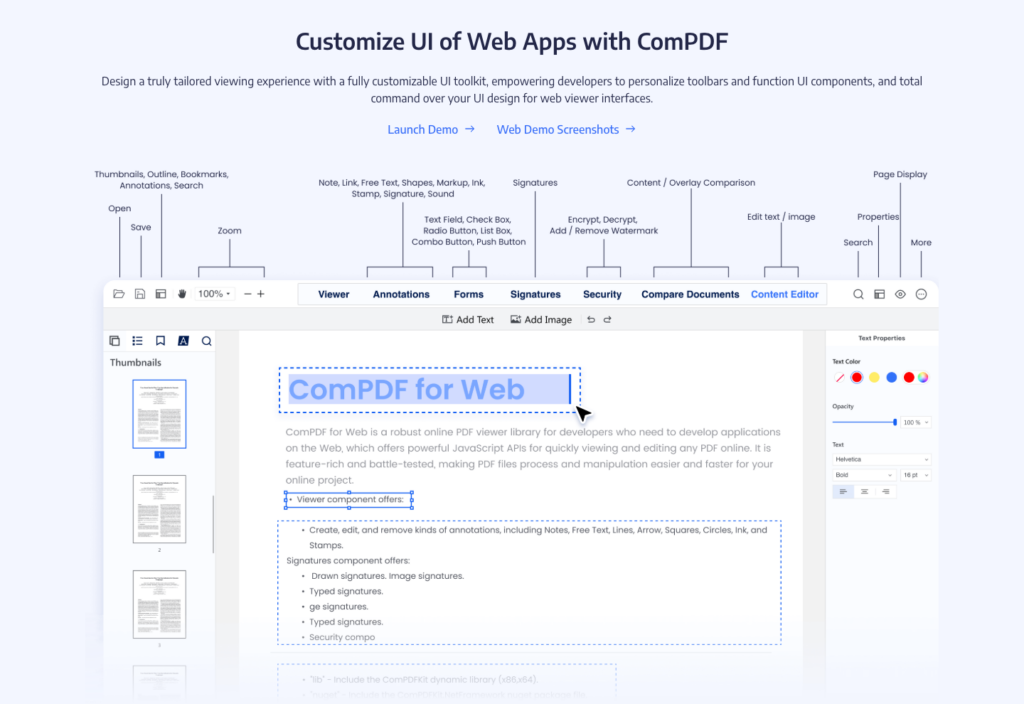
ComPDF Web SDK viewer, with each toolbar group labeled, from annotations and form fields to the content editor.
ComPDF Web SDK is a full SDK that runs entirely on the client through WebAssembly. Its standalone mode processes documents in the browser without an internet connection or a server call, and it ships integrations for SharePoint, Microsoft Teams, OneDrive, and Salesforce.
| Feature | Details |
| Route and rendering | Full SDK. Standalone mode is a JavaScript library that runs entirely on the client through WebAssembly. |
| Annotations | Create, edit, delete, flatten, import, and export annotations. |
| Forms | Create, fill, edit, delete, flatten, import, and export form fields. Electronic and digital signatures. A content editor for text and images. |
| Saving changes | getDocument().getFileData() returns PDF bytes for local saving or server upload. |
| Pricing | Quote-based on products, features, and deployment. Simple use cases start from $1,300. |
| Free option | A 30-day trial. |
| Deployment and data | Standalone mode keeps data on the client and renders PDFs without internet or a server. Integrations for SharePoint, Microsoft Teams, OneDrive, and Salesforce. |
| Moving from PDF.js | Install the Web SDK for your framework (Vue, React, Angular, Next.js, Nuxt.js, Svelte, SvelteKit, or vanilla JavaScript), apply the license key, and replace your viewer. |
Checked in November 2026.
Where ComPDF Web SDK stands out
The full form and annotation lifecycle (create, fill, edit, delete, flatten, import, and export) runs in the browser without a server, which keeps data handling straightforward for client-only architectures.
The Microsoft 365 and Salesforce integrations make it a practical choice for teams building inside those ecosystems. A published starting price for simple use cases gives you a floor for the budget conversation.
What to consider
Anything beyond simple use cases is quoted, so the starting price is a floor, not an estimate for complex deployments. The trial period is 30 days.
Best for
It’s best for teams embedding a viewer inside SharePoint, Teams, or Salesforce, or needing form authoring in a standalone browser SDK.
Getting started
To get started, sign up for a 30-day trial at the ComPDF site.
EmbedPDF
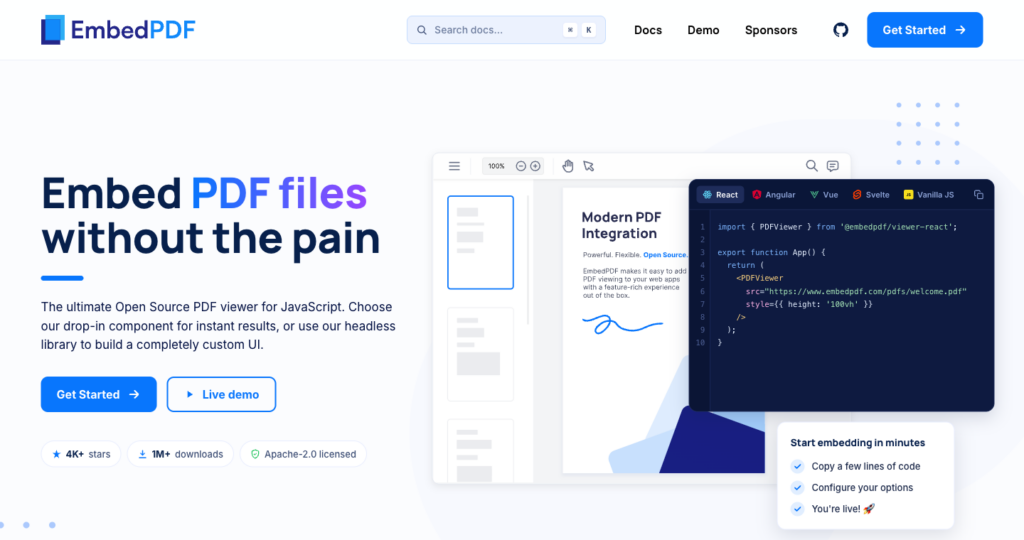
EmbedPDF home page, with the drop-in React component next to the viewer it renders.
EmbedPDF is an open-source viewer powered by PDFium, the PDF library inside Chrome. PDFium is compiled to WebAssembly and runs in a Web Worker. Version 3.0 shipped as a stable release on 6 Nov 2026, and the current release is v3.1.0 on npm under Apache-2.0. You add the ready-made viewer as one <embedpdf-viewer> element, or build your own UI from the headless plugins.
| Feature | Details |
| Route and rendering | Open-source viewer. The engine runs PDFium compiled to WebAssembly in a Web Worker, so pages render in the browser. Use the ready-made viewer (one <embedpdf-viewer> element, with packages for React, Vue, Svelte, and Angular) or the headless plugins to build your own UI. |
| Annotations | Highlight, underline, strikeout, drawing, notes, text boxes, and callouts, plus shapes (rectangles, circles, lines, arrows, and polygons), stamps, and comment threads with replies. Measurement is available but off by default. The user’s identity.displayName becomes the annotation author. Redaction (off by default) removes marked content from the file. |
| Forms | Form filling is on by default. Turning on form building adds a Form mode for creating fields. Users can draw, type, or upload a signature, sign fields, and check signatures. |
| Saving changes | The viewer’s Download includes every annotation, form value, and signature. viewer.documents.download() returns the same PDF as bytes for a server upload, and annotations export as a JSON bundle you can store apart from the PDF. |
| Pricing | Free and open source under Apache-2.0. |
| Free option | Free viewer with GitHub and Discord community help. Sponsors get priority and integration support. |
| Deployment and data | Runs client-side. By default the engine’s WebAssembly, its worker, and the standard stamps ship inside your build and load from your own origin, and no fonts are fetched unless you configure them. The self-hosting and air-gapped guide lists every URL a deployment can touch. |
| Moving from PDF.js | Install @embedpdf/viewer, replace your viewer with <embedpdf-viewer> or EmbedPDF.init(), and replace your saveDocument() upload with viewer.documents.download(). |
Checked in November 2026.
Where EmbedPDF stands out
It’s an open-source replacement on a different rendering engine. If PDFium’s rendering suits your documents better than PDF.js, EmbedPDF gives you that engine without a license cost.
True redaction (which removes content from the file) and form-field building are absent from PDF.js’s editor types, and EmbedPDF has both, along with signing and measurement.
Its assets load from your own origin by default, which suits a strict Content Security Policy and air-gapped deployments without extra setup. The headless plugins let you build your own UI entirely on top of the engine, giving you more control over the viewer chrome than any hosted embed API.
What to consider
Version 3.0 is a new major release, and most config names changed from 2.x (@embedpdf/snippet became @embedpdf/viewer), so existing 2.x integrations need the migration guide and a test pass. Redaction, form building, and measurement stay off until you turn them on in features.
Unless you become a sponsor, support for production incidents comes from the community through GitHub issues and Discord. The engine checks permissions on every call, and as EmbedPDF’s permissions guide puts it, hiding a button “is about honest UI, not safety.”
Best for
It’s best for teams that want to stay open source but need redaction, form building, signing, or a PDFium-based renderer.
Getting started
To get started, install via npm (@embedpdf/viewer) or follow the EmbedPDF viewer quick start.
Keep PDF.js, embed a hosted viewer, or license a full SDK
Together with keeping PDF.js, the 7 entries above make up the 3 routes from the introduction plus an open-source option, and each moves a different share of the work off your team.
The comparisons below put them side by side, starting with who owns what, then how saved changes reach your server, then what a move to our API involves in practice.
What each route asks of your team
| Route | Picks in this list | Who renders the PDF | How you pay | What you maintain |
| Keep PDF.js | PDF.js and its wrappers | PDF.js in the browser, with a worker you host | Free under Apache-2.0 | Viewer UI, saving, permissions, upgrades, and patches |
| Hosted embed API | Foxit PDF Embed API, Adobe PDF Embed API, Nutrient Web SDK through DWS Viewer API | Adobe and Foxit render locally; DWS renders app-provided files locally and managed files in its cloud | Included in a plan (Foxit), free (Adobe), or per session (Nutrient DWS) | Client IDs or session tokens, CORS, storing saved changes |
| Full SDK | Nutrient Web SDK, Apryse WebViewer, Syncfusion JavaScript PDF Viewer, ComPDF Web SDK | WebAssembly in the browser, with optional servers | Annual license, quoted, or per developer | Self-hosted assets, license keys, upgrades |
| Open-source viewer | EmbedPDF | PDFium compiled to WebAssembly in the browser | Free under Apache-2.0 | The same work as PDF.js, plus serving the engine’s WebAssembly from your own site |
Checked in November 2026.
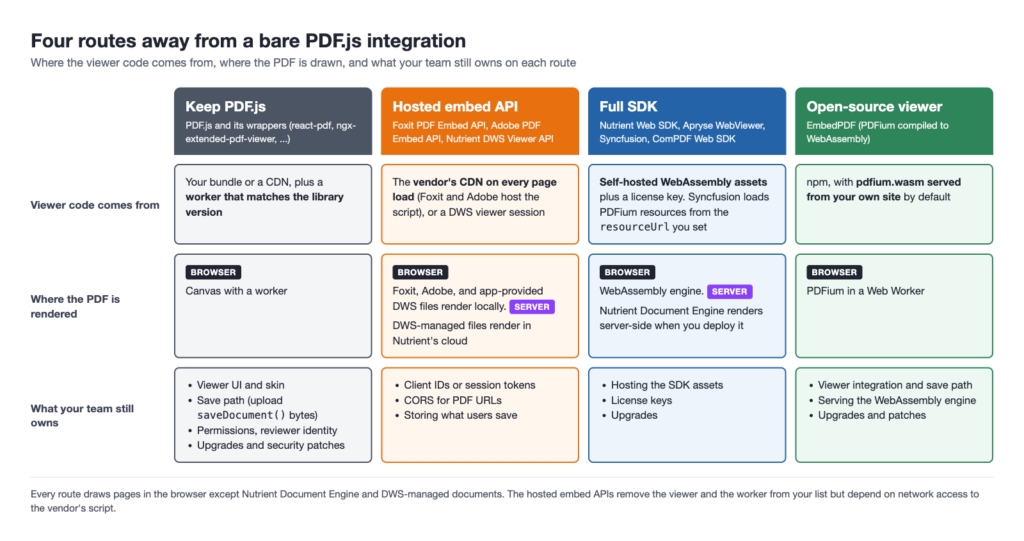
Where the viewer code comes from, where the PDF is drawn, and what your team still owns on each route.
Who renders
Almost every tool in this list displays pages in the browser. The exceptions are Nutrient Document Engine and DWS-managed documents, which render server-side. For the dedicated hosted embed APIs (Foxit, Adobe), the viewer code arrives from the vendor’s CDN on each page load. For full SDKs and EmbedPDF, the code comes from your bundle or your self-hosted assets.
How you pay
The billing unit varies more than the headline price.
Our annual plans cover PDF Embed plus credits shared across PDF Services, Document Generation, and eSign. Adobe charges nothing.
Nutrient DWS charges per viewer session. Syncfusion charges per developer per year. Apryse, Nutrient Web SDK, and ComPDF charge by quote. Compare the unit that matches your usage pattern before comparing the numbers.
What you keep up
Keeping PDF.js means owning the viewer, the save path, and security patches, as CVE-2024-4367 illustrates. Hosted APIs remove the viewer and the worker from your list but leave you responsible for storing what users save.
Full SDKs remove most UI work but add license management and asset hosting. EmbedPDF shifts the work from PDF.js to PDFium, a different engine but a similar obligation.
Pick the route by what users must do with documents, then pick the tool inside that route.
How annotations and form data get back to your server
| Option | Annotations out | Filled form data out | Saved PDF to your server |
| PDF.js | annotationStorage, written into the PDF by saveDocument() | Same, through saveDocument() | Upload the bytes saveDocument() returns |
| Foxit PDF Embed API | Saved into the PDF with the viewer’s Save button | Saved into the PDF, or exported from the viewer menu as FDF, XFDF, or XML | No server-side save callback is documented. Users download the file from the viewer’s download button. |
| Adobe PDF Embed API | Annotations API and events | Saved into the PDF buffer | SAVE_API callback receives the updated PDF |
| Nutrient Web SDK | XFDF or Instant JSON | XFDF or Instant JSON | Export through the SDK, or keep documents in Document Engine or DWS |
| Apryse WebViewer | Through the WebViewer API | Through the WebViewer API | getFileData({ xfdfString }) returns PDF bytes |
| Syncfusion JavaScript PDF Viewer | Annotation import and export | Filled and saved in the viewer | saveAsBlob() returns the modified PDF for upload |
| ComPDF Web SDK | Annotation import and export | Form import and export | getDocument().getFileData() returns PDF bytes for upload |
| EmbedPDF | Annotation export as a JSON bundle, and import | Form import and export | viewer.documents.download() returns the PDF with every change as bytes |
Checked in November 2026.
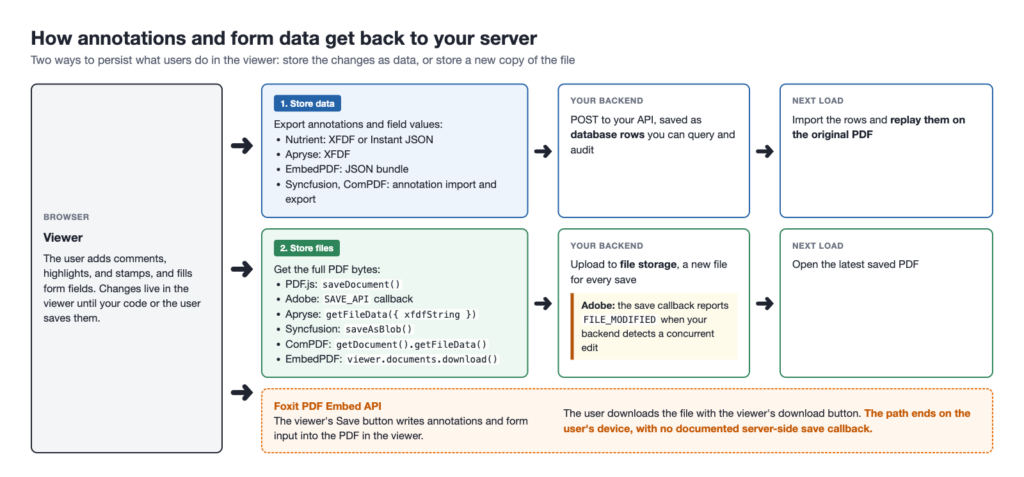
The data path stores changes as rows you can query; the file path stores a new PDF per save. Our viewer’s path ends with the user downloading the file.
Store data or store files
You can store exported annotations or form data as rows in your own database and replay them on the original PDF later. Formats include XFDF or Instant JSON from Nutrient, XFDF from Apryse, a JSON bundle from EmbedPDF, and FDF, XFDF, or XML form data from our PDF Embed API.
Saving the whole PDF is simpler but creates a new file for every save. Our PDF Embed API also saves the whole PDF, and both the PDF and any form data export end at the user’s download rather than on your server. The practical tradeoff is storage cost and the ability to query or audit individual changes.
Reviewer identity
Adobe names reviewers through a user profile callback. EmbedPDF sets the author from identity.displayName in its config. With PDF.js you add identity yourself as part of the annotationStorage logic, and with our PDF Embed API you track who saved each file on your side.
Two people, one file
Adobe’s callbacks report FILE_MODIFIED when your backend detects a concurrent edit. Nutrient Instant syncs edits in real time through Document Engine. The other tools leave concurrent-edit handling to you. Check each SDK’s collaboration model separately before you build.
If your app needs the filled PDF on the server, confirm the vendor’s save path before you choose. A viewer that fills forms well doesn’t help if the result never reaches your storage.
Mapping PDF.js calls to the Foxit PDF Embed API
We use our own API as the worked example. The mapping below covers concepts, not code. Existing PDFs open as they are, and only your viewer code and your save logic change.
| PDF.js | Foxit PDF Embed API | What changes |
getDocument() plus PDFViewer, EventBus, and your toolbar | new FoxitEmbed.View() with a client ID and div ID, then previewFile() | Our hosted viewer replaces the viewer you assemble |
GlobalWorkerOptions.workerSrc and the exact API and worker version match | One script tag that carries your client ID | No worker file to host or version-match |
A url or data passed to getDocument(), with CORS or a proxy | Content passed to previewFile() as a URL, ArrayBuffer, or Blob | Same-origin or CORS rules still apply to URLs |
Range requests and streaming (rangeChunkSize, disableRange) | Not documented | Check load times on your largest files |
| Free text, highlight, stamp, ink, signature, and comment editors | Note, typewriter, text markup, pencil, eraser, shape, and stamp tools | No signature editor in our toolbar |
annotationStorage and saveDocument() | The viewer’s Save button, then the download button | No save callback to your server is documented |
AcroForm filling through annotationStorage | Built-in form filling with a Save button, plus form data export and import (FDF, XFDF, XML) from the viewer menu | No field authoring, XFA, JavaScript calculations, or signature fields |
enableXfa | Not supported | XFA forms need another route |
eventBus.on() handlers | addListener() with PageNum_Changed, File_Opened, Text_Selected, and 9 more events | Rename your handlers |
| Your own toolbar and theme code | showToolControls, showLeftHandPanel, showDownloadPDF, showPrintPDF, theme, and logo | Customization and branding removal need Startup or higher |
| No account, Apache-2.0 | A client ID from a free Developer account | Production branding control needs a paid plan |
The same account gives you PDF Services for server-side steps, including our Import PDF Form Data API to prefill a form before the viewer opens, and our Export PDF Form Data API to read field values from a PDF your server holds.
Where your PDFs load from and what works offline
Feature coverage matters less if your security team rules a tool out because of where its code and your files travel. The table below traces both for every option, along with whether it can run on a disconnected network.
| Option | Viewer code comes from | Where the PDF goes | Offline or air-gapped |
| PDF.js | Your bundle or a CDN, plus a matching worker | Fetched by the browser from your server, with range requests | Yes, when you self-host the build |
| Foxit PDF Embed API | Our hosted script at embed.developer-api.foxit.com | A URL or binary passed to the viewer and rendered in the browser | Not documented |
| Adobe PDF Embed API | Adobe’s hosted script at acrobatservices.adobe.com | A URL or ArrayBuffer passed to the viewer and rendered in the browser | Not documented |
| Nutrient Web SDK | Self-hosted assets with a license key, or a DWS Viewer API session | Browser, your Document Engine server, or Nutrient cloud, by mode | Yes with self-hosted assets; DWS needs a connection for each viewer load |
| Apryse WebViewer | Self-hosted static assets | Processed in the browser; Apryse states no content reaches its infrastructure | The client-only deployment needs no server |
| Syncfusion JavaScript PDF Viewer | An npm package plus PDFium resources from the URL you set | The browser | Yes in standalone mode with self-hosted resources |
| ComPDF Web SDK | A self-hosted library | The browser, in standalone mode | Yes in standalone mode, with no internet or server needed |
| EmbedPDF | npm, with the engine’s WebAssembly served from your own site by default | The browser | Yes, with nothing fetched from a public CDN by default |
Checked in November 2026.
Hosted viewers still render locally
Both dedicated hosted embed APIs (Foxit and Adobe) render the PDF in the browser, not on the vendor’s server.
The viewer code still arrives from the vendor’s CDN on every page load. Both viewers need network access, and you accept the vendor’s script updates automatically.
“Our documents cannot leave our servers”
Full SDKs with self-hosted assets and open-source viewers are the routes that can run inside a closed network, and the callout below lists which configurations qualify. Separate a regulatory requirement from an internal preference before ruling out hosted options, because “we prefer not to use third-party CDNs” and “we operate on a disconnected network” are different constraints.
If documents must stay inside your network
Nutrient Web SDK with self-hosted assets and a license key, Apryse WebViewer’s client-only deployment (no server required by default), ComPDF’s standalone WebAssembly mode, Syncfusion’s PDF Viewer with self-hosted PDFium resources, and EmbedPDF with its default self-hosted engine assets all support closed-network use. Both dedicated hosted embed APIs (Foxit and Adobe) load their viewer code from the vendor’s CDN and are not documented for offline operation. Whichever option you choose, an offline viewer still needs a plan for patching it.
Permissions are not security
PDF permission flags such as “no print” or “no copy” depend on the viewer to honor them. Hiding the download and print buttons in any viewer is a UI choice, not content protection. A determined user can still extract content by other means.
For regulated documents, check where the code and the files go before you compare features.
Common PDF.js claims that need context
A few claims repeat across PDF.js comparison pages, and each one needs context before it shapes your decision.
“PDF.js lacks annotations”
Many summaries say PDF.js lacks annotations, digital signatures, and redaction out of the box.
The annotation claim is out of date, the signature claim needs a qualifier, and the redaction claim holds. PDF.js v6.5.438 saves form and annotation changes with saveDocument() and ships free-text, highlight, stamp, ink, drawn-signature, and comment editors.
The drawn signature editor produces an ink annotation, though, and certificate-based digital signatures are a separate capability entirely. What PDF.js genuinely lacks is redaction (which removes content) and form-field authoring.
Generators aren’t viewers
jsPDF, PDFKit, pdfmake, and pdf-lib create or modify PDFs. They don’t replace a viewer, even though some PDF.js alternatives roundups list all 4 next to real viewers.
Old reviews age fast
Reviews from 2020 describe PDF.js as rarely updated and without signature support. PDF.js shipped 6 releases between 30 May and 1 Nov 2026, and its editor types now include a signature editor. Don’t rely on 2020-era claims as a description of the current library.
The most useful evaluation step is to load your hardest PDFs (forms, scans, large drawings) into PDF.js and 2 shortlisted options, then save and reopen them before you decide.
Where Foxit fits
If the PDF.js alternative you need is a hosted viewer, the Foxit PDF Embed API lives in the same developer account as our PDF Services API, Document Generation API, and eSign API.
One set of credentials, one plan, one dashboard. If your team is already using or evaluating our other APIs, the Embed viewer slots into the same workflow without separate procurement.
Start by converting Office files to PDF or generating documents from templates on the server with our PDF Services or Document Generation API. Continue by prefilling form fields with our Import PDF Form Data API before the user opens the document. Show and annotate the result with PDF Embed, then send the final file for signature with our eSign API. Each step uses the same credentials.
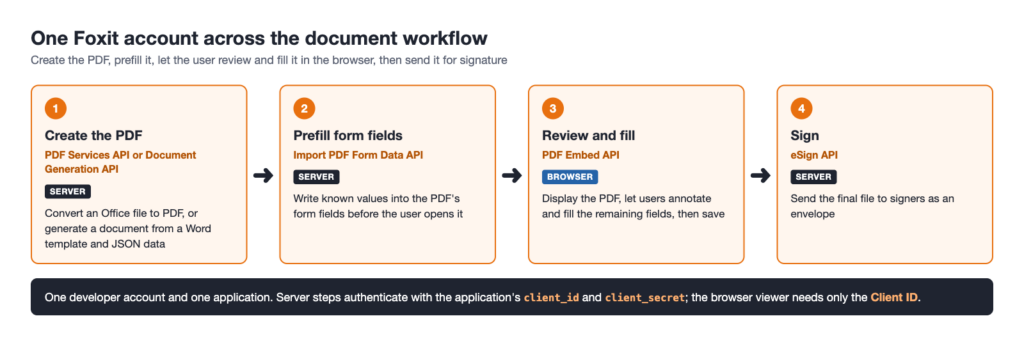
One account covers the whole workflow, with the browser viewer as the only step that runs client-side.
Our hosted viewer fits apps that display, annotate, and fill existing PDFs. Teams that need form-field authoring, XFA forms, redaction in the browser, offline use, or self-hosted viewer code should pick a full SDK (Nutrient Web SDK, Apryse WebViewer, Syncfusion JavaScript PDF Viewer, or ComPDF Web SDK) or EmbedPDF from this list.
The free Developer plan gives you PDF Embed with Foxit branding and 500 shared credits a year across PDF Services, Document Generation, and eSign, with no credit card required. Startup and higher plans add branding removal, custom logos, theme and UI customization, and Embed analytics.
Create a free Foxit developer account and embed your first PDF with the PDF Embed API.
What else to know before you replace PDF.js
The answers below cover common questions about replacing PDF.js in a web app.