
6 Best PandaDoc API alternatives for developers in 2026
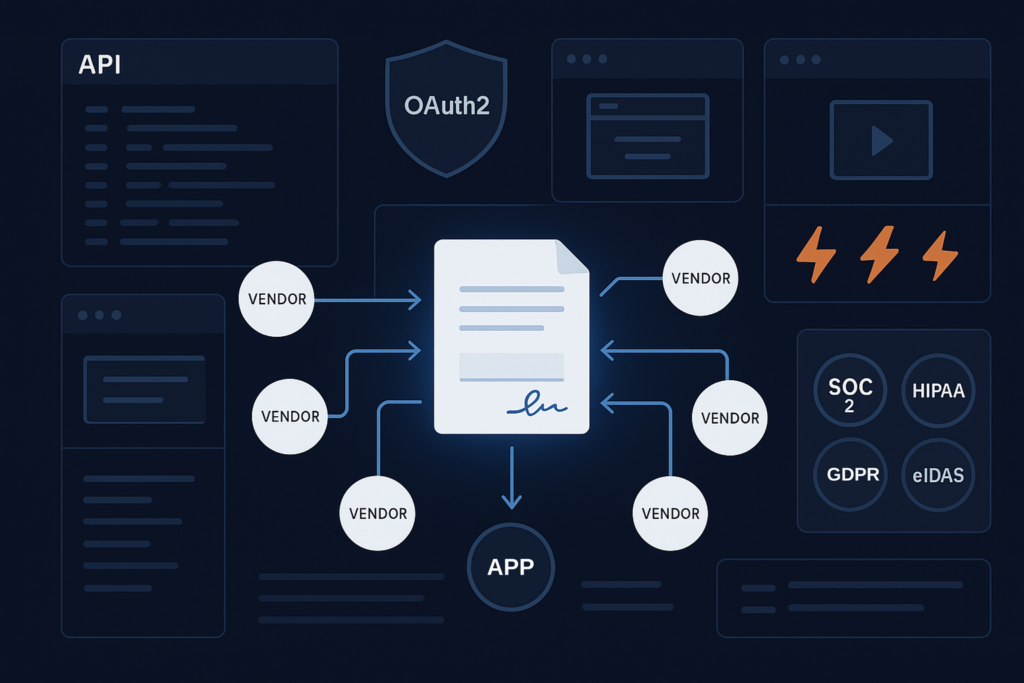
PandaDoc’s API works well for sales documents, but Enterprise-only access and per-seat pricing get in the way of signing embedded in your product. This roundup compares six alternatives, including Foxit eSign, DocuSign, and BoldSign, across seven criteria that decide how well an eSign API fits your app. Use the side-by-side table to shortlist the right option before you commit.
PandaDoc built its API around document workflows (proposals, quotes, contracts with approval chains). The API is capable, but two frictions surface quickly when you try to embed signing inside a product you’re building. API access sits on the quote-based Enterprise tier, so a developer who wants programmatic control can’t pick a published plan and start. The self-serve plans are priced per seat, tracking headcount rather than envelope volume, which misaligns cost with the way product-embedded signing actually scales.
If your use case is pure signing or in-app embedded flows, you’ll likely outgrow PandaDoc’s API shape before you outgrow the need. This roundup covers six PandaDoc API alternatives (Foxit eSign, DocuSign, Adobe Acrobat Sign, Dropbox Sign, SignNow, and BoldSign), measured across seven criteria that determine how well an e-signature API fits a product integration. Every claim below was checked against the vendor’s own live pages in September 2026, and the Foxit behaviour was checked against the live sandbox.
What to look for in an e-signature API
The best e-signature API for a product integration keeps signers inside your application, authenticates server-side without interrupting the flow, and prices by usage rather than headcount. Every entry in this roundup is assessed against the same seven criteria, each of which maps to a row in the comparison table below.
In-app embedding mechanism. Three patterns exist in the market. The first returns a raw iframe URL directly from the API that you drop into an <iframe>. The second provides a vendor JavaScript library or web component that manages the session for you. The third redirects the signer to the vendor’s own domain and returns them afterward. The table names the mechanism and says whether the signer stays inside your application.
Auth approach. The grant type and how credentials reach the token endpoint. Client-credentials grants suit server-side integrations best, since no human login step interrupts the flow.
Webhook granularity. Which lifecycle events fire (viewed, signed, declined, expired) and whether payloads carry a signed HMAC you can verify before trusting them.
Client-library coverage. Official language SDKs versus a documented REST API with request samples. Both work, but the delta in integration time is real, and a published SDK that the vendor itself marks as out of date is worth less than a clean REST reference.
Named compliance certifications. Listed by name, not tier label. Certifications gated behind a plan upgrade, a signed agreement, or a qualified third-party provider are marked as such, because the conditions matter in a procurement conversation.
Pricing model structure. Described as per-seat, per-envelope, volume-based, or consumption and credit-based.
Free developer tier. Whether one exists, whether a credit card is required, and whether it carries production traffic or test-mode traffic only. Those three facts determine whether you can validate your integration before committing.
PandaDoc API at a glance
PandaDoc offers a free tier that includes 60 documents per year with no credit card, two self-serve per-seat monthly tiers at $19 and $49 per seat, and a quote-based Enterprise tier where API access lives.
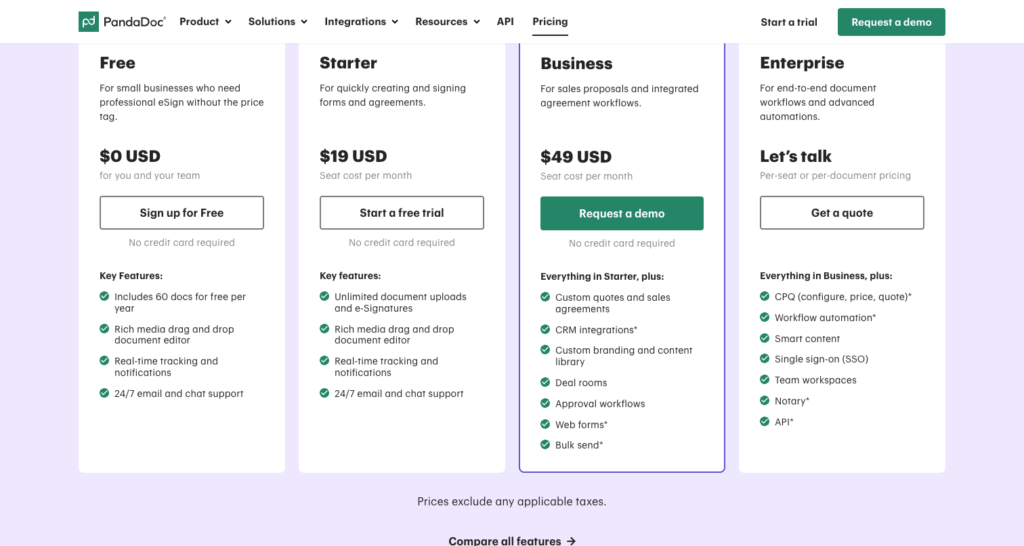
PandaDoc’s published plans. Note that API sits in the Enterprise column, under “Let’s talk” pricing, while Starter and Business are metered per seat.
At the API level, PandaDoc supports document creation from a PDF or a pre-built template, recipient groups, and field placement through its field tags reference. Field tags use bracket notation and cover eight types, including textfield (short form t), checkbox (c), signature (s), date (d), initials (i), dropdown (dd), radio (r), and stamp (st). Radio and stamp each carry their own documented limitations, so a radio block has to sit on one page with unique option values, and a stamp field is square with its height derived from its width. The API changelog documents ongoing updates to this surface.
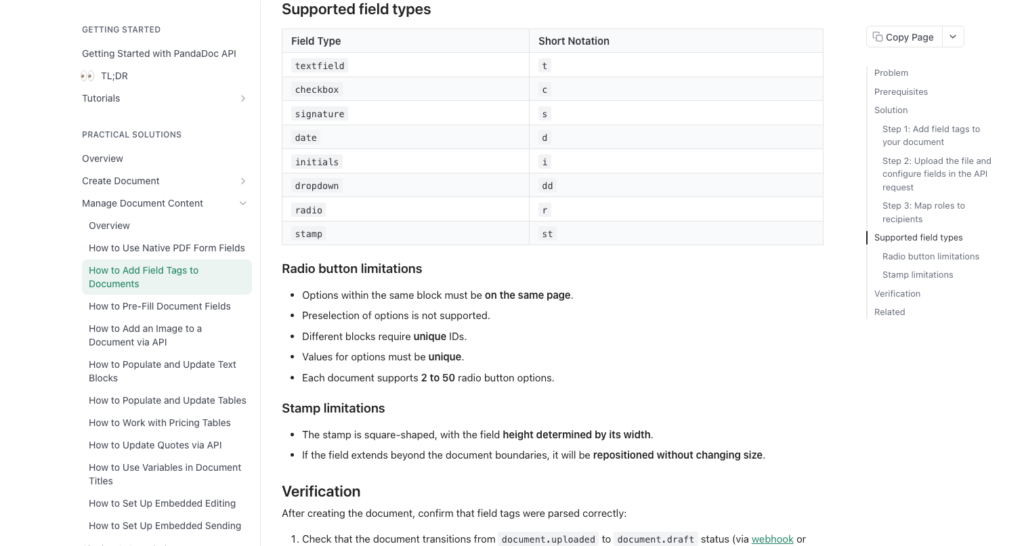
The Supported field types table, with radio and stamp as the two types most roundups miss, each followed by its own limitations section.
For in-app embedding, PandaDoc ships a separate pandadoc.js JavaScript library alongside four official client SDKs covering Python, Node, Java, and PHP. Webhooks fire on document lifecycle events. Branding control is restricted on the lower self-serve tiers.
PandaDoc fits well where the workflow is sales-heavy, covering proposals with approval routing, quotes that require CRM sync, and contracts that evolve through negotiation. That’s a different job than product-embedded signing, which is where the mismatch above comes from.
6 PandaDoc API alternatives
Each of the 6 is scored against the same 7 criteria above, starting with the option built specifically for product-embedded signing.
Foxit eSign API
Foxit eSign’s API is built for the product-embedded use case. Authentication runs over the OAuth 2.0 client-credentials flow against a POST-only, form-encoded token endpoint at POST https://na1.foxitesign.foxit.com/api/oauth2/access_token, and a JSON body to that endpoint returns HTTP 415 because it accepts only application/x-www-form-urlencoded. The regional hosts, per the Foxit eSign developers guide, are na1.foxitesign.foxit.com (US), eu1.foxitesign.foxit.com (EU), na2.foxitesign.foxit.com (CA, not ca1), and au1.foxitesign.foxit.com (AU).
Embedded signing runs through createEmbeddedSigningSession, and the parameter does not work on its own. Setting it to true with nothing else returns {"result": "error", "error_description": "email id of embedded signer(s) not submitted"} and no folder at all, which is the single most common way to lose an afternoon here. You have to pair it with either embeddedSignersEmailIds, an array naming the signers who get a session, or createEmbeddedSigningSessionForAllParties set to true, which covers every party on the envelope. Either pairing returns result: success and a top-level embeddedSigningSessions array whose entries carry emailIdOfSigner, embeddedToken, and embeddedSessionURL, the last of which is what you load in your own iframe. Setting createEmbeddedSigningSessionForAllParties alone, without createEmbeddedSigningSession, is silently ignored, returning success with folderStatus: DRAFT and no sessions.
{
  "folderName": "Customer agreement",
  "inputType": "base64",
  "base64FileString": ["<base64 of your PDF>"],
  "fileNames": ["agreement.pdf"],
  "processTextTags": true,
  "sendNow": false,
  "parties": [
    {
      "firstName": "Jane",
      "lastName": "Smith",
      "emailId": "[email protected]",
      "permission": "FILL_FIELDS_AND_SIGN",
      "sequence": 1
    }
  ],
  "createEmbeddedSigningSession": true,
  "embeddedSignersEmailIds": ["[email protected]"]
}
The body above is the minimum that produces a working session. The one behaviour worth planning around is that folderStatus comes back as SHARED rather than DRAFT even with sendNow: false, because the envelope has to be live for the session URL to open. No email goes out either way, so sendNow: false still means the signer only reaches the document through the URL you hand them.
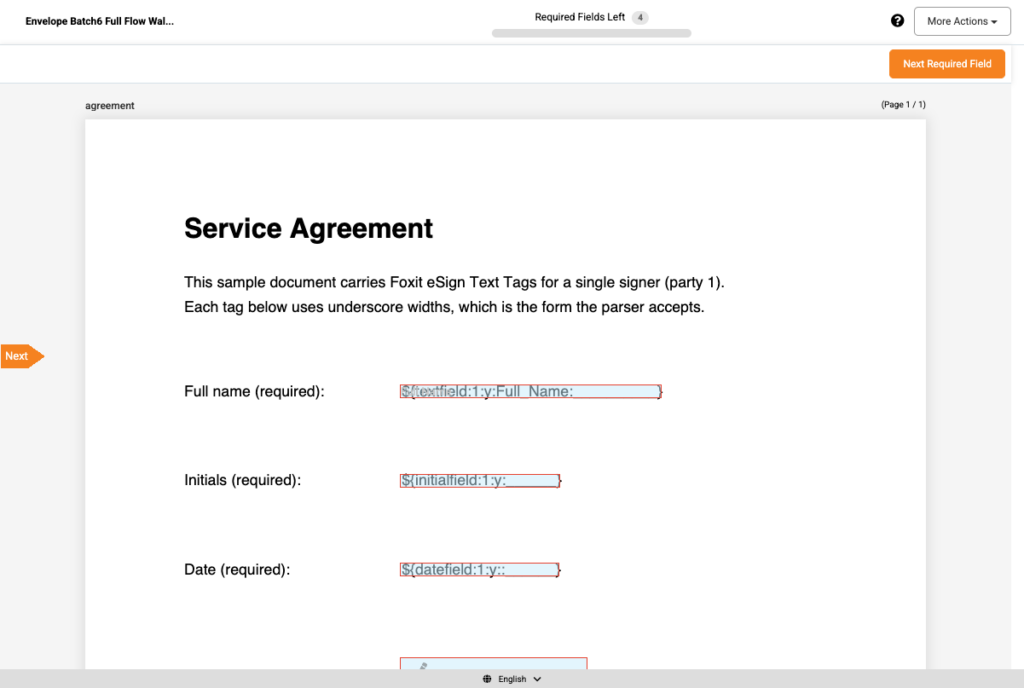
The embeddedSessionURL opened in a browser. The “Required Fields Left” counter in the header confirms the Text Tags were parsed into interactive fields rather than left as literal text.
Branding is handled by the themeColor parameter, four redirect parameters (signSuccessUrl, signDeclineUrl, signLaterUrl, signErrorUrl), and a long list of visibility toggles that goes well beyond the three most roundups mention. Alongside hideSenderName, hideFolderName, and hideDocumentsName, the developers guide documents hideSignerSelectOption, hideSignerActions, hideAddMeButton, hideAddNewButton, hideAddGroupButton, hideDeclineToSign, hideMoreAction, and hideNextRequiredFieldBtn, among others. Notification emails carry their own path through emailTemplateId, which applies an account-level template with custom content, logo, button colour, and footer. What the guide does not document anywhere is full white-label customization, and there is nothing in it about suppressing Foxit’s own mail delivery in favour of your SMTP server.
The client-library position is a documented REST API with request samples in cURL, PHP cURL, .NET, and Java, plus the official Foxit eSign Postman collection. No language-specific SDK exists. The collection imports cleanly, but two of its request bodies need their JSON repaired before they will run. “Create Envelope from URL” carries "inputType": "{"inputType": "url"}" with unescaped nested quotes, and sending it verbatim against the live sandbox returns HTTP 400 with Unexpected character ('i' (code 105)): was expecting comma to separate OBJECT entries. “Create Envelope from Base64” holds a bare unquoted base64 token inside an array and sets inputType to base64FileString, where the value the API actually accepts is base64. Both are quick fixes, but budget for them rather than assuming the collection runs as downloaded.
Compliance splits across two sources. The Foxit eSign compliance page documents conformance with eIDAS AES and QES (QES applies when used with a qualified trust service provider), ESIGN, UETA, HIPAA, GDPR, 21 CFR Part 11, and CCPA. The Foxit trust center is the source for SOC 2 Type 2 attested operations and for the Business Associate Agreement, which it frames as available where applicable rather than as a blanket offer.
Pricing is consumption and credit-based across the whole Foxit API Platform, which consolidates eSign alongside PDF Services, Document Generation, and PDF Embed on one account and one credit pool. The free Developer plan carries 500 shared credits per year, eSign is metered at 5 credits per envelope, and no credit card is required to open the account. That works out to roughly 100 envelopes on the free tier. Activating eSign provisions a 30-day Business trial in TEST mode, where completed envelopes are watermarked, so plan the production cutover separately from the integration work.
Best fit for teams building compliance-regulated products that need regional data residency, a granular compliance certification list, and an embedding mechanism that keeps signers inside the host application.
DocuSign eSignature API
DocuSign’s eSignature API is the most mature option on this list, with the broadest ecosystem of third-party integrations. Authentication supports OAuth2 authorization code and JWT grants, and the JWT path suits server-side integrations.
Embedded signing uses a recipient view URL returned by the API. The embedded signing guide is explicit that iframes work but come with conditions, stating that they “are not supported with all types of authentication options or SBS pen types” and that “Only full-screen iframes are supported for signers on mobile devices.” The newer focused view only works inside an iframe, and DocuSign’s own JavaScript library builds that iframe in the DOM for you. Client SDKs cover eight platforms, namely C#, Java, Node.js, PHP, Python, Ruby, iOS, and Android. Webhooks fire on a detailed event set including envelope and recipient lifecycle states, and payloads can be verified against a shared HMAC key.
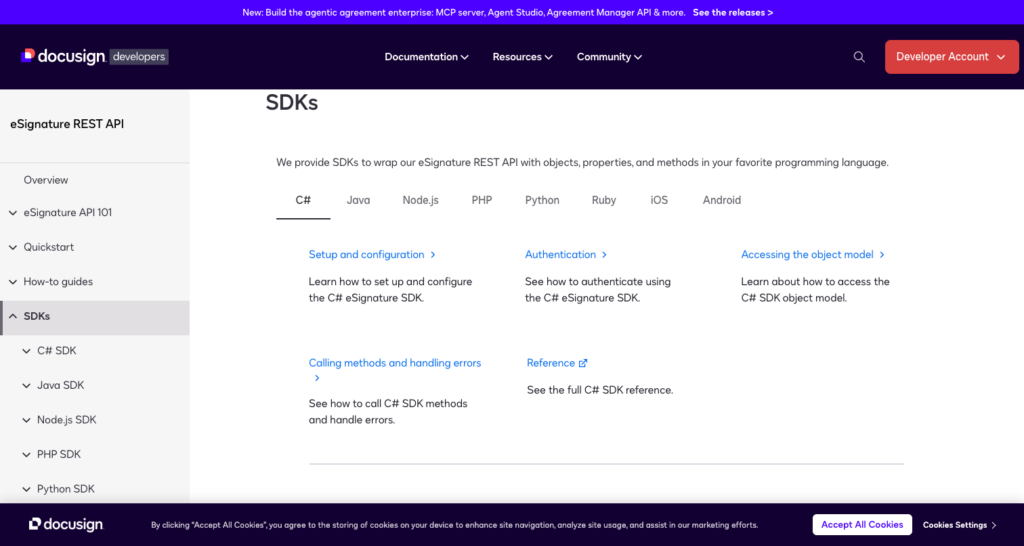
The eight tabs on DocuSign’s SDK page. The two mobile SDKs are easy to miss because the page opens on C# by default.
Compliance certifications include SOC 2 Type 2, ISO 27001, HIPAA (via BAA, plan-dependent), eIDAS, ESIGN, and UETA. FedRAMP Moderate authorization covers eSignature and CLM on a Government Community Cloud deployment, which DocuSign describes as running on “special servers that only house government data.” That is a separate environment from the commercial cloud, so treat it as a distinct procurement path rather than a property of the standard product. See DocuSign eSignature plans for the current plan structure. Pricing is per-seat and per-envelope depending on plan tier.
A free developer account is available with “No obligation, no credit card required.” It runs against the demo environment rather than production, so promoting an integration means a separate go-live review.
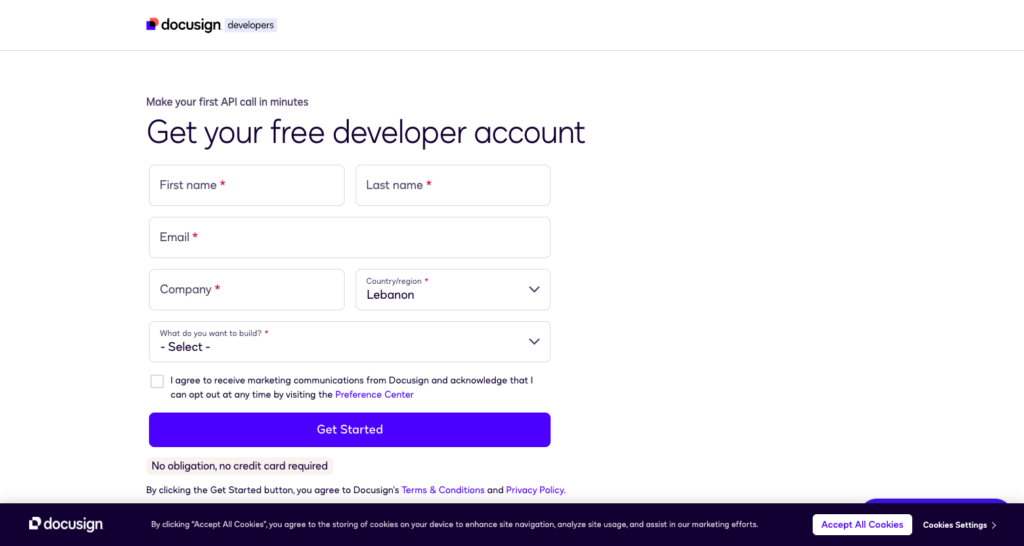
The developer account form. The no-credit-card condition sits directly under the submit button, and the account it creates is a demo environment.
Best fit for enterprises with existing DocuSign contracts, teams that need FedRAMP coverage on the government cloud, or projects where the size of the SDK ecosystem reduces integration risk.
Adobe Acrobat Sign API
Adobe Acrobat Sign’s REST API, documented at the Acrobat Sign developer guide, offers OAuth2 authorization code and refresh token flows. Embedded signing redirects the signer to Adobe’s domain by default, though the API does support returning a signing URL you can iframe, and the configuration is less straightforward than dedicated embedded-first APIs.
Adobe does publish SDKs, and the SDK Downloads page names C#, JAVA, JavaScript, OpenAPI, and REST, each with a readme, docs, and a repo download. The more decision-relevant fact is printed on that same page, where Adobe states that “The SDKs are obsolete and haven’t been in sync with REST v6 APIs for a while” and directs developers to the API endpoints and the Postman workspace instead. Treat the SDK list as historical and plan on raw REST calls.
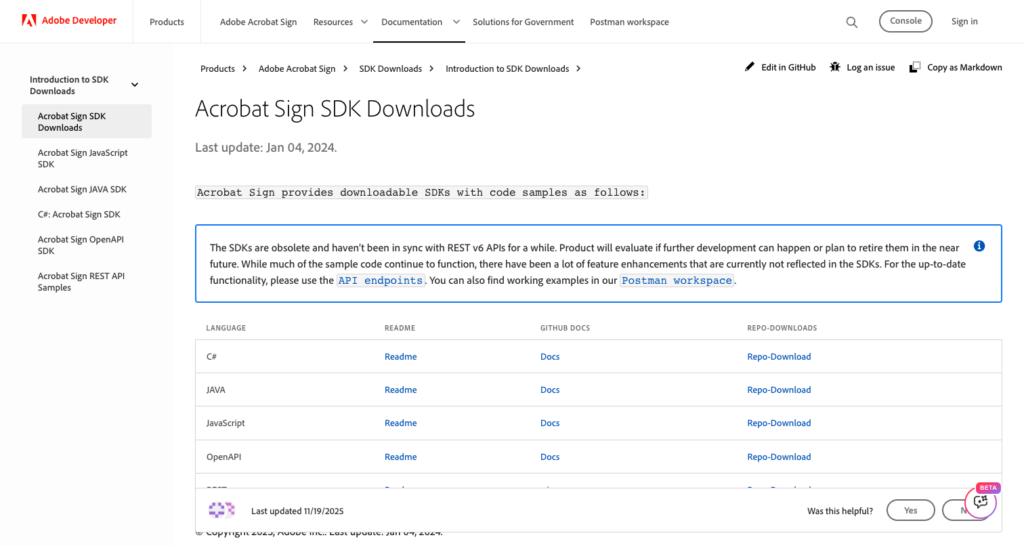
Adobe ships five SDKs and marks them obsolete on the same page. The blue callout is the sentence that should drive your integration plan.
Adobe integrates natively with Microsoft 365, Creative Cloud, and Acrobat. Webhooks fire on the AGREEMENT, WIDGET, and MEGASIGN resource types, scoped at ACCOUNT, GROUP, USER, or RESOURCE level, so bulk-send events are covered alongside agreements and web forms.
Compliance includes SOC 2 Type 2, ISO 27001, FedRAMP Moderate on the Acrobat Sign for Government offering, HIPAA (via BAA, plan-dependent), eIDAS, ESIGN, and UETA. Adobe publishes no standalone Acrobat Sign pricing page reachable through standard navigation, and plan structure varies by Adobe agreement type, so pricing is generally per-seat and negotiated. A free Acrobat Sign Developer Edition account does exist, and the developer guide states that it includes access to the Acrobat Sign API plus testing for document exchange and execution.
Best fit for organizations already running the Adobe enterprise stack, or where native Acrobat and Creative Cloud integration reduces friction for document authors.
Dropbox Sign API
Dropbox Sign (formerly HelloSign) is API-first by design. The SDK overview lists SDKs generated from an OpenAPI spec covering C#, Java, PHP, Python, Ruby, and Node.js. Authentication uses OAuth2 authorization code for user-facing flows and an API key for server-to-server calls.
Embedded signing returns a URL from the API that you load in an <iframe>, and the vendor’s hellosign-embedded JavaScript package manages the iframe lifecycle. Webhooks carry HMAC-SHA256 signatures for payload verification and fire on a full set of signature request lifecycle events.
Compliance covers SOC 2 Type 2, HIPAA (via BAA, plan-dependent), eIDAS, ESIGN, and UETA. Pricing on the Dropbox Sign API product page is volume-based rather than per-seat, with monthly subscription tiers keyed to signature-request count. Essentials starts at $75 per month and 50 requests, Standard at $250 per month and 100 requests, and Premium is custom, with volumes over 500 requests per month routed through sales. The API itself is free in test mode, which is how you validate an integration before committing to a tier.
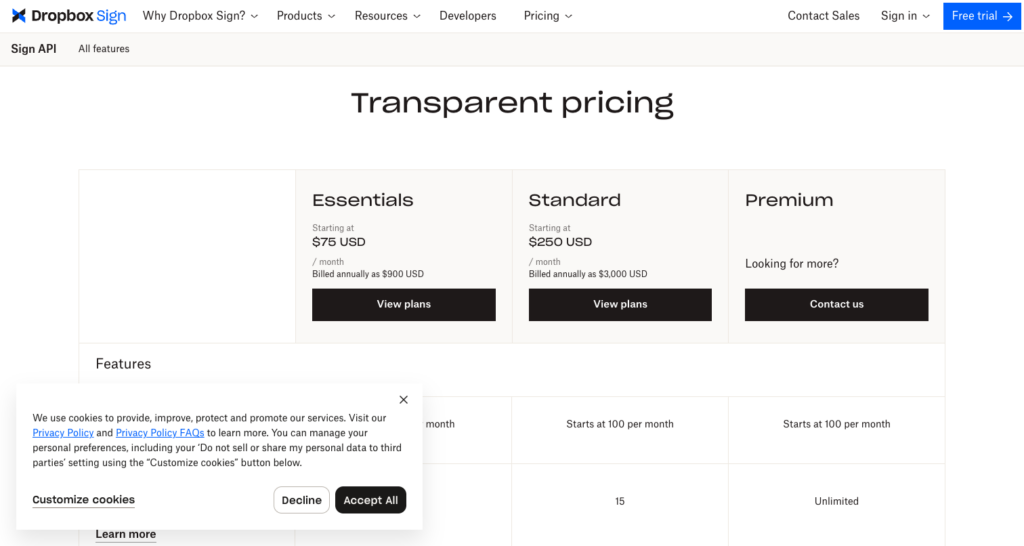
Dropbox Sign meters the API by signature request volume. No seat count appears anywhere on the API product page.
Best fit for teams that want broad official SDK coverage and a developer-first embedded signing path, particularly where a Dropbox ecosystem connection is already present.
SignNow API
SignNow’s API treats white-labeling as a documented, first-class capability. The white-labeled signing guide covers brand containers created with POST /v2/brands, logo upload through POST /v2/brands/{brand_id}/resources/logo, background and button colour control through PUT /v2/brands/{brand_id}/resources/general, and per-element visibility in the signing editor through PUT /v2/brands/{brand_id}/resources/editor. The same guide tells you not to use SignNow’s default email delivery and to “trigger your own emails using your SMTP server” instead, which is the piece that makes full brand suppression achievable. Authentication is OAuth2 authorization code and password grant, and the SignNow API docs document the full flow.
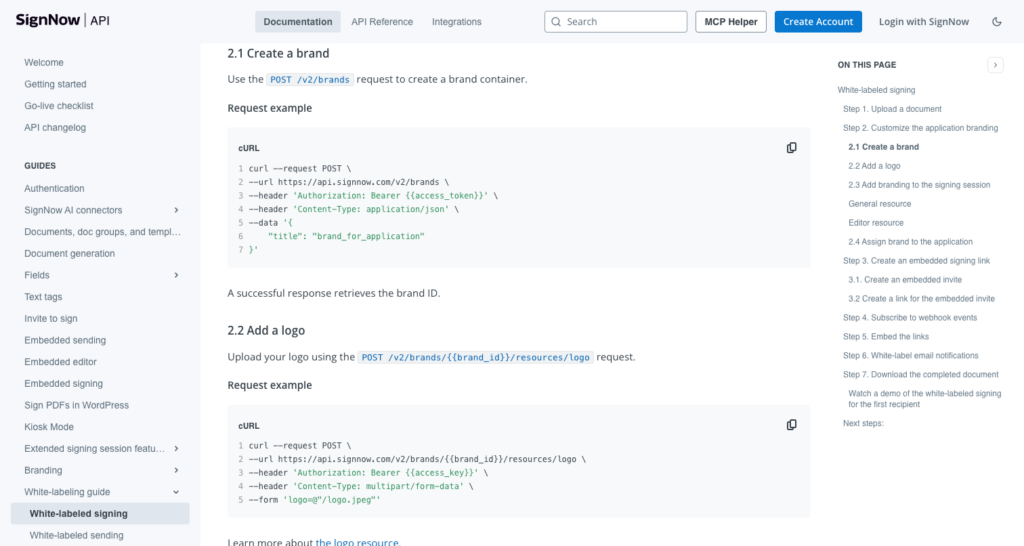
The brand container and logo endpoints, with the request bodies inline. This is the page that carries the detail, not the white-labeling index.
Embedded signing is iframe-based, generated via POST /v2/documents/{document_id}/embedded-invites. Official SDKs cover PHP, Python, Java, .NET, and JavaScript. Webhooks support document lifecycle events. Compliance includes SOC 2 Type 2, HIPAA, eIDAS, ESIGN, UETA, and GDPR.
Pricing is volume-based, not per-seat. Every tier on the SignNow plans page is marked “Unlimited users” under the headline “Free unlimited users with plans that scale,” with Business at $8 per month, Business Premium at $15, and Enterprise at $30, each including 100 signature invites per year. Full API access sits on the Site License tier, which is priced at $1.50 per signature invite with volume discounts.
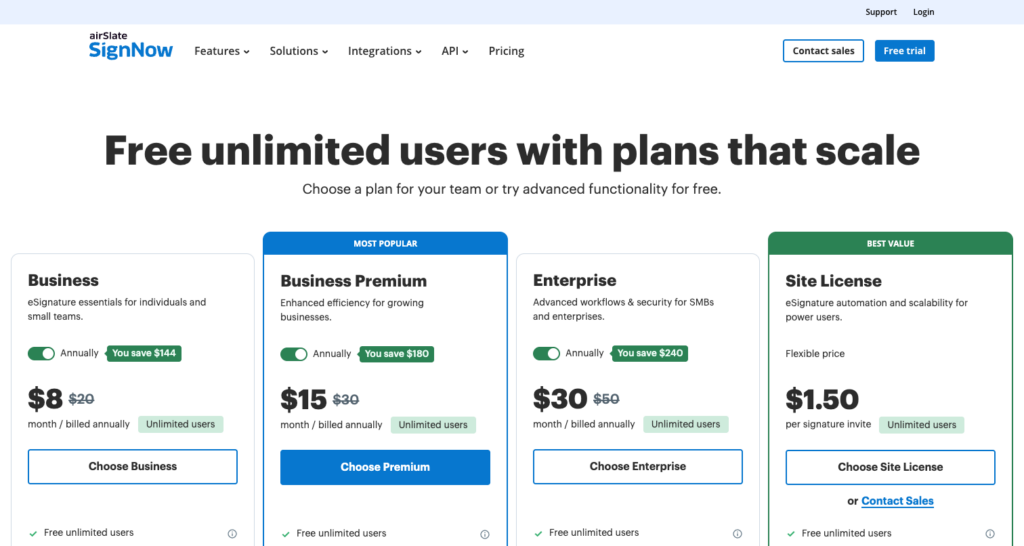
Every SignNow tier carries an “Unlimited users” badge. The Site License column, where full API access lives, is metered per signature invite.
Best fit for SaaS products where the requirement is full brand suppression of the signing vendor, including email notifications and signing UI chrome.
BoldSign API
BoldSign is API-first, developer-first. The BoldSign developer docs document iframe-based embedded signing through a Get Embedded Signing Link API that returns a URL you drop into an <iframe>. Official client libraries cover .NET (C#), PHP, Python, Java, and Node.js. Authentication supports both API key and OAuth2 access token patterns. Webhooks notify on document events.
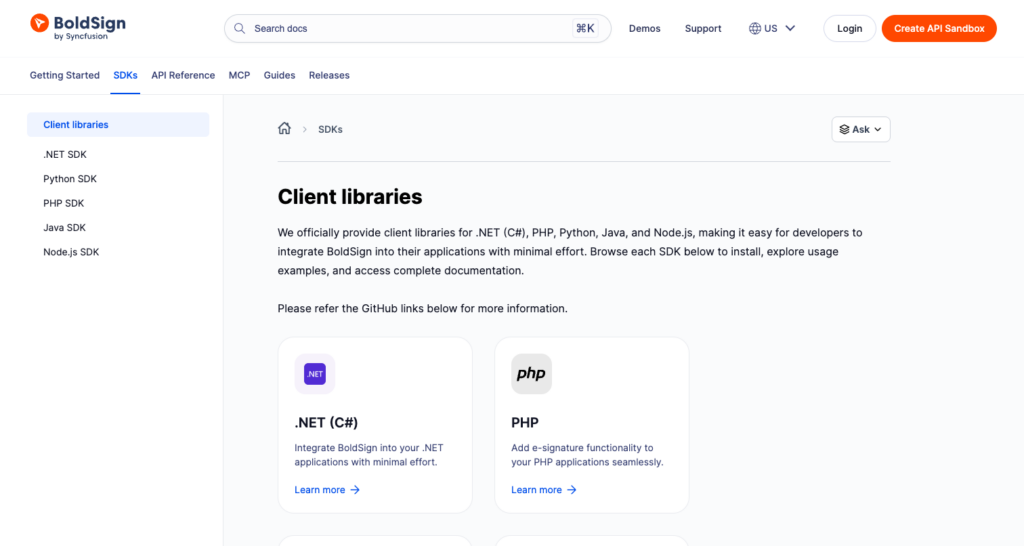
BoldSign’s client libraries page. All five are vendor-maintained, with GitHub links per language.
Compliance documentation covers SOC 2 Type 2, eIDAS, ESIGN, UETA, HIPAA, and GDPR, plus data residency in the US, EU, Canada, and Australia. HIPAA is the one certification that is plan-gated, appearing first on the Business plan and carried upward from there, including on the Enterprise API plan. Everything else in that list is present on every tier.
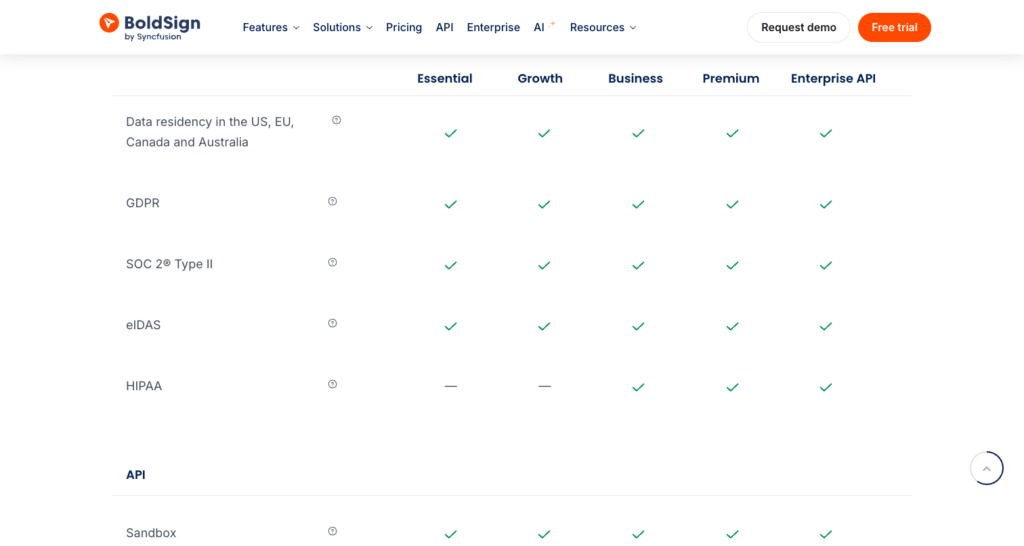
The compliance block of BoldSign’s plan comparison. HIPAA is the only row with dashes, and they sit on the two cheapest tiers.
The API product is priced per envelope rather than per seat. That distinction matters because BoldSign’s web app tiers are seat-based and the two get conflated. The Enterprise API plan is $0.75 per envelope, starting at $30 per month with 40 envelopes included. A free sandbox gives full API access with no credit card required, with signed documents watermarked and deleted automatically 14 days after creation.
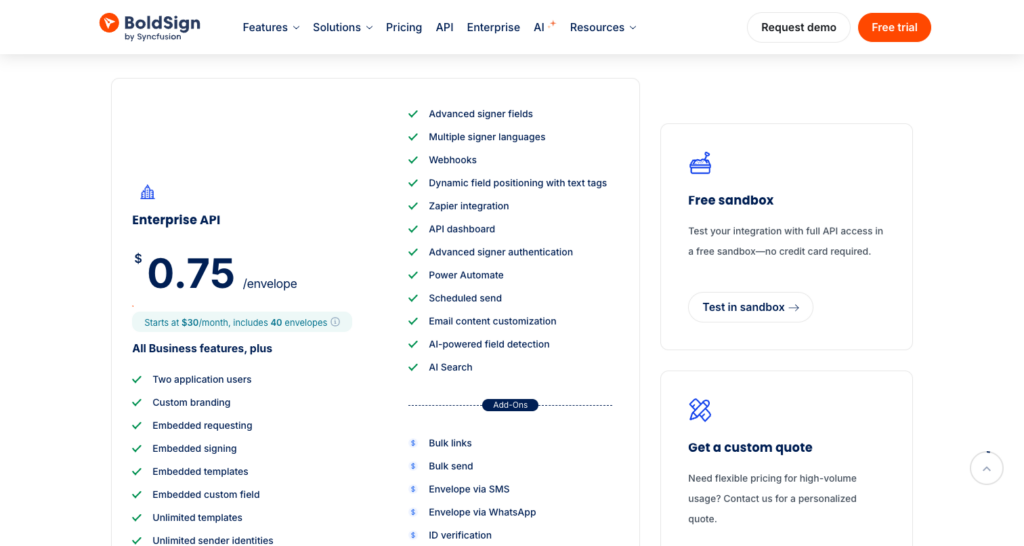
BoldSign’s API tier is metered per envelope. The free sandbox card on the right states the no-credit-card condition.
Best fit for teams that want a modern, lower-overhead alternative to DocuSign with a documented embedded signing path and a no-credit-card sandbox to validate before committing.
Shortlisting your options
| Criterion | Foxit eSign | DocuSign | Adobe Acrobat Sign | Dropbox Sign | SignNow | BoldSign |
|---|---|---|---|---|---|---|
| In-app embedding | Signer stays in your app. iframe URL from createEmbeddedSigningSession plus embeddedSignersEmailIds or createEmbeddedSigningSessionForAllParties | Signer stays in your app. Recipient view URL in an iframe, with auth-method and mobile full-screen caveats | Redirect to Adobe’s domain by default. Signing URL can be iframed, with more configuration | Signer stays in your app. URL from the API, with hellosign-embedded managing the iframe | Signer stays in your app. iframe URL via the embedded-invites endpoint | Signer stays in your app. iframe URL from the Get Embedded Signing Link API |
| Auth approach | OAuth2 client-credentials, POST-only form-encoded endpoint | OAuth2 authorization code and JWT grant | OAuth2 authorization code and refresh token | OAuth2 authorization code, with API key for server-to-server | OAuth2 authorization code and password grant | API key or OAuth2 access token |
| Webhook granularity | Envelope lifecycle events with HMAC secret-key verification | Full envelope and recipient lifecycle with HMAC verification | AGREEMENT, WIDGET, and MEGASIGN resource types, scoped at account, group, user, or resource level | Full signature request lifecycle with HMAC-SHA256 signature | Document lifecycle events | Document lifecycle events |
| Client libraries | REST API with cURL, PHP cURL, .NET, and Java samples, plus a Postman collection whose two envelope-creation bodies need JSON repair. No language SDK | C#, Java, Node.js, PHP, Python, Ruby, iOS, Android | C#, Java, JavaScript, OpenAPI, REST, all marked obsolete by Adobe and out of sync with REST v6 | C#, Java, PHP, Python, Ruby, Node.js (OpenAPI-generated) | PHP, Python, Java, .NET, JavaScript | .NET, Java, Node.js, PHP, Python |
| Compliance certifications | eIDAS AES and QES (QES requires qualified trust service provider), ESIGN, UETA, HIPAA, GDPR, 21 CFR Part 11, CCPA (compliance page), SOC 2 Type 2 and conditional BAA (trust center) | SOC 2 Type 2, ISO 27001, eIDAS, ESIGN, UETA, HIPAA via BAA (plan-dependent), FedRAMP Moderate on the Government Community Cloud | SOC 2 Type 2, ISO 27001, eIDAS, ESIGN, UETA, HIPAA via BAA (plan-dependent), FedRAMP Moderate on Acrobat Sign for Government | SOC 2 Type 2, eIDAS, ESIGN, UETA, HIPAA via BAA (plan-dependent) | SOC 2 Type 2, eIDAS, ESIGN, UETA, HIPAA, GDPR | SOC 2 Type 2, eIDAS, ESIGN, UETA, GDPR, data residency in US, EU, CA, AU. HIPAA from the Business plan upward |
| Pricing model | Consumption and credit-based, shared across eSign, PDF Services, DocGen, and Embed, at 5 credits per envelope | Per-seat and per-envelope (tier-dependent) | Per-seat, negotiated. No standalone Acrobat Sign pricing page is published | Volume-based monthly tiers keyed to signature-request count | Volume-based. Unlimited users on every tier, with full API access on Site License at $1.50 per signature invite | Per-envelope for the API product at $0.75, from $30 per month with 40 envelopes. Web app tiers are per-seat |
| Free developer tier | Yes. Free Developer plan, no credit card, 500 shared credits per year at 5 credits per envelope, roughly 100 envelopes. eSign activation runs 30 days in TEST mode with watermarked envelopes | Yes. Free developer account, no credit card, demo environment rather than production | Yes. Acrobat Sign Developer Edition, free, with API access for testing document exchange and execution | Yes. The API is free in test mode, with paid tiers required for production traffic | Yes. Free trial on the self-serve tiers, with full API access gated to the Site License tier | Yes. Free sandbox, no credit card, full API access. Signed documents are watermarked and deleted after 14 days |
Decision path for compliance-regulated apps. Foxit eSign’s two-source compliance posture covers eIDAS AES and QES, HIPAA, GDPR, 21 CFR Part 11, and CCPA on the compliance page, with SOC 2 Type 2 and the conditional BAA on the trust center, giving regulated teams a verifiable certification list alongside regional host selection across US, EU, CA, and AU. If FedRAMP Moderate is a hard requirement, both DocuSign and Adobe carry it on dedicated government cloud offerings, which is a separate procurement path from their commercial products.
Decision path for lowest-friction embedding. Foxit eSign, Dropbox Sign, and BoldSign all return an embeddable URL from the API with minimal configuration. Foxit eSign and BoldSign let you start with no credit card. Dropbox Sign’s hellosign-embedded library handles iframe lifecycle management if you’d rather not manage that directly.
Decision path for teams already on DocuSign. Stay on DocuSign. The JWT grant, the government cloud coverage, and the existing SDK investment represent switching costs that rarely pay back unless a specific compliance delta or pricing model change forces the move.
Decision path for full white-label. SignNow is the documented choice. Its white-labeled signing guide covers brand containers, logo and colour control, per-element visibility in the signing editor, and the instruction to send signing links from your own SMTP server, a surface no other vendor on this list documents to the same depth.
PandaDoc API alternatives FAQ
Which of these e-signature APIs support HIPAA compliance?
For Foxit eSign, HIPAA is documented on the Foxit eSign compliance page, and the Foxit trust center states that Foxit is prepared to enter into a Business Associate Agreement where applicable, so the BAA is conditional rather than blanket. BoldSign gates HIPAA to its Business plan and above, which its own plan comparison shows explicitly. Across the market, HIPAA support is usually tied to a specific plan tier and a signed BAA rather than being a platform-wide property, so read the plan table rather than the marketing page.
Does Foxit eSign offer a free developer plan?
Yes, through the developer-API sign-up form. No credit card is required, and the account-level pool of 500 shared credits per year (5 per eSign envelope) covers roughly 100 envelopes across the full signing lifecycle before the 30-day TEST-mode trial needs a production decision.
Can I test an e-signature API integration without a credit card?
All six alternatives let you start without one, but what the free environment can do varies. DocuSign’s is a demo environment rather than production, BoldSign watermarks and auto-deletes sandbox documents after 14 days, and SignNow reserves full API access for its Site License tier. Check the free-tier row in the table above for each vendor’s specific conditions.
What auth grant type should a server-side product integration use?
Client-credentials or JWT, since neither requires a human login step at token time. Foxit eSign uses client-credentials; DocuSign supports JWT alongside authorization code. Authorization code grants suit user-facing flows instead.
Conclusion
Choosing among PandaDoc API alternatives comes down to the same seven questions every time, namely whether the signer stays in your app, how the API authenticates, what the webhooks tell you, whether an official client library exists and is current, which certifications are named rather than implied, whether the meter counts seats or envelopes, and how far you can get before a credit card is required. Those answers move. Adobe’s SDKs were current once and are now marked obsolete on Adobe’s own page, SignNow has dropped its seat meter entirely, and a Postman collection can ship with JSON that does not parse. Check the vendor’s live pages rather than a roundup from last year, including this one.
If you want to test a full signing flow today, the Foxit eSign developer account is free, needs no credit card, and gives you 500 shared credits per year across eSign and the rest of the Foxit API platform, which is about 100 envelopes to build against before you decide anything.