
Document Generation API: Automate Personalized Document Creation at Scale
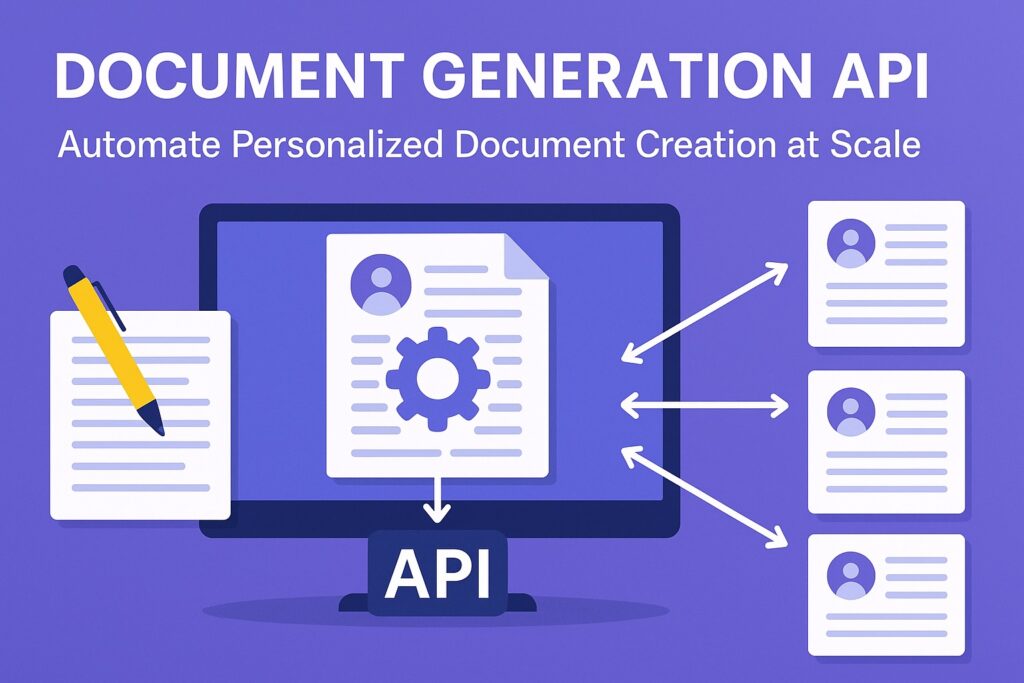
Automate document creation at scale with a document generation API. Learn how templates and JSON data replace manual workflows to produce PDFs instantly.
Somewhere in your company right now, someone is copying client data from a CRM into a Word document, updating the logo, adjusting the date, and exporting it to PDF. If you’re lucky, it’s an intern doing this for 50 documents a month. If you’re not, it’s a developer who hard-coded the layout in iText or PDFKit, and Marketing is about to ask them to change the font size.
Neither of those is a document generation strategy. They’re workarounds — and like legacy Mail Merge tools that choke on anything beyond a few hundred records, they don’t scale to 50,000 invoices overnight.
The good news is that the problem is well-solved. A document generation API lets you treat documents exactly like you treat any other data pipeline: a template defines the structure, a JSON payload carries the content, and the API outputs a polished, production-ready PDF (or DOCX) in milliseconds. The copy-paste step disappears entirely.
This guide walks through how that works, where it fits in real-world systems, and how tools like Foxit’s DocGen API make the implementation straightforward — even for a team that’s never touched a document automation system before.
What Is a Document Generation API?
A document generation API is a cloud service that merges a template with structured data to produce a final document — typically a PDF or DOCX. The template defines layout, fonts, branding, and placeholder tokens. A JSON payload supplies the dynamic values. The API engine renders the finished document in milliseconds, with no manual intervention and no layout code required.
The equation looks like this:
Template (Structure) + JSON Data (Content) + API Engine = Final Document
Using a document generation API rather than building a local generator offers two key advantages: scalability and separation of concerns.
On the scalability side, the same POST request that generates one invoice generates 100,000 invoices. You don’t need to provision more rendering capacity, manage memory pressure from large PDFs, or debug pagination edge cases — the API handles it. On the separation-of-concerns side, your legal team can update a liability clause in the Word template without touching your codebase. Your marketing team can swap the logo without a redeploy. The document’s design is fully decoupled from the application logic that drives it.
That said, not all document generation tools take the same approach. Older solutions like PDFKit or Apache PDFBox require you to code the visual layout programmatically — drawing lines, positioning text boxes, calculating column widths manually. That works for simple, static documents. It breaks down fast when tables grow dynamically, when conditional sections appear based on customer data, or when stakeholders want to iterate on the design.The API approach flips that model, the design stays in the template while the logic stays in the API.
The Architecture of Document Generation Automation
Understanding the three-layer architecture makes every implementation decision easier. Here’s how the pieces fit together.
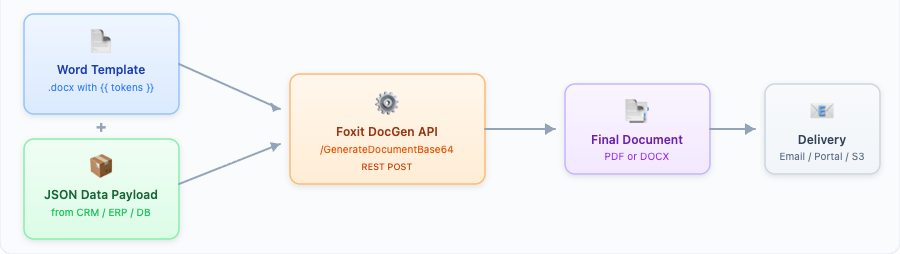
1. Template Creation
With a modern document generation API like Foxit’s, you don’t write rendering code. You open Microsoft Word, design the document exactly as it should look, and insert double-bracket tokens wherever dynamic data belongs.
A simple invoice template might include:
{{ companyName }}— replaced with the client’s company name{{ invoiceDate \@ MM/dd/yyyy }}— replaced with a date formatted as01/15/2024{{ totalDue \# Currency }}— replaced with a currency-formatted number like$2,500.00
That’s it. Business users can open this .docx file, update the header font, move the logo, reword a clause — and none of those changes require a developer.
2. Data Binding
Your application pulls data from wherever it lives — a Salesforce CRM, an SAP ERP, a PostgreSQL database — and structures it as a JSON payload. The JSON keys map directly to the template token names. No transformation layer, no intermediate format.
A payload for the invoice above looks like:
{
"companyName": "Meridian Financial Group",
"invoiceDate": "2024-01-15",
"invoiceNumber": "INV-00471",
"lineItems": [
{
"description": "API Integration Consulting",
"qty": 10,
"unitPrice": 150.0
},
{ "description": "Compliance Review", "qty": 5, "unitPrice": 200.0 }
],
"totalDue": 2500.0
} The keys companyName, invoiceDate, and totalDue match the tokens in the template. It’s a direct 1:1 bind.
3. Dynamic Template Logic: Loops and Formatting
This is where document generation APIs separate themselves from simple find-and-replace tools.
Repeating tables are handled with loop delimiters. In Foxit’s syntax, you wrap the repeating row of your Word table with {{TableStart:lineItems}} and {{TableEnd:lineItems}}. The API iterates over the lineItems array in your JSON and generates one row per item — no matter if the array has 2 entries or 200. Inside the loop, you can use {{ ROW_NUMBER }} for automatic line numbering and {{ SUM(ABOVE) }} to calculate column totals.
Formatting specifiers are built into the token syntax. Currency formatting (\# Currency) converts 2500.00 to $2,500.00. Date formatting (\@ MM/dd/yyyy) handles locale-specific date presentation without extra preprocessing in your application code.
The result: dynamic document templates that handle variable-length tables, formatted numbers, and conditional logic entirely in Word — not in your codebase.
Top Document Generation Use Cases by Industry
Document generation sits in the critical path for several industries. These are the scenarios where teams see the most immediate return.
Financial Services: Client Reports and Investment Summaries
A wealth management firm generates quarterly performance summaries for thousands of clients. The template — header, chart placeholders, disclaimer text, signature block — stays constant. The data changes per client: portfolio value, allocation breakdown, benchmark comparison, YTD return. The team pushes a nightly batch job that pulls data from their portfolio management system, constructs JSON payloads per client, and fires POST requests to the generation API — programmatic invoice generation and report creation at scale. By morning, 8,000 personalized PDFs are sitting in an Amazon S3 bucket, ready to be emailed.
Insurance: The Policy Packet
An insurance carrier issuing a homeowner’s policy needs to assemble a multi-section document: the cover letter (personalized with the policyholder’s name and address), the policy declarations page (premium, coverage limits, deductibles), the endorsements, and the liability disclaimer. Each section might be its own template. The API merges them into a single PDF. Underwriters stop manually assembling packets; the system generates them at bind time.
HR and Operations: Employee Onboarding
When a new hire accepts an offer, the HRIS triggers a webhook. The document generation service receives the employee’s data — name, role, start date, salary, benefits elections — and generates the full onboarding packet: offer letter, benefits summary, I-9 instructions, handbook acknowledgment. The employee receives a complete, personalized PDF bundle within seconds of accepting. No one in HR touched it.
Sales: Branded Quotes and Contracts
Sales teams often live in the “Export to PDF” nightmare — they fill in a spreadsheet, copy it into Word, format it manually, and hope the branding looks right. A document generation API replaces that with a contract automation workflow tied directly to the CRM. When a rep marks a deal as “Proposal Sent,” Salesforce triggers a POST request with the deal data, and the API returns a PDF with the correct pricing, the client’s logo pulled from the CRM, and the correct contract terms based on the deal tier.
Foxit DocGen: The Developer Experience
Foxit brings 20+ years of PDF engine experience to a word template to PDF API that’s straightforward to integrate. The implementation follows three steps:
Step 1 : Design your Word template
Add {{ token }} placeholders using Foxit’s double-bracket syntax. Format specifiers and loop delimiters go directly into the Word document. No special editor required.
Step 2: Send a POST request
The endpoint is /document-generation/api/GenerateDocumentBase64. You authenticate with your client_id and client_secret in the request headers, then send the base64-encoded template and your JSON data in the body. Here’s what that looks like in Python:
import requests
import base64
# Load and encode the Word template
with open("invoice_template.docx", "rb") as f:
template_b64 = base64.b64encode(f.read()).decode("utf-8")
# JSON data payload from your CRM or database
document_values = {
"companyName": "Meridian Financial Group",
"invoiceDate": "2024-01-15",
"invoiceNumber": "INV-00471",
"lineItems": [
{"description": "API Integration Consulting", "qty": 10, "unitPrice": 150.00},
{"description": "Compliance Review", "qty": 5, "unitPrice": 200.00}
],
"totalDue": 2500.00
}
# POST to Foxit DocGen API
# Replace HOST with the base URL from your Foxit developer console
response = requests.post(
"{HOST}/document-generation/api/GenerateDocumentBase64",
headers={
"client_id": "YOUR_CLIENT_ID",
"client_secret": "YOUR_CLIENT_SECRET",
"Content-Type": "application/json"
},
json={
"base64FileString": template_b64,
"documentValues": document_values,
"outputFormat": "pdf"
}
)
# Decode and save
result = response.json()
pdf_bytes = base64.b64decode(result["base64FileString"])
with open("invoice_00471.pdf", "wb") as f:
f.write(pdf_bytes)
print("Invoice generated successfully.") Step 3: Decode and store the response
The API returns a base64-encoded document. Decode it, write it to disk or pass it to an Amazon S3 bucket, and you’re done.
One feature worth calling out: Foxit supports DOCX output in addition to PDF. Most document generation APIs only produce PDFs — which means once the document is generated, it’s immutable. DOCX output enables a “Draft Mode” workflow where a generated document can be sent to a reviewer for light edits before it’s finalized. That’s genuinely useful in legal and HR workflows where a human needs to add a handwritten note or approve a clause. Sample code and SDKs are available for Python, JavaScript, Java, C#, and PHP, with additional language support on the developer portal. A Postman workspace is available for quick testing without writing any code first.
Why the API Approach Wins Over Build-It-Yourself
If you automate PDF creation with the API approach, you gain three concrete advantages over build-it-yourself alternatives:
Compliance and accuracy: When a developer hard-codes a PDF layout, human error enters every time someone updates the template. A token mismatch (
{{ CustomerName }}vs.{{ customerName }}) silently renders as blank. The API approach catches mismatches and enforces consistent data binding. More importantly, the data flows directly from your database to the document — no manual copy-paste step, no transposition errors on a loan amount or policy limit.Speed at scale: Generating PDFs with a local library like PDFKit means each document renders sequentially on your server — and rendering time grows with document complexity, especially when tables span multiple pages. At 10,000 documents, even modest per-document rendering times add up to minutes of blocking processing. A cloud document generation API parallelizes rendering across infrastructure you don’t manage. Fifty thousand invoices overnight is a scheduling problem, not a compute problem.
Maintenance belongs to the right person: When Marketing wants to update the invoice footer, they open the Word template and make the change. When Legal updates the liability clause, same thing. The developer does nothing — no code change, no redeploy, no regression testing on a layout that changed by three pixels. That’s the real ROI of the template-first approach, and it compounds over time as the team iterates on document designs without creating developer tickets.
Final Thoughts
Document generation shouldn’t be a manual task or a maintenance burden. If your team is still copy-pasting data into Word or maintaining a custom PDF renderer that breaks whenever a table gets too long, the template-plus-API model is a straightforward fix — not a major architectural change.
The next step worth watching: document generation paired with generative AI. The pattern is emerging in a few places — use an LLM to draft a personalized summary paragraph based on a client’s portfolio data, then pass the result as a JSON field to the document generation API. The LLM handles the prose; the API handles the formatting and branding. You get dynamic content without losing layout control.
Ready to automate your document workflow? Create a free developer account at Foxit and access the DocGen API today. Use the quickstart guide and Postman workspace to generate a PDF from JSON in minutes — and see for yourself why the template-plus-API approach is replacing hand-coded generators.