
7 Best Docmosis Cloud Alternatives for Template-Based Document Generation
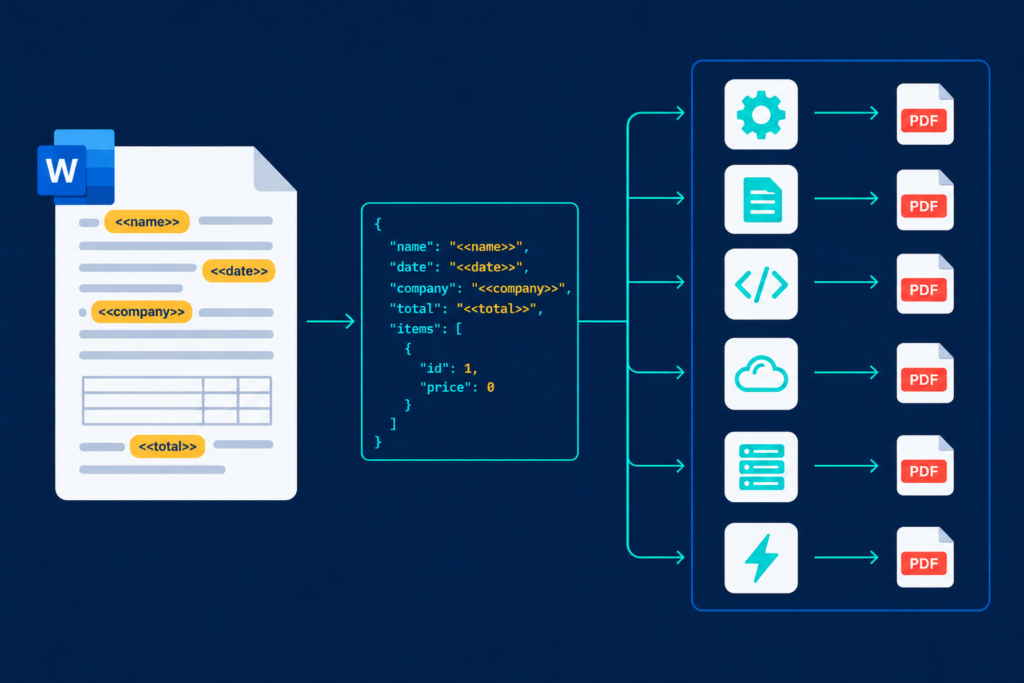
Docmosis Cloud bills by the page, so your costs climb as documents grow longer. This guide compares 7 Docmosis alternatives on template syntax, pricing, hosting, and migration effort. Use it to shortlist 1 or 2 services and test them with your own templates before you switch.
Docmosis Cloud bills by the page. A 12-page contract uses 12 pages of your monthly quota. A 1-page letter uses 1. At low volume, that math works in your favor (4,000 pages a month costs $49 on the Docmosis pricing page). Tornado, the self-hosted sibling, runs the same DOCX and ODT templates on your own servers.
The bill climbs with document length, and contracts that then need e-signature or PDF manipulation add a second vendor’s pricing on top. Some teams also need a UK region, support for spreadsheet and slide templates, or a way to let business users edit templates in Google Docs, which Docmosis’s own FAQ warns against, noting that DOCX files exported from Google Docs “will typically perform poorly as templates.”
A template-based document generation API solves the same problem Docmosis does. You design a Word or OpenDocument file with placeholder tags for fields, repeating rows, and conditional sections, then send the service structured data and get back a finished PDF or Office file. What differs between services is the tag syntax, the billing unit, where your templates and data are stored, and what happens to the document after it is generated.
In this article, we compare 7 Docmosis Cloud alternatives based on their template syntax, features, pricing, usage limits, and deployment options.
Top picks by reason for switching
No alternative imports full Docmosis syntax. Custom delimiters can preserve simple <<field>> placeholders on some engines, but loops, conditions, and expressions need migration in every case. The picks below match the most common reasons teams leave Docmosis Cloud.
| If you are leaving Docmosis Cloud because… | Pick | Why it fits |
|---|---|---|
| The contract goes on to e-signature, merging or compression | Foxit Document Generation API | Word templates and JSON in one synchronous call, on the same credit pool as the PDF Services and eSign APIs |
| You also use ODT, XLSX or PPTX templates, or want an EU-hosted service | Carbone | Office and OpenDocument templates, billed per document whatever the page count, with a European cloud and an on-premises edition |
| You want a large free monthly allowance | Adobe Document Generation API | 500 free Document Transactions a month, and 1 transaction covers a generated document of up to 50 pages |
| You want simple tags, per-document pricing and a UK region | DocuGenerate | [Field] tags in Word or ODT templates, endpoints in the US, EU, UK and Australia |
| Business users should own the templates | DocsAutomator | Google Docs, Word or PDF templates with e-signing, webhooks and sync or async API calls on every plan |
| Reports pull from SQL databases and must run on your servers | Apryse Fluent | Java or .NET engine with RESTful wrappers, an Office add-in for template design, and connectors for JSON, XML, SQL Server, Oracle and more |
| You want the engine inside your own code | docxtemplater | MIT-licensed DOCX/PPTX templating; XLSX, ODT, images and HTML need paid modules |
Each option appears once, under the reason it fits best. Several fit more than one case, and each entry’s feature table shows its full coverage.
What Docmosis Cloud gives you today
Docmosis Cloud product page, which describes it as a multi-region service for generating documents through a REST API.
Every entry below is measured against this baseline.
USD per month, monthly billing, per the Docmosis pricing page. The 3 plans differ by users (1, 3 and 10) and environments (1, 2 and 4). All include the US, EU and Australian regions.
| Account quota, pages a month | Professional | Business | Enterprise |
|---|---|---|---|
| 4,000 | $49 | $64 | $78 |
| 10,000 | $99 | $127 | $153 |
| 20,000 | $164 | $205 | $246 |
| 35,000 | $239 | $299 | $359 |
| 60,000 | $339 | $424 | $509 |
| 100,000 | $469 | $586 | $704 |
| 170,000 | $649 | $805 | $961 |
| 290,000 | $899 | $1,106 | $1,313 |
| 500,000 | $1,249 | $1,524 | $1,799 |
| 1,000,000 and up | Contact Docmosis | Contact Docmosis | Contact Docmosis |
Checked in November 2026.
How billing works
The quota counts every page of every successfully generated document in a calendar month, so a 4-page template that expands to 8 pages counts as 8 pages.
There is no overage charge and no blocking at quota. Exceeding the quota for 2 consecutive months triggers an upgrade request, and continued overruns “may result in a hard limit.” Unused pages do not roll over. The X-Docmosis-PagesRendered response header reports the pages each render used.
Templates and tags
Docmosis templates are DOCX or ODT files authored in Word or LibreOffice Writer. Fields use <<name>>, repeating table rows <<rr_items>> to <<er_items>>, repeating sections <<rs_items>> to <<es_items>>, conditions <<cs_name>> with <<else>> and <<es_name>>, and expressions inside <<{ }>>. DWS4 adds sort, filter and group on repeats. Images replace a Word bookmark or a Writer image named img_name. Other tags cover barcodes, sub-templates (<<ref:sub1.docx>>), and coordinator templates that combine several templates. The DWS4 Template Guide lists every tag.
API
Each region has its own base URL (us1, eu1 and au1 on dws4.docmosis.com) and each environment its own accessKey. The render call names a stored template and sends JSON or XML data. outputFormat accepts pdf, docx, odt, rtf, html and txt. storeTo accepts stream, mailto and s3. Other services upload, list and delete templates, return template structure and render tags, generate sample data and convert files, as described in the DWS4 Web Services Guide. The render service queues requests and, when the queue is full, rejects them with a suggested back-off time in its response headers.
PDF options
Render parameters set PDF/A through pdfVersion and PDF/UA through pdfUniversalAccessibility. They also control watermarks, passwords, and print or copy restrictions.
Data and hosting
The service runs on AWS. Docmosis says input data and generated documents are deleted immediately after processing, templates are encrypted at rest, and a SOC 2 Type II report is available through its Trust Portal. It has monitored a test render every 60 seconds since 2016 and targets more than 99.9% monthly uptime. DWS4 launched in August 2023, and DWS3 still runs in parallel.
Trial
The trial runs 30 days with no credit card and no watermarks, and Docmosis extends it on request.
Before you compare
List the Docmosis tags and render parameters your templates use before comparing alternatives.
That list decides which alternative needs the fewest rewrites. Tornado, the self-hosted engine with similar endpoints, keeps the same templates and deserves a look if data residency or operational control is the main concern (see the self-hosting notes in the data section below).
The 7 Docmosis Cloud alternatives in detail
Each entry’s feature table covers the same 8 criteria, namely template formats, tags and logic, output formats, pricing, free allowance, limits, hosting and data, and moving from Docmosis. The Moving from Docmosis row names the biggest template or API change, so you can read it against the tag and parameter list you just made.
The billing unit sits beside every price (pages a month, documents, Document Transactions, credits, licenses) because the same workload lands on a different tier with each vendor. The cost comparison after the entries does the math for 2 sample workloads, with its assumptions stated. Uptime, compliance, and fidelity statements are vendor claims.
Foxit Document Generation API
Our Document Generation API product page, which covers PDF and DOCX output from templates and structured data.
Our Document Generation API merges a DOCX template with a JSON payload and returns a PDF or DOCX in the same synchronous response, drawing from the same credit pool as the PDF Services and eSign APIs.
Feature table based on API reference v2.3.0.
| Feature | Details |
|---|---|
| Template formats | DOCX authored in Microsoft Word. ODT is not an accepted input, so save ODT templates as DOCX first. |
| Tags and logic | {{field}} text tags, {{TableStart:items}} and {{TableEnd:items}} around a table row to repeat it, date masks such as {{PaymentDueDate \@ MM/dd/yyyy}} and the built-in {{today}} tag, picture-string number masks such as {{amount \# "$#,##0.00"}}, {{=SUM(ABOVE)}} totals in tables with an optional currencyCulture parameter (default en-US) that sets the currency format of those totals, Word IF fields with a MergeField for conditional content, and eSign text tags that place signature fields when the PDF goes to the eSign API. The Analyze endpoint returns a template’s single and repeating tags. |
| Output formats | PDF (the default) or DOCX, returned as binary in the same response. |
| Pricing | 1 credit per successful generation, from one pool shared with PDF Services (1 credit per operation) and eSign (5 credits per envelope). Startup $1,750 a year (5,000 credits), Business $4,500 a year (15,000 credits), Volume by quote, per our API pricing page. Credits reset yearly with no rollover, and failed calls use none. |
| Free allowance | 500 credits a year on the Developer plan. |
| Limits | 5 MB template and 10 MB total request on Generate; 10 MB template on Analyze. 100 requests a minute per application in production, with a lower limit in sandbox. 1 document per call. |
| Hosting and data | Cloud only, through 1 documented gateway (na1.fusion.foxit.com). Your backend authenticates every call with the client ID and client secret from the developer console (see the authentication guide). The template travels with each request and is not stored as a named template. Our cloud-hosted PDF APIs are covered by SOC 2 Type II audits, and we support HIPAA BAAs. A retention period for Document Generation inputs is not published. |
| Moving from Docmosis | Rename <<field>> to {{field}}, swap <<rr_items>> rows for {{TableStart:items}} and {{TableEnd:items}}, rebuild <<cs_>> sections as Word IF fields, compute expressions in your own code, upload the DOCX with each call instead of naming a templateName, and replace the accessKey with the client ID and client secret, kept on your backend. |
Checked in November 2026.
Where Foxit Document Generation API stands out
Generation costs 1 credit per document whatever its page count, so a 20-page contract and a 1-page letter cost the same.
With the same account, you can merge, compress, watermark, protect, or redact the file through our PDF Services API, or send the contract for signature through our eSign API.
eSign text tags already in the Word template place the signature fields. The call is synchronous and returns the file itself, with no polling or download step.
What to consider
The API accepts DOCX only, so ODT templates need to be converted before migration. The API has no documented dynamic image or barcode tag, so templates that rely on img_ bookmarks or <<barcode:>> need a plan before you switch.
A DOCX of up to 5 MB travels with every call, and there is no template store or equivalent for Docmosis expressions, sort, filter, group, sub-templates, or coordinator templates. The API runs through 1 gateway (na1.fusion.foxit.com), with no published EU processing region. Credits are sold as yearly pools, and at low volume a document costs more than on Docmosis’s page tiers.
Above the Business plan’s 15,000 credits a year, the Volume plan is priced by quote, so there is no list price to compare at high volume. The cost section below shows the numbers for 2 workloads.
Best for
It’s best for contracts, offer letters, and statements built from Word templates that go on to signature or another PDF step.
Getting started
To get started, create a free Foxit developer account and generate your first document from a Word template with the Document Generation API.
Carbone
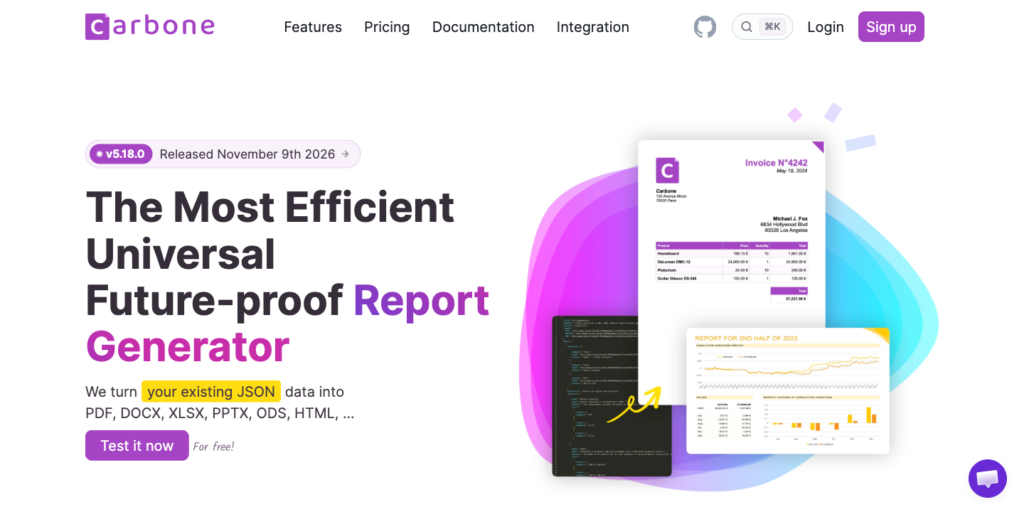
Carbone home page, with JSON data turned into an invoice and a report, and output formats listed as PDF, DOCX, XLSX, PPTX, ODS and HTML.
Carbone is a template engine that generates documents from Office, OpenDocument, HTML, and Markdown templates, billed per document rather than per page. It runs in a European cloud and also ships as a self-hosted engine.
| Feature | Details |
|---|---|
| Template formats | DOCX, ODT, XLSX, PPTX and other Office and OpenDocument files, plus HTML and Markdown templates, made in Word, LibreOffice or OnlyOffice. |
| Tags and logic | {d.field} tags, with repeats marked by 2 consecutive items ([i] on the first row and [i+1] on the next), conditional blocks such as {d.vip:ifEQ(true):showBegin} to {d.vip:showEnd}, formatters for dates, numbers and currencies, sorting, filtering, grouping and aggregation, pictures replaced through a tag in the placeholder image’s alternative text, and barcodes, charts and HTML. |
| Output formats | PDF, or another format in the template’s family, such as DOCX, ODT, DOC, RTF, HTML, TXT, Markdown, EPUB or images for documents, XLSX, ODS or CSV for spreadsheets, and PPTX, ODP or images for presentations, per Carbone’s output file type table. |
| Pricing | Per document, monthly in EUR excluding VAT, per Carbone pricing. Essential €29 (1,000 documents), Essential Plus €95 (5,000), Advanced €159 (20,000), Advanced Plus €295 (100,000), Advanced Ultra €595 (500,000). Annual billing lowers each price. Extra documents cost €0.02 on Essential down to €0.001 on the largest plans. |
| Free allowance | Free Cloud plan with 100 documents a month, 100 templates and the Enterprise features. Unlimited watermarked test renders with the test token. The self-hosted Community Edition is free. |
| Limits | 60-second render timeout, or 5 minutes with webhook-based asynchronous rendering. Parallel renders from 1 on Free to 50 on the largest plans. Template counts from 100 to 10,000 by plan. |
| Hosting and data | European cloud on OVHcloud, Scaleway and BunnyCDN. Templates uploaded with a production token stay stored until deleted unless you set expireAt. You can also send the template inline without storing it. A rendered file can be downloaded once within 1 hour. On-premises: Community Edition (core features), Fit €1,500 a year (12,000 documents, 1 server) and Unlimited from €2,940 a year; AWS private cloud from $0.008 a document. |
| Moving from Docmosis | <<field>> becomes {d.field}, repeating rows become [i] and [i+1] items, <<cs_>> sections become showBegin and showEnd formatters, expressions become formatters, img_ bookmarks become alternative-text tags, and ODT templates can stay ODT. |
Checked in November 2026.
Where Carbone stands out
It has the widest template-format coverage in this list, ODT included, so LibreOffice users keep their editor and their templates without converting file formats. Per-document pricing ignores page count, which changes the economics for long reports.
The same templates run on Carbone Cloud or on your own servers using the Community or Enterprise on-premises edition, and the carbone-version header selects a major API version.
What to consider
A render whose injected JSON and images exceed 1 MB counts as multiple documents, so data-heavy renders can multiply your bill.
The 60-second synchronous timeout pushes long reports to webhooks, adding a polling or callback step to your code. Prices are in EUR excluding VAT, so currency moves affect your budget comparison.
The free Community Edition lacks dynamic images, barcodes, charts, and HTML, all of which every Cloud plan includes. The Community Edition’s source-available Carbone Code License is not an open-source license.
Best for
It’s best for teams with ODT or mixed Office templates, EU data requirements, or a plan to self-host later.
Getting started
To get started, follow the Carbone getting started guide.
Adobe Document Generation API
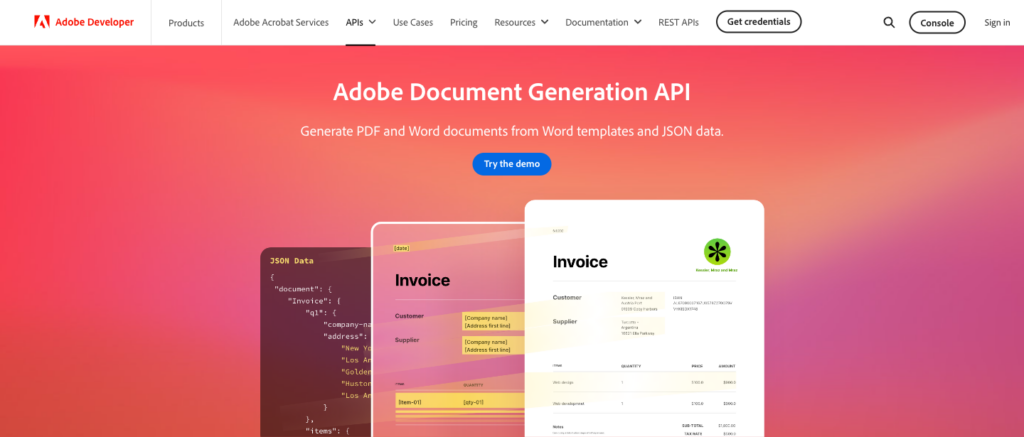
Adobe Document Generation API product page, showing JSON data, a tagged Word template and the generated invoice side by side.
Adobe Document Generation API is part of Adobe PDF Services and generates PDFs or DOCX files from Word templates using JSONata-compliant tags. It includes 500 free Document Transactions a month.
| Feature | Details |
|---|---|
| Template formats | DOCX authored in Microsoft Word, with Adobe’s Word add-in for inserting tags. |
| Tags and logic | JSONata-compliant tags. Placeholders such as {{companyName}}, table rows that repeat over an array with tags such as {{subscriptions.name}}, repeating sections for lists, conditional sections whose condition is wrapped in expr(), calculations in expr(), and images through a placeholder image whose alternative text gives a location-path. Each tag stays under 1,000 characters. |
| Output formats | PDF or DOCX. |
| Pricing | Document Transactions: 1 per generated document of up to 50 pages. Adobe’s own example: a 15-page PDF from a 2-page template and 1 MB of JSON uses 1 transaction. Paid plans by sales quote. |
| Free allowance | 500 Document Transactions a month across PDF Services operations, with no credit card. |
| Limits | 100 MB files, 10 MB JSON, 25 requests a minute on the Free Tier and 100 on enterprise plans, per Adobe’s usage limits. |
| Hosting and data | Adobe Document Cloud on AWS in US-East and EMEA, with the region chosen by the customer. Uploaded assets and generated output are stored for 24 hours by default, or you can bring your own storage with signed URLs. No self-hosted option. |
| Moving from Docmosis | <<field>> becomes {{field}}, repeating rows become array tags in a table row, <<cs_>> sections become conditional sections with expr(), img_ bookmarks become alternative-text placeholders, and the call becomes asynchronous. Upload the template, start the job, poll or receive a webhook, then download the result. |
Checked in November 2026.
Where Adobe Document Generation API stands out
The free allowance covers up to 500 generations a month at up to 50 pages each, with no credit card, making it a practical starting point for teams building a proof of concept. JSONata expressions keep calculations in the template, an approach closer to Docmosis’s <<{ }>> expressions than most alternatives here. The same account also gives you access to Adobe’s other PDF services.
What to consider
Paid plans are priced by quote, so there is no list price to compare. The asynchronous flow (upload the template, start the job, poll or receive a webhook, then download the result) adds calls and orchestration compared with Docmosis’s single render call or our synchronous Generate endpoint.
Free Tier throughput is 25 requests a minute, and the 500 transactions are shared with other PDF Services operations. Generated output stays in Adobe storage for 24 hours unless you bring your own.
Best for
It’s best for teams whose volume fits within 500 transactions a month, or Adobe customers adding generation to an existing contract.
Getting started
To get started, read the Adobe Document Generation API overview.
DocuGenerate
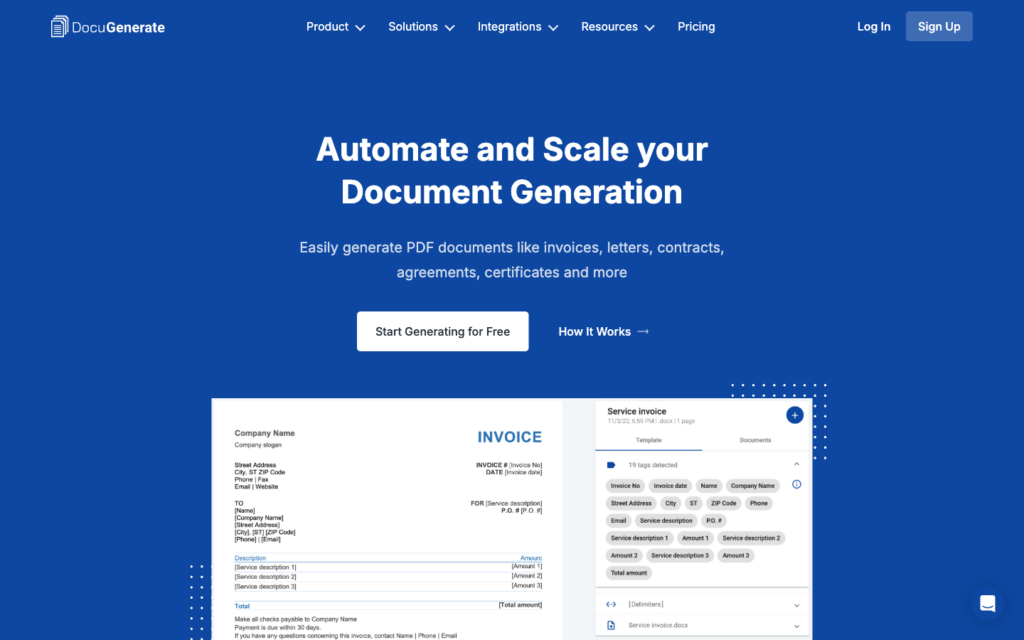
DocuGenerate home page, with an invoice template whose bracket tags the app detects and lists.
DocuGenerate generates documents from Word or ODT templates using bracket-based merge tags, with regional endpoints in the US, EU, UK, and Australia and straightforward per-document pricing.
| Feature | Details |
|---|---|
| Template formats | Word (DOCX or DOC), ODT or plain text. |
| Tags and logic | [Field] merge tags with configurable delimiters, [#items] and [/items] around list items or table rows, [#condition] to [/condition] for conditions and [^condition] for negation, [%logo] image tags for PNG, JPEG, HEIC and SVG, QR codes and barcodes, and filters for formatting data. |
| Output formats | PDF, DOCX, DOC, ODT and TXT. |
| Pricing | Per document, with batch runs counting 1 document per data item. Monthly, per DocuGenerate pricing: Plus $19 (500 documents, $0.04 each after), Premium $59 (2,000, $0.03 after), Business $199 (10,000, $0.02 after), Enterprise by quote. Overage has no hard limit unless you set a monthly cap. |
| Free allowance | 20 documents a month and 2 templates. |
| Limits | Templates per plan (2, 5, 20, then 100 or more), with concurrent documents from 1 on Free to 20 or more on Business and batch generation on paid plans. |
| Hosting and data | Regional endpoints in San Francisco, Frankfurt, London and Sydney. A DPA is available. Generated documents remain until deleted, while binary API output bypasses storage. Input data is not stored. SDKs for Node.js, Python, PHP, Ruby, Go, C#, Rust and Java. |
| Moving from Docmosis | <<field>> becomes [field], <<rr_items>> rows become [#items] in the row’s first cell and [/items] in its last, <<cs_>> sections become [#condition] blocks, img_ bookmarks become [%name] tags, and ODT templates can stay ODT. |
Checked in November 2026.
Where DocuGenerate stands out
The tag model (bracket fields, [#items] sections, and [^negation]) is structurally close to Docmosis’s angle-bracket fields and sections, so the structure is familiar when migrating. The London endpoint fills a UK region gap that Docmosis Cloud’s US, EU and Australian nodes leave open, and per-document pricing keeps costs predictable regardless of page count.
What to consider
Per-document overage adds up at high volume, and the template allowance on lower plans is small, with 5 on Plus and 20 on Premium. If your application serves many different templates, you’ll hit that ceiling quickly. There’s no self-hosted edition.
Best for
It’s best for small and mid-size teams that want simple tags, predictable per-document pricing, and a UK region.
Getting started
To get started, open the DocuGenerate API reference.
DocsAutomator
DocsAutomator home page, where the starting point is an existing PDF, Word or Google Docs template.
DocsAutomator generates documents from Google Docs, Word, or PDF templates, with e-signing built into every plan and an API that offers sync responses, async jobs, and idempotency keys.
| Feature | Details |
|---|---|
| Template formats | Google Docs, Word (DOCX) or PDF templates, each linked to an automation. |
| Tags and logic | {{field}} placeholders, a table row marked {{line_items_1}} that repeats per record, nested line-item rows such as {{line_items_1_1}} that go up to 3 levels deep, {{line_items_1}} to {{/line_items_1}} repeating sections that each hold 1 nested table, {{section_name}} to {{/section_name}} sections whose show or hide rule is set in the automation rather than the template, and {{image_field}} images sized to the placeholder. No math in the template itself; group sums, averages and counts are configured in the automation. |
| Output formats | PDF, plus an optional Word document or Google Doc copy, delivered to Google Drive, OneDrive, Dropbox, email or a webhook. |
| Pricing | Per document, with e-signing included and a signed document counted once. Monthly, per DocsAutomator pricing: Professional $29 (100 documents, $0.20 each after, 250 maximum), Business $79 (1,000, $0.10 after, 2,000 maximum), Scale $199 (5,000, $0.06 after, 10,000 maximum). Yearly billing lowers these to $19, $59 and $149 a month. |
| Free allowance | Unlimited testing with no credit card. |
| Limits | A monthly maximum per plan, after which creation pauses; automations capped at 5 on Professional and 20 on Business. |
| Hosting and data | Hosted only. Simple electronic signatures under ESIGN and eIDAS, with a GDPR DPA described on its compliance page; database and file storage in the EU, per its privacy policy; generated files have no expiry by default, configurable per automation. |
| Moving from Docmosis | <<field>> becomes {{field}}, <<rr_items>> rows become a {{line_items_1}} row, <<cs_>> conditions move out of the template into automation rules, expressions move into your JSON, and the API call sends an automationId (createDocument) instead of a templateName. |
Checked in November 2026.
Where DocsAutomator stands out
Business users can edit the template in Google Docs or Word and publish changes without a developer deploying code. E-signing is included in every plan, and a signed document counts as a single document against the quota.
The API offers sync responses that return a PDF URL, async jobs with polling, and idempotency keys to prevent duplicate creation.
What to consider
Overage costs $0.20 a document on Professional and $0.10 on Business, so traffic above the plan allowance gets expensive quickly. Conditions live in automation settings rather than the template, which separates the logic from the Word file a developer reviews.
Per-field Docmosis expressions must arrive precomputed in the JSON payload your application builds. Monthly maximums pause generation once reached, so you’ll need to plan around traffic spikes. Documents come back as URLs rather than in the response body.
Best for
It’s best for operations-led teams where non-developers own the templates and documents go out for signature.
Getting started
To get started, read the DocsAutomator REST API documentation.
Apryse Fluent
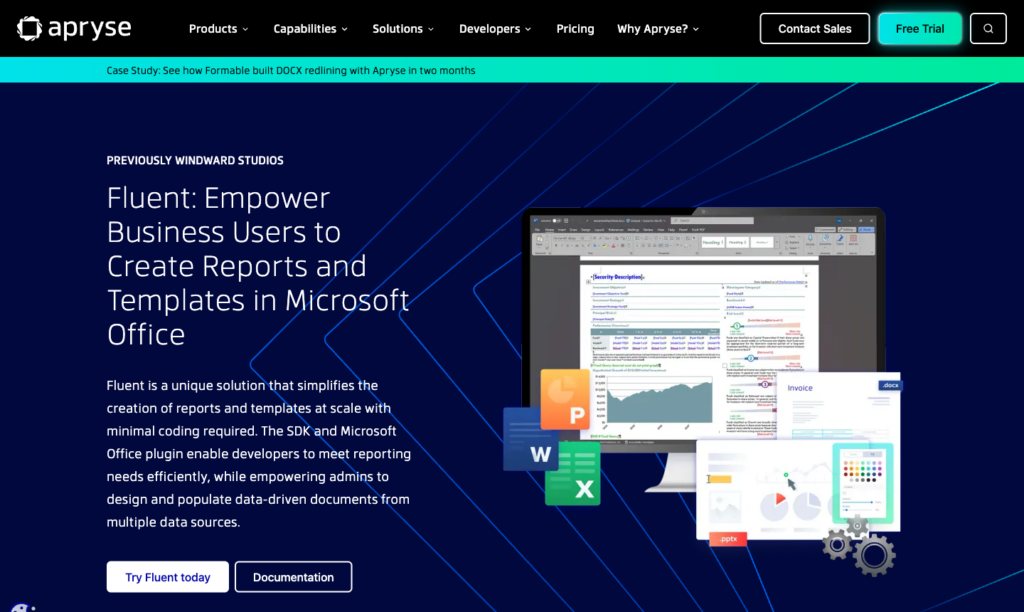
Apryse Fluent, formerly Windward Studios, with templates designed in Microsoft Office.
Apryse Fluent (formerly Windward Studios) is a Java or .NET engine you deploy yourself, with direct connectors to SQL databases and an Office add-in for template design.
| Feature | Details |
|---|---|
| Template formats | Word, Excel and PowerPoint templates designed with the Fluent Office add-in. |
| Tags and logic | Tags and conditional logic inserted through the add-in’s Template Designer; a central Template Manager handles versions. |
| Output formats | Native Microsoft Office files, PDF, PDF/A, PDF/UA, HTML, RTF and images. |
| Pricing | Not published; contact Apryse sales. |
| Free allowance | A free trial from Apryse. |
| Limits | Not published. |
| Hosting and data | A Java or .NET engine you deploy on your own servers; Apryse states that your data never leaves your infrastructure. Data sources include JSON, XML, SQL Server, MySQL, PostgreSQL, Oracle, Microsoft Dynamics 365, OData, Salesforce, SharePoint and Db2. |
| Moving from Docmosis | Templates are re-tagged in the add-in, data can come straight from a database query instead of a posted JSON payload, and you run the engine yourself. |
Checked in November 2026.
Where Apryse Fluent stands out
Direct connectors to SQL Server, Oracle, PostgreSQL, and other databases let reports query data at render time without first assembling a JSON payload.
Excel and PowerPoint templates alongside Word cover formats that Docmosis Cloud doesn’t support.
Template Manager handles versioning for teams that maintain many templates across many documents.
What to consider
Paid plans are priced by quote, so there is no list price to compare. Template authors need the Office add-in installed, adding an onboarding step for every new template designer.
Best for
It’s best for enterprise reporting teams that pull from databases directly and can operate their own engine.
Getting started
To get started, request access from the Apryse Fluent product page.
docxtemplater
docxtemplater home page, with a {firstname} tag in a Word document and the 3 lines of JavaScript that fill it.
docxtemplater is a JavaScript library that merges data into DOCX and PPTX templates. It runs inside your Node.js application or in the browser, and its MIT-licensed core has no per-document fee.
| Feature | Details |
|---|---|
| Template formats | DOCX/PPTX; paid modules add XLSX/ODT. |
| Tags and logic | {field} placeholders, {#loop} to {/loop} for repeats including table rows, {#condition} to {/condition} and {^inverted} sections, raw XML tags, custom delimiters and an optional expression parser. Images ({%image}), HTML and sub-templates need paid modules. |
| Output formats | The same Office format as the template. docxtemplater cannot produce PDF. Its FAQ points to a converter such as LibreOffice in headless mode. |
| Pricing | Core library free under MIT. Modules, per docxtemplater pricing: €500 per module a year, PRO €1,250 a year (4 modules), ENTERPRISE €3,000 a year (all modules plus a Docker image with an HTTP API), Premium €9,000 a year. |
| Free allowance | The core library has no document limit. |
| Limits | Infrastructure and paid-module instance caps set by your environment. |
| Hosting and data | Runs in Node.js or the browser inside your application; templates and data stay wherever you keep them. |
| Moving from Docmosis | <<field>> becomes {field}, <<rr_items>> rows become {#items} loops, <<cs_>> sections become {#condition} sections, img_ bookmarks become image-module tags ({%logo}), and you add a PDF conversion step. |
Feature table based on docxtemplater 3.71.1 on npm, checked in November 2026.
Where docxtemplater stands out
There’s no per-document fee and no request limit imposed by a third-party service, so generation cost scales only with your infrastructure. The Mustache-style tags ({field}, {#loop}) are easy to explain to developers new to template engines, and the library runs entirely inside your existing Node.js stack without an external API call.
What to consider
You own PDF conversion, fonts, and rendering fidelity, so embed fonts in the Word file before testing output quality. Images and HTML require a yearly module license. There is no hosted service; ENTERPRISE customers run the Docker image themselves, so operational responsibility stays with your team.
Best for
It’s best for JavaScript teams that want template generation inside their own codebase with no per-document cost.
Getting started
To get started, install the library and follow the docxtemplater documentation.
What changes when you move templates off Docmosis Cloud
This section lines the 7 options up side by side for a migration, covering tag mapping, the API call, and workload cost.
How Docmosis tags map to each engine
Field names (name, items, vip, logo) are placeholders. Apryse Fluent is excluded because its tags are inserted through the Office add-in rather than typed into the template file.
| Engine | Field | Repeating table row | Conditional block | Image |
|---|---|---|---|---|
| Docmosis Cloud | <<name>> | <<rr_items>> to <<er_items>> | <<cs_vip>> to <<es_vip>>, with <<else>> | Word bookmark or Writer image named img_logo |
| Foxit Document Generation API | {{name}} | {{TableStart:items}} to {{TableEnd:items}} | Word IF field with a MergeField | Not covered in the reference |
| Carbone | {d.name} | {d.items[i].name} with a {d.items[i+1].name} marker row | {d.vip:ifEQ(true):showBegin} to {d.vip:showEnd} | Tag in the placeholder picture’s alternative text |
| Adobe Document Generation API | {{name}} | {{items.name}} in a table row | Conditional section with expr() | Placeholder image whose alternative text gives a location-path |
| DocuGenerate | [name] | [#items] to [/items] across the row | [#vip] to [/vip], or [^vip] | [%logo] |
| DocsAutomator | {{name}} | Row marked {{line_items_1}} | {{section_vip}} to {{/section_vip}}, rule set in the automation | {{image_logo}} |
| docxtemplater | {name} | {#items} to {/items} | {#vip} to {/vip}, or {^vip} | {%logo} with the paid image module |
Features to check when migrating
Beyond field, loop, and condition tags, compare support and syntax for these Docmosis features:
- Sort, filter, and group on repeats: Docmosis DWS4 supports all three, and so does Carbone.
- Stepping and ranges: Check each engine’s loop syntax.
- Sub-templates through
<<ref:sub1.docx>>: Only docxtemplater, through its paid Subtemplate module, includes another Word file inline, while Carbone can append a separately rendered template to the PDF. - Coordinator templates and template variables: Check whether the engine has an equivalent.
<<barcode:>>: Carbone and DocuGenerate generate barcodes.- Render-time PDF options: PDF/A, passwords, and similar settings.
Each missing feature becomes a workaround in your application code or a reason to pick a different alternative.
Expressions and formatting
Docmosis evaluates <<{amount * qty}>> and its formatting functions inside the template. Adobe’s expr() and Carbone’s formatters keep calculations in the template, which stays closest to the Docmosis approach. Our Document Generation API offers date masks, picture-string number masks such as \# "$#,##0.00", and {{=SUM(ABOVE)}} in tables, and its currencyCulture parameter changes how those totals print, so de-DE renders 1.250,00 € where the default gives $1,250.00. DocsAutomator computes group sums, averages and counts from automation settings, but per-field expressions such as amount * qty must arrive precomputed in the JSON.
Convert your most-used template first, send the same JSON to the old and new service, and compare the output page by page before moving the rest of your template library.
What changes in the API call and JSON payload
The table below uses our Document Generation API as a worked example, following its API reference. The concepts apply to any migration.
| Docmosis Cloud render | Foxit Document Generation API | What changes |
|---|---|---|
Regional base URL (us1, eu1 or au1 on dws4.docmosis.com) | One documented gateway (na1.fusion.foxit.com) | No region choice in the reference |
accessKey in the body or a header, one per environment | The client ID and client secret from the developer console on every call | 2 credentials instead of 1 key, kept on your backend |
templateName points to a template stored in Docmosis Cloud | The DOCX is uploaded as the multipart file field on every call | No template store; 5 MB template limit |
data as a JSON or XML object | documentValues as a JSON string form field | XML must become JSON |
outputFormat pdf, docx, odt, rtf, html or txt | outputFormat pdf or docx | ODT, RTF, HTML and TXT need another tool |
storeTo stream, mailto or s3 | The file comes back in the response | Email and S3 delivery move into your code |
getRenderTags and getTemplateStructure | Analyze returns single and repeating tags | No sample-data generator |
| Render queue with rejection and a suggested back-off | 100 requests a minute per application in production | Throttle your own requests and retry with backoff |
| Billed per generated page | 1 credit per successful call | See the cost table below |
Carbone and DocuGenerate store templates and render by template ID like Docmosis (Carbone can also take the template inline). Adobe runs every job asynchronously, uploading the template, starting the job, then polling or receiving a webhook before downloading the result. DocsAutomator renders through an automation ID and returns a PDF URL rather than a file.
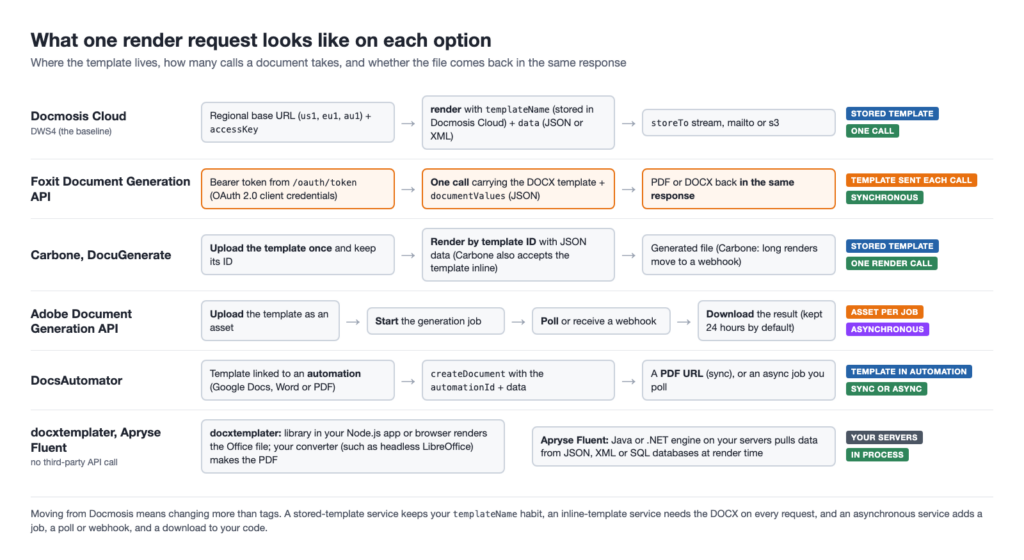
Stored-template services keep the templateName pattern, our API takes the DOCX with every call, and Adobe adds a job, a poll and a download.
If each generated contract then needs to be merged, compressed, or sent for signature, our guide to chaining PDF actions with Foxit shows how to handle that step using the same credit pool.
What the same workload costs on each option
These calculations use list prices and monthly billing unless noted, exclude VAT, and show Carbone prices in EUR. Workload A covers 1,000 2-page contracts a month, totaling 2,000 pages. Workload B covers 10,000 8-page statements a month, totaling 80,000 pages. Carbone assumes each render’s JSON and images stay under 1 MB.
| Option and plan | 1,000 2-page contracts a month | 10,000 8-page statements a month |
|---|---|---|
| Docmosis Cloud, Professional | $49 (4,000-page tier) | $469 (100,000-page tier) |
| Foxit Document Generation API | $375 a month on Business ($4,500 a year for 15,000 credits; workload A uses 12,000 a year) | Volume plan by quote (workload B needs 120,000 credits a year) |
| Carbone Cloud | €29 on Essential | €120 on Essential Plus with 5,000 extra documents, or €159 on Advanced |
| Adobe Document Generation API | 500 free transactions, then a sales quote | Sales quote |
| DocuGenerate | $39 on Plus with 500 extra documents at $0.04 | $199 on Business |
| DocsAutomator | $79 on Business | $499 on Scale with 5,000 extra documents, at the plan’s 10,000 monthly maximum |
| Apryse Fluent | License by quote, plus your servers | License by quote, plus your servers |
| docxtemplater | Free core, plus your servers and a PDF converter | Free core, plus your servers and a PDF converter |
Checked in November 2026.
Pages against documents
At workload A, Docmosis costs $49, DocuGenerate $39, and Carbone €29. Convert currencies before ranking, and remember that page count changes the economics. For 1-page letters, $49 on Docmosis’s Professional plan covers 4,000 of them, about $0.012 each, while every letter past the 500 included on DocuGenerate’s Plus plan costs $0.04. Long documents reverse that math.
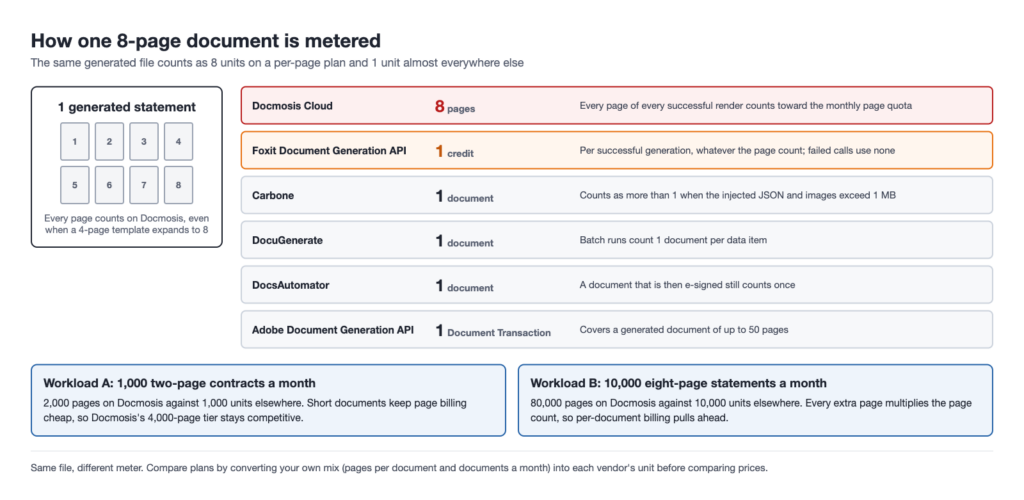
The same 8-page file counts 8 times on a per-page plan and once on every other meter, which is why long documents reverse the ranking.
What the credit buys besides generation
If each contract is then sent for signature, an envelope adds 5 credits from the same Foxit pool, and a merge or compression operation adds 1. A Docmosis pipeline needs a separate e-signature service with its own bill.
Commitment
Docmosis Cloud, Carbone, DocuGenerate, and DocsAutomator bill monthly with optional annual terms. Our paid plans use yearly credit pools. Adobe and Apryse are quote-based. Price your own mix (pages per document, documents a month, and the steps after generation) on 2 shortlisted options before switching.
Where your templates and data live
Template storage, retention, and region often decide a move before price does. The table below shows what each vendor has stated. “Not published” appears where a vendor is silent.
| Option | Template storage | Data retention, vendor-stated | Regions | Self-hosted route |
|---|---|---|---|---|
| Docmosis Cloud (baseline) | Stored per environment and region, encrypted at rest | Input data and generated documents deleted immediately after processing | US, EU, Australia | Tornado or Docmosis-Java |
| Foxit Document Generation API | Sent with each call; storage is not documented | Not published | One documented gateway | None for this API |
| Carbone | Stored until deleted, or set to expire, or sent inline | Rendered file downloadable once within 1 hour | European cloud; AWS private cloud | Community or Enterprise on-premises |
| Adobe Document Generation API | Uploaded as an asset for each job | Assets and output kept 24 hours by default | US-East, EMEA | None |
| DocuGenerate | Stored in your account | Stored until deleted; binary API output bypasses storage | US, EU, UK, Australia | None |
| DocsAutomator | Linked to an automation | No expiry by default; configurable per automation | EU database/files; some subprocessors outside EU | None |
| Apryse Fluent | Your servers | Your servers | Your infrastructure | Java or .NET engine only |
| docxtemplater | Your code or storage | Your infrastructure | Your infrastructure | Library, or the ENTERPRISE Docker image |
Checked in November 2026.
For regulated documents, check storage, retention, and region before syntax, because those decide whether you can use the service at all.
Keeping documents in the EU
If your documents must stay in the EU, Docmosis Cloud’s EU region, Carbone’s European cloud, DocuGenerate’s Frankfurt endpoint, and Adobe’s EMEA region cover this.
For the Foxit Document Generation API, the API runs through 1 gateway (na1.fusion.foxit.com) with no published EU processing option, so if EU processing is a hard requirement, talk to our team about current availability before committing to a migration.
Compliance claims
Docmosis offers a SOC 2 Type II report through its Trust Portal. Our cloud-hosted PDF APIs are covered by SOC 2 Type II audits, and we support HIPAA BAAs. Treat every certification as the vendor’s own statement and check the scope before sending regulated data.
If templates and data must stay on your servers
When nothing can leave your own infrastructure, the hosted APIs drop out and the self-hosted routes remain. Docmosis Tornado runs the same DOCX and ODT templates as Docmosis Cloud, with perpetual licenses starting at $3,795 for 1 converter and 50 templates (prices updated 1 June 2026 on the Docmosis pricing page).
Carbone On-Premise ships as a free Community Edition (without dynamic images, barcodes, charts or HTML) and a commercial Fit edition at €1,500 a year. Apryse Fluent is a Java or .NET engine for self-deployment.
docxtemplater is a JavaScript library your team embeds, with PDF conversion handled by a tool of your choice such as LibreOffice in headless mode. Of the hosted APIs in this list, only Carbone also sells the same engine for your servers.
Testing vendor claims before you switch
Vendor comparison pages and product claims each come from a party with a stake, so check where each claim comes from and what it leaves out.
Comparison pages and fidelity claims
Comparison pages written by Docmosis or by a competing vendor, and the rendering-fidelity claims on any vendor’s product page, are positioning rather than independent tests. The only fair comparison runs identical templates, data, and fonts through each engine.
Fonts decide most surprises
Docmosis substitutes fonts its Cloud environment does not have. DocuGenerate adds custom fonts on its Business plan.
The docxtemplater FAQ traces wrong fonts in converted PDFs to missing or unembedded fonts in the original Word file. Embed or confirm fonts in both the source template and the target environment before comparing rendered output.
Uptime
Docmosis states that it publishes historical uptime from a test render every 60 seconds and targets more than 99.9% monthly uptime. Carbone states an SLA of 99.5% to 99.9% depending on plan. Both are the vendors’ own figures, not independent measurements.
Render your 3 hardest templates (tables that break across pages, headers and footers, images, non-standard fonts) on 2 shortlisted services with the same JSON, and compare them page by page with the Docmosis output before making a final decision.
Choosing your Docmosis Cloud alternative
Four constraints narrow the shortlist of Docmosis Cloud alternatives faster than any feature list:
- Document length: Short documents at steady volume keep per-page billing competitive, while long statements and contracts favor a per-document, per-credit, or per-transaction meter.
- Template formats you keep: ODT, XLSX, and PPTX templates rule out the DOCX-only APIs, and Google Docs templates point to DocsAutomator.
- Where templates and data live: A required region or a no-cloud rule decides the move before price or syntax does.
- What happens after generation: If the file goes on to signature, merging, or compression, count the second vendor that step needs today.
Compare those constraints with your template and tag list, then use the picks table at the top of this article to choose 1 or 2 services for a side-by-side render test.
Where Foxit fits
Our Document Generation API fits best when the generated file is the first step of a longer pipeline, as with contracts, offer letters, and statements that go on to signature, merging, or compression.
The generation step itself is a single pass, taking a DOCX template and a JSON object and returning a PDF or DOCX in the same response.
What sits next to it on the same account
The PDF Services API merges, compresses, watermarks, protects, or redacts the generated file at 1 credit per operation. The eSign API sends it for signature at 5 credits per envelope, with signature fields positioned by eSign text tags already in the Word template.
The 3 APIs draw from the same annual credit pool, so a document that goes from generation through signature touches 1 account and 1 billing cycle.
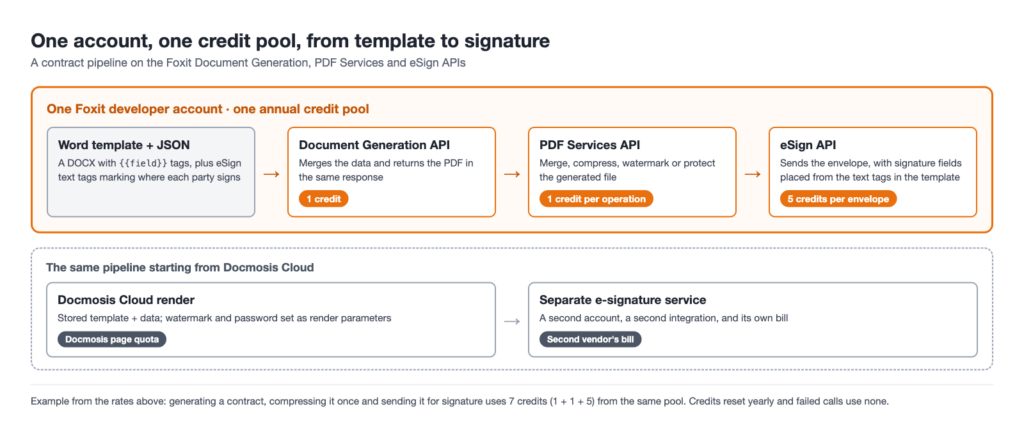
Generation, PDF processing and signature draw on one credit pool, where a Docmosis pipeline adds a second vendor for signatures.
Coverage and gaps
The limits listed in our entry above still apply, namely Word-only templates, no documented image or barcode tag, no template store, no equivalent for Docmosis expressions or sub-templates, one documented gateway, and annual credit pools. Teams that need ODT or spreadsheet templates, images, an EU processing region, or the lowest price for short documents at high volume should pick from the other entries in this list.
Our Document Generation API quickstart and Word template invoice tutorial walk you through your first integration. The guide to generating PDFs from JSON, the CRM-triggered document pipeline, and the contract lifecycle post show how the API fits into larger workflows.
The free Developer plan covers 500 credits a year, enough to build and test a real integration, with no credit card required. Start by converting your most-used Docmosis template to {{ }} tags and running it through the Analyze endpoint. The endpoint lists the single and repeating tags it finds, so you can check them against your JSON payload before the first generation call. If you have not converted a template yet, download a tagged sample contract and run the same step with it.
Create a free Foxit developer account and generate your first document from a Word template with the Document Generation API.
What else to know before you replace Docmosis Cloud
The answers below cover common questions about replacing Docmosis Cloud.