Manual invoice processing costs between $18 and $26 per invoice, while automated workflows bring that down to $2.50 to $4, according to industry accounts-payable benchmarks. Foxit’s Document Generation API generates well-formatted, dynamic PDF invoices from your existing data, which eliminates manual data entry, formatting errors, and the overhead of per-invoice handling. This tutorial shows you how to build that workflow end to end.
Before You Start
To follow along, grab your free credentials on the developer portal and read the introductory guide to automated document pipelines, which covers the basics of working with the API.
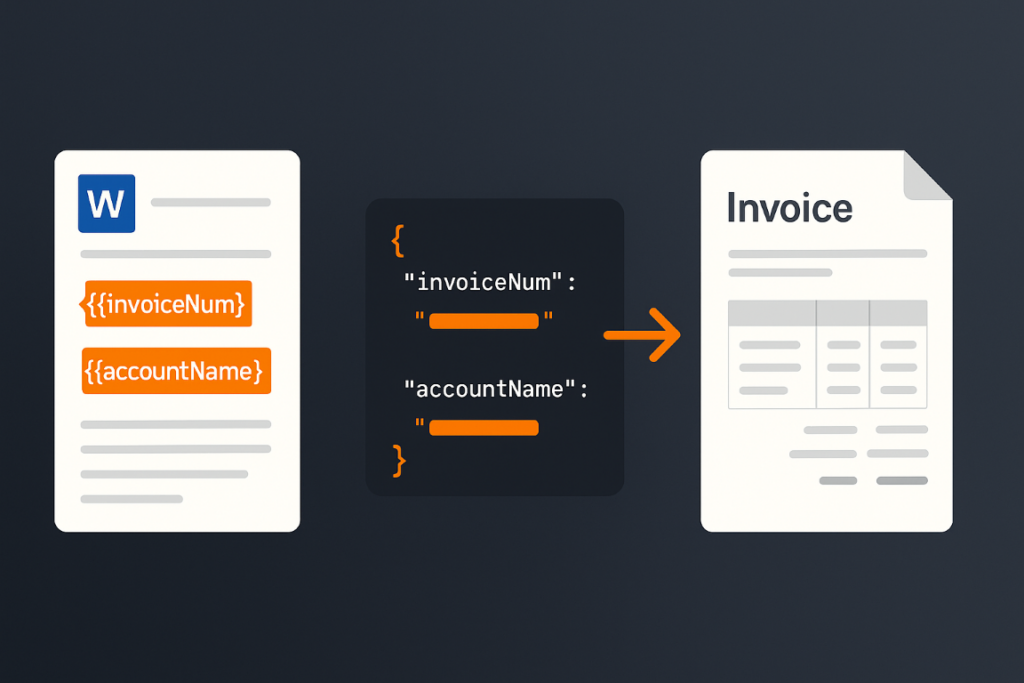
The API works with Microsoft Word templates containing tokens wrapped in double brackets. You pass the template and your data to the API, it replaces those tokens with your data values, and returns a PDF (or Word file, if you prefer).
Prerequisites
This tutorial runs a short Python script, so set up the following before you start:
-
Python 3.12 or newer. The script uses an f-string syntax introduced in Python 3.12.
-
pip for installing packages, plus the built-in venv module for an isolated environment.
-
The requests library for the HTTP call.
-
A code editor such as VS Code with the Python extension. PyCharm, WebStorm, or Sublime Text work too.
-
curl if you want to hit the endpoint from the command line first.
-
A Foxit developer account. Sign up for free to get your Client ID and Client Secret.
Scaffold the workspace in one shot:
mkdir foxit-invoices && cd foxit-invoices
python3 -m venv .venv
source .venv/bin/activate
pip install requests
Then export your credentials and host so the script can read them from the environment:
export CLIENT_ID="your_client_id"
export CLIENT_SECRET="your_client_secret"
export HOST="https://na1.fusion.foxit.com"
Designing Your Invoice Word Template
Template design in Word is your starting point. An invoice typically includes:
-
The customer receiving the invoice
-
The invoice number and issue date
-
The payment due date
-
A line-item table with product name, quantity, price, and a running total
The Document Generation API places no constraints on template design. Size, alignment, and styling can match your corporate standards, whether that means a simple layout or a polished, branded one. Consider the template below (download link at the end of this article):

The Word template with double-bracket tokens that the Document Generation API replaces at runtime.
Working from the top of the template:
-
{{ invoiceNum }}is the invoice number for the customer. -
{{ today \@ MM/dd/yyyy }}combines a built-in value (today, which represents the current date at API call time) with a date mask that controls the display format. The API docs list all available masks. -
{{ accountName }}is a standard token mapped directly from your data. -
{{ paymentDueDate \@ MM/dd/yyyy }}demonstrates date masks applied to dates from your own data, not just built-ins. -
The line-item table uses one header row and one data row. The dynamic row opens with
{{TableStart:lineItems}}(wherelineItemsis the name of an array in your JSON) and closes with{{TableEnd:lineItems}}. Between those markers sitproduct,qty,price,totalPrice, andROW_NUMBER(a built-in that auto-increments from 1). The\# Currencyformat applied tototalPricerenders it as a formatted currency value. -
A final table row uses
SUM(ABOVE)with currency formatting to total the column.
Structuring Your Invoice Data as JSON
In a production system, invoice data typically comes from a database or e-commerce API. For this demo, it comes from a JSON file:
[
  {
    "invoiceNum": 100,
    "accountName": "Customer Alpha",
    "accountNumber": 1,
    "paymentDueDate": "August 15, 2025",
    "lineItems": [
      { "product": "Product 1", "qty": 5, "price": 2, "totalPrice": 10 },
      { "product": "Product 5", "qty": 3, "price": 9, "totalPrice": 18 },
      { "product": "Product 4", "qty": 1, "price": 50, "totalPrice": 50 },
      { "product": "Product X", "qty": 2, "price": 15, "totalPrice": 30 }
    ]
  },
  {
    "invoiceNum": 25,
    "accountName": "Customer Beta",
    "accountNumber": 2,
    "paymentDueDate": "August 15, 2025",
    "lineItems": [
      { "product": "Product 2", "qty": 9, "price": 2, "totalPrice": 18 },
      { "product": "Product 4", "qty": 1, "price": 8, "totalPrice": 8 },
      { "product": "Product 3", "qty": 10, "price": 25, "totalPrice": 250 },
      { "product": "Product YY", "qty": 3, "price": 15, "totalPrice": 45 },
      { "product": "Product AA", "qty": 2, "price": 100, "totalPrice": 200 }
    ]
  },
  {
    "invoiceNum": 51,
    "accountName": "Customer Gamma",
    "accountNumber": 3,
    "paymentDueDate": "August 15, 2025",
    "lineItems": [
      { "product": "Product 9", "qty": 1, "price": 2, "totalPrice": 2 },
      { "product": "Product 23", "qty": 30, "price": 9, "totalPrice": 270 },
      { "product": "Product ZZ", "qty": 6, "price": 15, "totalPrice": 90 }
    ]
  }
]
The array holds three invoice objects, each matching the structure of the Word template. The accountNumber field has no matching template token, and that’s intentional. Your data can contain fields the template doesn’t use, and accountNumber is used in the Python script to build unique output filenames.
Calling the Document Generation API with Python
The Generate Document endpoint requires your credentials, a base64-encoded version of the template, and your data. The complete demo runs in just over 50 lines of Python:
import os
import requests
import sys
from time import sleep
import base64
import json
from datetime import datetime

CLIENT_ID = os.environ.get('CLIENT_ID')
CLIENT_SECRET = os.environ.get('CLIENT_SECRET')
HOST = os.environ.get('HOST')

def docGen(doc, data, id, secret):

	headers = {
		"client_id":id,
		"client_secret":secret
	}

	body = {
		"outputFormat":"pdf",
		"documentValues": data,
		"base64FileString":doc
	}

	request = requests.post(f"{HOST}/document-generation/api/GenerateDocumentBase64", json=body, headers=headers)

	return request.json()

with open('invoice.docx', 'rb') as file:
	bd = file.read()
	b64 = base64.b64encode(bd).decode('utf-8')

with open('invoicedata.json', 'r') as file:
	data = json.load(file)

for invoiceData in data:
	result = docGen(b64, invoiceData, CLIENT_ID, CLIENT_SECRET)

	if result["base64FileString"] == None:
		print("Something went wrong.")
		print(result)
		sys.exit()

	b64_bytes = result["base64FileString"].encode('ascii')
	binary_data = base64.b64decode(b64_bytes)

	filename = f"invoice_account_{invoiceData["accountNumber"]}.pdf"

	with open(filename, 'wb') as file:
		file.write(binary_data)
		print(f"Done and stored to {filename}")
After importing modules and loading credentials from environment variables, the docGen function takes the template, data, and credentials, then posts to the API endpoint. The API returns the rendered PDF as a base64 string.
The main loop reads and base64-encodes the template, loads the JSON file, iterates over each invoice object, calls the API, and writes the result to a uniquely named file using accountNumber. You don’t have to write results to disk at all, since the raw binary data can go straight to an email attachment or a document storage system.
Keep one limit in mind, since the GenerateDocumentBase64 endpoint rejects a .docx payload larger than 4 MB after base64 encoding. If your template approaches that ceiling, compress its images through Word’s Picture Format tools, drop embedded fonts and OLE objects, and split oversized templates into smaller ones.

The rendered PDF invoice the script produces, with all tokens replaced by values from the JSON payload.
Generate Invoice PDF API FAQ
What output formats does the Document Generation API support?
The API returns either a PDF or a DOCX file. You specify the format in the outputFormat field of the request body, as shown in the Python example above.
Can I use live data from a CRM or database instead of a JSON file?
Yes. The documentValues parameter accepts any JSON-serializable object, so you can pull data from Salesforce, a SQL database, a REST endpoint, or any other source and pass it directly to the API. The JSON file in this tutorial is a stand-in for whatever data source you use in production.
Do I need special Foxit software to design the Word template?
No. You design templates in standard Microsoft Word. The API reads the token syntax ({{ }}) from any valid .docx file, with no Foxit desktop software or proprietary editor required.
Is the API compliant with data security requirements?
Foxit’s API platform is SOC 2 Type II certified and supports GDPR and HIPAA compliance, which makes it suitable for invoices that include customer personally identifiable information or regulated financial data. See Foxit’s API security and compliance page for the full list of frameworks.
How do I get started without paying upfront?
The free Developer plan gives you instant access. It covers this tutorial and experimentation with your own templates before committing to a paid tier.
Next Steps
Get free credentials and download the template, Python script, and sample output from the GitHub repository to run this demo yourself.
Two natural extensions follow from here. Foxit Connectors provides 40+ pre-built integrations with platforms like Salesforce, SharePoint, and Google Drive, so you can pull invoice data directly from your CRM or ERP rather than a local JSON file. You can also chain document generation with an eSign step, sending the invoice for client acknowledgment immediately after creation, by passing the generated PDF to the Foxit eSign API.