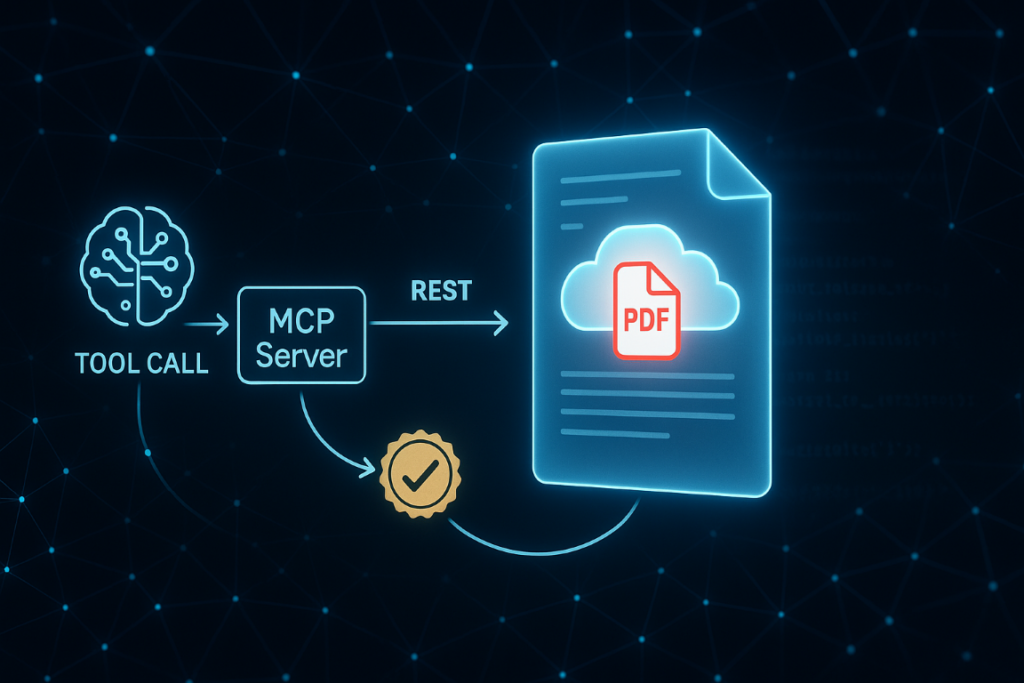
Agentic document workflows go beyond retrieval, since they convert, transform, merge, and sign documents without human intervention. This guide shows how to expose Foxit’s production PDF API as callable MCP tools so any LLM agent can execute the full document lifecycle (OCR, extraction, generation, and legally binding signatures) in a single automated pipeline.
Most LLM-powered applications have solved the retrieval problem. The harder part of agentic document workflows is action, the moment your agent needs to convert a scanned invoice to searchable text, merge a dozen contract pages into a package, and route it for a legally binding signature without a human in the loop.
RAG gets text into a context window, which is useful for reading. Once you need to produce, transform, or sign a document, you’ve moved into document operations territory. A plain text API won’t close that delta, and bolting together a dozen bespoke REST wrappers every time you need a new pipeline quickly becomes the bottleneck.
The Model Context Protocol (MCP) gives agents a standard way to discover and call tools. Document workflows have been missing a tool surface that exposes real PDF operations as callable MCP tools, backed by a production-ready API. This guide walks through exactly how to build that.
What You Need Before You Start
Five prerequisites are required to follow this guide. You need a Foxit developer account, the open-source MCP server, an MCP-compatible host, three environment variables, and a Python workspace for the signing example.
A Foxit developer account. Sign up at account.foxit.com/site/sign-up (no credit card required for the free Developer plan). The Foxit Developer Portal issues your Client ID and Client Secret, gives you access to the API Playground, and tracks usage in real time.
The open-source MCP server. Clone github.com/foxitsoftware/foxit-pdf-api-mcp-server. The repo ships two active implementations, a Python build (using FastMCP, Python 3.11+, and the uv package manager) and a TypeScript build (Node.js 18+, pnpm). The original stdio-python variant is deprecated, so use the current Python or TypeScript implementation.
An MCP-compatible host. You need somewhere to run the agent. Claude Desktop, Cursor, or VS Code with GitHub Copilot all work, and any MCP-compliant custom agent framework will also connect to the server.
A Python workspace for the signing example. The eSign walkthrough later in this guide runs a short Python script, so you need Python 3.8+ and the requests library. That walkthrough also uses a separate set of eSign credentials, which you set up in its own section rather than here. Scaffold an isolated workspace in one shot:
mkdir agentic-docs && cd agentic-docs
python3 -m venv .venv && source .venv/bin/activate
pip install requests Three environment variables. Before launching your MCP host process, export these:
export FOXIT_CLOUD_API_HOST="https://na1.fusion.foxit.com/pdf-services"
export FOXIT_CLOUD_API_CLIENT_ID="your_client_id"
export FOXIT_CLOUD_API_CLIENT_SECRET="your_client_secret" Never hardcode credentials in config files. The MCP server reads these at startup and uses them to authenticate every request to the PDF Services API.
What “Agentic” Actually Means for Document Workflows
An agentic document workflow executes operations on documents (converting formats, applying OCR, merging pages, routing for signature) rather than simply retrieving text from them. The tool surface required is fundamentally different from a RAG setup.
Retrieval-augmented generation pulls text from a document and injects it into a prompt. An agentic document workflow does something to a document, whether it converts a format, applies OCR to make a scanned image searchable, merges pages from multiple sources, or routes the result for signature.
In a tool-use architecture, the LLM doesn’t call the API directly. It picks the right operation from a catalog of tools based on the task, calls it with structured inputs, processes the result, and decides whether to continue the chain or hand off to the next step. If you’ve worked with web-search or code-execution tools in LangChain or AutoGen, the pattern is identical. The model reasons about which tool to invoke, not about how the underlying HTTP request works.
A REST API is an HTTP surface. An MCP tool is a named, typed function with an input schema, an output contract, and a description the model uses to decide when and whether to call it. MCP standardizes that interface so any compliant host can discover the full tool catalog, call individual operations, and chain results without custom adapter code.
A well-designed MCP server eliminates the bespoke integration layer. Without one, every document-heavy agent pipeline requires someone to write and maintain that plumbing from scratch.
Architecture Overview: Two Modes for Agent-Driven PDF Processing
The Foxit PDF API MCP Server wraps Foxit’s cloud PDF Services API as 30+ callable MCP tools, covering every stage of a document lifecycle. Foxit PDF Editor is the first PDF editor in the industry to act as an MCP Host, connecting outward to external MCP Servers and acting on open documents.
Those two facts define two distinct architectural modes.
Mode 1: Programmatic pipeline. Your MCP host (Claude Desktop, Cursor, VS Code with GitHub Copilot, or a custom agent) registers the Foxit PDF API MCP Server. The agent calls PDF tools directly, the server translates those calls into Foxit PDF Services REST requests, and structured results return to the agent. The agent never writes REST plumbing. This is the right model for automated pipelines running without a human in the loop.
Mode 2: In-app orchestration. Foxit PDF Editor acts as the MCP Host. Its embedded AI Assistant connects to external MCP Servers (Jira, Salesforce, Gmail, Notion, GitHub, Google Workspace) and acts on the open document. You could extract fields from a contract PDF and open a Jira ticket without leaving the editor. This is the right model when a knowledge worker needs AI assistance during document review.
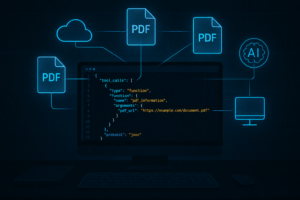
Mode 1 is what the rest of this guide builds. Its data flow runs like this:
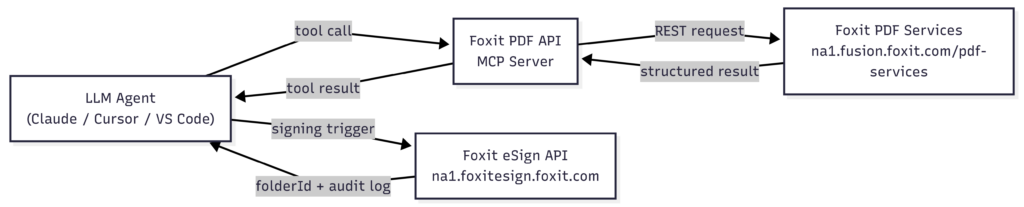
The agent calls tools, the MCP server handles the REST layer against PDF Services, and a prepared document hands off to eSign at the end of the chain.
One detail to understand before you build is that each successful Foxit PDF Services API call consumes one credit from your plan. Failed requests (4xx or 5xx) do not consume credits. The Developer Dashboard shows real-time usage, so you can see exactly what a pipeline costs per document before scaling it up.
Setting Up the Foxit MCP Server
The server exposes tools across six categories (document lifecycle, creation, conversion, manipulation, security, and forms) plus OCR and document compare.
The full tool catalog breaks down as follows:
- Document lifecycle : upload, download, delete
- Creation : Word, Excel, PowerPoint, HTML, URL, plain text, and image to PDF
- Conversion : PDF to Word, Excel, PowerPoint, HTML, plain text, and image
- Manipulation : merge, split, extract pages, compress, flatten, linearize, watermark, and page operations
- Security : add and remove passwords, set permissions
- Forms : export and import form data as JSON
OCR and document compare are also in the catalog. Signing lives in the eSign API covered in Section 6.
Mode 1: Programmatic Pipeline Setup
Clone the repo and pick your implementation. For the Python version with VS Code and GitHub Copilot, create or update your .vscode/mcp.json with the following:
{
"servers": {
"foxit-pdf": {
"command": "uv",
"args": [
"--directory",
"/absolute/path/to/foxit-pdf-api-mcp-server",
"run",
"foxit-pdf-api-mcp-server"
],
"env": {
"FOXIT_CLOUD_API_HOST": "${env:FOXIT_CLOUD_API_HOST}",
"FOXIT_CLOUD_API_CLIENT_ID": "${env:FOXIT_CLOUD_API_CLIENT_ID}",
"FOXIT_CLOUD_API_CLIENT_SECRET": "${env:FOXIT_CLOUD_API_CLIENT_SECRET}"
}
}
}
} VS Code launches the MCP server as a subprocess through uv, which runs the cloned Python build from its directory. The three ${env:...} references pull credentials from the shell environment instead of hardcoding them in the file, so replace /absolute/path/to/foxit-pdf-api-mcp-server with the path where you cloned the repo and restart VS Code to load the server. Claude Desktop uses the same shape under an mcpServers key and can run the published npm package directly with "command": "npx" and "args": ["-y", "@foxitsoftware/foxit-pdf-api-mcp-server"], so you do not have to clone anything for that host.
Mode 2: In-App Orchestration Setup
Open Foxit PDF Editor, click the AI Assistant tab in the Ribbon, and launch AI Chat to open the right-hand panel. In the bottom left of that panel, click MCP Tools, then click Add MCP Server to configure a new MCP service. Fill in the required fields and save. Once configured, the server appears in the MCP Tools list and its tools activate inside AI Chat.
In both modes, the server reads your Client ID and Client Secret from the environment variables set at startup. No additional gateway configuration is required.
Core Document Operations Agents Can Execute
With the server running, your agent has 30+ callable PDF operations available. Five categories do the heaviest lifting in production pipelines, namely conversion, OCR, structural extraction, merge/split, and document generation via DocGen.
Conversion. An agent receiving an uploaded DOCX triggers the Word-to-PDF creation tool before any downstream step. The output is a standards-compliant PDF that every subsequent operation (OCR, extraction, merge) can work with consistently, eliminating manual conversion and format ambiguity downstream.
OCR. When an agent ingests a scanned or image-only PDF, an OCR call should precede any extraction step. Calling the OCR tool makes the document searchable and text-extractable, which is required for invoice and contract pipelines where key fields sit inside scanned images. The agent calls OCR, waits for the result, and proceeds.
Structural extraction. After OCR, an agent extracts text, tables, and form-field data as structured JSON. Foxit’s structural extraction returns per-page content plus images, giving you a payload that routes cleanly into a BI tool or a second LLM step for analysis or classification. For the full response schema, refer to the Foxit MCP Server developer blog.
Merge and split. An agent assembling a contract package from multiple source documents calls the merge tool with an ordered list of PDFs. An agent pre-processing a large compliance document for parallel LLM analysis calls the split tool to divide it into per-section chunks. Both operations are synchronous and safe to retry on failure.
Document generation via DocGen. For dynamically generated contracts, invoices, or reports, the Foxit Document Generation API accepts a DOCX template with {{dynamic_tags}} and a JSON data payload from a CRM, database, or form response. It returns a finished PDF via POST /document-generation/api/GenerateDocumentBase64. A ready-to-use template lives in the Foxit demos repo if you want to test the call without authoring one. When you upload a DOCX template directly, the 4 MB post-base64 encoding cap applies, so slim templates down by stripping embedded fonts and large images before encoding. The agent supplies the JSON payload at runtime, so a single template can produce thousands of unique documents.
A representative end-to-end pipeline runs like this. An agent ingests a purchase order scan, calls OCR to make it searchable, extracts the structured fields as JSON, merges that data into a contract template via DocGen, and hands the finished PDF off to eSign. Every step is a tool call. The agent reasons about sequencing while the MCP server handles the REST layer.
Agent-Triggered Signing Workflows via the eSign API
Document signing uses a separate REST service, the Foxit eSign API, which has its own credentials and completes the pipeline in three calls. The agent exchanges its credentials for a token, creates a signing folder from the prepared PDF, and dispatches it to the signer.
The eSign API runs on its own host and issues its own Client ID and Client Secret from the eSign portal, separate from the PDF Services credentials the MCP server uses. Export the three eSign variables the script reads before running it:
export FOXIT_ESIGN_BASE_URL="https://na1.foxitesign.foxit.com"
export FOXIT_ESIGN_CLIENT_ID="your_esign_client_id"
export FOXIT_ESIGN_CLIENT_SECRET="your_esign_client_secret" The folder can only be sent if the signer has a signature field, and the simplest way to place one is with Foxit eSign text tags embedded in the document. Download the ready-to-sign sample, agent_agreement.pdf, into your workspace as agreement.pdf. It already carries the tag that maps a signature field to the first party, so the folder is sendable as is. Then run:
import base64
import os
import requests
BASE_URL = os.environ["FOXIT_ESIGN_BASE_URL"] # https://na1.foxitesign.foxit.com
CLIENT_ID = os.environ["FOXIT_ESIGN_CLIENT_ID"]
CLIENT_SECRET = os.environ["FOXIT_ESIGN_CLIENT_SECRET"]
def get_access_token():
resp = requests.post(
f"{BASE_URL}/api/oauth2/access_token",
data={
"client_id": CLIENT_ID,
"client_secret": CLIENT_SECRET,
"grant_type": "client_credentials",
"scope": "read-write",
},
timeout=30,
)
resp.raise_for_status()
return resp.json()["access_token"]
def route_for_signature(pdf_path, signer):
token = get_access_token()
headers = {"Authorization": f"Bearer {token}", "Content-Type": "application/json"}
with open(pdf_path, "rb") as fh:
encoded = base64.b64encode(fh.read()).decode()
folder = requests.post(
f"{BASE_URL}/api/folders/createfolder",
headers=headers,
json={
"folderName": "Agent Service Agreement",
"inputType": "base64",
"base64FileString": [encoded],
"fileNames": ["agreement.pdf"],
"processTextTags": True,
"sendNow": False,
"parties": [
{
"permission": "FILL_FIELDS_AND_SIGN",
"firstName": signer["first_name"],
"lastName": signer["last_name"],
"emailId": signer["email"],
"sequence": 1,
}
],
},
timeout=60,
)
folder.raise_for_status()
folder_id = folder.json()["folder"]["folderId"]
sent = requests.post(
f"{BASE_URL}/api/folders/sendDraftFolder",
headers=headers,
json={"folderId": folder_id},
timeout=60,
)
sent.raise_for_status()
return folder_id
if __name__ == "__main__":
fid = route_for_signature(
"agreement.pdf",
{"first_name": "Jordan", "last_name": "Lee", "email": "[email protected]"},
)
print(f"Folder {fid} sent for signature") In this code, you read the eSign credentials from the environment and exchange them for a bearer token at the access_token endpoint, where the request is form-encoded rather than JSON (sending JSON returns a 415). You then base64-encode the local PDF and post it to createfolder with inputType set to base64 so the API reads the base64FileString array, with processTextTags set to True so the document’s text tags become a real signature field, and with sendNow set to False so the folder is created as a draft instead of emailing anyone immediately. The parties array names the signer with FILL_FIELDS_AND_SIGN permission, you read the new id at folder.folderId, and you pass it to sendDraftFolder, which dispatches the draft to the signer. To confirm the result, call GET /api/folders/viewActivityHistory?folderId={id}, which returns the activity log once the folder has been shared (a draft returns logs of a non-shared folder can not be viewed). Foxit uses “folder” throughout the eSign API, never “envelope.”
Compliance is built into the API layer. The Foxit eSign API supports eIDAS, the ESIGN Act, UETA, HIPAA, and GDPR, covering the requirements for agents operating in legal, healthcare, and finance contexts. No separate compliance infrastructure is required.
Production Considerations: Compliance, Cost, and Error Handling
The Foxit PDF Services and eSign APIs are SOC 2 Type II certified, with HIPAA BAA support, GDPR compliance, and CCPA coverage built in. Three additional concerns (credit consumption, idempotency, and async polling) determine whether a pipeline runs reliably at scale.
Credit consumption. The free Developer plan includes 500 credits per year (annual reset, no rollover). The Startup plan is $1,750/year for 3,500 credits. The Business plan is $4,500/year for 150,000 credits. Each successful API call consumes one credit; 4xx and 5xx responses do not. A pipeline processing 50 documents per day burns through those allocations quickly. Monitor real-time usage in the Developer Dashboard before moving to production and size your plan accordingly.
Idempotency. Merge, flatten, and convert calls are safe to retry on failure. Signing-folder creation is not, so gate createfolder behind a state check so the agent doesn’t create duplicate folders and dispatch duplicate signing requests to the same signers.
Async operations. Translation and batch conversion operations are asynchronous, so they return a job ID immediately, and your agent should poll the job status endpoint roughly every three seconds until the status is COMPLETED or FAILED before proceeding to the next step in the chain. Handling these concerns at build time separates a working pipeline from one that generates support tickets.
Common Mistakes
- Dropping the
/api/prefix on eSign calls : Every eSign path lives under/api/, as in/api/folders/createfolder. Omitting it returns a 404 against a docs-style path that does not exist. - Sending the token request as JSON : The
access_tokenendpoint is form-encoded. A JSON body returns415 Unsupported Media Type, so pass the credentials as form data. - Forgetting
inputType: base64: When you send a base64 PDF without it,createfolderrejects the request withfileUrls or base64FileString cannot be empty. URL mode usesfileUrlsandfileNamesinstead. - Sending a signer with no signature field : A
FILL_FIELDS_AND_SIGNparty needs a field. If the document has no text tag like${s:1:______}and you skipprocessTextTags,sendDraftFolderreturnsPlease assign a signature field. Use underscores in the tag placeholder, since an empty placeholder does not create a field. - Expecting a signing tool in the MCP server : The 30+ MCP tools cover PDF operations, not signatures. Signing is the eSign API, a separate service with separate credentials.
Agentic Document Workflows FAQ
What is an agentic document workflow?
An agentic document workflow is an automated pipeline in which an LLM agent executes operations on documents (conversion, OCR, extraction, merging, generation, and signing) without human intervention. Unlike retrieval-augmented generation, which only reads documents, an agentic workflow produces and transforms them using callable tools exposed through a protocol like MCP.
How does the Model Context Protocol (MCP) work with PDF APIs?
MCP defines a standard interface for exposing named, typed functions, called tools, that an LLM agent can discover and invoke. A PDF API MCP server wraps REST endpoints as MCP tools with input schemas and output contracts. The agent selects the right tool based on task context, calls it with structured parameters, and processes the result, without writing any HTTP request logic.
What PDF operations does the Foxit MCP server expose?
The Foxit PDF API MCP Server exposes 30+ tools covering document lifecycle (upload, download, delete), creation (Word, Excel, PowerPoint, HTML, image to PDF), conversion (PDF to multiple formats), manipulation (merge, split, compress, OCR, watermark), security (password management), and forms (JSON import/export).
Does every API call consume a credit even if it fails?
No. Only successful Foxit PDF Services API calls consume credits. Requests that return 4xx or 5xx status codes do not count against your plan. The Developer Dashboard provides real-time usage tracking so you can measure pipeline cost per document before scaling.
How do I trigger document signing from an agent without human intervention?
After preparing a document, your agent calls the Foxit eSign API directly. It authenticates with client_credentials, POSTs to /api/folders/createfolder with the base64 PDF and a parties entry for the signer, then POSTs to /api/folders/sendDraftFolder with the returned folderId. The signing email workflow triggers automatically, and the agent can poll /api/folders/viewActivityHistory for the audit trail.
What compliance standards does the Foxit eSign API meet?
The Foxit eSign API supports eIDAS, the U.S. ESIGN Act, UETA, HIPAA, GDPR, and CCPA. The PDF Services API is SOC 2 Type II certified with HIPAA BAA support. No separate compliance wrappers are required for agents operating in legal, healthcare, or financial contexts.
What is the difference between Mode 1 and Mode 2 in the Foxit MCP architecture?
Mode 1 is a programmatic pipeline where an external LLM agent (Claude Desktop, Cursor, VS Code with GitHub Copilot, or a custom framework) registers the Foxit MCP Server and calls PDF tools automatically. Mode 2 is in-app orchestration where Foxit PDF Editor acts as the MCP Host, connecting to external services like Jira or Salesforce while a knowledge worker reviews the open document.
Why should signing-folder creation be gated behind a state check?
The /api/folders/createfolder endpoint is not idempotent. If an agent retries on failure without a state check, it will create duplicate folders and send duplicate signing requests to the same signers. Merge, flatten, and convert operations are safe to retry; folder creation requires the agent to verify no existing folder was created before calling the endpoint again.
Start Building: Free Developer Access in Minutes
The full pipeline in this guide is available to test today. Activate a free Foxit Developer plan to get your Client ID, Client Secret, access to the API Playground, and 500 credits for real requests. No credit card required.
Clone the open-source MCP server, export the three environment variables, and register the server in Claude Desktop, Cursor, or VS Code with GitHub Copilot. At that point, 30+ PDF tools are callable from your agent with no local SDK to install and no REST plumbing to write.
Once a document is prepared, extend the pipeline into legally binding signatures with the eSign API. The architecture in this guide covers the full document lifecycle from conversion and OCR through extraction, generation, merging, and signing, all in a single agentic document workflow.
Create your free developer account to clone the open-source MCP server and make 30+ PDF tools callable from your agent in minutes, no credit card required.