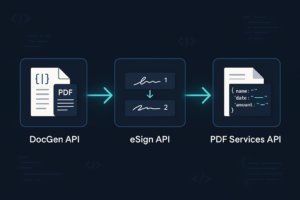
If you’re building document workflows at scale, you already know that manual PDF editing doesn’t cut it. Whether you’re generating contracts, processing invoices, or packaging reports, you need an API that handles page manipulation, merging, splitting, and flattening without breaking under load. Foxit PDF Services API gives you exactly that.
This guide covers the operations you’ll use most: adding and removing pages, merging documents, splitting by page range, and flattening annotations and form fields. Code examples are in Python, but the API is REST-based, so the patterns translate to any stack.
What Is the Foxit PDF Services API?
Foxit PDF Services API is a cloud-based REST API for programmatic PDF manipulation. You send documents and parameters; it returns processed PDFs. No local dependencies, no rendering engine to maintain.
The API handles:
Page insertion, deletion, and reordering
Document merging (combining multiple PDFs into one)
Document splitting (breaking one PDF into multiple outputs)
Flattening (converting annotations, form fields, and overlays into static page content)
Authentication uses API keys. Every request requires client_id and client_secret as separate HTTP request headers.
Why Backend PDF Editing Is an Infrastructure Decision
Teams processing hundreds of PDFs a day have an architecture problem, not a tooling problem.
When your CRM spits out contracts, your ERP generates invoices, and your intake forms produce patient records, the question is how you process these at scale without standing up a server farm or babysitting a library version matrix. At 500+ documents per day, manual desktop tooling is off the table. Per-file scripts that depend on a locally installed library become a liability the moment the library version shifts or a new language target appears.
Two architectural approaches dominate this space: SDK-based libraries and cloud REST APIs. SDK libraries require local installation, version pinning, language-specific bindings, and ongoing maintenance every time a dependency shifts. A cloud REST API requires none of that. Any language that can send an HTTP request can call it, with no package to install, no runtime to configure, and no compatibility matrix to manage.
This guide covers four operations in full: page manipulation (move, rotate, delete, add), merging multiple PDFs into one output, splitting a large document by page count, and flattening annotations into permanently static content. All of it runs via REST calls against the Foxit PDF Services API, authenticated with two request headers and structured around a single four-step loop that applies to every endpoint in the suite.
Prerequisites
Get your environment in order before any code runs. Each tool links to its canonical install page.
venv for project isolation
Node.js 18+ and npm
axiosfor Node examplesA code editor such as VS Code with the Python extension; alternatives include PyCharm, WebStorm, and Sublime Text
Postman (optional, for API exploration alongside the Foxit API Playground)
A Foxit developer account, available at account.foxit.com/site/sign-up with no credit card required and free credits included
Set up your workspace:
mkdir foxit-pdf-tutorial && cd foxit-pdf-tutorial

python3 -m venv .venv

source .venv/bin/activate

pip install requests
Authentication and the Upload → Task → Poll → Download Loop
Authentication
Foxit PDF Services API authenticates via headers. Every request must include client_id and client_secret as separate HTTP request headers, exactly as named: lowercase, underscored. They’re passed individually, as plain strings. Concatenating them, Base64-encoding them, or prefixing them with Bearer are all auth mistakes that look like they should work and don’t.
The base host for the North America environment is https://na1.fusion.foxit.com. Set it once as an environment variable and reuse it:
export BASE_URL="https://na1.fusion.foxit.com"

export CLIENT_ID="your_client_id"

export CLIENT_SECRET="your_client_secret"
Every cURL request in this guide uses that pattern:
--header "client_id: $CLIENT_ID"

--header "client_secret: $CLIENT_SECRET"
In Python, read credentials from os.environ and never hardcode them:
import os

import time

import requests


BASE_URL = os.environ["BASE_URL"]

CLIENT_ID = os.environ["CLIENT_ID"]

CLIENT_SECRET = os.environ["CLIENT_SECRET"]


headers = {

"client_id": CLIENT_ID,

"client_secret": CLIENT_SECRET,

}
In Node.js:
const axios = require("axios");


const BASE_URL = process.env.BASE_URL;

const headers = {

client_id: process.env.CLIENT_ID,

client_secret: process.env.CLIENT_SECRET,

};
The Four-Step Loop
Every operation in this API follows the same four steps, regardless of endpoint.
POST /pdf-services/api/documents/uploadwith the file asmultipart/form-data. The response returns an uploaddocumentId.POSTto the relevant endpoint (manipulate, combine, split, or flatten) with the uploaddocumentIdin the request body. The response is HTTP 202 with ataskId.GET /pdf-services/api/tasks/{task-id}until thestatusfield readsCOMPLETED. The completed task response also carries aresultDocumentIdand aprogresspercentage. Task statuses are always uppercase:PENDING,PROCESSING,COMPLETED,FAILED.GET /pdf-services/api/documents/{resultDocumentId}/downloadto retrieve your result. The uploaddocumentIdfrom step one and theresultDocumentIdfrom step three are different identifiers. You download using theresultDocumentId. Swapping these is the most common 4xx error.
Use a-midsummer-nights-dream.pdf to follow along with a known-good file:
curl --location "$BASE_URL/pdf-services/api/documents/upload" \

--header "client_id: $CLIENT_ID" \

--header "client_secret: $CLIENT_SECRET" \

--form 'file=@"a-midsummer-nights-dream.pdf"'
Response:
{

"documentId": "abc123-upload-id"

}
A reusable Python polling function with exponential backoff:
def poll_task(task_id: str) -> str:

url = f"{BASE_URL}/pdf-services/api/tasks/{task_id}"

delay = 2

while True:

response = requests.get(url, headers=headers)

response.raise_for_status()

data = response.json()

status = data["status"]

if status == "COMPLETED":

return data["resultDocumentId"]

elif status == "FAILED":

raise RuntimeError(f"Task {task_id} failed: {data}")

time.sleep(delay)

delay = min(delay * 2, 30)
Branch on "COMPLETED" and "FAILED" in uppercase. Lowercase strings will silently never match.
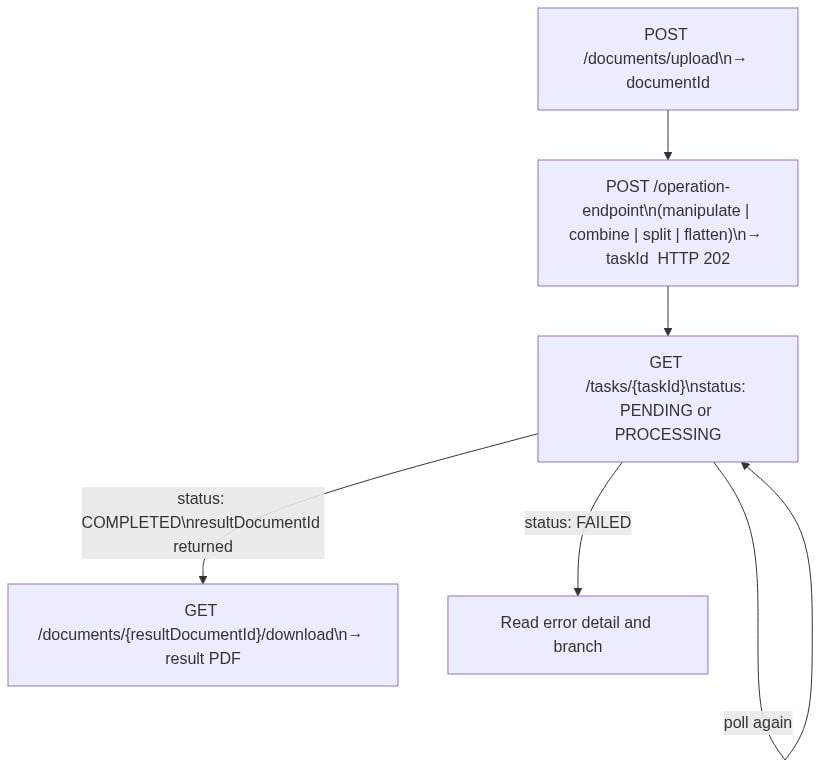
The async model is what makes this scalable. A 50-page merge or a batch of 200 splits doesn’t block your thread while it runs. You dispatch the operation call, collect the taskId, and poll on a sensible backoff schedule. At 500+ PDFs per day, that non-blocking pattern keeps your worker pool from saturating.
Page Manipulation: Move, Rotate, Delete, and Add Pages
All page operations go through a single endpoint: POST /pdf-services/api/documents/modify/pdf-manipulate.
{

"documentId": "<upload-document-id>",

"password": "optional",

"config": {

"operations": [{ "type": "OPERATION_TYPE" }]

}

}
The config.operations array runs in order. Page indexing is 1-based and adjusts after each step. If you delete page 3 and then reference page 4 in the next operation, that reference points to what was originally page 5 before the delete. Keep that in mind when chaining operations in a single request.
MOVE_PAGES
MOVE_PAGES reorders pages within the document:
{

"type": "MOVE_PAGES",

"pages": [5, 6, 7],

"targetPosition": 1

}
targetPosition is 1-based and must not exceed the document’s total page count.
ROTATE_PAGES
ROTATE_PAGES changes page orientation:
{

"type": "ROTATE_PAGES",

"pages": [1, 2, 3],

"rotation": "ROTATE_CLOCKWISE_90"

}
Valid rotation values are ROTATE_0, ROTATE_CLOCKWISE_90, ROTATE_180, and ROTATE_COUNTERCLOCKWISE_90.
DELETE_PAGES
DELETE_PAGES removes specific pages:
{

"type": "DELETE_PAGES",

"pages": [8, 9]

}
ADD_PAGES
ADD_PAGES appends blank pages to the end of the document:
{

"type": "ADD_PAGES",

"pageCount": 2

}
ADD_PAGES has no insert-at-position parameter; blank pages always go to the end. There’s also no REPLACE_PAGES operation in the current API. Page replacement requires a DELETE_PAGES call on the target pages followed by a separate merge step to bring in the replacement content.
A document intake pipeline for scanned medical records often receives pages in landscape orientation when the archive standard is portrait. The Python call below normalizes pages 1 through 3 of the uploaded file:
def rotate_pages(document_id: str) -> str:

url = f"{BASE_URL}/pdf-services/api/documents/modify/pdf-manipulate"

payload = {

"documentId": document_id,

"config": {

"operations": [

{

"type": "ROTATE_PAGES",

"pages": [1, 2, 3],

"rotation": "ROTATE_CLOCKWISE_90"

}

]

}

}

response = requests.post(url, json=payload, headers=headers)

response.raise_for_status()

return response.json()["taskId"]
A legal document workflow that assembles exhibits and needs to move pages 5, 6, and 7 to the front before archiving uses this request body:
{

"documentId": "<upload-document-id>",

"config": {

"operations": [

{

"type": "MOVE_PAGES",

"pages": [5, 6, 7],

"targetPosition": 1

}

]

}

}
All four operation types return HTTP 202 with a taskId. Pass that ID to poll_task, wait for COMPLETED, then download the resultDocumentId.
Merging and Splitting PDFs
Merging Multiple PDFs with pdf-combine
The merge endpoint is POST /pdf-services/api/documents/enhance/pdf-combine.
The request body takes a required documentInfos array. Each entry is a source document object:
{

"documentInfos": [

{ "documentId": "<doc-id-1>" },

{ "documentId": "<doc-id-2>" },

{ "documentId": "<doc-id-3>" }

],

"config": {

"addBookmark": true,

"continueMergeOnError": false,

"retainPageNumbers": false

}

}
The config object supports three keys:
addBookmarkgenerates one bookmark per source file in the merged output, useful when the reader needs to navigate by source.retainPageNumberspreserves original page-number labels from each source.continueMergeOnErroris the one that matters most in production. Set it tofalsefor any job where a single bad source must fail the entire batch. Set it totrueonly for best-effort pipelines where partial output is acceptable. Always set it explicitly rather than relying on defaults.
The following code assembles a monthly client report from three sources. Download input.pdf, second.pdf, and input_for_compare.pdf to run this end-to-end:
def upload_file(path: str) -> str:

url = f"{BASE_URL}/pdf-services/api/documents/upload"

with open(path, "rb") as f:

response = requests.post(url, headers=headers, files={"file": f})

response.raise_for_status()

return response.json()["documentId"]


def merge_pdfs(document_ids: list) -> str:

url = f"{BASE_URL}/pdf-services/api/documents/enhance/pdf-combine"

payload = {

"documentInfos": [{"documentId": doc_id} for doc_id in document_ids],

"config": {

"addBookmark": True,

"continueMergeOnError": False,

"retainPageNumbers": False

}

}

response = requests.post(url, json=payload, headers=headers)

response.raise_for_status()

return response.json()["taskId"]


# Upload all three source files, collect their documentIds

doc_ids = [

upload_file("input.pdf"),

upload_file("second.pdf"),

upload_file("input_for_compare.pdf")

]


# Merge and download

merge_task_id = merge_pdfs(doc_ids) # POST combine → taskId

merge_result_id = poll_task(merge_task_id) # poll → resultDocumentId
Once poll_task returns a resultDocumentId, pass it to your download function.
Splitting a PDF by Page Count with pdf-split
The split endpoint is POST /pdf-services/api/documents/modify/pdf-split. The pdf- prefix is required and matches the naming convention used by pdf-combine, pdf-manipulate, and pdf-flatten.
The request body is minimal:
{

"documentId": "<upload-document-id>",

"pageCount": 10

}
pageCount specifies how many pages go into each output file. The last file gets whatever pages remain. The current API exposes only this page-count split mode. File-size-based and bookmark-based splitting are not in the published reference.
curl --location "$BASE_URL/pdf-services/api/documents/modify/pdf-split" \

--header "client_id: $CLIENT_ID" \

--header "client_secret: $CLIENT_SECRET" \

--header 'Content-Type: application/json' \

--data '{

"documentId": "<upload-document-id>",

"pageCount": 10

}'
The response returns a taskId. When polling reaches COMPLETED, the result contains multiple output files, one per split chunk.
Flattening Annotations: Making PDF Changes Permanent
Flattening merges annotations, form fields, and layers into the page content itself. The output is a single static PDF where no markup can be toggled, filled, or removed. This is a one-way transformation with no undo.
The endpoint is POST /pdf-services/api/documents/modify/pdf-flatten.
The request body is intentionally minimal:
{

"documentId": "<upload-document-id>"

}
No flags for selective annotation or form-field handling are exposed in the current API reference. The operation flattens both annotations and form fields together in a single pass.
When to Flatten a PDF
Flattening is required in three situations:
Archiving a signed form. Without flattening, a technically capable recipient can still manipulate form fields in most PDF viewers, even after signature. Flattening removes that possibility entirely.
Print production. Annotation layers render differently across print drivers and produce visible artifacts in the final output. Flattening eliminates the variable.
Compliance workflows under HIPAA or legal hold. Documents at rest must be immutable. A live form field fails that requirement.
curl --location "$BASE_URL/pdf-services/api/documents/modify/pdf-flatten" \

--header "client_id: $CLIENT_ID" \

--header "client_secret: $CLIENT_SECRET" \

--header 'Content-Type: application/json' \

--data '{ "documentId": "<upload-document-id>" }'
Flattening does not encrypt the document or apply password protection. If your workflow requires both, chain a pdf-protect call after flattening using POST /pdf-services/api/documents/security/pdf-protect, passing the resultDocumentId from the completed flatten task as the documentId input for the protect call and the password under config.userPassword. The result of one operation becomes the input of the next.
{

"documentId": "<flatten-result-document-id>",

"config": {

"userPassword": "<password>"

}

}
In this body, you point documentId at the flatten task’s resultDocumentId and set the open password under config.userPassword. The password lives inside the config object, not at the top level. A top-level password key is accepted by the request but the task then fails with a parameter error, so nest it under config.
Building a Multi-Step PDF Editing Pipeline for High Volume
Chaining Operations with resultDocumentId
Every completed task returns a resultDocumentId. That ID becomes the documentId for the next operation. The full chain: upload, then operation A, then poll until A reaches COMPLETED, then operation B using A’s resultDocumentId, then poll until B reaches COMPLETED, then download B’s resultDocumentId.
A complete flatten-then-protect pipeline, with inline comments showing which ID type is active at each step:
import os

import time

import requests


BASE_URL = os.environ["BASE_URL"]

CLIENT_ID = os.environ["CLIENT_ID"]

CLIENT_SECRET = os.environ["CLIENT_SECRET"]


headers = {

"client_id": CLIENT_ID,

"client_secret": CLIENT_SECRET,

}


def upload_file(path: str) -> str:

url = f"{BASE_URL}/pdf-services/api/documents/upload"

with open(path, "rb") as f:

response = requests.post(url, headers=headers, files={"file": f})

response.raise_for_status()

return response.json()["documentId"]


def poll_task(task_id: str) -> str:

url = f"{BASE_URL}/pdf-services/api/tasks/{task_id}"

delay = 2

while True:

response = requests.get(url, headers=headers)

response.raise_for_status()

data = response.json()

status = data["status"]

if status == "COMPLETED":

return data["resultDocumentId"]

elif status == "FAILED":

raise RuntimeError(f"Task failed: {data}")

time.sleep(delay)

delay = min(delay * 2, 30)


def flatten(document_id: str) -> str:

url = f"{BASE_URL}/pdf-services/api/documents/modify/pdf-flatten"

response = requests.post(url, json={"documentId": document_id}, headers=headers)

response.raise_for_status()

return response.json()["taskId"]


def protect(document_id: str, password: str) -> str:

url = f"{BASE_URL}/pdf-services/api/documents/security/pdf-protect"

payload = {"documentId": document_id, "config": {"userPassword": password}}

response = requests.post(url, json=payload, headers=headers)

response.raise_for_status()

return response.json()["taskId"]


def download(document_id: str, output_path: str):

url = f"{BASE_URL}/pdf-services/api/documents/{document_id}/download"

response = requests.get(url, headers=headers)

response.raise_for_status()

with open(output_path, "wb") as f:

f.write(response.content)


# Pipeline: upload → flatten → protect → download

upload_doc_id = upload_file("signed-form.pdf") # documentId

flatten_task_id = flatten(upload_doc_id) # taskId

flatten_result_id = poll_task(flatten_task_id) # resultDocumentId

protect_task_id = protect(flatten_result_id, os.environ["PDF_PASSWORD"]) # taskId

protect_result_id = poll_task(protect_task_id) # resultDocumentId

download(protect_result_id, "final-protected.pdf")
Three distinct IDs flow through this pipeline: the upload documentId, the taskId returned by each operation call, and the resultDocumentId returned by each completed task. Confusing any two of these produces a 4xx.
Batch Polling for High-Volume Jobs
For a single document, sequential polling works fine. For a batch of thousands, polling each task one at a time becomes the bottleneck. The pattern that scales is to dispatch first, then consolidate.
Upload all source files in parallel and collect their documentIds. Dispatch all operation calls in parallel and collect their taskIds. Then run a single consolidated polling loop that iterates over all taskIds, checks each status, and branches on COMPLETED or FAILED per task. Your thread never blocks waiting for one document while others are already done, and it processes results as they arrive.
The multi.py sample in the foxitsoftware/developerapidemos repository demonstrates this exact dispatch-then-consolidate shape, including the resultDocumentId handoff across operations.
Common Mistakes and Troubleshooting
These are the integration errors that come up most often.
Polling too aggressively. Start at a two-second interval and double it up to a ceiling of around 30 seconds. Tight-looping the /tasks/{task-id} endpoint burns rate-limit budget and produces 429s that slow the whole pipeline down.
Treating FAILED as transient. A FAILED status means the job encountered a specific error. Read the task response body, surface the reason, and branch on it. Retrying indefinitely on FAILED produces the same failure indefinitely.
Downloading before COMPLETED. Some integrations skip the status check and call the download endpoint immediately after the operation response. The result is a partial or empty file. Always confirm status == "COMPLETED" before hitting the download endpoint.
Mixing up the three IDs. All three appear in the same code block so they can’t be confused:
upload_doc_id = upload_file("input.pdf") # documentId → input to operation endpoints

task_id = flatten(upload_doc_id) # taskId → input to the polling endpoint

result_doc_id = poll_task(task_id) # resultDocumentId → input to the download endpoint

download(result_doc_id, "output.pdf")
The download endpoint takes the resultDocumentId, not the upload documentId or the taskId.
Task status casing. The polling endpoint returns PENDING, PROCESSING, COMPLETED, and FAILED in uppercase. Branching on lowercase "completed" will silently never match and your loop will run forever.
continueMergeOnError semantics. Setting this to true lets the merge skip a failing source and continue. Setting it to false aborts the entire batch if any source fails. In production, always set this explicitly.
Retrying 4xx responses. Retry on 5xx errors and timeouts. A 400 or 401 will return the same 4xx until you fix the request, so don’t retry them.
Auth header format. client_id and client_secret are separate headers, lowercase with underscores, passed individually. They’re not concatenated, Base64-encoded, or Bearer-prefixed.
pdf-flatten does not encrypt. Flattening makes a document’s content static but doesn’t restrict access to the file. If your compliance workflow requires both, chain a pdf-protect call after the flatten step using the flatten task’s resultDocumentId as the next documentId input.
PDF Editor API FAQ
What is the Foxit PDF Services API used for?
The Foxit PDF Services API is a cloud-based REST API for programmatic PDF manipulation at scale, covering page manipulation, document merging, splitting, and annotation flattening. Any language that can send HTTP requests can use it without installing local dependencies.
How do you merge multiple PDFs using the Foxit API?
Upload each source file to get a documentId, then POST all documentIds in a documentInfos array to POST /pdf-services/api/documents/enhance/pdf-combine. Poll the returned taskId until status is COMPLETED, then download the resultDocumentId.
What is PDF flattening and when should you use it?
PDF flattening converts interactive elements (form fields, annotations, and overlays) into static page content that cannot be edited. Use it when archiving signed forms, preparing documents for print production, or meeting compliance requirements such as HIPAA that mandate immutable records at rest.
What is the difference between documentId and resultDocumentId in the Foxit API?
documentId is returned after uploading a file and is used as input to operation endpoints. resultDocumentId is returned when a task reaches COMPLETED status and is used to download the processed file. They are different identifiers; using one where the other is expected produces a 4xx error.
Does the Foxit PDF Services API support splitting PDFs by custom page ranges?
The current pdf-split endpoint splits by a fixed pageCount value, producing equal-sized chunks with the last file containing remaining pages. File-size-based and bookmark-based splitting are not available in the published API reference.
How should you handle errors in the Foxit PDF Services API?
Retry on 5xx errors and timeouts using exponential backoff. Do not retry 400 or 401 responses, since those indicate a problem with the request itself. Read the response body on FAILED task status and branch on the specific error rather than retrying blindly.
Getting Started with Foxit PDF Services API
Create a free developer account. No credit card required, and free credits are included.
Once you have your credentials, open the Foxit API Playground. Start with pdf-combine. Download input.pdf and second.pdf, upload both to get two documentIds, POST the merge request with the JSON body from the Merging section, and poll for the result. The full cycle, authentication through download, takes under ten minutes on a first attempt.
If you’re evaluating this for production volume, check the current plan options and credit pools. Plans range from the free developer tier up through Startup and Business options with larger shared-credit allocations.
For the authoritative reference on every endpoint and parameter covered in this guide, the Foxit PDF Services API documentation is your starting point. The GitHub samples repository has complete Python and Node.js examples you can clone and run immediately, including the multi-step pipeline pattern this guide covers.