<

Document Workflow Automation: An Architectural Guide to Building API-Driven Document Pipelines

Automate document workflows with APIs. Learn how to scale PDF generation, eSign, and processing pipelines using modern architecture.
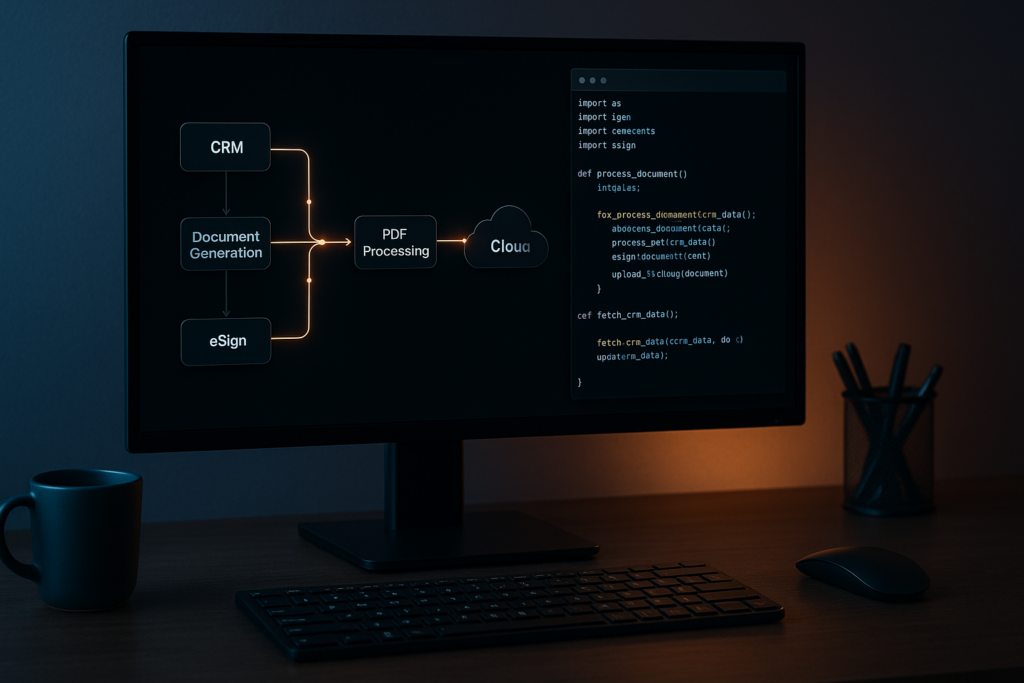
Diagram of an API-driven document workflow automation system showing CRM, document generation, eSign, and PDF processing pipeline connected to cloud infrastructure.

A PDF generation script that breaks on special characters. A cron job that retries failed document conversions by rerunning the entire job. An eSign flow tracked in a shared spreadsheet where “sent” means someone sent an email. These aren’t hypothetical failure modes; they’re the actual engineering artifacts that accumulate when document workflows grow faster than the architecture beneath them.

The scale problem compounds quickly. A team processing 200 contracts a month can survive on scripts and email hand-offs. At 2,000 contracts, those same workflows are the bottleneck. At 20,000, engineers are maintaining hacks that should have been replaced two years ago: retry logic bolted onto cron jobs, signing flows with no audit trail, and PDF generation that silently drops content when a CRM field contains a Unicode character.

The global intelligent document processing market was valued at $2.3B in 2024 and is projected to reach $12.35B by 2030 at a 33.1% CAGR, not because AI is newly fashionable, but because manual document handling is a measurable operational ceiling. The organizations crossing that ceiling aren’t doing it by adopting better tools in isolation. They’re adopting an architectural model.

The problem isn’t a lack of API options for document generation, conversion, or signing. The problem is the absence of a framework for assembling those operations into a pipeline that’s resilient, auditable, and testable. This guide gives you that framework, then grounds it in working Python examples against a real REST API suite.

Anatomy of a Document Automation Pipeline: The Five Stages

Before you write a single API call, you need a model for what you’re building. Every document workflow automation pipeline, regardless of domain, decomposes into five discrete stages.

Stage 1 is intake: you receive or capture the source data that will drive the document. This might be a webhook payload from your CRM when a deal closes, a form submission, or a batch export from an ERP system. The manual failure mode here is no schema validation, no deduplication, and no observable queue depth. Documents arrive out of order, get processed twice, or disappear without trace.

Stage 2 is generation: you render a document from a template and the structured data from stage 1. Common outputs include contracts, invoices, compliance reports, and onboarding kits. The failure mode is template version drift (production runs a different template version than staging), no validation of input data against the template’s expected schema, and no idempotent retry path if the generation call fails partway through.

Stage 3 is processing: you transform, extract from, or optimize the generated document. This covers format conversion (DOCX to PDF), content extraction for downstream indexing, compression, and linearization for fast web delivery. The failure mode is processing steps chained with no error isolation, so a failed compression step blocks the entire document from reaching signing.

Stage 4 is signing: you route the document for signature, track signer status, and capture consent with a full audit trail. The failure mode is manual polling for signer status, no webhook-driven callbacks, and no programmatic access to the audit log when a compliance review is triggered.

Stage 5 is archival and distribution: you store the signed document with a retention policy and push it to downstream systems, your DMS, CRM, or data warehouse. The failure mode is no content-addressed versioning, no record of which document version was signed, and no delivery confirmation to downstream consumers.

Idempotency is a first-class requirement at every stage. Each operation should be safely retryable: the same inputs produce the same output, and a retried call doesn’t create a duplicate document, signing request, or archive record. You implement idempotency in your orchestration layer by generating a unique key per document job and checking it before re-processing. This is a design responsibility. The API doesn’t handle it for you automatically.

The data flow through a well-designed document automation pipeline looks like this:

API-driven document workflow diagram showing CRM or ERP data flowing through document generation, PDF processing, eSignature, and storage or distribution systems.

One constraint to know upfront: the three APIs in this stack don’t share a document ID namespace. Each stage boundary requires a file handoff. DocGen returns the rendered document as base64 in the response body. You decode it and either save it to disk or upload it directly to PDF Services. PDF Services returns a resultDocumentId that you download as a file, then re-upload to eSign, which runs on a different host with different authentication. The handoff pattern is a feature, not a limitation. It makes each stage independently testable and replayable.

Architectural Decision Framework: Four Axes Before You Write Code

Four decisions determine whether your document pipeline scales cleanly or becomes the thing your team rewrites in 18 months.

Axis 1: REST API vs. SDK

Use REST APIs for cloud-native, horizontally scalable pipelines where document operations are stateless HTTP calls. Use an SDK for on-premise deployments, air-gapped environments, or latency-sensitive processing where network round-trips are a constraint. Foxit offers both: REST APIs for cloud-native pipelines and PDF SDKs for on-premise or air-gapped deployments, so the axis is a real choice, not a theoretical one. If your document pipeline runs inside a regulated environment where data can’t leave the network perimeter, the SDK is the correct answer regardless of how convenient the REST API is.

Axis 2: Synchronous vs. Asynchronous Processing

This is the most consequential call you’ll make, and it varies by stage within a single pipeline.

FactorSynchronousAsynchronous
Document sizeUnder ~10 pagesLarge or variable-length
SLA requirementSub-second responseVariable completion time acceptable
Typical use caseReal-time contract previewBatch invoice processing
Error handlingInline exception handlingDead-letter queue, retry on callback
Foxit API exampleDocGen (returns document in response body)PDF Services (returns taskId, poll for result); eSign (webhook callback on folder execution)

The Foxit suite itself illustrates this split cleanly. DocGen is synchronous: POST your template and data payload, get the rendered document back immediately in the response body. No taskId, no polling. PDF Services is asynchronous: a conversion call returns a taskId, and you poll a status endpoint until the result is ready. eSign is asynchronous via webhooks: creating a folder returns immediately, and the API delivers a callback to your registered endpoint when the folder is executed (all signers complete). Design your pipeline around this reality rather than assuming a uniform execution model across all three APIs.

Axis 3: Linear Pipeline vs. Event-Driven Architecture

A linear pipeline (where stage A blocks until complete before stage B starts) works for simple three-stage flows with predictable volume and acceptable end-to-end latency. An event-driven pipeline, where each stage emits a completion event consumed by the next stage, is the correct choice when you need error isolation (a failed stage 3 doesn’t block stage 2 outputs from being replayed), partial replay (reprocess from stage 2 without regenerating the document), or parallel processing branches (send the same document to multiple downstream consumers simultaneously).

For pipelines that start as linear but need to scale, n8n is a practical bridge. You can call Foxit’s REST APIs from n8n workflows via HTTP Request nodes, which lets you wire pipeline stages without writing custom glue code while you validate the workflow logic before committing to a fully coded implementation.

Axis 4: Error Handling Strategy for Document Pipelines

Three components belong in your initial design, not bolted on afterward.

The first is idempotency keys. Generate a unique key per document job (a UUID tied to the source record ID and timestamp works well) and check it before re-processing. If a worker crashes mid-job and the job re-queues, the idempotency key prevents duplicate processing.

The second is dead-letter handling. Define what happens to a document that has failed three consecutive processing attempts. It should route to a dead-letter queue with the failure reason and enough context to replay it manually or trigger an alert.

The third is a circuit breaker. If PDF Services returns 5xx responses on five consecutive calls within 30 seconds, stop sending requests and return a fast failure to the calling system. This prevents a degraded upstream API from exhausting your worker pool and cascading failures downstream. The circuit breaker pattern maps cleanly onto any stateless HTTP integration.

Building the Pipeline: Foxit APIs in Practice

We’ll use Foxit’s PDF Services, DocGen, and eSign APIs for the examples below. The patterns translate to any REST-based document API, but these are the endpoints we’ll call.

Document Generation with the DocGen API

DocGen takes a DOCX template (encoded as base64) and a JSON data payload, and returns the rendered document immediately in the response body. There’s no templateId concept; you send the template inline with every request. This means you own template versioning. Keep your templates in version control and pin the version used for each job to your event log.

One practical cap to design around: the DocGen endpoint rejects .docx uploads larger than 4 MB once base64-encoded. Compress embedded images through Word’s Picture Format settings, drop embedded fonts and OLE objects, and split very large templates into multiple files before the request leaves your service.

The request uses client_id and client_secret as HTTP headers against na1.fusion.foxit.com.
# Illustrative example - not production code
import base64
import requests
import json

def generate_contract(template_path: str, data: dict) -> bytes:
    with open(template_path, "rb") as f:
        template_b64 = base64.b64encode(f.read()).decode("utf-8")

    payload = {
        "outputFormat": "pdf",
        "documentValues": data,
        "base64FileString": template_b64
    }

    response = requests.post(
        "https://na1.fusion.foxit.com/document-generation/api/GenerateDocumentBase64",
        headers={
            "client_id": "YOUR_CLIENT_ID",
            "client_secret": "YOUR_CLIENT_SECRET",
            "Content-Type": "application/json"
        },
        json=payload
    )
    response.raise_for_status()
    result = response.json()
    return base64.b64decode(result["base64FileString"])

# Data pulled from your CRM or ERP; validate against your template schema before calling
contract_data = {
    "client_name": "Acme Corp",
    "contract_value": "48000",
    "effective_date": "2025-09-01",
    "payment_terms": "Net 30"
}

pdf_bytes = generate_contract("templates/msa_v3.docx", contract_data)

Validate your data payload against the template’s expected field schema before the API call. DocGen doesn’t catch type errors or missing fields with a clean error response. You get a malformed document instead. A Pydantic model or JSON Schema validation step before the POST saves significant debugging time.

PDF Processing with the PDF Services API

The most common PDF Services operation is conversion. The DOCX-to-PDF call is also the simplest entry point for teams new to the API. PDF Services uses a two-step pattern: upload the source file first to get a documentId, then call the operation endpoint with that ID. Because operations are asynchronous, the call returns a taskId that you poll until the result is available.

# Illustrative example - not production code
import time
import requests

PDF_SERVICES_HOST = "https://na1.fusion.foxit.com"
HEADERS = {
    "client_id": "YOUR_CLIENT_ID",
    "client_secret": "YOUR_CLIENT_SECRET"
}

def upload_document(file_bytes: bytes, filename: str) -> str:
    response = requests.post(
        f"{PDF_SERVICES_HOST}/pdf-services/api/documents/upload",
        headers=HEADERS,
        files={"file": (filename, file_bytes, "application/octet-stream")}
    )
    response.raise_for_status()
    return response.json()["documentId"]

def poll_task(task_id: str) -> str:
    while True:
        status_resp = requests.get(
            f"{PDF_SERVICES_HOST}/pdf-services/api/tasks/{task_id}",
            headers=HEADERS
        )
        status_resp.raise_for_status()
        status_data = status_resp.json()

        if status_data["status"] == "COMPLETED":
            return status_data["resultDocumentId"]
        elif status_data["status"] == "FAILED":
            raise RuntimeError(f"Task failed: {status_data}")
        time.sleep(2)

def download_document(document_id: str) -> bytes:
    response = requests.get(
        f"{PDF_SERVICES_HOST}/pdf-services/api/documents/{document_id}/download",
        headers=HEADERS
    )
    response.raise_for_status()
    return response.content

def convert_docx_to_pdf(docx_bytes: bytes) -> bytes:
    doc_id = upload_document(docx_bytes, "document.docx")
    response = requests.post(
        f"{PDF_SERVICES_HOST}/pdf-services/api/documents/create/pdf-from-word",
        headers={**HEADERS, "Content-Type": "application/json"},
        json={"documentId": doc_id}
    )
    response.raise_for_status()
    result_doc_id = poll_task(response.json()["taskId"])
    return download_document(result_doc_id)

def extract_text(pdf_bytes: bytes) -> str:
    doc_id = upload_document(pdf_bytes, "document.pdf")
    response = requests.post(
        f"{PDF_SERVICES_HOST}/pdf-services/api/documents/modify/pdf-extract",
        headers={**HEADERS, "Content-Type": "application/json"},
        json={"documentId": doc_id, "extractType": "TEXT"}
    )
    response.raise_for_status()
    result_doc_id = poll_task(response.json()["taskId"])
    return download_document(result_doc_id).decode("utf-8")

The pdf-extract endpoint pulls text from the PDF (pass extractType as TEXT, IMAGE, or PAGE depending on what you need). Both conversion and extraction follow the same upload, execute, poll, download cycle. Feed the text output to a downstream search index so the document is queryable immediately after processing.

Signature Orchestration with the eSign API

The eSign API uses OAuth2, not header-based authentication. Your first call exchanges client_id and client_secret for a Bearer token on a separate host (na1.foxitesign.foxit.com).

# Illustrative example - not production code
import json
import requests
from flask import Flask, request as flask_request

ESIGN_HOST = "https://na1.foxitesign.foxit.com"

def get_esign_token(client_id: str, client_secret: str) -> str:
    response = requests.post(
        f"{ESIGN_HOST}/api/oauth2/access_token",
        data={
            "grant_type": "client_credentials",
            "client_id": client_id,
            "client_secret": client_secret
        }
    )
    response.raise_for_status()
    return response.json()["access_token"]

def create_signing_folder(token: str, pdf_bytes: bytes, signers: list) -> str:
    folder_payload = {
        "folderName": "MSA - Acme Corp",
        "parties": [
            {
                "firstName": s["first_name"],
                "lastName": s["last_name"],
                "emailId": s["email"],
                "permission": "FILL_FIELDS_AND_SIGN",
                "sequence": s["sequence"]
            }
            for s in signers
        ]
    }

    response = requests.post(
        f"{ESIGN_HOST}/api/folders/createfolder",
        headers={"Authorization": f"Bearer {token}"},
        files={
            "file": ("contract.pdf", pdf_bytes, "application/pdf"),
            "data": (None, json.dumps(folder_payload), "application/json")
        }
    )
    response.raise_for_status()
    return response.json()["folderId"]

# Webhook handler receives the folder-executed event
app = Flask(__name__)

@app.route("/webhooks/esign", methods=["POST"])
def esign_webhook():
    event = flask_request.json
    if event.get("event_type") == "folder_executed":
        folder_id = event["folder_id"]
        signed_doc_url = event["documents"][0]["download_url"]
        archive_signed_document(folder_id, signed_doc_url)
    return "", 200

Register your webhook endpoint in the eSign developer portal settings. When a folder is executed (all signers complete), the API POSTs the event payload to your endpoint. Extract the signed document URL from the callback and pass it to your archival stage. The eSign API also exposes a folder activity history endpoint that returns a complete audit trail: signer identity, timestamp, IP address, and authentication method for every interaction with the folder.

Chaining the Pipeline Stages with Idempotency

The file handoff between stages is explicit by design. Here’s a minimal orchestration wrapper that chains all three stages and demonstrates the idempotency pattern:

# Illustrative example - not production code
import uuid

def run_document_pipeline(job_id: str, template_path: str, data: dict, signers: list):
    idempotency_key = f"{job_id}:{uuid.uuid4()}"

    if is_already_processed(idempotency_key):
        return  # Safe to retry

    # Stage 2: Generate (DocGen returns PDF bytes synchronously)
    pdf_bytes = generate_contract(template_path, data)
    log_pipeline_event(job_id, "generated", hash_document(pdf_bytes))

    # Stage 3: Process (extract text for indexing; convert if needed)
    extracted = extract_text(pdf_bytes)
    index_document(job_id, extracted)
    log_pipeline_event(job_id, "processed", hash_document(pdf_bytes))

    # Stage 4: Sign (eSign returns folder ID; completion arrives via webhook)
    token = get_esign_token("YOUR_CLIENT_ID", "YOUR_CLIENT_SECRET")
    folder_id = create_signing_folder(token, pdf_bytes, signers)
    log_pipeline_event(job_id, "sent_for_signature", folder_id)

    mark_processed(idempotency_key)

For async pipelines handling thousands of documents per hour, replace direct function calls with queue messages. Each stage worker pulls a job from Redis or Amazon SQS, executes the API call, ACKs on success, and publishes a completion event to the next stage’s queue. If a worker crashes mid-job, the unACKed message re-queues and the idempotency key prevents re-processing a document that has already been completed.

Auditability and Compliance by Design

GDPRHIPAA, and SOC 2 Type II each impose specific requirements around document lifecycle traceability. Retrofitting an audit layer onto a pipeline that wasn’t designed for it takes far more work than building it in from the start.

The event sourcing pattern fits document pipelines directly. Maintain an append-only log of every document event: createdconvertedsent_for_signaturesignedarchived. Use a stable document_id as the primary key. This log makes replay straightforward: if signing fails, you can replay from the processing output without regenerating the document from scratch. Each event record should include the stage name, timestamp, operator identity, and a SHA-256 hash of the document bytes at that stage.

The SHA-256 hash at each stage isn’t overhead; it’s your tamper detection mechanism. If the hash of the document presented for signing doesn’t match the hash recorded at generation, you have an integrity problem that’s immediately visible. This satisfies document integrity requirements in regulated industries without any additional tooling.

The Foxit eSign API’s built-in audit trail captures signer identity, timestamp, IP address, and authentication method for every folder interaction. Query the folder activity history endpoint to retrieve this data and persist it in your own audit store alongside your pipeline event log. Storing it in your own system, rather than relying solely on the eSign provider’s records, gives you a complete, portable audit trail that survives a provider migration.

Scaling Document Workflow Automation Without Rebuilding It

Batch Ingestion

Place incoming document jobs on a queue (Redis list or SQS FIFO queue) and run a pool of stateless worker processes. Each worker pulls a job, executes the API call with an idempotency key, and ACKs on success. Dead-letter routing handles permanently failed documents.

This pattern processes thousands of documents per hour without hammering the API or requiring coordination between workers. Because each REST API call is stateless, workers scale horizontally without any shared state. You add capacity by adding workers, not by redesigning the pipeline.

Credit Quota and Backoff

Foxit’s pricing model is credit-based: API calls consume credits, and calls pause when credits are exhausted until renewal or upgrade. Implement exponential backoff with jitter on 5xx responses as a general practice for any REST API integration.

# Illustrative example - not production code
import time
import random
import requests

def api_call_with_retry(url, headers, payload, max_retries=4):
    for attempt in range(max_retries):
        response = requests.post(url, headers=headers, json=payload)
        if response.status_code < 500:
            return response
        wait = (2 ** attempt) + random.uniform(0, 1)
        time.sleep(wait)
    response.raise_for_status()

Log quota exhaustion as a separate metric category. Consistent credit exhaustion is a signal to upgrade your plan. It shouldn’t require digging through application logs to detect.

Observability

Instrument each pipeline stage with three metrics: processing latency (time from job enqueue to stage completion), error rate per stage, and document volume per time window. Use structured JSON logging so stage failures are queryable without parsing free-text log lines. Tools like OpenTelemetry make it straightforward to emit these metrics in a vendor-neutral format.

A document that enters the pipeline and never exits is a data integrity problem. Track in-flight documents explicitly: when a job enters signing, record it. When the eSign webhook fires, close the record. Any job that’s been in stage 4 for longer than your expected SLA without a webhook callback warrants an alert, not just a log entry.

Ship Your First Document Pipeline Stage Today

The gap between a collection of one-off scripts and a production document pipeline isn’t as wide as it looks. It starts with one stage, not five.

Create a free account directly at account.foxit.com/site/sign-up (no credit card required; the Developer plan ships with 500 credits per year). The direct URL skips the pricing-page redirect you would otherwise hit from the developer portal, so you finish on the account form and then land in the API Keys section where credentials live. From there, make your first conversion call: POST a DOCX file from your own system to the PDF Services conversion endpoint using the Python example above and confirm you get a valid PDF back. That single round-trip validates your auth, your network path, and the basic integration pattern before you write any orchestration logic.

Once that’s working, pick one document type in your system that’s currently generated or processed manually and map it to the five-stage model from the second section of this article. Find the highest-friction bottleneck stage and start there, not at stage 1. If generation is the pain point, use the Developer Playground in the developer portal to test DocGen templates against real data payloads before writing a single line of integration code. If signing is the bottleneck, wire up the eSign folder creation and a webhook handler to close the loop.

The patterns in this guide (idempotency keys, event-sourced audit logs, async stage handoffs, circuit breakers) apply to any document API stack. A unified REST API suite covering generation, processing, and signing from a single provider cuts the number of authentication models to manage, reduces integration surface area, and gives you a consistent debugging path when something fails across stages. That’s the practical payoff of treating document workflow automation as a first-class architectural concern rather than a collection of scripts that should have been replaced two years ago.

Start building your first pipeline stage today.

Frequently Asked Questions

What is document workflow automation?

Document workflow automation replaces manual, script-driven document operations (generation, conversion, signing, and archival) with a structured API-driven pipeline. Each stage is independently testable, retryable via idempotency keys, and observable through structured event logs. At scale (thousands of documents per hour), automation eliminates the bottlenecks created by cron jobs, shared spreadsheets, and one-off scripts.

When should I use a synchronous vs. asynchronous document API?

Use synchronous APIs when you need sub-second responses for small documents, for example, real-time contract previews under approximately 10 pages. Use asynchronous APIs (polling or webhook-driven) for large or variable-length documents, batch invoice processing, or any workflow where variable completion time is acceptable. Many document API suites, including Foxit’s, mix both models across different endpoints, so design each pipeline stage around the actual execution model of the specific API call it makes.

How do I make a document pipeline idempotent?

Generate a unique key per document job (a UUID tied to the source record ID and timestamp works well) and check whether that key has already been processed before executing any stage. Store processed keys in a fast key-value store (Redis is a common choice). On retry, the idempotency check returns early without duplicating the document, signing request, or archive record. This is an orchestration-layer responsibility; the document API itself doesn’t provide it automatically.

What compliance requirements apply to document pipelines?

GDPR, HIPAA, and SOC 2 Type II each require document lifecycle traceability. Implement an append-only event log keyed by a stable document_id, capturing stage name, timestamp, operator identity, and a SHA-256 hash of the document at each stage. For eSign specifically, store the provider’s audit trail (signer identity, IP address, authentication method, timestamp) in your own system so the record is portable across provider migrations.

Explore More Blogs
Foxit PDF Structural Extraction API engine extracting tables, forms, and text from scanned PDFs.

Extract Anything from Any PDF: Inside Foxit’s Advanced Extraction Engine

Basic PDF extraction libraries break on scanned documents, complex tables, and form fields, leaving downstream pipelines starved of clean data. Foxit’s PDF Structural Extraction API combines OCR, layout recognition, and AI parsing to return all twelve PDF element types as structured JSON, ready for RAG, BI, and CRM workflows.

API Webinars

Explore Real-World Use Cases, Live Demos, and Best Practices.
Our technical team walks through practical applications of Foxit APIs with live Q&A, hands-on demos, and clear integration strategies. Whether you're comparing tools or actively building, these sessions are designed to help you move faster with fewer roadblocks

What You'll Learn