
<

Extract Anything from Any PDF: Inside Foxit’s Advanced Extraction Engine

Basic PDF extraction libraries break on scanned documents, complex tables, and form fields, leaving downstream pipelines starved of clean data. Foxit's PDF Structural Extraction API combines OCR, layout recognition, and AI parsing to return all twelve PDF element types as structured JSON, ready for RAG, BI, and CRM workflows.
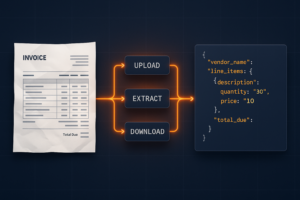
Foxit PDF Structural Extraction API engine extracting tables, forms, and text from scanned PDFs.

Your PDF extraction pipeline passes unit tests against the sample invoices you built it on. Then production arrives and you’re looking at 47% garbled output on the Q4 contract batch because half those documents are scanned TIFFs wrapped in a PDF envelope, and your extraction library has no concept of what an image-only page actually is.

The failure modes are specific. PyMuPDF’s get_text() returns empty strings on scanned PDFs because it reads content streams directly, and image-only pages carry no text stream. pdfplumber’s table detection merges rows when column widths span non-uniform grids, which is standard in any financial statement that mixes summary and line-item rows on the same page. Embedded images containing meaningful text (stamped signatures, engineering drawing annotations, letterhead logos) get silently dropped. The library extracts coordinates for the XObject reference but does nothing with the raster data inside. Form fields built on non-standard annotation types (AcroForms using widget annotations with custom action streams) lose their values entirely when you serialize to text.

The architectural distinction that creates this problem is the difference between content serialization and semantic extraction. A PDF converter reads a content stream and writes out whatever character sequences it finds in rendering order. An extraction engine understands the spatial relationships between those character sequences: that two columns of text at x=72 and x=320 are parallel body copy, that the row at y=210 belongs to the table starting at y=180, that the text block repeating on every page is a header carrying lower retrieval weight in a RAG index. Output that lacks spatial and semantic classification looks correct on screen but breaks every downstream consumer that depends on structure.

BI dashboards require numbers tied to the right row labels. AI ingestion pipelines require heading hierarchy to chunk accurately. CRMs require form field values extracted from AcroForm widget dictionaries, delivered with field names intact. The delta between what basic extraction libraries return and what those systems can actually consume is where document pipeline engineering hours accumulate.

How Foxit’s PDF Structural Extraction Engine Works Under the Hood

Foxit exposes this capability as the PDF Structural Extraction (Trial) endpoint inside the PDF Services API (POST /pdf-services/api/documents/pdf-structural-extract). Trial status means the schema is versioned at v1.0.7 and may evolve, but the contract is stable enough to build against today, and the endpoint runs against the production base URL at developer-api.foxit.com.

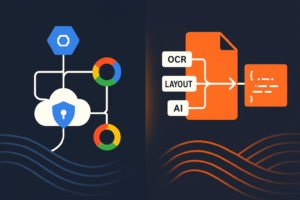
The engine runs three coordinated layers. The OCR layer operates on rasterized page content, recognizing characters from image-based PDFs and scanned documents across 200+ languages. The layout recognition layer applies spatial analysis to identify column boundaries, reading order, table cell boundaries, figure regions, and header/footer zones. The AI-based parsing layer classifies extracted objects semantically, resolving ambiguous blocks (a text run that spans two layout columns, or a figure caption that reads syntactically like a section heading) into typed elements.

All three layers run inside Foxit’s core PDF engine, which powers 700 million+ users across 20+ years of production deployments. That engine has native awareness of PDF internal structures: content streams, XObject dictionaries, AcroForm field trees, and annotation layers. The OCR layer operates on the same internal page representation the rendering engine uses, so it handles annotated PDFs where text overlaps image regions, and form fields where the visual display and stored value diverge.

The same Structural Extraction endpoint is also Step 1 of Foxit’s PDF Translation (Trial) workflow, which signals that the extraction output is structured enough to backbone a full rewrite-and-rerender pipeline.

NVIDIA’s July 2025 NeMo Retriever research on PDF extraction showed that specialized OCR-based pipelines outperform general-purpose vision-language models on retrieval recall and throughput for complex elements including tables, charts, and infographics. VLMs produce plausible-looking output on clean documents but degrade on exactly the edge cases (multi-column scans, mixed-content pages, annotated overlays) that a specialized pipeline handles systematically.

The Full Object Map: All 12 Extractable PDF Element Types

The Structural Extraction schema v1.0.7 defines twelve element types in the type enum: titleheadparagraphtableimageheaderFooterformhyperlinkfootnotesidebarannotation, and formula.

The API exposes no per-object filter parameters. The only request body fields are documentId (required) and password (optional, for protected PDFs). The engine extracts the full element graph and returns everything in one asynchronous round-trip. You filter client-side on the returned JSON. The design is correct for the workload because partial extraction would require re-running layout recognition per request, costing more compute than transmitting the full element set in a single ZIP.

The result is a ZIP archive. At minimum it contains StructureInfo.json, whose top-level analyzeResult object holds versionpageselements, and info. Documents that contain figures or tables also produce additional binary files (image renditions and table renditions) alongside the JSON, referenced from individual elements so the JSON payload stays manageable on large documents.

Each element in the document-wide flat elements array carries its own idtypecontentregion (with page and an 8-point boundingBox polygon), and score confidence value. A table element adds its cell grid. A form element adds field data. An image element points to its binary file in the ZIP. Because titlehead, and paragraph elements appear in document reading order in the elements array, they chunk cleanly on semantically correct boundaries, which is what a RAG index needs to return complete, coherent passages.

Each type maps directly to a downstream use case: table feeds financial reporting pipelines, form drives automated CRM data entry, image routes to computer vision workflows or document archives, annotation builds compliance audit trails, and head combined with paragraph elements in reading order feeds RAG ingestion.

API Walkthrough: The Four-Step Async PDF Extraction Flow

There’s no synchronous path. You upload, get a task ID, poll until completion, then download the result ZIP. Every request carries two headers: client_id and client_secret (lowercase snake_case, as specified in the API spec’s security schemes). Both come from the Developer Portal’s default application. Pass them as named HTTP headers on every request and do not use Authorization: Bearer.

The four-step sequence runs as follows:
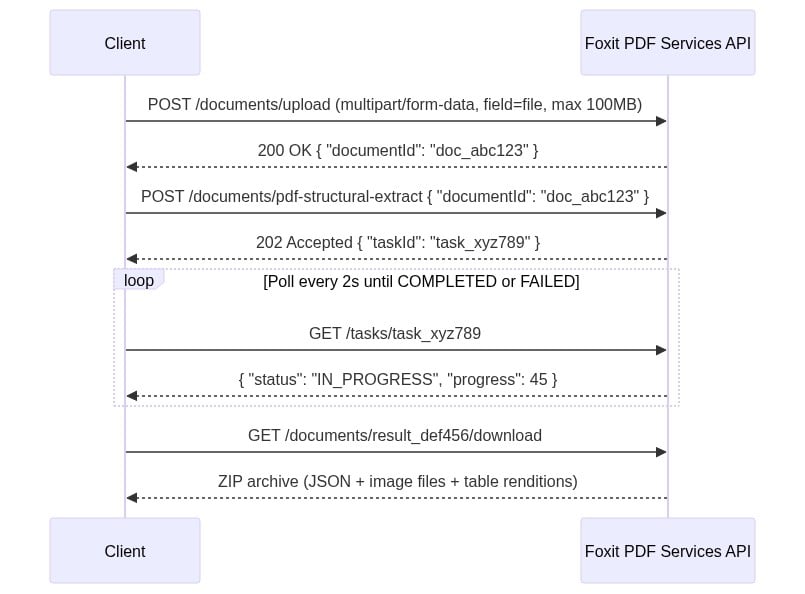
Four-step PDF structural extraction API flow between client and Foxit PDF Services. 

The four-step sequence diagram uses two headers on every request: client_id and client_secret. Create a free developer account at account.foxit.com/site/sign-up (no credit card required, no sales call). Once you’re in, the credentials live under the default application in the Developer Portal. Copy the Client ID and Client Secret pair and treat them like any other API secret. Pass them as named HTTP headers on every call (lowercase snake_case, not Authorization: Bearer).

  • Step 1: Upload the PDF to POST /pdf-services/api/documents/upload as multipart/form-data with the file under field name file. The 100MB ceiling is enforced with a 413 and error code MAX_UPLOAD_SIZE_EXCEEDED. The response body returns { "documentId": "doc_abc123" }.

  • Step 2: Starts extraction with POST /pdf-services/api/documents/pdf-structural-extract, passing { "documentId": "doc_abc123" }. Add a "password" field for protected PDFs. The response is 202 Accepted with { "taskId": "task_xyz789" }.

  • Step 3: Polls GET /pdf-services/api/tasks/{task-id}. The TaskResponse carries taskIdstatusprogress (0-100 integer), resultDocumentId, and an optional error object. The status enum values are PENDINGIN_PROGRESSCOMPLETED, and FAILED. Portal narrative copy occasionally uses “PROCESSING,” but the schema enum value is IN_PROGRESS. Match your code against the enum. Poll until COMPLETED and capture resultDocumentId.

  • Step 4: Downloads with GET /pdf-services/api/documents/{resultDocumentId}/download, which streams the ZIP archive. The optional filename query parameter overrides the default filename.

The complete cURL sequence for all four steps: 

# Step 1: Upload
curl -X POST "https://na1.fusion.foxit.com/pdf-services/api/documents/upload" \
  -H "client_id: YOUR_CLIENT_ID" \
  -H "client_secret: YOUR_CLIENT_SECRET" \
  -F "file=@invoice_batch.pdf"

# {"documentId":"doc_abc123"}

# Step 2: Start extraction
curl -X POST "https://na1.fusion.foxit.com/pdf-services/api/documents/pdf-structural-extract" \
  -H "client_id: YOUR_CLIENT_ID" \
  -H "client_secret: YOUR_CLIENT_SECRET" \
  -H "Content-Type: application/json" \
  -d '{"documentId":"doc_abc123"}'

# 202 Accepted: {"taskId":"task_xyz789"}

# Step 3: Poll task status
curl "https://na1.fusion.foxit.com/pdf-services/api/tasks/task_xyz789" \
  -H "client_id: YOUR_CLIENT_ID" \
  -H "client_secret: YOUR_CLIENT_SECRET"

# {"taskId":"task_xyz789","status":"COMPLETED","progress":100,"resultDocumentId":"result_def456"}

# Step 4: Download the result ZIP
curl "https://na1.fusion.foxit.com/pdf-services/api/documents/result_def456/download" \
  -H "client_id: YOUR_CLIENT_ID" \
  -H "client_secret: YOUR_CLIENT_SECRET" \
  -o extraction_result.zip

The Python version with a polling loop and ZIP parsing:

import requests, json, time, zipfile
BASE_URL = "https://na1.fusion.foxit.com/pdf-services/api"
HEADERS  = {"client_id": "YOUR_CLIENT_ID", "client_secret": "YOUR_CLIENT_SECRET"}

# Step 1: Upload
with open("invoice_batch.pdf", "rb") as f:
    doc_id = requests.post(
        f"{BASE_URL}/documents/upload", headers=HEADERS, files={"file": f}
    ).json()["documentId"]

# Step 2: Start extraction
task_id = requests.post(
    f"{BASE_URL}/documents/pdf-structural-extract",
    headers={**HEADERS, "Content-Type": "application/json"},
    json={"documentId": doc_id},
).json()["taskId"]

# Step 3: Poll until COMPLETED or FAILED
while True:
    task = requests.get(f"{BASE_URL}/tasks/{task_id}", headers=HEADERS).json()
    if task["status"] == "COMPLETED":
        result_doc_id = task["resultDocumentId"]
        break
    if task["status"] == "FAILED":
        raise RuntimeError(f"Extraction failed: {task.get('error')}")
    time.sleep(2)

# Step 4: Download the result ZIP and save it locally for inspection,
# then parse StructureInfo.json from the saved file
response = requests.get(
    f"{BASE_URL}/documents/{result_doc_id}/download", headers=HEADERS
)
with open("advanced-extraction-result.zip", "wb") as f:
    f.write(response.content)

with zipfile.ZipFile("advanced-extraction-result.zip") as zf:
    json_name = next(n for n in zf.namelist() if n.endswith("StructureInfo.json"))
    result = json.loads(zf.read(json_name))["analyzeResult"]

print(f"Schema: {result['version']['schema']}, Elements: {len(result['elements'])}")

On a clean run you should see output like Schema: 1.0.7, Elements: 9 for a small invoice batch. You’ll also find a fresh advanced-extraction-result.zip next to your script. That ZIP holds the full API response, including StructureInfo.json and any rendered image or table binaries, so you can inspect everything the engine returned and not just the parsed JSON.

First, set up and activate a Python virtual environment in your project folder. The official venv guide covers the exact commands for macOS, Linux, and Windows.

Once the virtualenv is active, the sample only needs one third-party package. Drop this into a requirements.txt next to your script and install it with pip install -r requirements.txt:

requests>=2.31.0

If you’re on macOS, use Homebrew Python (brew install python) rather than the system Python from the Xcode command-line tools. The Xcode build is linked against LibreSSL, which is enough to make a correct sample fail.
The ZIP contains a StructureInfo.json file whose top-level object wraps everything under analyzeResult. Inside that wrapper you get a version object, a pages array, a flat elements array, and an info block with analysis metadata. Each element carries its own idtypecontentregion (with page and an 8-point boundingBox polygon [x1,y1,x2,y2,x3,y3,x4,y4]), and a score confidence value:

{
  "analyzeResult": {
    "version": {
      "schema": "1.0.7",
      "software": "FoxitPDFAnalyzer",
      "model": "idp-analysis"
    },
    "pages": [
      {
        "pageNumber": 1,
        "size": { "width": 612, "height": 792, "unit": "point" },
        "state": "success"
      }
    ],
    "elements": [
      {
        "id": "title1",
        "type": "title",
        "content": {
          "text": "Q3 Revenue Summary",
          "style": {
            "fontName": "Helvetica",
            "fontSize": 24.0,
            "fontWeight": 0,
            "fontItalic": false
          }
        },
        "region": {
          "page": 1,
          "boundingBox": [72, 47, 317, 47, 317, 80, 72, 80]
        },
        "score": 0.76
      }
    ],
    "info": {
      "basicInfo": {
        "softwareVersion": "1.6.0",
        "analyzedPageCount": 1,
        "elementCounts": { "title": 1 }
      },
      "extendedMetadata": {
        "pageCount": 1,
        "isEncrypted": false,
        "hasAcroform": false,
        "language": "en"
      }
    }
  }
}

Elements of type tableimage, and form carry additional type-specific payload on top of this base shape, and any rendered image or table binary lands as a sibling file inside the ZIP referenced from the element.

HTTP errors return a standard error envelope:

{ "code": "VALIDATION_ERROR", "message": "documentId is required" }

The documented error codes include VALIDATION_ERROR (400), MAX_UPLOAD_SIZE_EXCEEDED (413), DOCUMENT_NOT_FOUND (404), STORAGE_ERROR, and INTERNAL_SERVER_ERROR (500).

Password-protected PDFs that arrive with no password parameter reach the processing stage before failing. That failure surfaces in the task status poll response after status reaches FAILED, so your error handler must inspect the task response body in addition to the HTTP status codes from the initial POST calls:

{
  "taskId": "task_xyz789",
  "status": "FAILED",
  "progress": 0,
  "error": {
    "code": "INTERNAL_SERVER_ERROR",
    "message": "Document is password-protected"
  }
}

Wiring Extracted PDF Data Into Your Workflow

Pattern 1: AI/RAG pipeline. Filter the flat elements array to titlehead, and paragraph types. Chunk by heading hierarchy, iterating over the array in the order the engine returned it (document reading order is preserved across columns and pages). Embed each chunk and index in Pineconepgvector, or your vector store of choice. Correct reading order, as provided by the extraction engine, is the prerequisite for accurate RAG retrieval on multi-column and paginated documents. When chunks split mid-thought because a layout detector merged two columns, retrieval recall drops and answer quality follows.

Pattern 2: BI reporting. Filter elements by type == "table" client-side, then convert each table’s cell structure into a pandas DataFrame:

import pandas as pd

# `result` is the `analyzeResult` object loaded from StructureInfo.json
tables = [e for e in result["elements"] if e["type"] == "table"]

for i, tbl in enumerate(tables):
    # Cells live at content.body.cells[]. Each cell carries rowIndex,
    # columnIndex, and a nested paragraph whose content.text holds the value.
    body = tbl["content"]["body"]
    grid = [["" for _ in range(body["columnCount"])] for _ in range(body["rowCount"])]
    for cell in body.get("cells", []):
        text = cell.get("paragraph", {}).get("content", {}).get("text", "")
        grid[cell["rowIndex"]][cell["columnIndex"]] = text
    df = pd.DataFrame(grid[1:], columns=grid[0])  # first row as header
    print(f"Table {i}: {df.shape[0]} rows x {df.shape[1]} cols")
    # df.to_gbq("finance.q3_revenue", project_id="your-project")  # BigQuery
    # df.to_sql("q3_revenue", engine)                             # Postgres / Snowflake

The row and column indices from the extraction schema map directly to DataFrame positions, so you get a correctly-structured table with zero manual parsing.

Pattern 3: n8n automation. The four-step flow maps to a chain of HTTP Request nodes in n8n. The first node uploads to POST .../upload and passes documentId through the item. The second sends POST .../pdf-structural-extract and captures taskId. A Loop Over Items construct with an HTTP Request node calling GET .../tasks/{taskId} on a two-second interval checks status until COMPLETED, then routes to the download node. The final HTTP Request node calls GET .../documents/{resultDocumentId}/download, and a Code node using n8n’s binary data helpers unpacks the ZIP and parses the JSON for routing to a Salesforce, HubSpot, Postgres, or Airtable node. The polling requirement makes this a multi-node workflow, but you write zero custom glue code and gain n8n’s built-in error routing and retry handling.

PDF Extraction Tools Compared: Foxit vs. Adobe, Google, Amazon, and Azure

ToolUnderlying ApproachEcosystem Lock-inHandles Scanned PDFsPricing ModelSetup OverheadStatus
Foxit Structural ExtractionProprietary OCR + layout recognition + AI (integrated core engine)Cloud-agnostic REST APIYes (dedicated OCR layer)Subscription, no per-page creditsLow (2 credential headers, 4 REST calls)Trial (schema v1.0.7)
Adobe PDF Extract APIAdobe Sensei ML, reading order + renditionsAdobe Document ServicesYesContact salesMedium (Adobe SDK + ecosystem)GA
Google Document AICloud ML + generative AI, Document Object ModelGoogle Cloud requiredYesPer-page pay-as-you-goMedium-high (GCP + IAM)GA
Amazon TextractDeep learning OCR, key-value and table extractionAWS-nativePartial (strong on forms, weaker on complex layouts)Per-page pay-as-you-goMedium (AWS + IAM)GA
Azure Document IntelligencePrebuilt + custom ML modelsAzure ecosystemYes (prebuilt models)Per-page + model training costsHigh for custom modelsGA

Google Document AI and Azure Document Intelligence win on ecosystem integration if you’re all-in on those clouds. Adobe wins on PDF structural fidelity for workflows already inside the Adobe Document Services ecosystem. Amazon Textract excels on standardized form documents where its pre-trained schema fits the input. These are real advantages, and the comparison is honest only when those contexts are acknowledged.

Foxit’s case is strongest when you need a cloud-agnostic REST API with zero ecosystem dependency, full object coverage across all twelve element types, and enterprise throughput (10 to 10,000+ PDFs/day) with SOC 2, GDPR, and HIPAA compliance built in. The Structural Extraction status is a real trade-off to factor in. The schema at v1.0.7 is callable and stable enough for pipeline integration today, but GA competitors carry a finalized contract. Pin your parser to the version field in the response and you’re insulated from schema evolution.

Your First PDF Extraction API Call, Right Now

Go to developer-api.foxit.com, create a free developer account (no credit card required), and copy your Client ID and Client Secret from the default application. Use the built-in API Playground or import the Postman collection from the Developer Portal to run the four-step sequence: upload a real document (an invoice, a multi-page contract, or a scanned form), call pdf-structural-extract with the returned documentId, poll tasks/{taskId} until COMPLETED, then download via documents/{resultDocumentId}/download.

Unzip the result, open StructureInfo.json, and check three things: analyzeResult.version.schema should report 1.0.7analyzeResult.elements[] should contain at least one table element and one form element if your source document includes those, and the ZIP root should contain the corresponding binary files for any image-type elements. That verification confirms the full extraction pipeline is wired correctly end-to-end.

The same endpoint pattern scales to enterprise volumes. Increase upload and poll concurrency horizontally and the architecture stays identical, with no schema changes, no infrastructure modifications, and no per-page credit consumption to track.

The engineering gap between what basic extraction libraries return and what downstream systems actually consume is where document pipeline hours accumulate. Structural Extraction closes that gap at the API layer, so the complexity stays in the engine and out of your codebase. Get started at developer-api.foxit.com.

PDF Structural Extraction FAQ

PDF structural extraction is the process of identifying and classifying the semantic elements inside a PDF, such as titles, paragraphs, tables, forms, images, and annotations, rather than just pulling raw text. Foxit’s PDF Structural Extraction API returns twelve distinct element types as structured JSON, preserving spatial relationships, reading order, and table cell grids so downstream systems like RAG pipelines, BI dashboards, and CRMs can consume the data without manual parsing.

Yes. Foxit’s PDF Structural Extraction engine includes a dedicated OCR layer that recognizes characters from image-based and scanned PDFs across 200+ languages. The OCR runs on the same internal page representation as the rendering engine, so it handles edge cases like text overlapping image regions, stamped signatures, and engineering drawing annotations that basic libraries like PyMuPDF silently drop.

Foxit’s API is cloud-agnostic with no ecosystem lock-in, requiring just two credential headers and four REST calls. Adobe PDF Extract requires the Adobe Document Services ecosystem, Google Document AI requires GCP and IAM setup, and Amazon Textract requires AWS infrastructure. Foxit also uses subscription-based pricing without per-page credits, while Google, AWS, and Azure all charge per page.

The API identifies twelve element types: title, head, paragraph, table, image, headerFooter, form, hyperlink, footnote, sidebar, annotation, and formula. Each element returns with its content, an 8-point bounding box polygon, page location, and a confidence score. Tables include full cell grids with row and column indices, forms include field data, and images are extracted as separate binary files inside the result ZIP.

The API uses a four-step asynchronous flow: upload the PDF via POST /documents/upload to get a documentId, start extraction with POST /documents/pdf-structural-extract, poll GET /tasks/{taskId} every two seconds until status is COMPLETED, then download the result ZIP via GET /documents/{resultDocumentId}/download. Authentication uses two headers, client_id and client_secret, available from the default application in the Foxit Developer Portal.

The endpoint is currently in Trial status with schema version v1.0.7, meaning the contract is stable but may evolve. It runs on the production base URL at developer-api.foxit.com and is built on Foxit’s core PDF engine, which powers 700 million+ users across 20+ years of deployments. For production pipelines, pin your parser to the version field in the response to insulate against future schema changes.

Explore More Blogs
Foxit PDF Structural Extraction API engine extracting tables, forms, and text from scanned PDFs.

Extract Anything from Any PDF: Inside Foxit’s Advanced Extraction Engine

Basic PDF extraction libraries break on scanned documents, complex tables, and form fields, leaving downstream pipelines starved of clean data. Foxit’s PDF Structural Extraction API combines OCR, layout recognition, and AI parsing to return all twelve PDF element types as structured JSON, ready for RAG, BI, and CRM workflows.

API Webinars

Explore Real-World Use Cases, Live Demos, and Best Practices.
Our technical team walks through practical applications of Foxit APIs with live Q&A, hands-on demos, and clear integration strategies. Whether you're comparing tools or actively building, these sessions are designed to help you move faster with fewer roadblocks

What You'll Learn