Poor contract management costs the average organization an estimated 9.2% of annual revenue, according to World Commerce & Contracting research into common contracting pitfalls like slow negotiation cycles and missed post-award milestones. A lot of that leakage traces back to a specific integration gap.
Most engineering teams wire up an eSign API, get signature collection working, and call the contract lifecycle solved. Drafting still happens in a shared drive. Approval routing still happens over email. Nobody’s watching for the moment a contract actually gets executed, so the data inside it (dates, values, terms) sits locked in a PDF until someone opens it by hand.
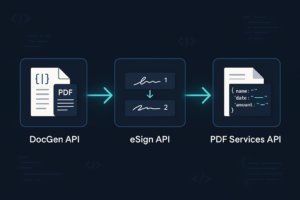
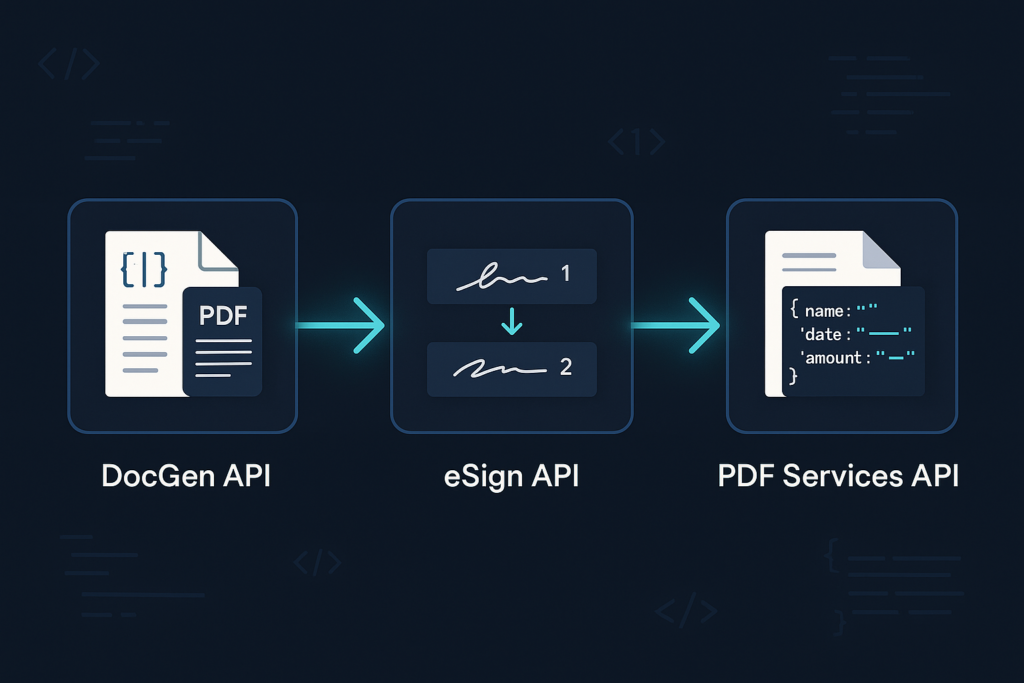
This guide chains three Foxit APIs into one automated pipeline that closes that gap, using DocGen for template-based drafting, eSign for signature routing, and PDF Services for post-execution data extraction, connected end to end by eSign’s own webhook events rather than a separate orchestration product. By the end, you’ll have a contract that goes from template to structured, extracted data with no manual hand-off at any stage.
Prerequisites
Before running any of the code below, set up a local Python environment:
- Python 3.8+
- pip, Python’s package manager
- venv for an isolated project environment
- A code editor such as VS Code with its Python extension
- A free Foxit developer account, no credit card required
mkdir contract-lifecycle-demo && cd contract-lifecycle-demo
python3 -m venv .venv
source .venv/bin/activate
pip install requests flask
Each of the three Foxit APIs in this guide authenticates with its own credential pair. DocGen and PDF Services both live behind the same fusion gateway and use a client_id/client_secret header pair, while eSign issues a separate client_id/client_secret pair that it exchanges for a bearer token. Generate all three pairs from the Foxit developer dashboard after signing up, and store them as environment variables (FOXIT_CLIENT_ID/FOXIT_CLIENT_SECRET for DocGen, FOXIT_ESIGN_CLIENT_ID/FOXIT_ESIGN_CLIENT_SECRET for eSign, FOXIT_PDF_CLIENT_ID/FOXIT_PDF_CLIENT_SECRET for PDF Services) rather than hardcoding them.
The contract lifecycle as an API call graph
Before writing code, it helps to map each stage of a contract’s life to the specific API that owns it:
- Drafting: the DocGen API merges structured data into a Word template and returns a populated document.
- Approval routing and signing: the eSign API creates a signing envelope, defines who signs in what order, and renders the signing UI (embedded in your app or via a redirect).
- Completion handoff: eSign fires a webhook event the moment every signature lands, which is the trigger for everything downstream.
- Post-execution extraction: the PDF Services API pulls structured data (party names, dates, values) back out of the now-signed contract.
Four API calls own the whole lifecycle. No fifth orchestration layer is required. eSign’s own party sequencing handles approval routing, and its own webhook subscriptions handle the handoff to downstream systems, which is the pattern this guide builds.
Generating the contract from a template
The DocGen API works from a Word .docx template with merge fields written as {{ field_name }}. This guide uses a Master Services Agreement template with fields for both parties’ names, addresses, signatories, the effective date, term, contract value, payment schedule, and governing law.
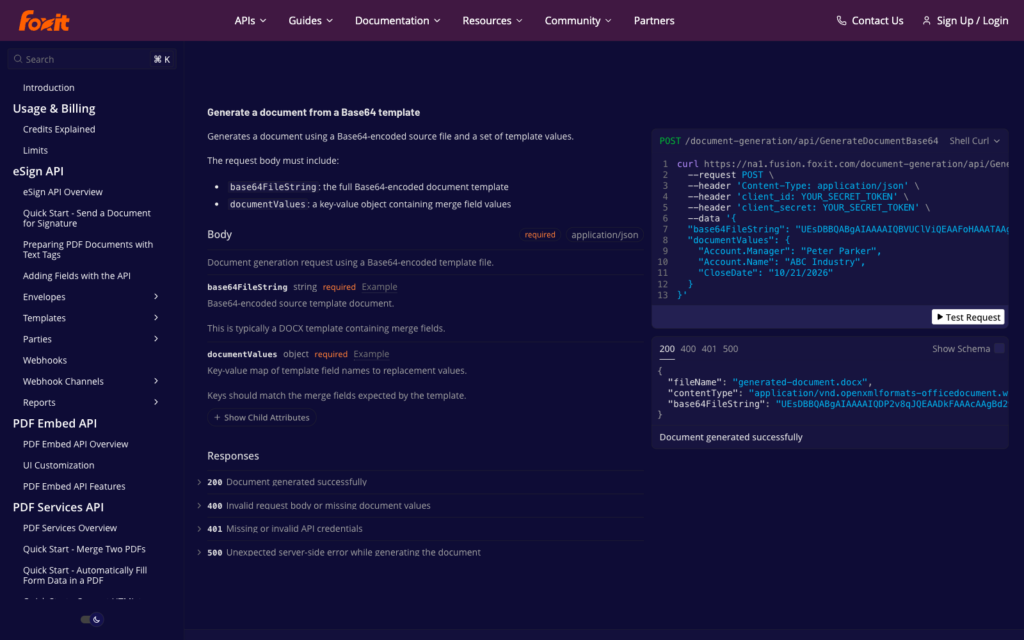
Before merging data into a template, call the Analyze Document endpoint to get back the exact list of tags the template actually contains. This step is not optional. Getting the field names wrong in your merge payload silently drops that field rather than throwing an error, so confirming the real tag list first is what catches a typo before it ships into a signed contract. GenerateDocumentBase64 also rejects .docx payloads larger than 4 MB once they’re base64-encoded, so a template that grows past that (usually from embedded images or fonts) needs slimming down before it reaches the API, either by compressing images in Word’s Picture Format tools, dropping embedded fonts and OLE objects, or splitting an oversized template into smaller pieces.
import os
import base64
import requests

BASE_URL = "https://na1.fusion.foxit.com"
HEADERS = {
    "client_id": os.environ["FOXIT_CLIENT_ID"],
    "client_secret": os.environ["FOXIT_CLIENT_SECRET"],
}

with open("contract_standard_signable.docx", "rb") as f:
    template_b64 = base64.b64encode(f.read()).decode()

analyze_response = requests.post(
    f"{BASE_URL}/document-generation/api/AnalyzeDocumentBase64",
    headers={**HEADERS, "Content-Type": "application/json"},
    json={"base64FileString": template_b64, "fileName": "contract_standard_signable.docx"},
)
analyze_response.raise_for_status()
tags = analyze_response.json()["singleTagsString"].split(",")
print(tags)
Run against the sample template, this returns singleTagsString, a comma-separated list of every merge field the template contains. This is the exact key set your merge payload needs to match. Run this command from your terminal:
python3 analyze_tags.pyThe expected output should look like the following:
['effective_date', 'party_a_name', 'party_a_address_line1', 'party_a_address_city', 'party_a_address_state', 'party_a_signatory_name', 'party_a_signatory_title', 'party_b_name', 'party_b_address_line1', 'party_b_address_city', 'party_b_address_state', 'party_b_signatory_name', 'party_b_signatory_title', 'term_months', 'contract_value', 'payment_schedule', 'governing_law']The endpoint’s own reference confirms the same request and response shape:
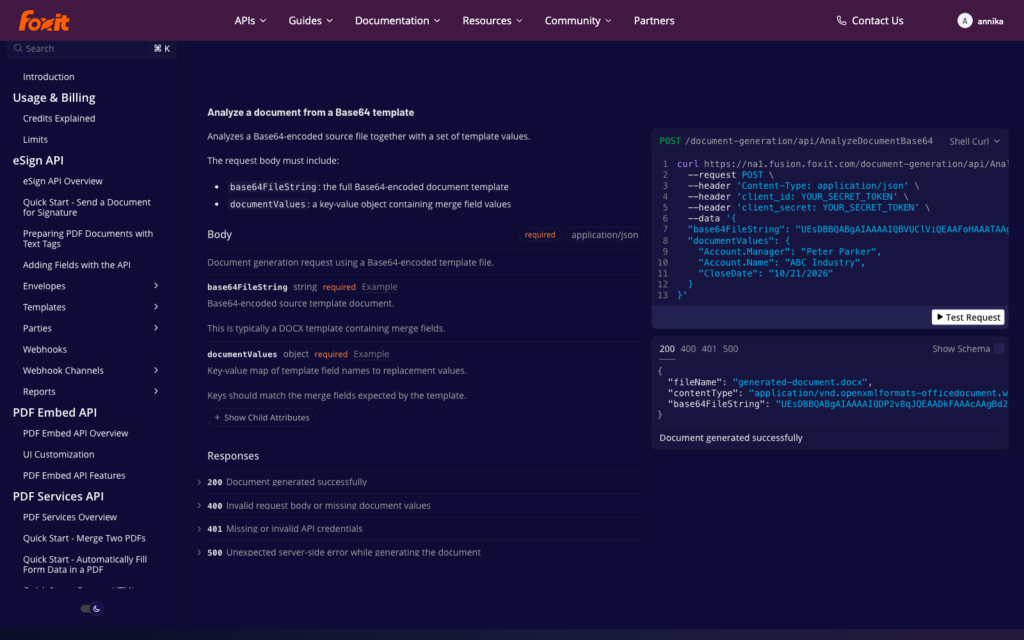
With the confirmed tag list in hand, call the generation endpoint with a documentValues object keyed to those tags:
document_values = {
    "effective_date": "October 1, 2026",
    "party_a_name": "Northwind Robotics, Inc.",
    "party_a_address_line1": "200 Innovation Way",
    "party_a_address_city": "Austin",
    "party_a_address_state": "TX",
    "party_a_signatory_name": "Jordan Lee",
    "party_a_signatory_title": "VP of Operations",
    "party_b_name": "Blue Harbor Analytics LLC",
    "party_b_address_line1": "55 Market Street",
    "party_b_address_city": "San Francisco",
    "party_b_address_state": "CA",
    "party_b_signatory_name": "Morgan Diaz",
    "party_b_signatory_title": "Managing Director",
    "term_months": 12,
    "contract_value": 48000,
    "payment_schedule": "Net 30, monthly",
    "governing_law": "State of Delaware",
}

generate_response = requests.post(
    f"{BASE_URL}/document-generation/api/GenerateDocumentBase64",
    headers={**HEADERS, "Content-Type": "application/json"},
    json={
        "base64FileString": template_b64,
        "fileName": "contract_standard_signable.docx",
        "documentValues": document_values,
        "outputFormat": "pdf",
    },
)
generate_response.raise_for_status()
result = generate_response.json()

with open("generated_contract.pdf", "wb") as f:
    f.write(base64.b64decode(result["base64FileString"]))
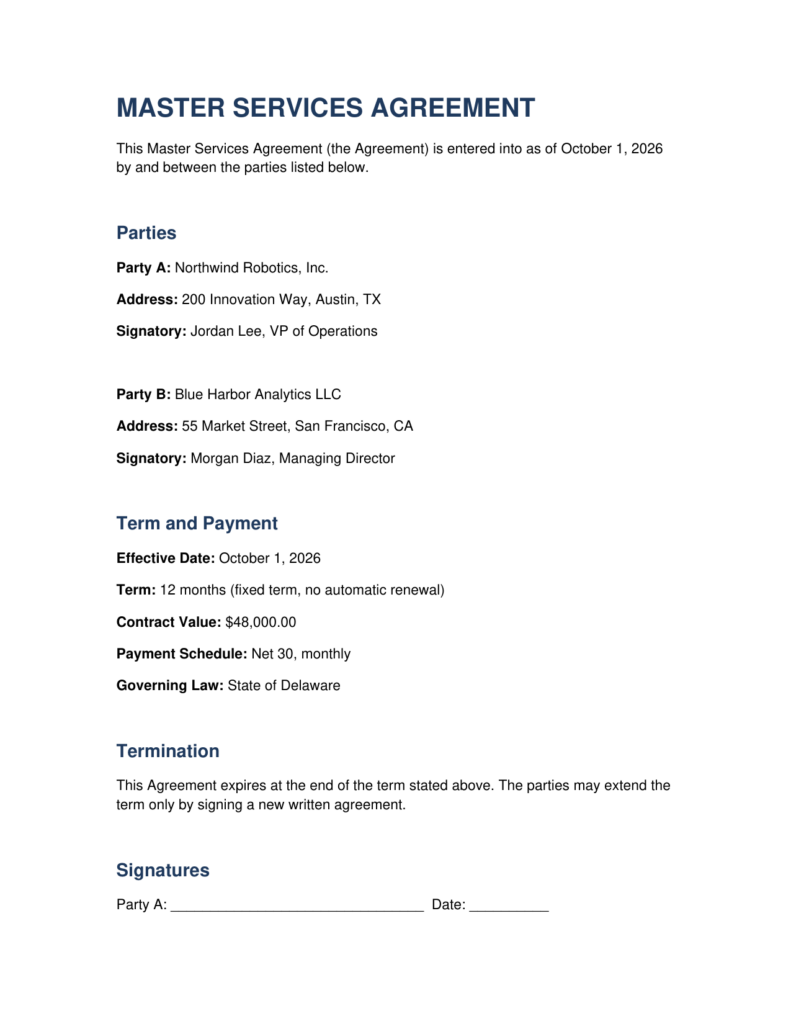
This code sends the same base64-encoded template alongside the merge data and an outputFormat of pdf, and gets back a response containing the generated file as another base64 string, decoded and written to disk in the final step. The contract_value field, formatted in the template as {{ contract_value \# "$#,##0.00" }}, renders as $48,000.00 in the output without any currency formatting logic in the Python code; the formatting instruction lives entirely in the Word template.
Run against the sample data above, that call produces a fully merged contract, ready for the signature block eSign picks up next:
Routing for approval and signature
The generated PDF above already contains eSign Text Tags in its signature block, ${signfield:1:y:__________} for the first signer and ${signfield:2:y:__________} for the second, embedded directly in the Word template alongside matching ${datefield:...} tags. Text Tags and DocGen merge fields don’t conflict; DocGen only touches {{ }}-style tags, so the eSign tags pass through untouched and get parsed by eSign once the document reaches it.
Creating the envelope and defining who signs, and in what order, is one call:
esign_response = requests.post(
    "https://na1.foxitesign.foxit.com/api/oauth2/access_token",
    data={
        "client_id": os.environ["FOXIT_ESIGN_CLIENT_ID"],
        "client_secret": os.environ["FOXIT_ESIGN_CLIENT_SECRET"],
        "grant_type": "client_credentials",
        "scope": "read-write",
    },
)
esign_response.raise_for_status()
esign_token = esign_response.json()["access_token"]

with open("generated_contract.pdf", "rb") as f:
    contract_b64 = base64.b64encode(f.read()).decode()

folder_response = requests.post(
    "https://na1.foxitesign.foxit.com/api/folders/createfolder",
    headers={"Authorization": f"Bearer {esign_token}"},
    json={
        "folderName": "MSA - Northwind Robotics / Blue Harbor Analytics",
        "sendNow": False,
        "processTextTags": True,
        "inputType": "base64",
        "base64FileString": [contract_b64],
        "fileNames": ["msa.pdf"],
        "createEmbeddedSigningSession": True,
        "embeddedSignersEmailIds": ["[email protected]", "[email protected]"],
        "parties": [
            {"firstName": "Jordan", "lastName": "Lee", "emailId": "[email protected]",
             "permission": "FILL_FIELDS_AND_SIGN", "sequence": 1},
            {"firstName": "Morgan", "lastName": "Diaz", "emailId": "[email protected]",
             "permission": "FILL_FIELDS_AND_SIGN", "sequence": 2},
        ],
    },
)
folder_response.raise_for_status()
folder = folder_response.json()
folder_id = folder["folder"]["folderId"]
sessions = folder["embeddedSigningSessions"]
eSign authenticates separately from DocGen and PDF Services, with its own credential pair and its own OAuth2 token exchange (form-encoded, not JSON). The parties array is where approval routing actually lives. Each party’s sequence number controls signing order, here Jordan signs first and Morgan second, and the exact rules for how sequence numbers interact (whether two parties can share a sequence for parallel signing, for instance) are documented on the Parties reference rather than repeated here, since that’s the definitive source and it’s worth reading directly before you rely on the exact semantics. processTextTags: true tells eSign to parse the ${signfield:...} tags already embedded in the PDF into real, positioned signature fields, which is what makes the fields the reader sees next actually show up.
createEmbeddedSigningSession: true returns a ready-to-render embeddedSessionURL for each signer in the response, meaning the signing UI loads inside your own app in an iframe rather than sending the signer an email that takes them to a hosted Foxit page. This is the embedded option; the alternative is redirect-based delivery, where sendNow: true and no embedded session flag sends signers a standard email invitation instead. Embedded signing keeps the whole flow inside your product; redirect delivery is simpler to wire up but hands the signer off to a separate page.
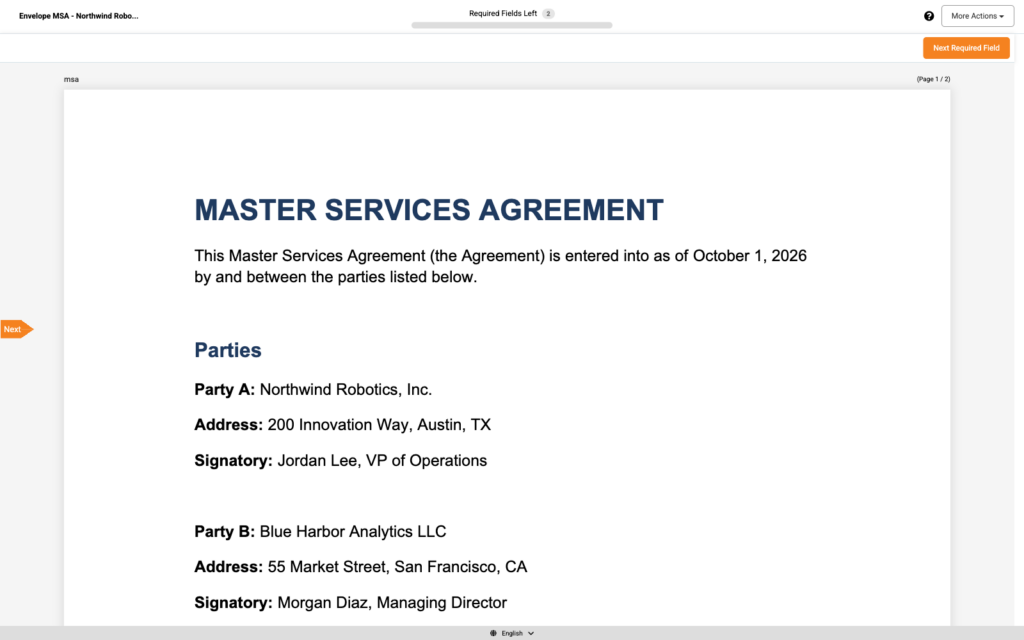
Once every party has signed, the folder moves through SHARED, then PARTIALLY SIGNED as each signer completes their fields, then COMPLETED, and finally EXECUTED. That transition to EXECUTED is the event this guide’s next section listens for.
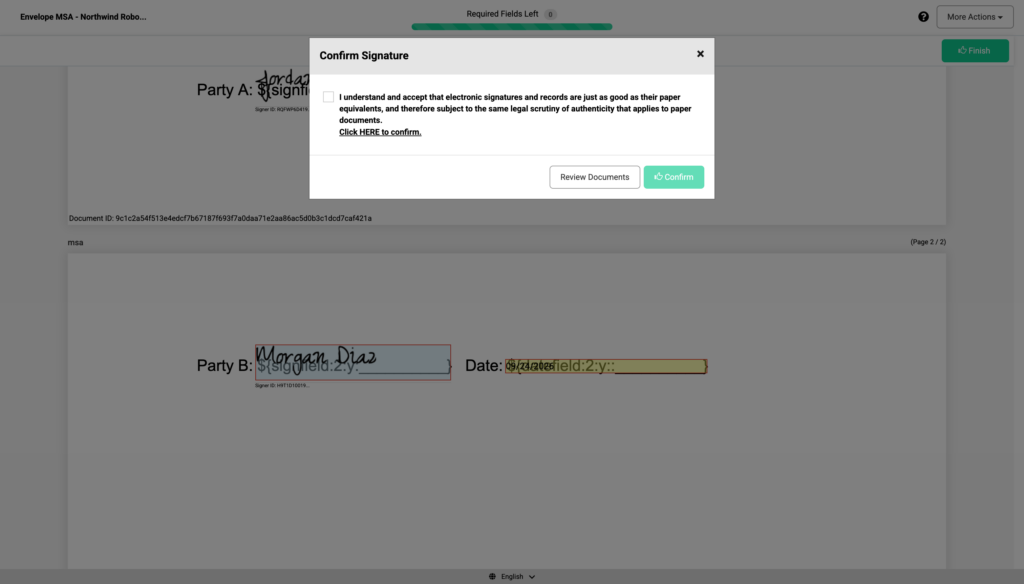
Confirming lands the signer on eSign’s own result page, shown below.
Once the folder reaches EXECUTED, retrieve the signed PDF with a single download call:
download_response = requests.get(
    "https://na1.foxitesign.foxit.com/api/folders/download",
    headers={"Authorization": f"Bearer {esign_token}"},
    params={"folderId": folder_id},
)
download_response.raise_for_status()

with open("signed_contract.pdf", "wb") as f:
    f.write(download_response.content)
The response comes back as application/octet-stream rather than application/pdf, so write the raw bytes to disk without trying to sniff or validate the content type. The downloaded file contains every filled field value plus each signer’s certificate, which is the file the extraction step below reads from.
Extracting structured data from the signed contract
Once eSign’s completion webhook fires (covered in the next section), the signed PDF is ready for extraction. This reuses the same asynchronous pattern the PDF Services API uses everywhere, uploading the file, starting a task, polling it, then downloading the result.
pdf_headers = {
    "client_id": os.environ["FOXIT_PDF_CLIENT_ID"],
    "client_secret": os.environ["FOXIT_PDF_CLIENT_SECRET"],
}

with open("signed_contract.pdf", "rb") as f:
    upload_response = requests.post(
        f"{BASE_URL}/pdf-services/api/documents/upload",
        headers=pdf_headers,
        files={"file": ("signed_contract.pdf", f, "application/pdf")},
    )
document_id = upload_response.json()["documentId"]

extract_response = requests.post(
    f"{BASE_URL}/pdf-services/api/documents/pdf-structural-extract",
    headers={**pdf_headers, "Content-Type": "application/json"},
    json={"documentId": document_id},
)
task_id = extract_response.json()["taskId"]
This code uploads the signed PDF to the PDF Services API and gets back a documentId, then calls the pdf-structural-extract endpoint with that id to kick off an asynchronous extraction task and get back a taskId to track its progress.
From here, poll the task status endpoint until its status field reads COMPLETED, then download the resulting ZIP and pull out StructureInfo.json:
import time
import io
import json
import zipfile

while True:
    status_response = requests.get(
        f"{BASE_URL}/pdf-services/api/tasks/{task_id}", headers=pdf_headers
    )
    status_response.raise_for_status()
    status = status_response.json()
    if status["status"] == "COMPLETED":
        result_document_id = status["resultDocumentId"]
        break
    if status["status"] == "FAILED":
        raise RuntimeError(f"Extraction task failed: {status}")
    time.sleep(3)

zip_response = requests.get(
    f"{BASE_URL}/pdf-services/api/documents/{result_document_id}/download",
    headers=pdf_headers,
)
zip_response.raise_for_status()

with zipfile.ZipFile(io.BytesIO(zip_response.content)) as archive:
    structure_info = json.loads(archive.read("StructureInfo.json"))

for element in structure_info["analyzeResult"]["elements"]:
    if element["type"] in ("title", "head", "paragraph"):
        text = " ".join(element["content"]["text"].split())
        print(element["type"], text)
The loop polls every three seconds until status reads COMPLETED, at which point resultDocumentId names the file to download as a ZIP archive. Inside that archive, StructureInfo.json holds the contract’s text broken into typed elements (titles, heads, paragraphs, and tables) under analyzeResult.elements, each carrying its content, position on the page, and a region.boundingBox polygon; the final loop walks the title, head, and paragraph elements and prints their normalized text, which is the starting point for mapping the output into a party_a/effective_date/contract_value schema. Table elements carry a different shape (a content.body grid keyed by row and column index rather than the region/content.text fields shown above), and mapping that full structure into a business schema is a big enough topic that it deserves its own treatment, which a companion article to this one covers. The full endpoint spec, including the task status values and the exact response shape, is documented in the Foxit API reference.
Run this command from your terminal:
python3 extract_structure.pyThe expected output should look like the following, run against this guide’s own signed contract:
title MASTER SERVICES AGREEMENT
paragraph This Master Services Agreement (the Agreement) is entered into as of October 1, 2026 by and between the parties listed below.
head Parties
paragraph Party A: Northwind Robotics, Inc.
paragraph Address: 200 Innovation Way, Austin, TX
paragraph Signatory: Jordan Lee, VP of Operations
paragraph Party B: Blue Harbor Analytics LLC
paragraph Address: 55 Market Street, San Francisco, CA
paragraph Signatory: Morgan Diaz, Managing Director
head Term and Payment
paragraph Effective Date: October 1, 2026
paragraph Term: 12 months (fixed term, no automatic renewal)
paragraph Contract Value: $48,000.00
paragraph Payment Schedule: Net 30, monthly
paragraph Governing Law: State of Delaware
head Termination
paragraph This Agreement expires at the end of the term stated above. The parties may extend the term only by signing a new written agreement.
head Signatures
paragraph Party A: ${signfield:1:y:__________} Date: 09/24/2026 ${datefield:1:y::__________} Signer ID: RQFWP6D419...
paragraph Party B
paragraph Signer ID: H9T1D10019...
paragraph ______} Date: 09/24/2026 ${datefield:2:y::__________}
The signature block splits across several ragged elements rather than one clean paragraph, since the extractor treats the signed field’s rendered signature image and the surrounding text tags as separate content runs. That’s real extractor behavior worth planning for if you’re parsing this section specifically.
Connecting the chain to downstream systems with webhooks
None of this becomes an automated pipeline until something reacts the moment a contract gets executed. That’s the job of eSign’s own webhook subscriptions.
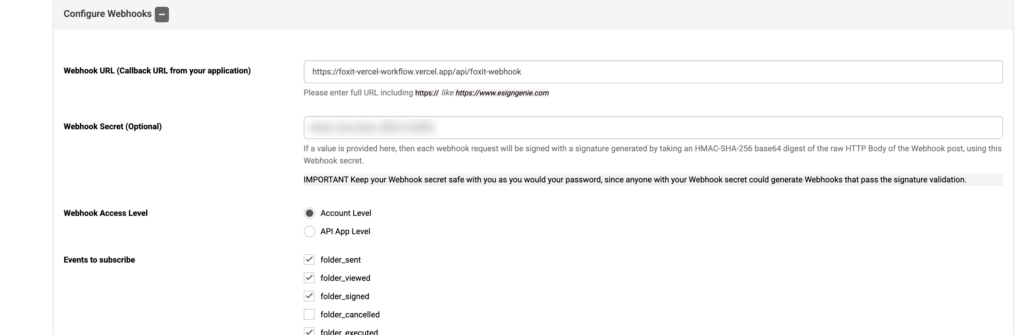
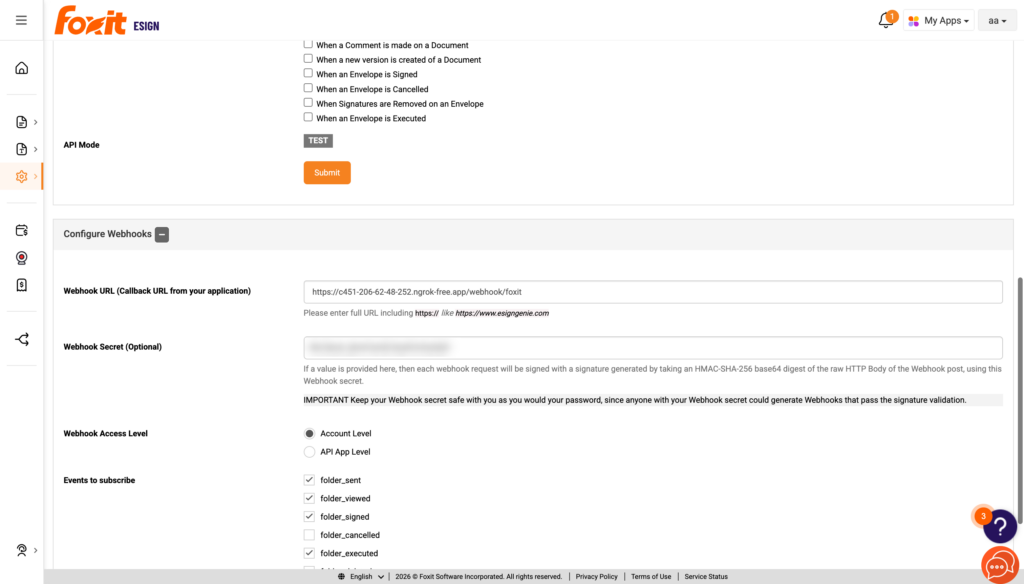
Registering a webhook is a portal step, not an API call. Log in to the eSign account as its owner and open API Settings, where a “Configure Webhooks” section takes a webhook URL, a webhook secret, and a set of event checkboxes to subscribe to (folder_completed is the one that matters here). This settings page is owner-only; a standard team-member login won’t see it.
Once registered, Foxit delivers each event as a POST to your URL with a signature query parameter, a base64-encoded HMAC-SHA-256 digest of the raw request body computed with your webhook secret. Verifying that signature before trusting the payload is the whole point of having a secret in the first place:
import hmac
import hashlib
import base64
from flask import Flask, request, abort

app = Flask(__name__)
WEBHOOK_SECRET = os.environ["FOXIT_ESIGN_WEBHOOK_SECRET"].encode()


def trigger_extraction_and_sync(folder_id):
    print(f"[webhook] verified signature, folder_completed for folder {folder_id}, kicking off extraction")
    # kick off the PDF Services extraction from the previous section and push the result to a CRM or ERP


@app.route("/webhook/foxit", methods=["POST"])
def foxit_webhook():
    received_sig = request.args.get("signature", "")
    raw_body = request.get_data()
    computed_sig = base64.b64encode(
        hmac.new(WEBHOOK_SECRET, raw_body, hashlib.sha256).digest()
    ).decode()

    if not hmac.compare_digest(received_sig, computed_sig):
        abort(403)

    payload = request.json
    event_name = payload.get("event_name")
    folder_id = payload.get("data", {}).get("folder", {}).get("folderId")

    if event_name == "folder_completed":
        trigger_extraction_and_sync(folder_id)

    return "", 200
This handler pulls the signature off the query string, recomputes the same HMAC digest server-side over the raw request body, and compares the two with hmac.compare_digest, a constant-time comparison that avoids leaking timing information an attacker could use to guess the correct signature one byte at a time. Only once that check passes does it parse the JSON payload and branch on event_name. A single folder_completed webhook fires once the envelope is fully executed, and by the time it arrives, its own data.folder.folderStatus field already reads EXECUTED, so there’s no separate event to wait for after this one. trigger_extraction_and_sync should still be written idempotently, since any webhook consumer needs to tolerate a duplicate delivery of the same event without double-processing it.
With the handler running locally, run this command from your terminal to send it a real folder_completed payload, correctly HMAC-signed with the same secret, for a folder that genuinely reached EXECUTED in this guide’s own signing run:
python3 -c "
import hmac, hashlib, base64, json, requests

WEBHOOK_SECRET = b'your_webhook_secret'
payload = {
    'event_name': 'folder_completed',
    'data': {'folder': {'folderId': 36099927, 'folderStatus': 'EXECUTED'}},
}
raw_body = json.dumps(payload).encode()
sig = base64.b64encode(hmac.new(WEBHOOK_SECRET, raw_body, hashlib.sha256).digest()).decode()
r = requests.post(f'http://127.0.0.1:5055/webhook/foxit?signature={sig}', data=raw_body, headers={'Content-Type': 'application/json'})
print(r.status_code, r.text)
"
The expected output should look like the following, in the terminal running the Flask app:
[webhook] verified signature, folder_completed for folder 36099927, kicking off extraction
127.0.0.1 - - [24/Sep/2026 17:45:04] "POST /webhook/foxit?signature=uK1HvZU6dmH9oH4cGhsm8sNeEBZA1hremgqaDYzMZyc= HTTP/1.1" 200 -
Before wiring trigger_extraction_and_sync to a production system, register a real webhook URL and send a real envelope through the whole chain to confirm the callback arrives and verifies. That first live run is also where the handful of mistakes below tend to surface.
Common mistakes
A few failure modes show up repeatedly when building this pipeline, and each one is easy to avoid once you know to look for it.
- Tag names in the merge payload don’t match the template exactly.
GenerateDocumentBase64doesn’t error on an unrecognized key indocumentValues; it silently drops that field from the output. Always confirm the real tag list withAnalyzeDocumentBase64first rather than trusting a remembered field name, and diff the payload keys against the returnedsingleTagsStringbefore sending a merge request. - Word’s autocorrect turns straight quotes into smart quotes inside a merge field. A field typed as
{{ party_a_name }}can end up with a curly apostrophe or quote character if autocorrect touches it while editing the template, which breaks the tag silently the same way a misspelled name does. Paste field names in rather than retyping them, and re-runAnalyzeDocumentBase64after any manual template edit to confirm the tag count hasn’t changed. - A Text Tag with a space instead of underscores never becomes a signature field.
${signfield:1: }is parsed by eSign as inert literal text rather than a fillable field, so the signer sees the placeholder text but nothing to sign. The working form always uses underscores for the fill width, as in${signfield:1:y:__________}. If a signing session reports fewer required fields than the template has tags, this is the first thing to check. - The template’s
.docxfile exceeds the 4 MB DocGen cap after base64 encoding. Embedded images and fonts are the usual cause.GenerateDocumentBase64rejects the payload outright rather than truncating it, so compress images, strip embedded fonts and OLE objects, or split the template before it reaches that size.
Frequently asked questions
What is a contract lifecycle management API?
A contract lifecycle management (CLM) API is a programmatic interface, or in this case a small set of them working together, for automating each stage of a contract’s life (drafting, review, signing, storage, and post-execution data extraction) without manual hand-offs between stages.
How do you automate contract workflows with an API?
Chain the stages together by generating a document from a template, routing it for signing with role-based sequencing, capturing the completion event through a webhook rather than polling, and extracting structured data from the executed document asynchronously.
What is the difference between an eSign API and a CLM API?
An eSign API handles the signature step, creating envelopes, defining signers, and collecting signatures. A CLM API (or, as this guide shows, a composed set of APIs) spans the full lifecycle, from drafting through post-execution data extraction, with the eSign step as one stage inside a larger pipeline.
How do you extract data from a signed PDF contract programmatically?
Upload the signed PDF to get a documentId, call the structural extraction endpoint to start an asynchronous task and get back a taskId, then poll the task status endpoint until the result is ready and download the structured JSON.
Get started
The chain built in this guide, DocGen for drafting, eSign for signing and approval routing, PDF Services for extraction, and eSign’s own webhooks for the handoff between them, covers a contract’s full lifecycle with four API calls and no separate orchestration product. What it unlocks once it’s running unattended includes an audit trail that doesn’t depend on someone remembering to check a shared drive, renewal automation triggered off the actual execution date rather than a calendar reminder, and CRM or ERP sync that happens the moment a contract closes instead of whenever someone gets around to data entry.
Start building with a free Foxit developer account, no credit card required, using the same DocGen, eSign, and PDF Services endpoints shown above.