Your invoice template has the wrong tax rate. The legal team needs a disclaimer block added. Sales wants the logo repositioned. Who makes that change, and does it need a deploy?
Start with who will maintain the template. With a Word-template engine, a business user can edit the DOCX in Word while preserving the template tags.
Hosted editors let users update layouts in a browser, but you should check their versioning and export options.
If your application generates HTML from templates in its repo, layout changes can follow the normal release process. Fillable PDF templates are useful when you already have a branded form you want to reuse.
Billing adds another consideration. These APIs meter different units, so compare expected usage alongside the plan price. PDF Generator API (pdfgeneratorapi.com) bills per 5-page block, so a 12-page report costs 3 credits. CraftMyPDF bills 1 credit per PDF regardless of length, so that same 12-page report costs 1 credit. Docmosis Cloud charges per output page. Carbone counts each extra megabyte of JSON and images as an additional render. Foxit charges 1 credit per document, drawn from the same pool shared by its PDF Services API and eSign API.
We compare our Foxit Document Generation API with 9 alternatives across template models, billing units, free allowances, published limits, SDKs, and hosting. The comparison draws on public pricing pages and documentation. Check current plan terms before making a purchasing decision.
Top picks by use case
The best PDF generation APIs for developers in 2026 are Foxit, Adobe, Carbone, Docmosis, PDF Generator API (pdfgeneratorapi.com), CraftMyPDF, PDFMonkey, DocRaptor, Nutrient DWS Processor API, and Gotenberg. Each fits a different combination of template model, billing unit, and hosting requirement.
Use case | Pick | Why it fits |
Documents that then get signed, merged or converted | Foxit Document Generation API | Word templates and JSON in one call, on the same credit pool as PDF Services and eSign |
Largest free allowance for Word templates | Adobe Document Generation API | 500 free transactions/month; Document Generation uses 1 transaction per up-to-50-page block |
Batch runs from office templates | Carbone | Async batches up to 100 reports per Cloud call; Essential €29/month for 1,000 billable documents |
One Word-template engine in the cloud and on-premises | Docmosis Cloud | Cloud plus self-hosted Tornado; US, EU and Australian regions |
Letting your own users edit templates | PDF Generator API (pdfgeneratorapi.com) | Embeddable template editor from the Basic plan; SDKs in 8 languages |
Turning existing PDF forms into templates | CraftMyPDF | AI field detection for fillable PDF templates, plus a drag-and-drop editor; Lite $29/month for 1,200 credits |
Low-cost paid entry plan | PDFMonkey | Starter €5/month for 300 documents. A separate Free plan has 20/month |
Print-grade HTML rendering | DocRaptor | Prince 15.1 engine with PDF/A and PDF/UA output |
Several PDF operations in one request | Nutrient DWS Processor API | One /build call can chain conversion, watermark, OCR and compression; HTML to PDF costs 0.5 credits |
Free, self-hosted conversion | Gotenberg | MIT-licensed Docker API with Chromium and LibreOffice |
Each API appears once, under the use case it fits best. Several support more than one template route, and the feature table in each entry shows their coverage.
Create a free Foxit developer account and generate your first PDF from a Word template and JSON with the Document Generation API.
How we compared these APIs
The comparison draws on public pricing pages, official documentation, and GitHub repositories reviewed on 7 Oct 2026.
Compare template routes, data merge, other PDF operations, pricing and billing units, free allowances, published limits, SDKs and integrations, and hosting. Speed, uptime, and compliance figures reflect vendor claims. Prices retain their original currencies and billing periods; compare costs at your expected usage rather than treating different vendors’ credits as equivalent.
The 10 PDF generator APIs in detail
Start with the template format and hosting model your application needs, then compare costs and limits at your expected volume. Tag syntax differs across vendors, so a DOCX template may need changes before it works with another API.
For CSS and JavaScript rendering details across HTML-to-PDF APIs, see the “best HTML to PDF APIs” comparison.
Foxit Document Generation API
Our Document Generation API merges a DOCX template with JSON data in a single synchronous call and returns a PDF or DOCX. Business users author the template in Microsoft Word, and developers send the data.
Feature | Details |
Template routes | Word (DOCX) templates with JSON through the Document Generation API. Your own HTML, a URL or Office files through the PDF Services API on the same account |
Data merge | {{tokens}}, date and number masks, TableStart/TableEnd row loops, and Word IF fields for conditional content. An Analyze endpoint lists a template’s tags |
Other PDF operations | Merge, split, compress, watermark, flatten, protect, redact and OCR through separate PDF Services endpoints. eSign shares the same account |
Pricing | 1 credit per generated document, drawn from the same shared pool as PDF Services, eSign, and PDF Embed. Startup $1,750/year (5,000 credits), Business $4,500/year (15,000 credits) |
Free allowance | 500 credits/year on the Developer plan. No credit card required |
Limits | 4 MB maximum .docx template after base64 encoding |
SDKs and integrations | REST with code samples in the API reference. n8n and Power Automate walkthroughs on the Foxit developer blog |
Hosting | Cloud only |
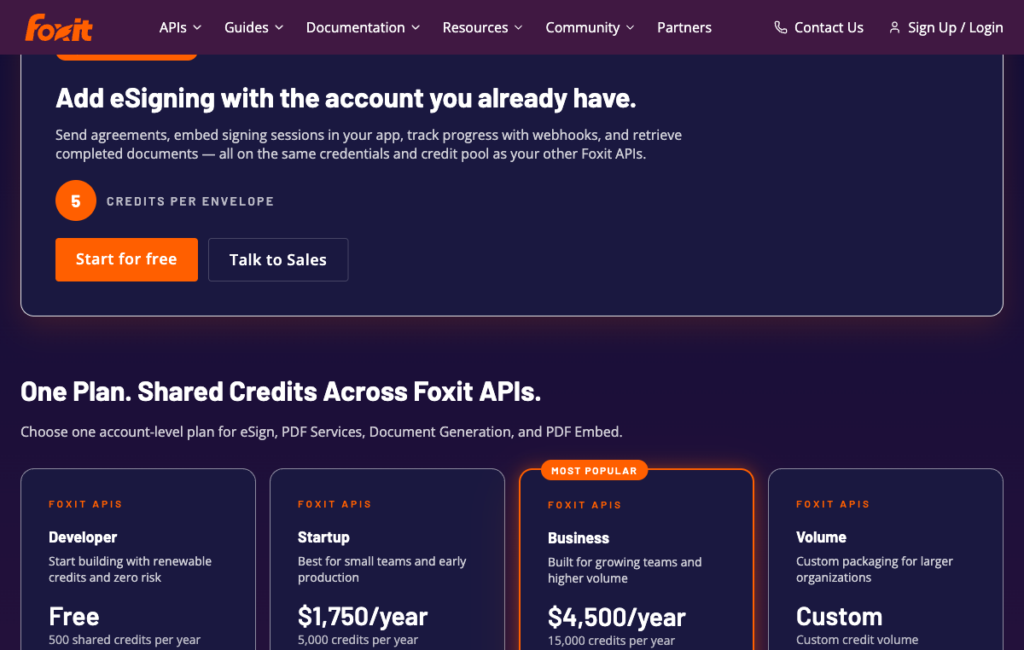
Our pricing calculator and credit reference list Business at $4,500/year for 15,000 credits, while the pricing page’s plan cards show a custom Volume tier. Confirm the available plan with our team before purchasing.
Where Foxit Document Generation API stands out
Our Document Generation, PDF Services, and eSign APIs share one developer account and credit pool. You can generate an invoice, then merge, compress, or send it for signature without switching accounts. Budget 1 credit for generation, 1 for each merge or watermark operation, and 5 for each eSign envelope created.
Use our Analyze endpoint to inspect a DOCX template and list its tags before building a high-volume workflow. Compare those tags with the keys in your JSON payload to catch mismatches before generation.
For teams that use both HTML and Word templates, the PDF Services API on the same account handles HTML-to-PDF, URL-to-PDF, and Office-to-PDF conversions. You pay from one credit pool regardless of which route you use. See the PDF Services quick start guide for the conversion request format.
What to consider
Foxit’s Document Generation API has no visual template editor. Microsoft Word is the editor, which is an advantage if your document designers already live in Word but a friction point if you want non-technical users to make layout changes through a browser UI.
The API generates one document per call. There’s no built-in batch endpoint for submitting 100 documents in a single request, so high-volume runs need a loop at the application layer. On the Startup plan, 5,000 shared credits a year works out to roughly 416 documents a month if Document Generation is the only thing drawing from that pool, though in practice PDF Services and eSign usage share the same balance.
The Developer plan’s 500 credits reset annually, not monthly, so a spike in November doesn’t refill until your renewal date. Plan for that reset when estimating free-tier capacity for quarterly report runs.
Our current document-generation endpoint accepts a DOCX template as a multipart upload, with a 5 MB template limit and a 10 MB total request limit. It returns the generated PDF or DOCX directly, without base64 decoding. Compress embedded images and remove unnecessary objects if a template exceeds the file-size limit.
Best for
Products where the generated document goes on to conversion, merging, or signing, such as finance apps generating statements for e-signature, or HR platforms assembling offer letters that need a compression step before archive storage.
Getting started
Create a free Foxit developer account and generate your first PDF from a Word template and JSON with the Document Generation API. The Document Generation quick start guide walks through the multipart request step by step using a sample invoice template with styled tables, repeating data, and conditional logic. To try it against a ready-made file instead of building one from scratch, grab a sample invoice template here.
Adobe Document Generation API
Adobe Document Generation API is part of Adobe PDF Services API. It takes a DOCX template tagged with Adobe’s JSON-driven syntax and renders it to PDF through an async job flow, where you upload the template, submit the generation job, then poll for completion or receive a webhook.
The free tier is generous for a hosted Word template engine.
Feature | Details |
Template routes | Word (DOCX) templates with JSON. HTML (static, dynamic or by URL) and Office files to PDF through PDF Services |
Data merge | Template tags in Word, filled from a JSON payload of up to 10 MB |
Other PDF operations | Combine, OCR, compress, protect, export to Office, extract content, accessibility auto-tagging and electronic seals |
Pricing | 1 Document Transaction per up-to-50-page block. Paid plans by sales quote |
Free allowance | 500 Document Transactions/month across PDF Services |
Limits | 100 MB files, 10 MB JSON, 25 requests/minute on the free tier (100 on enterprise) |
SDKs and integrations | Java, .NET, Node.js, Python. Power Automate, Workfront Fusion and UiPath |
Hosting | US by default. EU processing available after purchase. No self-hosted option found as of 7 Oct 2026 |
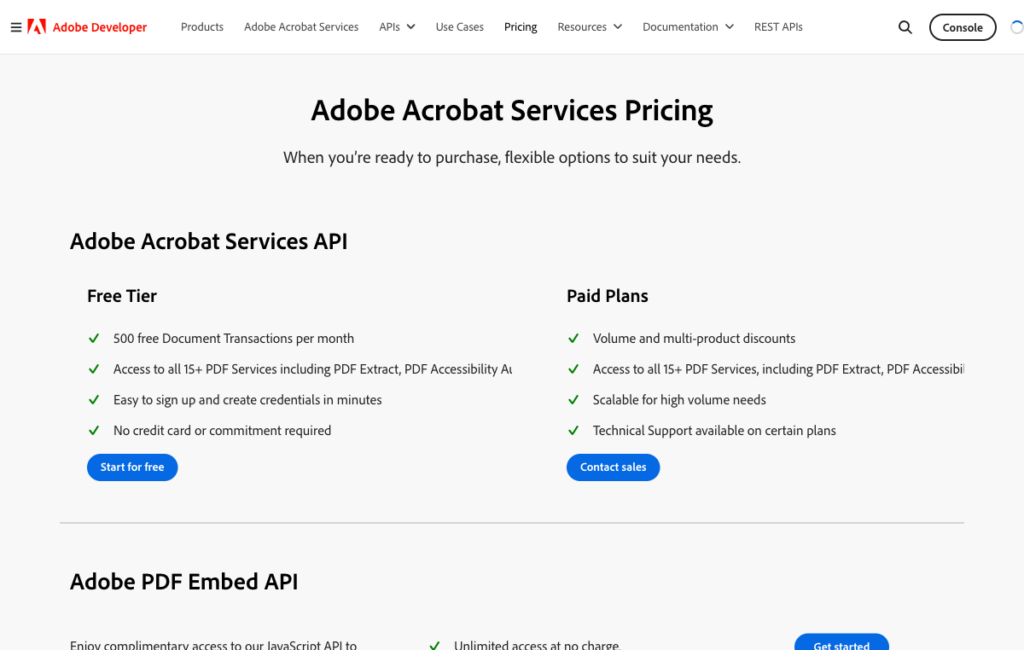
Adobe’s pricing page, confirming the 500 free Document Transactions a month shared across its PDF Services.
Where Adobe Document Generation API stands out
Adobe lists a free allowance of 500 transactions/month shared across PDF Services. For teams generating short reports (say, 5-page monthly statements), 500 transactions covers 500 documents a month at no cost, which is enough for many internal tools and early-stage SaaS products.
The transaction meter is shared across PDF Services operations, so a compress or OCR job draws from the same pool as a generation job.
The SDK coverage is broad. Java, .NET, Node.js, and Python are all officially supported, and the Power Automate connector means non-developer teams can trigger document generation from a workflow without writing API calls directly.
What to consider
Adobe lists paid plans by sales quote, so request pricing before estimating costs above the free allowance. Its async workflow requires an upload, a generation request, and either polling or a webhook to collect the result. Account for that orchestration in your integration rather than assuming it establishes a speed difference from synchronous APIs.
The transaction counter resets monthly, which is useful for steady-state workloads but means a single end-of-quarter report run could consume weeks of allowance at once. A 200-page annual report costs 4 transactions (one per 50-page block).
Best for
Teams whose generation and follow-on operations fit within 500 transactions/month, or existing Adobe buyers who want Document Generation on the same contract as their other PDF Services usage.
Getting started
Adobe Document Generation API docs include a template tagger add-in for Word and quick-start guides in all four supported SDKs.
Carbone
Carbone is a template engine built around office formats, including DOCX, XLSX, PPTX, ODT, and more.
You place merge tags in any of those formats, POST a template and a JSON payload to the API, and Carbone returns your rendered document.
Batch generation is a first-class feature, and a single Cloud call can queue up to 100 reports and return them as a ZIP or a merged PDF.
Feature | Details |
Template routes | Office templates (DOCX, XLSX, PPTX, ODT and more) with JSON. HTML content in templates requires the Enterprise edition |
Data merge | JSON merge tags in office templates. Async webhook batches up to 100 reports per Cloud call, returned as ZIP or one PDF |
Other PDF operations | Enterprise: PDF append/attachments. PDF/A and PDF/UA depend on converter support. Outputs vary by source format (DOCX produces PDF or DOCX; XLSX produces PDF or XLSX) |
Pricing | Per render, where each extra MB of JSON and images beyond the base counts as an additional document. Essential €29/month for 1,000 renders |
Free allowance | 100 documents/month in the cloud. Free self-hosted Community Edition |
Limits | Parallel renders by plan, from 1 on Free to 50 on higher tiers |
SDKs and integrations | Node.js, Python, PHP, Go, Java. Zapier, Make and n8n |
Hosting | European Cloud. Free self-hosted Community Edition or paid Fit from €1,500/year. AWS private cloud separately |
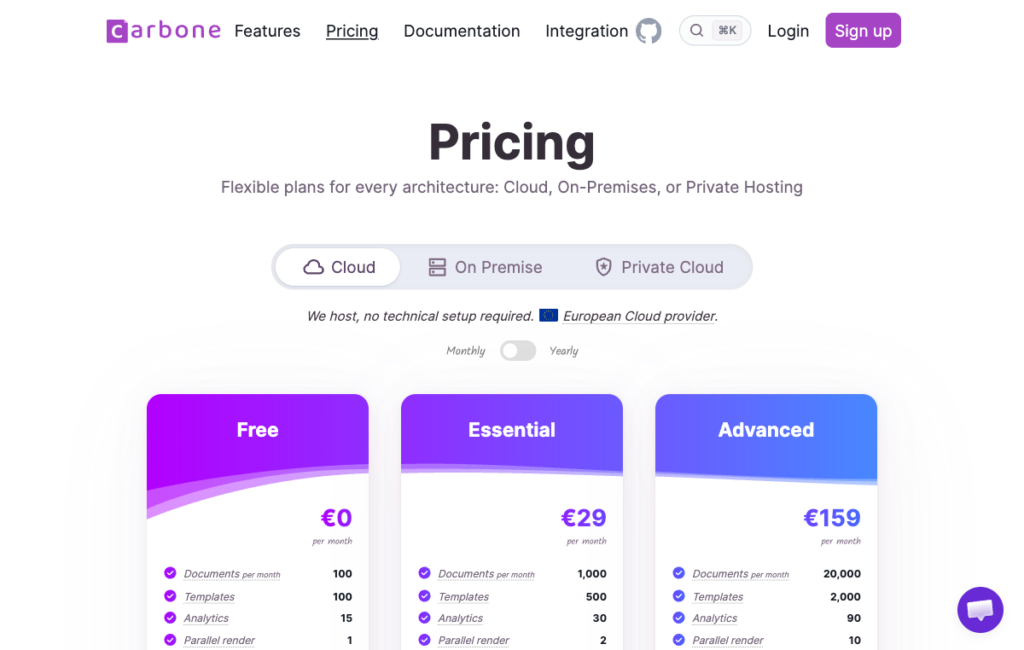
Carbone’s pricing tiers, confirming the Essential plan’s €29/month for 1,000 documents.
Where Carbone stands out
The batch endpoint is genuinely useful for month-end runs. Submitting 100 statements in one API call and receiving a ZIP is a cleaner pattern than 100 individual calls with 100 individual status checks, especially valuable for financial services teams generating account statements on a schedule.
Carbone’s template format coverage goes beyond DOCX. If your data naturally lives in tabular form, you can merge directly into an XLSX and produce a styled spreadsheet without any intermediate conversion step.
The Community Edition on GitHub is also free to self-host under Carbone’s license terms, though the license restricts using it to offer a competing hosted template service.
What to consider
The data-size billing rule catches teams off guard, because each extra megabyte of JSON and images above the base counts as an additional render.
An image-heavy product catalog template with a large JSON payload could cost several times what a plain invoice costs, even if both produce a single PDF. Model your actual payload sizes before committing to a plan.
HTML content in templates requires the Enterprise edition, and some advanced PDF features (append, attachments) are Enterprise-only. The free Cloud plan does include Enterprise features, but paid Cloud plans below Enterprise don’t. Read the plan matrix carefully before assuming a feature is available at your chosen tier.
Best for
High-volume statement and report runs from office templates in multiple formats, especially for EU-hosted data requirements.
Getting started
Carbone documentation covers template syntax and the batch API. The GitHub repo has the Community Edition and issue tracker.
Docmosis Cloud
Docmosis Cloud generates documents from DOCX or ODT templates authored in Word or LibreOffice Writer.
You POST a template name and a JSON or XML data payload, specify a delivery route (direct response, email, or S3), and receive your output in PDF, DOCX, ODT, or TXT.
The notable differentiator is the parallel path, where the same Docmosis template engine runs as a cloud API and as self-hosted software (called Tornado), so you can start in the cloud and move on-premises without rewriting templates.
Feature | Details |
Template routes | DOCX or ODT templates authored in Word or LibreOffice Writer |
Data merge | Template name plus JSON or XML payload. Outputs PDF, DOCX, ODT or TXT |
Other PDF operations | Conversion, watermark and protection. Delivery to response, email or S3 |
Pricing | Professional $49/month for 4,000 output pages. No rollover or overage fees stated. Repeated overruns require a plan upgrade |
Free allowance | 30-day trial with no watermarks |
Limits | Not published as of 7 Oct 2026 |
SDKs and integrations | REST for DWS4. Official Java SDK listed for older DWS3. Compatibility with DWS4 unverified. Appian, Mendix, Bubble and OutSystems listed |
Hosting | US, EU and Australia regions. Self-hosted Tornado with a similar API |
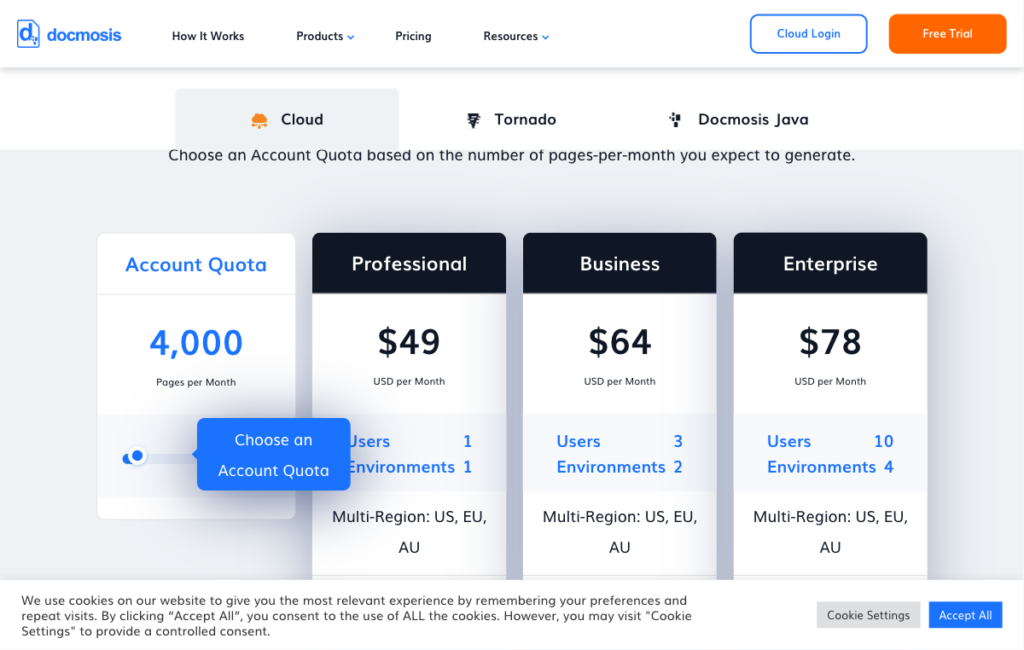
Docmosis Cloud’s Account Quota pricing, confirming the Professional plan’s $49/month for 4,000 pages.
Where Docmosis Cloud stands out
The cloud-plus-on-premises path is rare in this list. Docmosis Tornado uses the same template syntax as Docmosis Cloud, which means regulated teams can prototype against the cloud API and migrate to self-hosted infrastructure without re-tagging their templates. EU and Australian regions address data residency requirements that rule out US-only services.
The no-watermark 30-day trial is meaningful for evaluation. Testing with real templates against real data in a production-representative environment gives a clearer picture of layout fidelity than a sandboxed preview.
What to consider
With per-page billing, a 40-page report consumes 40 of the Professional plan’s stated 4,000 monthly pages, allowing 100 such reports if no other documents use the allowance.
CraftMyPDF and Foxit meter the same document as 1 credit within their supported limits, but those credits have different prices. Compare the plans’ total cost for your workload, not just the unit counts.
Published limits are not available on the Docmosis pricing and documentation pages as of 7 Oct 2026. You’ll need to contact Docmosis to understand concurrent request caps and rate limits before planning a high-volume integration.
Best for
Regulated teams that want to start in the cloud and preserve a self-hosting path for the same templates, particularly in EU or Australia.
Getting started
Docmosis Cloud documentation covers template syntax, the REST API, and Tornado configuration.
PDF Generator API
PDF Generator API (pdfgeneratorapi.com) is a hosted template platform with an embeddable drag-and-drop editor.
The core use case is letting your own users edit document layouts inside your application without touching your codebase.
Templates live in the vendor’s UI, and your app passes JSON to the generate endpoint and receives a PDF. There are also separate HTML-to-PDF and PDF form-fill APIs.
Feature | Details |
Template routes | Drag-and-drop editor templates (embeddable for your own users), plus HTML templates. Separate HTML-to-PDF and PDF form-fill APIs |
Data merge | Expression language, dynamic tables and conditional formatting, with batch generation |
Other PDF operations | Document signing, web forms, an accessibility API and an e-invoice API |
Pricing | 1 credit per up-to-5-page block. Creator €8/month for 50 credits. Teams Starter €52/month for 1,000 credits. Embedded editor starts at Basic €88/month. Annual billing saves roughly 17% |
Free allowance | Sandbox trial. The pricing page states 14 days while the integrations page states 30 days. Check current terms before signing up |
Limits | 30 RPM for Individuals plans; 60 to 240 RPM for Teams plans |
SDKs and integrations | PHP, JavaScript, Java, Ruby, Rust, Python, Go, C#. Zapier, Make, n8n. An MCP connector |
Hosting | Shared cloud. Dedicated US, EU, UK or Australia deployments and on-premises for enterprise |
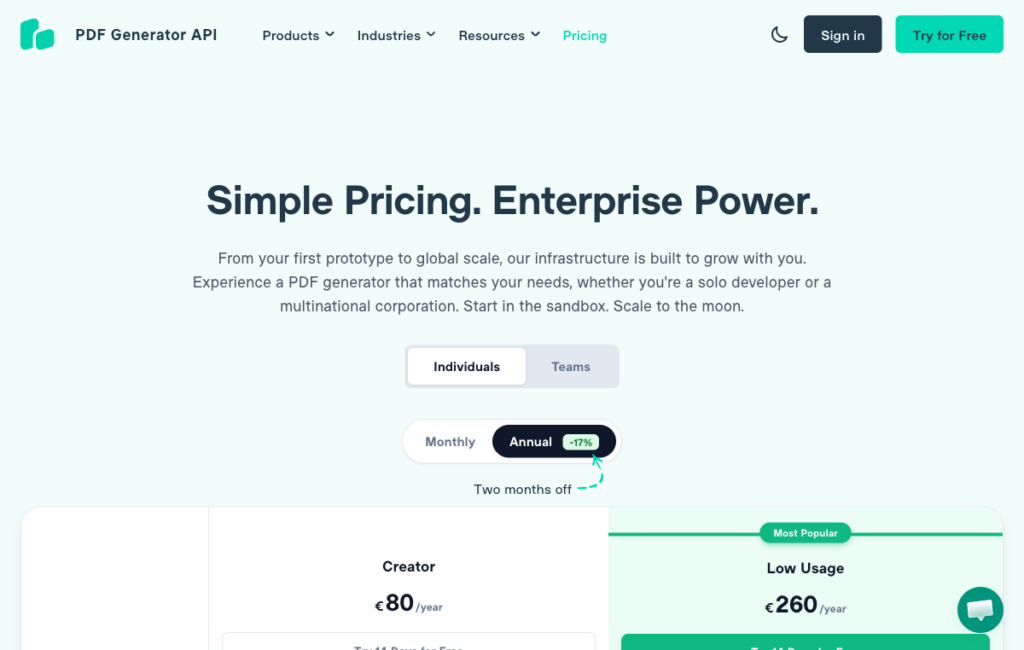
PDF Generator API’s Individuals pricing tab, showing the Creator tier’s annual-billing rate.
Where PDF Generator API stands out
The embeddable editor is the reason this API appears on this list. From the Basic plan upward, you can expose the template editor directly inside your own application, which means your customers can redesign an invoice layout, add a logo, or move a data field without raising a support ticket. That’s a meaningful product capability for SaaS platforms that serve non-technical end users.
The SDK breadth is also notable, covering eight languages including Rust and Go, alongside an MCP connector that lets AI agents call the generation endpoint. Dedicated regional deployments (US, EU, UK, Australia) give mid-market customers a path to data residency without moving to enterprise on-premises.
What to consider
PDF Generator API bills in five-page blocks, so a 12-page report uses 3 credits. At the stated Teams Starter allowance of 1,000 credits for €52/month, generating 500 twelve-page reports would require 1,500 credits, 50% more than the included allowance. Estimate usage from your actual page counts and confirm the plan’s current overage or upgrade terms.
There’s a documented conflict between trial duration claims, with 14 days on the pricing page and 30 days on the integrations page as of 7 Oct 2026. Check the current pricing page directly before making plans around a free trial window.
Best for
SaaS products whose end users need to edit document templates inside the application, without requiring a developer for every layout change.
Getting started
PDF Generator API docs cover the template editor, data merge syntax, and the REST API. pdfgeneratorapi.com/pricing has current plan details.
CraftMyPDF
CraftMyPDF offers two template routes: a drag-and-drop editor for building layouts from scratch and an AI field detection tool for turning existing fillable PDFs into data-driven templates.
Its per-PDF billing model makes usage easier to estimate when document lengths vary.
Feature | Details |
Template routes | Drag-and-drop editor templates and fillable PDF form templates with AI field detection |
Data merge | JSON with expressions and custom JavaScript functions |
Other PDF operations | Merge, parallel/image generation and e-signatures (10 credits per envelope). ZUGFeRD/Factur-X PDF/A-3 (labeled experimental, invoice XML required) |
Pricing | 1 credit per PDF, any length. Lite $29/month for 1,200 credits. Professional $99/month for 12,000 credits |
Free allowance | 50 PDFs/month |
Limits | 4 to 6 MB request/response caps; 30 to 100-second timeouts; 100 requests per 10 seconds per IP; 100 concurrent sync requests per account |
SDKs and integrations | No official SDKs; Zapier, Make, Bubble and n8n |
Hosting | Singapore by default; Frankfurt, US East and Sydney endpoints available |
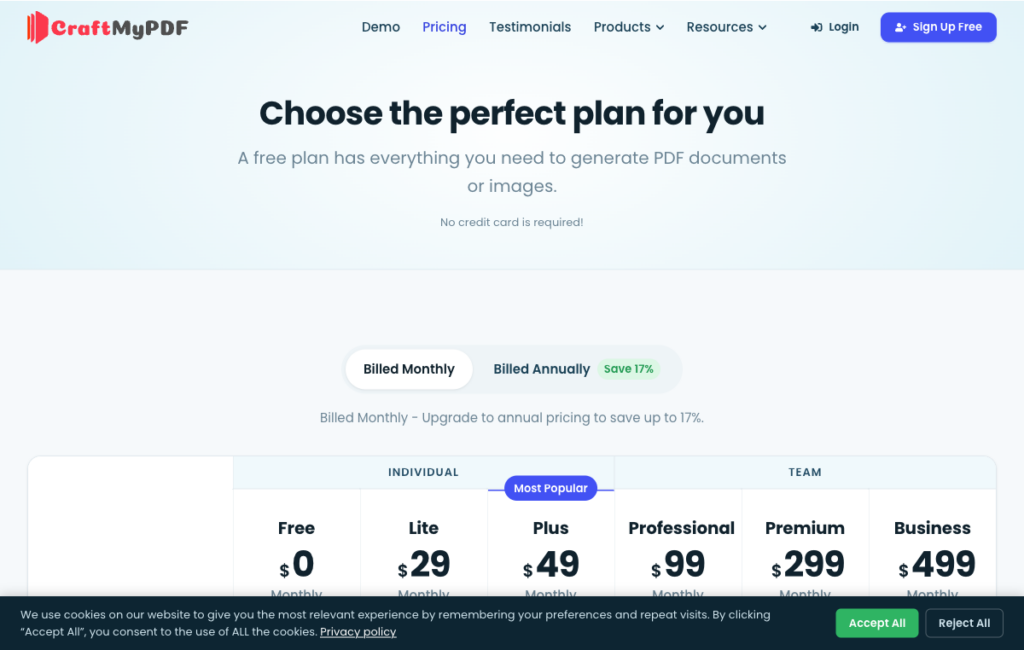
CraftMyPDF’s monthly tiers, confirming the Lite ($29) and Professional ($99) prices cited above.
Where CraftMyPDF stands out
The AI field detection tool solves a specific problem. You have an existing branded PDF form, you don’t want to rebuild it from scratch in a drag-and-drop editor, and you need it to accept JSON data.
Upload the PDF, let the AI map the form fields, and you have a working template. That’s a faster path to production than re-authoring from scratch, especially for regulated documents that went through a design and legal approval cycle.
Regional endpoint selection (Singapore, Frankfurt, US East, Sydney) gives you control over where request data and generated PDFs are processed and stored.
The per-PDF billing model means a 50-page report and a 2-page invoice cost the same 1 credit, which simplifies cost forecasting when your document mix varies in length.
What to consider
There’s no overage option on standard plans, so when you hit your monthly credit limit, you must upgrade. For workloads with monthly spikes (such as year-end reporting or seasonal invoicing), that means either over-provisioning or a mid-month plan change.
A Plus tier sits between Lite and Professional at $49/month (or $490/year) for 3,000 credits, so check current pricing for the full ladder before committing to a plan.
Singapore is the default endpoint. If your data residency requirements specify EU or US, you need to actively select a regional endpoint on each request. Concurrent-request limits (100 sync requests per account) also apply to multi-tenant SaaS platforms with bursty generation patterns.
Best for
Visual layouts or existing PDFs where request data and generated PDFs are processed and stored in your chosen region, with predictable per-document billing.
Getting started
CraftMyPDF API docs cover both template routes and regional endpoint configuration. craftmypdf.com pricing has current plan details.
PDFMonkey
PDFMonkey is a hosted HTML/CSS/Liquid template platform with a low-cost paid entry plan. Templates live in PDFMonkey’s UI as Code Templates (HTML/CSS/Liquid) or visual Builder templates.
Your app POSTs JSON, PDFMonkey merges the data, and you poll or receive a webhook when the document is ready. There’s also a separate synchronous endpoint for latency-sensitive workflows.
Feature | Details |
Template routes | Hosted HTML/CSS/Liquid or visual Builder templates. Your own HTML needs a pass-through Code Template |
Data merge | JSON with Liquid in Code templates or Builder bindings, one document per call |
Other PDF operations | Image output (WebP, PNG, JPG) |
Pricing | Starter €5/month for 300 documents. Pro €15/month for 3,000. Pro+ €60/month for 5,000. PAYG extras require opt-in; €0.005 per document applies to Premium tier |
Free allowance | 20 documents/month without external assets; 30-day trial with 300 documents |
Limits | 30-second generation timeout on Free and Starter, up to 5 minutes on Premium |
SDKs and integrations | Ruby gem and Node.js package; Zapier, Make, n8n |
Hosting | EU servers only. PDFMonkey states it has no special compliance certification |
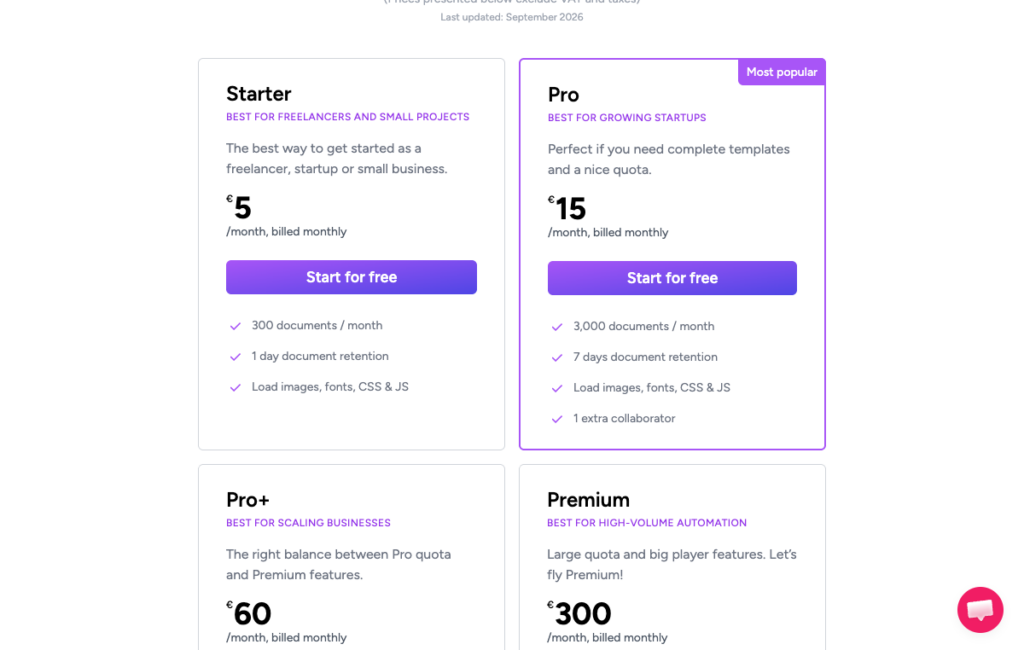
PDFMonkey’s tier table, confirming the Starter plan’s €5/month for 300 documents.
Where PDFMonkey stands out
PDFMonkey’s Starter plan costs €5/month for 300 documents. If you generate 200 invoices in a month, the subscription averages 2.5 euro cents per invoice, excluding VAT and taxes.
Using all 300 lowers that average to about 1.67 cents. The 30-day trial includes 300 documents for evaluating your templates before committing.
The PAYG top-up option on eligible plans absorbs occasional spikes without requiring a plan upgrade for a single busy month.
What to consider
EU-only hosting and no published compliance certifications rule PDFMonkey out for teams with US data residency requirements or industry-specific compliance obligations (HIPAA, FedRAMP). The one-document-per-call model means high-volume batch runs require application-side orchestration, and the 30-second generation timeout on Starter affects complex templates with external assets.
Code Templates use HTML/CSS/Liquid, while Builder templates offer a visual drag-and-drop editor. Choose the route your template authors can maintain, and check whether it supports the layout and logic you need.
Best for
Startups and internal tools generating invoices at low cost, where EU hosting and the absence of compliance certifications aren’t blockers.
Getting started
PDFMonkey docs cover template syntax, the async and sync endpoints, and the webhook setup.
DocRaptor
DocRaptor is an HTML-to-PDF API powered by the Prince rendering engine. You send HTML, CSS, and JavaScript, or a URL, and receive a PDF.
Your application handles data merge before sending the HTML. Prince’s CSS Paged Media support makes DocRaptor worth evaluating for reports with complex page breaks, headers, footers, and print color requirements.
Feature | Details |
Template routes | Your own HTML, CSS and JavaScript, or a URL |
Data merge | None. Your code fills the HTML before sending it to the API |
Other PDF operations | PDF/A, PDF/UA and PDF/X output profiles, Excel output, and a hosted-documents add-on |
Pricing | Per document. Basic $15/month for 125 documents. Professional $29/month for 325. Premium $75/month for 1,250. Overage from 12 cents down to 2.5 cents per document |
Free allowance | 5 documents/month plus unlimited watermarked test documents |
Limits | 60 seconds sync; 600 seconds async. Callbacks report success only, so poll for failure status |
SDKs and integrations | Ruby, Python, PHP, Java, C# and Node.js |
Hosting | AWS, rendering in the us-east-1 region (US East, N. Virginia). Vendor claims SOC 2 Type II and 99.99% uptime. HIPAA requires a paid plan, configured account and a BAA |
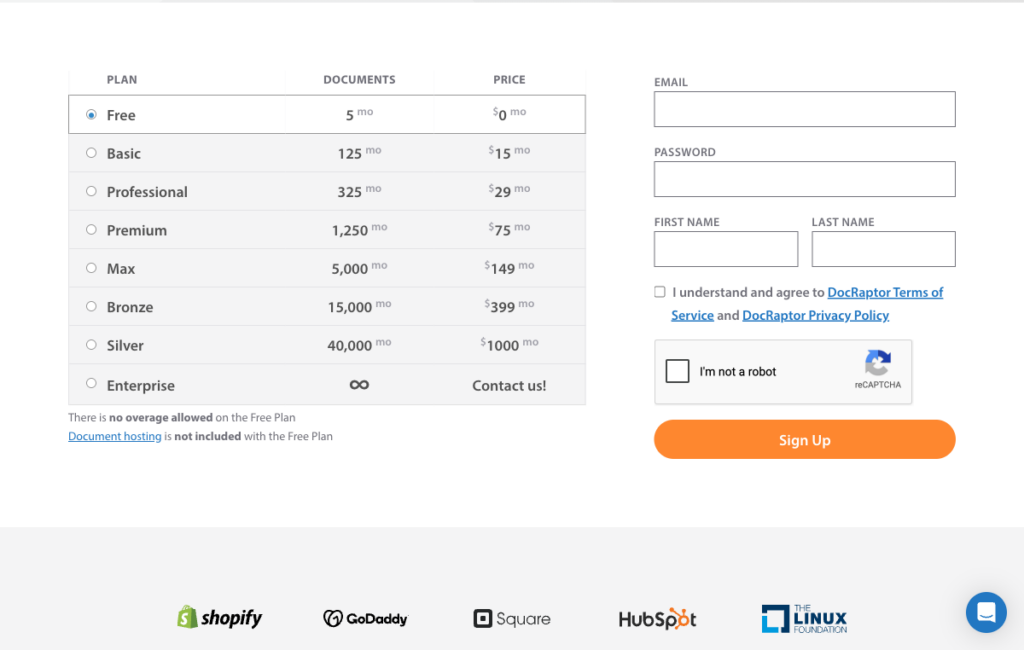
DocRaptor’s tier ladder, confirming the Basic ($15, 125 documents), Professional ($29, 325), and Premium ($75, 1,250) prices cited above.
Where DocRaptor stands out
Prince supports print-layout features such as named pages, running headers, cross-reference counters, table-of-contents leaders, and CMYK color profiles. If you produce regulatory filings, annual reports, or technical documentation, test those features with your own templates and compare the results with your print requirements.
The PDF/A and PDF/UA output profiles come from the same API call, which benefits teams with archiving or accessibility requirements. Not every HTML-to-PDF API offers PDF/UA output.
What to consider
DocRaptor’s data merge model is your application’s responsibility. Your backend assembles the HTML, querying the database, formatting numbers, and handling conditional sections, then sends the finished markup. That’s more work than a JSON-plus-template approach, and it means every layout change lives in your codebase.
The Basic plan’s 125 documents/month at $15/month works out to 12 cents per document before overages. Overage rates start at 12 cents and decline with volume, so small workloads are predictable but not cheap per document relative to PDFMonkey’s Starter tier.
Best for
Reports with complex print-layout requirements, such as regulatory filings, annual reports, and print-ready marketing collateral.
Getting started
DocRaptor API documentation includes a test mode (unlimited watermarked documents) and the Prince rendering options reference.
Nutrient DWS Processor API
Nutrient DWS Processor API accepts multiple document inputs in a single /build request and chains operations, converting an Office file to PDF, watermarking it, running OCR, then compressing the result, all in one call.
That chaining model is useful when you have a pipeline with several steps that other APIs would require separate requests for.
Feature | Details |
Template routes | HTML/CSS with assets, Office/image conversion, and DOCX templates with JSON |
Data merge | DOCX templating returns DOCX, and an additional conversion step (and credit) is required to produce PDF. Populate HTML in your application |
Other PDF operations | Merge, OCR, redaction, watermark, compress, digital signatures and Office conversion |
Pricing | Credits per operation: HTML to PDF costs 0.5 credits; Office to PDF costs 1 credit. Starter $75/month for 1,000 credits, roughly 10% less billed annually |
Free allowance | 50 credits/month, output watermarked. Free-plan PAYG starts with a $25 wallet load |
Limits | 100 requests/minute/API key across plans. No JavaScript assets supported |
SDKs and integrations | Python and TypeScript client libraries, Zapier, and an MCP server |
Hosting | Cloud, while self-hosting is a separate product (Document Engine). Vendor claims GDPR, HIPAA and SOC 2 Type 2-audited controls |
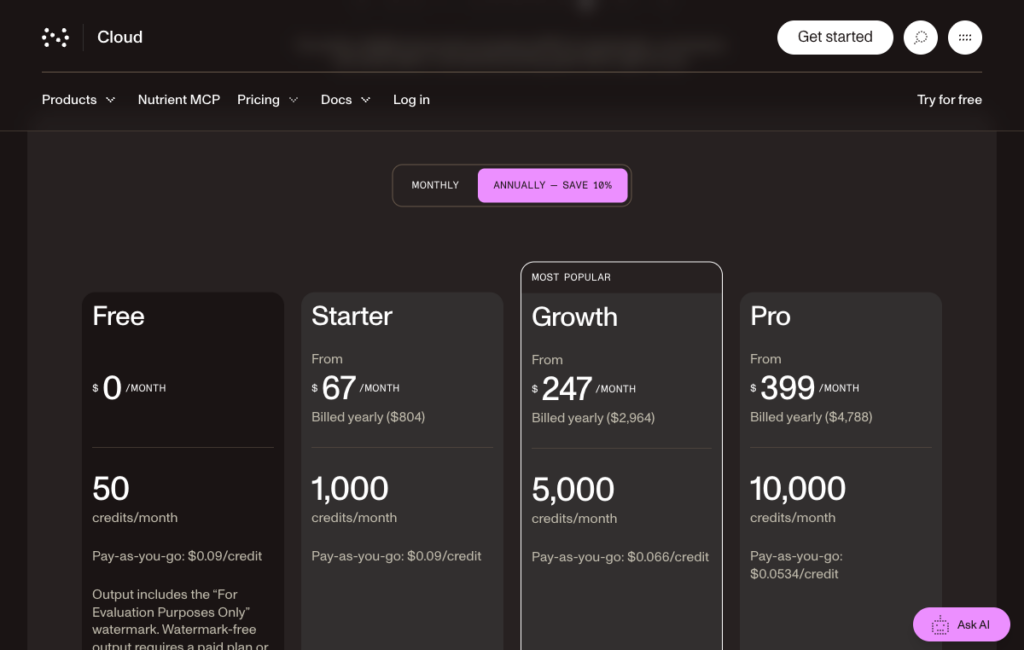
Nutrient’s Processor API pricing, shown at the annual-billing rate (about 10% below the monthly prices cited above).
Where Nutrient DWS Processor API stands out
The /build chaining model reduces round-trips for multi-step pipelines. A team that converts Word files from a CMS, watermarks drafts, runs OCR for search indexing, and then compresses for storage can do all four steps in one authenticated request, with one response to handle. That’s a cleaner pattern than four sequential API calls with four intermediate file transfers.
For HTML-heavy workflows, compare Nutrient’s cost for a complete request, including any follow-on operations. Credit counts alone do not establish which API is cheaper, because each vendor assigns its own value to a credit.
What to consider
DOCX templating returns a DOCX, and producing a PDF from a Word template requires a DOCX generation step plus a conversion step, costing 2 credits total rather than 1. If Word templates are your primary use case, Foxit, Adobe, or Carbone are more direct paths.
The free plan watermarks all output, and removing watermarks requires a paid plan or a $25 wallet load for PAYG. Some marketing pages imply broader free access than the limits documentation supports, so prefer the docs for accurate limits information. JavaScript assets are not supported in HTML rendering, which rules out charts or dynamic content rendered client-side.
Best for
Teams that already render HTML and want to chain multiple operations (convert, watermark, OCR, compress) in a single request without managing intermediate files.
Getting started
Nutrient Processor API overview and HTML to PDF guide cover the /build request format and chaining syntax.
Gotenberg
Gotenberg is a MIT-licensed Docker API that wraps Chromium (for HTML, URL, and Markdown conversion) and LibreOffice (for Office files).
You run it on your own infrastructure, expose the HTTP endpoints internally, and pay nothing for the license. As of 11 Sep 2026, release v8.37.0 is current. The project has approximately 13,300 GitHub stars.
Feature | Details |
Template routes | Your own HTML, a URL or Markdown through Chromium; Office files through LibreOffice |
Data merge | None. Your code fills the HTML |
Other PDF operations | Merge, split, watermark, encrypt, flatten, PDF/A, PDF/UA and Factur-X |
Pricing | Free under the MIT license. You pay for hosting |
Free allowance | No vendor quota. Capacity depends on your infrastructure |
Limits | 30-second default timeout, configurable |
SDKs and integrations | Official PHP client; community clients for other languages |
Hosting | Self-hosted Docker only |
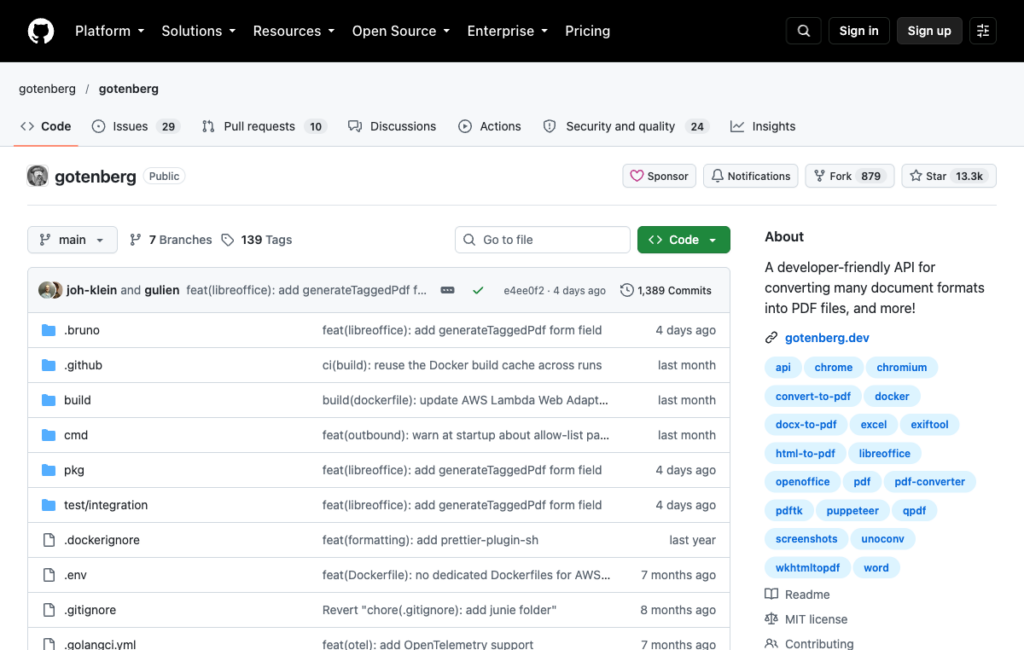
Gotenberg’s GitHub repository, confirming the MIT license and its Chromium/LibreOffice topic tags.
Where Gotenberg stands out
Gotenberg puts Chromium and LibreOffice behind one self-hosted HTTP API, with separate routes for HTML, URLs, Markdown, and Office conversion. The MIT license has no per-document fee, but you still need to budget for compute and operating the service.
The active release cadence (v8.37.0 on 11 Sep 2026) and approximately 13,300 GitHub stars indicate a maintained project with a real user base. PDF/A, PDF/UA, and Factur-X support make it viable for structured document archives, not just quick-convert workflows.
What to consider
You own capacity, scaling, security patching, and incident response. A cloud API handles availability for you, but Gotenberg does not. For a team without dedicated infrastructure engineering, the operational overhead of running and scaling a Gotenberg cluster can exceed the cost of a hosted API at moderate volumes.
Gotenberg converts documents and doesn’t template them. Your application must build the HTML and populate all data before sending the conversion request, so it’s not a substitute for Carbone or Foxit if you want template-based merge logic handled server-side.
Best for
Teams that must keep documents on their own infrastructure and already render HTML, with the engineering capacity to operate a Docker-based service.
Getting started
Gotenberg docs cover Docker setup, endpoint reference, and configuration options. The GitHub repo has the source and release notes.
What the price lists and limits pages reveal
Two angles matter most once you look past the headline price, which unit actually gets billed, and who owns the template after launch.
What counts as one billable document
Prices below were checked on 7 Oct 2026. Confirm current plan terms before purchasing.
API | Billable unit | Entry paid plan | Free allowance | Published limits |
Foxit Document Generation | 1 credit per document (shared pool) | Startup $1,750/year, 5,000 credits | 500 credits/year | 4 MB template cap, post-base64 |
Adobe Document Generation | 1 transaction per up-to-50-page block | Sales only | 500 transactions/month | 10 MB JSON, 25/min free tier |
Carbone | Per render; each extra MB of data counts as another document | Essential €29/month, 1,000 renders | 100 documents/month | Parallel renders by plan |
Docmosis Cloud | Pages generated | Professional $49/month, 4,000 pages | 30-day trial | Not published as of 7 Oct 2026 |
PDF Generator API | 1 credit per up-to-5-page block | Creator €8/month, 50 credits. Teams Starter €52/month, 1,000 credits | Sandbox trial; 14/30-day conflict on vendor pages | 30/min Individuals; 60 to 240/min Teams |
CraftMyPDF | 1 credit per PDF, any length | Lite $29/month, 1,200 credits | 50 PDFs/month | 4 to 6 MB request caps; 30 to 100-second timeouts |
PDFMonkey | Per document | Starter €5/month, 300 documents | 20 documents/month | 30 seconds to 5 minutes by plan |
DocRaptor | Per document | Basic $15/month, 125 documents | 5 documents/month | 60 seconds sync, 600 seconds async |
Nutrient DWS | Credits per operation (0.5 for HTML-to-PDF, 1 for Office-to-PDF) | Starter $75/month, 1,000 credits | 50 credits/month, watermarked | 100 requests/minute/API key |
Gotenberg | None (self-hosted) | No license fee; hosting costs vary | No vendor quota; capacity-limited | 30-second default timeout, configurable |
Three surprises in the table are worth understanding before you sign up.
Page-based billing uses more of your allowance for long reports. A 40-page financial statement uses 40 pages of Docmosis Cloud’s stated 4,000-page monthly allowance, the same as 40 one-page invoices. On PDF Generator API, it uses 8 credits under the five-page-block model. CraftMyPDF and Foxit count it as 1 credit within their supported limits. These are usage counts, not equivalent prices; compare the plan cost at your expected document mix.
Data-size billing penalizes image-heavy payloads. Carbone bills each extra megabyte of JSON and images as an additional render. A product catalog template with high-resolution images and a large JSON array can cost several times what a plain invoice costs, even though both produce one output file. Measure your actual payload size before estimating monthly costs on the Essential plan.
Yearly credit pools reset at renewal, not each month. Our Developer plan includes 500 shared credits per year. If you start a billing year with the full balance and generate 300 documents, 200 credits remain until the next annual reset, assuming no other usage. That can suit concentrated report runs, but PDF Services and eSign usage also draw from the pool.
Estimate your cost from your real page count and actual payload size, not from the headline plan price.
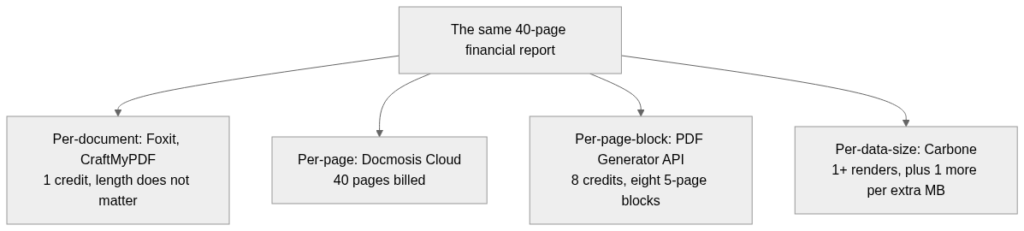
The same 40-page report priced under four billing models. Per-document billing (Foxit, CraftMyPDF) and per-page-block billing (PDF Generator API) stay fixed per document or per block; per-page billing (Docmosis Cloud) scales directly with length; per-data-size billing (Carbone) depends on payload rather than page count.
Who edits the template after launch
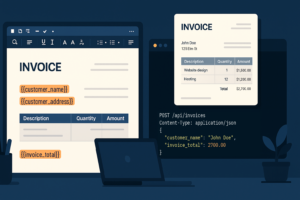
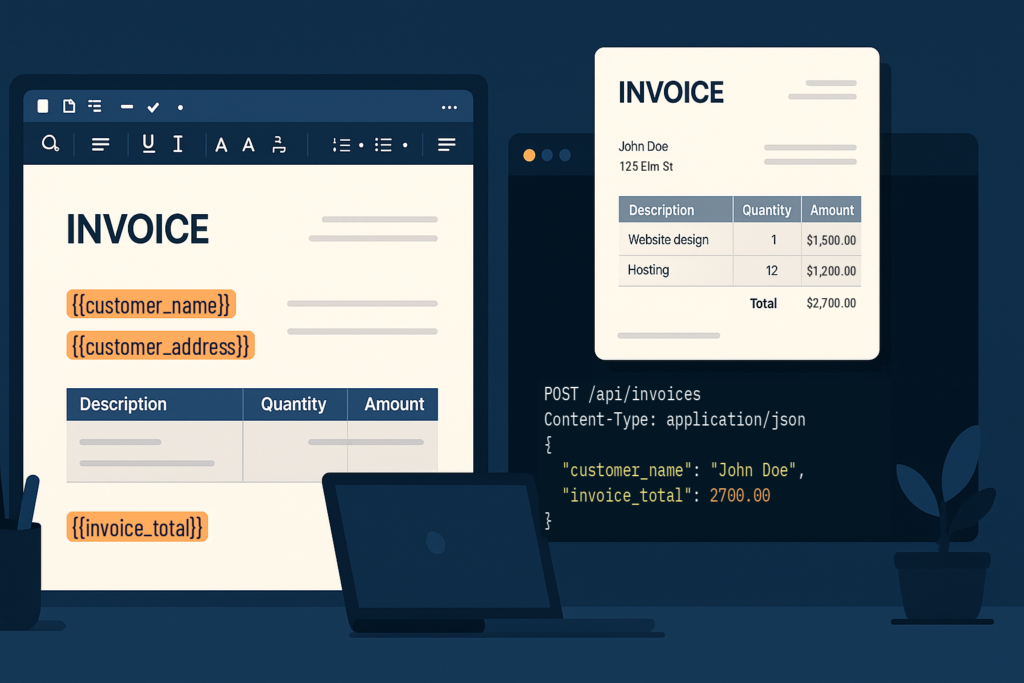
Word files. Foxit, Adobe, Carbone, and Docmosis all accept DOCX (or ODT) templates authored in Word or LibreOffice Writer. A business user can open the file, move a field, update a disclaimer, change a logo, and hand the file back to the deployment process without writing code. Tag syntax differs by vendor ({{customer_name}} in Foxit, Adobe’s Document Generation tagger syntax, Carbone’s {d.customer_name} notation, Docmosis’s <<customer_name>>), so a template built for one requires re-tagging before it works with another.
Hosted editors. PDF Generator API, CraftMyPDF, and PDFMonkey keep templates in the vendor’s UI. Non-technical users can make changes through a browser without touching a file system, but templates aren’t version-controlled in Git by default and aren’t portable between APIs. That tradeoff (easier to hand off to a business user, harder to audit changes) is the right call for some teams and a significant friction point for others.
HTML in your repo. DocRaptor, Nutrient, and Gotenberg all accept HTML that your application generates. Foxit and Adobe also support HTML-to-PDF routes on the same account as their Word-template routes. PDFMonkey requires a pass-through Code Template if you want to send your own HTML. Nutrient also offers DOCX-plus-JSON templating, though it returns a DOCX that needs a separate conversion step to produce PDF.

Template format affects who can maintain the layout. Word files and hosted editors can let non-developers make changes, while HTML templates in a repo can follow code review. Whether an update needs deployment depends on how your application stores and loads templates.
The practical question is who will change the invoice layout next year. If the answer is a developer, HTML-in-repo or Word templates both work. If the answer is someone in finance or legal who doesn’t use a code editor, a Word file or a hosted editor is the lower-friction path.
Will the PDF look exactly like your template?
Rendering engines differ, and those differences affect specific document types. DocRaptor uses Prince 15.1, which implements the CSS Paged Media specification for print layout. PDFMonkey uses a Chrome-based browser engine. Gotenberg uses Chromium for HTML and LibreOffice for Office files. Word-template APIs (Foxit, Adobe, Carbone, Docmosis) render from the DOCX layout, which means fidelity depends on the DOCX-to-PDF converter the vendor uses internally.
Documented engine gaps affect specific use cases. Nutrient DWS Processor API does not support JavaScript assets, which rules it out for HTML templates that render charts or dynamic content with client-side JavaScript. PDFMonkey’s free plan blocks external fonts and images, which can produce layout differences between your test output and your paid-plan output. Anvil (not on this list) documents the absence of Flexbox and Grid support, worth checking when evaluating any browser-based HTML renderer against complex CSS layouts.
Vendor benchmarks need careful scope checks. Carbone’s converter benchmark covers self-hosted converters, not the hosted APIs in this comparison. It does not establish how these ten services will render your templates.
Rendering fidelity callout
The only reliable way to assess rendering fidelity for your specific documents is to test your hardest template on each shortlisted free tier before committing. “Hardest template” means your longest table, your most complex page-break logic, your custom fonts, your header and footer positioning. A simple invoice rarely reveals rendering differences. A 30-page financial report with running totals, conditional sections, and custom typography often does. Vendor speed and fidelity claims are claims until you run your own template.
Choosing a PDF generation API for your pipeline
Choose the template model your team can maintain, then price your expected document mix and any follow-on operations.
Word templates suit business users who already work in Microsoft Word. Hosted editors offer browser-based layout changes, while HTML templates in a repo can follow your code-review process.
Per-document billing is easier to model for varying page counts, but it is not automatically cheaper once plan prices, allowances, and other operations are included.
If your generated documents need merging, compression, watermarking, or signing, our Document Generation API keeps those steps on the same account and credit pool as PDF Services and eSign.
Generation uses 1 credit; each eSign envelope created uses 5 credits, with PDF processing charged separately. Our free Developer plan includes 500 shared credits per year for evaluating the workflow before choosing a paid plan.