
<

10 best eSignature APIs for developers in 2026

The cheapest eSignature API plan may not include the signing flow you need. This guide compares 10 eSignature APIs on embedded signing, billing triggers, sandbox limits, and compliance. Use it to build a shortlist that fits your workflow and budget.
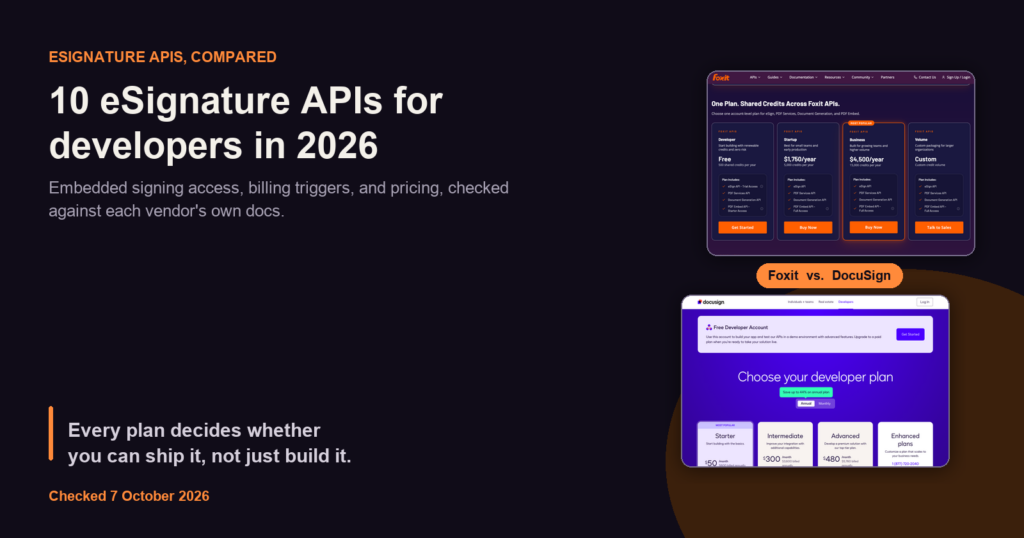
Cover for best eSignature API comparison showing Foxit API pricing tiers beside DocuSign developer plans

Getting a contract signed shouldn’t mean emailing PDFs back and forth or asking someone to print, sign, and scan a document.

An eSignature API lets you bring that signing flow into your product, so users can sign without leaving your app.

But embedded signing isn’t included in every plan, and the cheapest starting price may not cover the workflow you need.

For example, DocuSign’s $50/month Starter plan includes hosted envelopes and embedded sending, but embedded signing requires a sales-led Enhanced plan with at least five users.

Billing can also change the cost: some providers charge when you send an envelope, even if no one signs it. And a compliance badge may apply only to a specific plan.

Below, we compare 10 eSignature APIs to help you choose one that fits your workflow and budget. The details come from each vendor’s pricing, API documentation, and security pages.

Prices are US list prices, and compliance badges are vendor claims.

Top picks by use case

The best eSignature APIs for developers in 2026 are Foxit eSign API, Dropbox Sign, BoldSign, SignNow, SignWell, Anvil Etch, DocuSign, Adobe Acrobat Sign, DocuSeal, and Documenso.

Start with the plan that supports your signing flow, then check its cost at your expected volume.

Use casePickWhy it fits
Signing inside a larger PDF workflowFoxit eSign APIeSign, PDF Services, and Document Generation on one account. See Foxit API pricing for current allocations.
Mature SDKs with self-serve embeddingDropbox Sign APISix official SDKs, with embedded signing from the Standard plan ($250/month billed yearly).
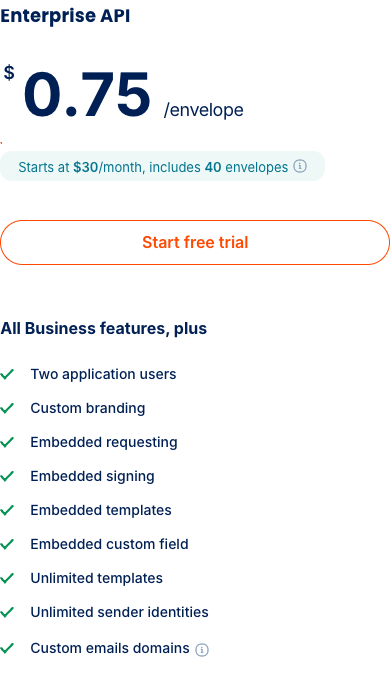
Low per-envelope rate on a monthly planBoldSign API$30/month with 40 envelopes, then $0.75 per envelope sent.
Per-signature API pricing with no monthly tier to pickSignNow APIFull API access is gated behind the custom-quoted Site License plan, billed at $1.50 per signature invite.
Pure usage pricing with no monthly minimumSignWell APIFrom $0.85 per API document, falling to $0.20 with volume.
Paying only for completed signaturesAnvil Etch$1.50 per packet, billed only when every party signs, with embedding included on the free plan.
Government and FedRAMP requirementsDocuSign eSignature REST APIDocuSign Federal offers FedRAMP Moderate and provisional DoD IL4 authorization, separate from commercial Enhanced.
Teams already licensing AdobeAdobe Acrobat Sign APIFree Developer Edition available. Production access and embedding go through Adobe sales.
Low per-document fee with an open-source coreDocuSeal$0.20 per completed document plus a $20 Pro seat. AGPL-3.0 self-hosting available.
Open source with unlimited documentsDocumensoTeams plan at $40/month billed yearly includes embedded signing under a fair-use policy.

Most of these APIs support several use cases, so compare their features and plan limits against your full workflow.

How we compared these eSignature APIs

Every entry below is scored against the same 8 criteria, in the same order:

  • API capabilities

  • Embedded signing

  • Webhook support

  • Sandbox access

  • Pricing

  • SDK availability

  • Rate limits

  • Security and compliance

The 10 eSignature APIs in detail

Start with the signing experience you need, then compare plan requirements and billing rules.

Foxit eSign API

Foxit’s eSign REST API embeds signing workflows directly into web applications, portals, and backend systems, so a product that generates, converts, and sends a document for signature runs under one Foxit developer relationship instead of two.

The API uses standard OAuth 2.0 authentication and returns an embeddedSessionURL that renders inside an <iframe> in your own application.

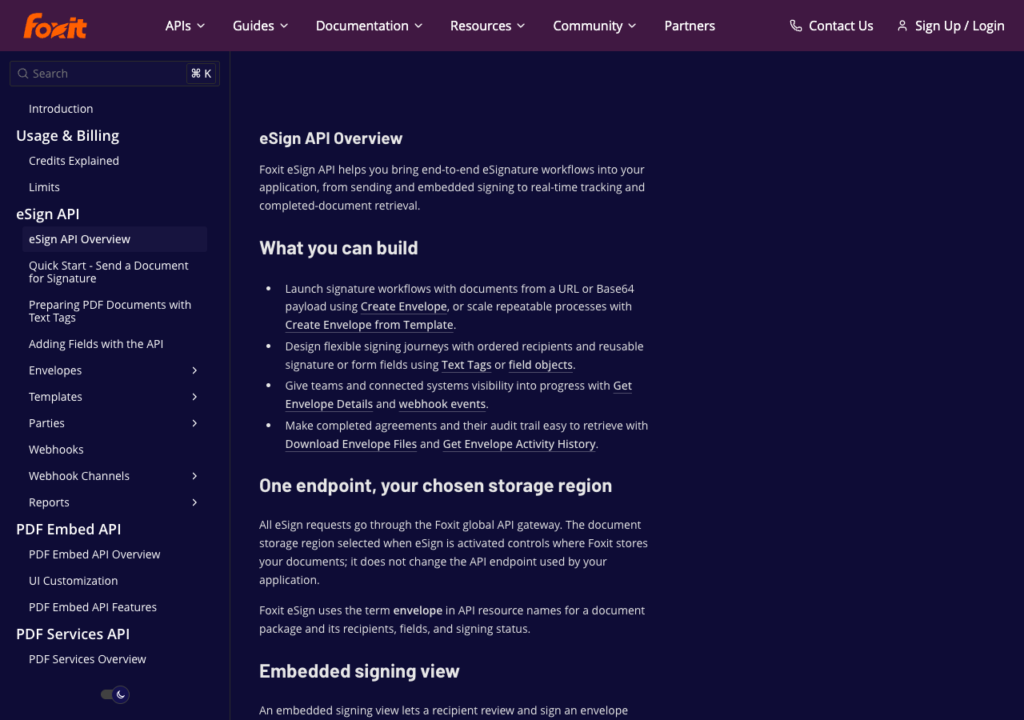
Foxit eSign API Overview docs page listing envelope creation, field setup, webhook events, and activity history

Foxit’s eSign API covers envelope creation, embedded signing, webhook events, and activity history.

Key features at a glance

FeatureDetails
CoversEnvelopes, templates, embedded signing and sending, envelope activity history. PDF Services and Document Generation available on the same account. Cloud only, storage region chosen at activation.
Embedded signingAvailable on every plan, including the free Developer plan (trial).
WebhooksWebhook channels for envelope status events. Status checks and webhooks consume no credits.
SandboxeSign trial on the free Developer plan. Envelopes are watermarked in TEST mode.
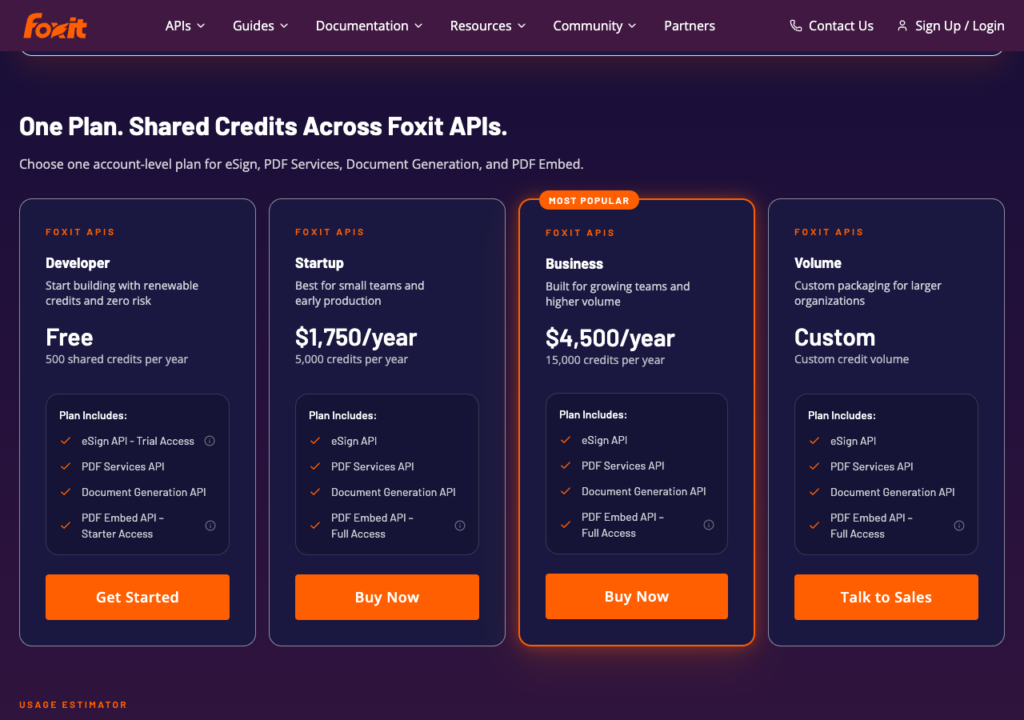
PricingeSign is billed per envelope created. eSign, PDF Services, and Document Generation draw from one shared credit pool. See Foxit API pricing and Credits Explained for current plan allocations and billing details. Billed annually and credits do not roll over.
SDKsREST API with an official Postman collection and code samples. Confirm installable SDK availability with Foxit for the current unified API. The separate PDF SDK is not an eSign API SDK.
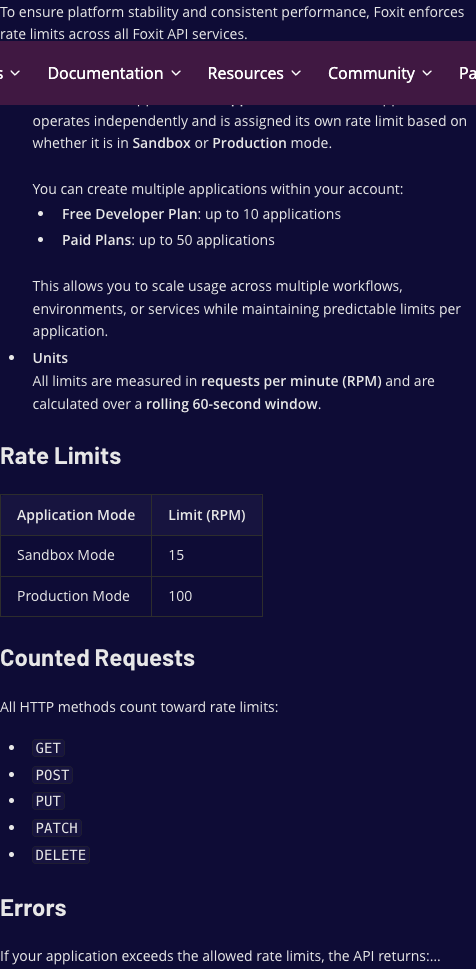
Rate limitsPer application, per minute, rolling 60-second window: 15 RPM in Sandbox mode, 100 RPM in Production. Free Developer plan allows up to 10 applications, paid plans up to 50.
Compliance claimsFoxit’s API security page lists ESIGN/UETA, AES/qualified electronic signature (QES), 21 CFR Part 11, and SOC 2 Type II. QES involves identity-validation services and a confirmed plan.

Where it fits

Keeping eSign, PDF Services, and Document Generation on one account avoids separate keys and billing cycles.

The billing trigger is envelope creation, so cost appears before signing; status checks, webhooks, downloads, and session generation consume no credits.

Annual credits don’t roll over, so size usage before picking a plan.

Foxit uses one credit pool for eSign, PDF Services, and Document Generation.

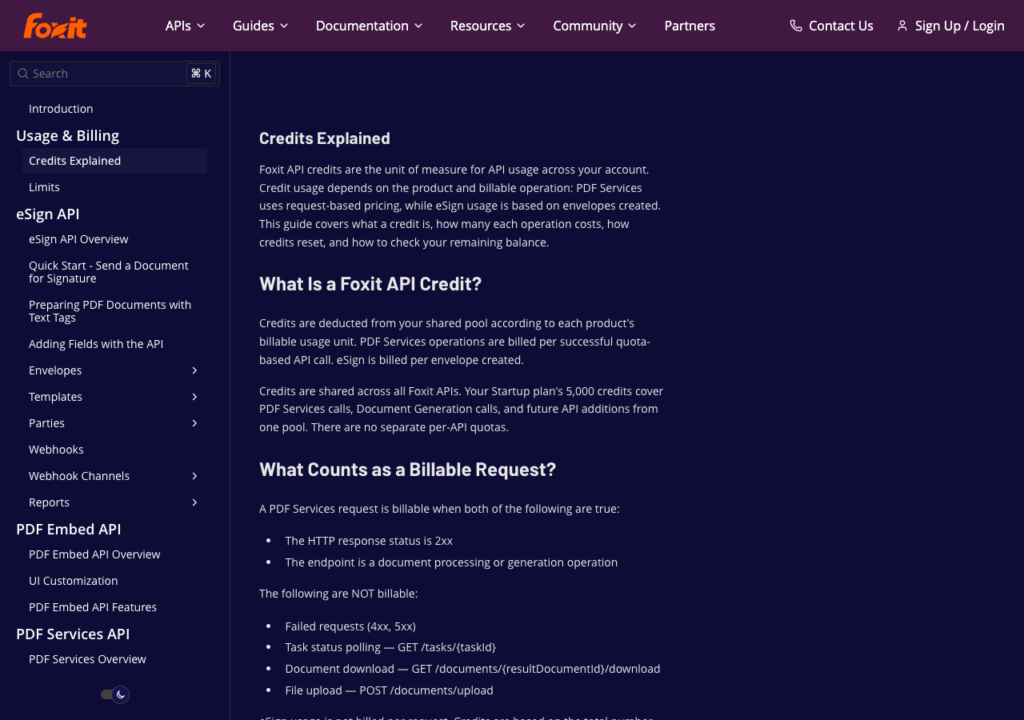
Foxit Credits Explained page noting eSign bills per envelope created and that status polling and downloads are not billed

Creating an eSign envelope uses credits; checking its status, downloading documents, and generating signing sessions do not.

Best for

Products that generate or convert PDFs then send them for signature.

Create a free developer account to activate the eSign trial. Then follow the eSign API reference to send your first envelope.

Foxit eSign API developer portal hero with a Start for Free button beside a developer working at her desk

The eSign API developer portal, source of the Postman collection.

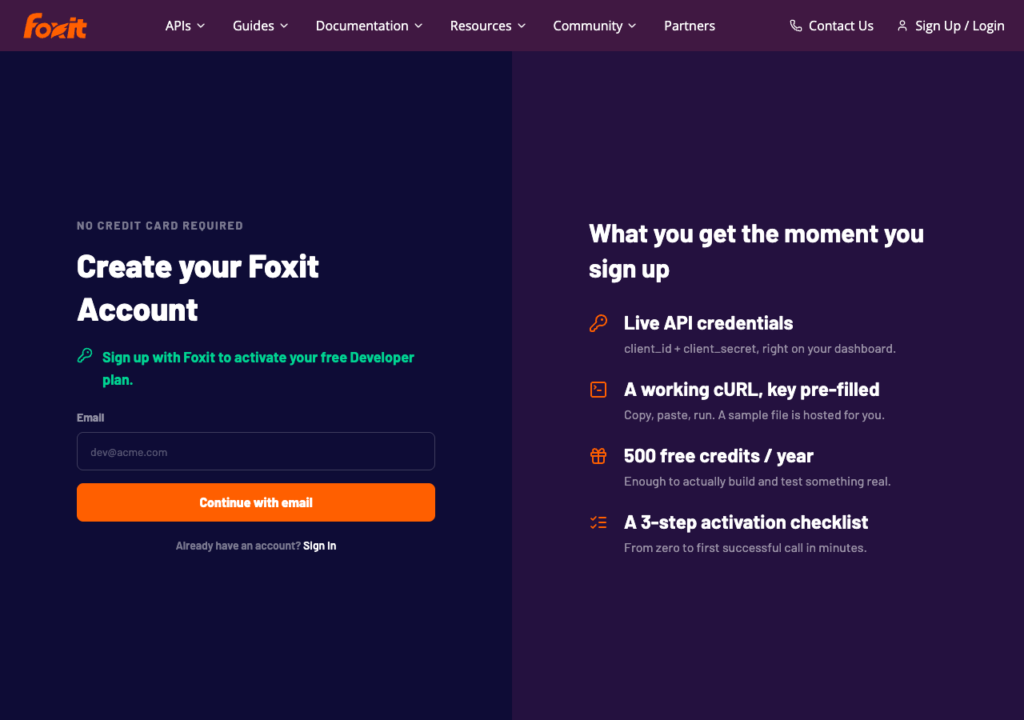
Foxit sign-up page offering a free Developer plan with no credit card, live API credentials, and 500 free credits a year

You can start with 500 free credits a year, with no credit card required.

Each application gets 15 requests per minute in the sandbox and 100 in production. The free plan allows up to 10 applications; paid plans allow up to 50.

Dropbox Sign API

Dropbox Sign (formerly HelloSign) ships six official SDKs and a published “endpoints by subscription plan” map showing which calls each plan unlocks, across signature requests, templates, bulk send, and embedded requesting and signing.

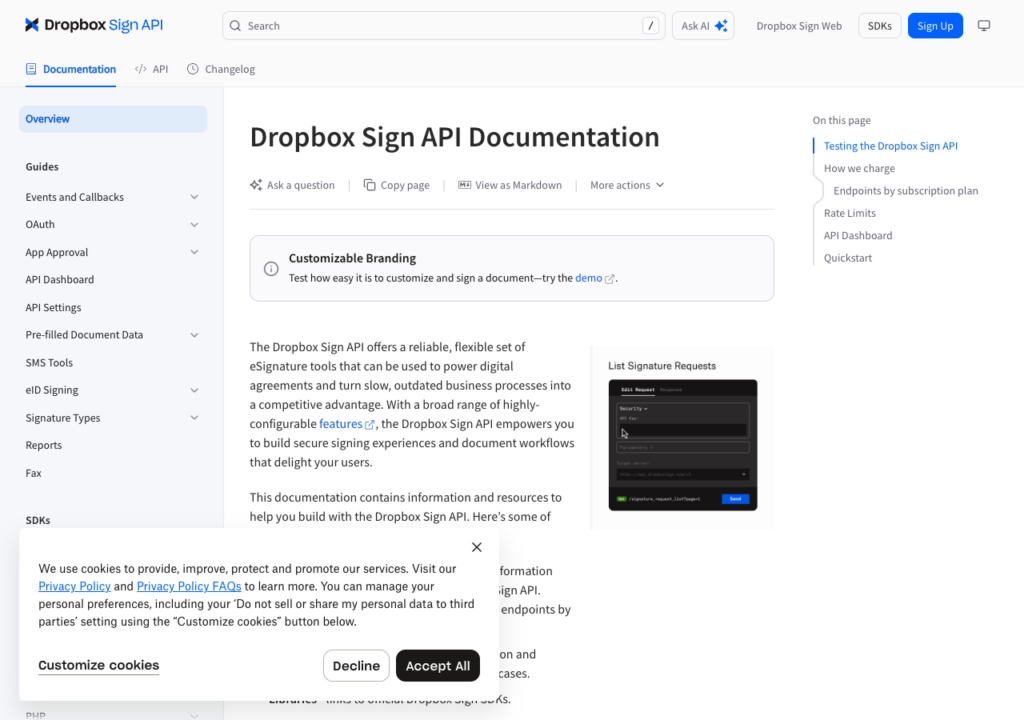
Dropbox Sign’s developer docs homepage, with the endpoints-by-plan and rate-limit references.

Key features at a glance

FeatureDetails
CoversSignature requests, templates, bulk send, embedded requesting and signing. Hosted only.
Embedded signingStandard ($250/month billed yearly) and Premium. Not available on Essentials.
WebhooksEvent callbacks.
SandboxFree test mode. Documents are watermarked and not legally binding. 10 requests/minute.
PricingEssentials $75/month billed yearly (50 signature requests/month), Standard $250/month (100 requests/month), Premium by quote. Billed per signature request.
SDKsPython, Ruby, PHP, Java, Node.js, C#.
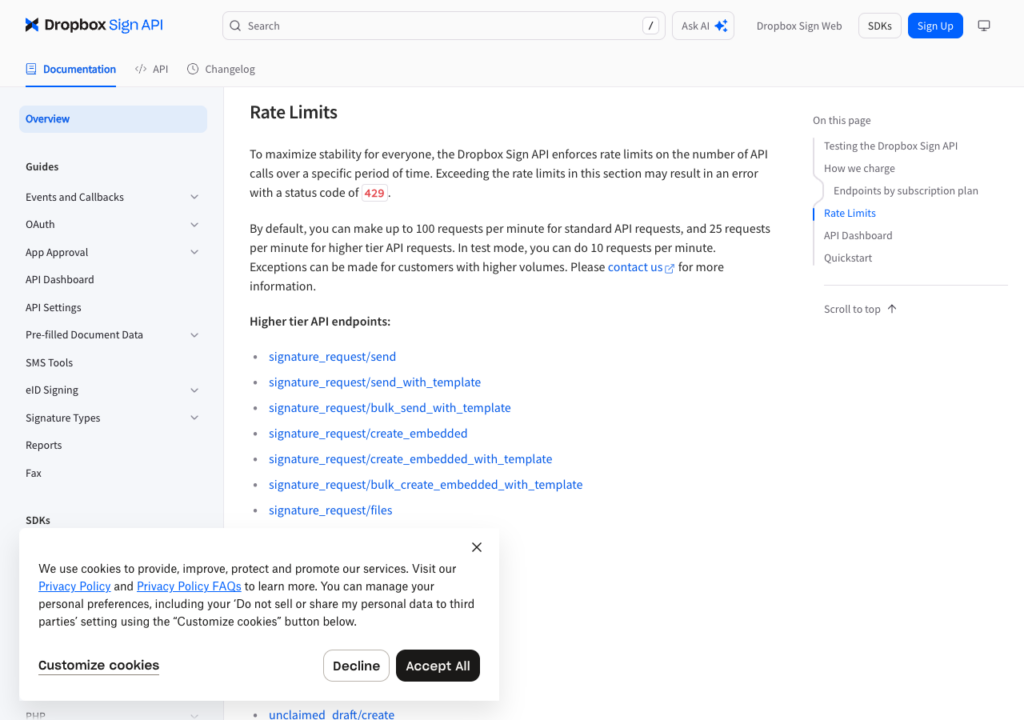
Rate limits100 requests/minute general; 25 requests/minute on heavier endpoints. Confirm current limits against the Dropbox Sign rate limits docs.
Compliance claimsSOC 2 Type II, ISO 27001, eIDAS, GDPR. QES available as a Premium add-on. See Dropbox Sign’s Trust Center for the full certification list.

Where it fits

The endpoints-by-plan map shows restrictions before you build, since embedded signing requires Standard or above (Essentials returns HTTP 402), and full white-label branding needs the sales-led Premium plan.

Best for

Teams that want official SDKs and a self-serve Standard plan for in-app embedded signing. Start with the API docs and a free sandbox account.

Dropbox Sign allows 100 requests per minute for general calls and 25 for heavier endpoints.

BoldSign API

BoldSign’s API runs on a monthly plan with a low per-envelope rate and a free sandbox with full API access, covering signing, requesting, templates, and embedded flows on the Enterprise API plan, with US, EU, Canada, and Australia base URLs.

BoldSign’s Developer Hub, the starting point for the sandbox and docs.

Key features at a glance

FeatureDetails
CoversSigning, requesting, templates, embedded signing and sending on the Enterprise API plan. Web plans are sandbox-only for API envelopes. Hosted, with US, EU, Canada, and Australia endpoints.
Embedded signingEnterprise API plan only.
WebhooksEnterprise API plan only.
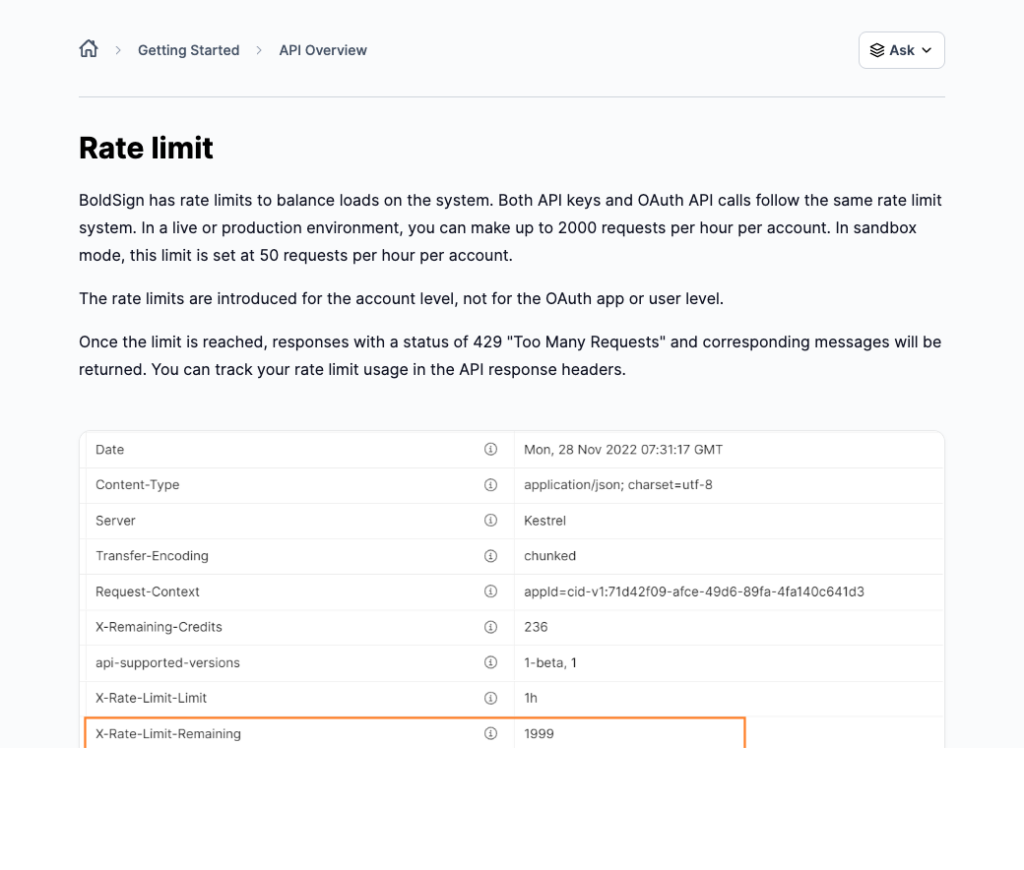
SandboxFree, with full API access. Test documents are watermarked and deleted after 14 days. 50 requests/hour.
Pricing$30/month including 40 envelopes, then $0.75 per envelope sent. Two users included. See BoldSign API pricing for current rates.
SDKs.NET, Node.js, Java, Python, PHP.
Rate limits2,000 requests/hour in production.
Compliance claimsSOC 2 Type 2, HIPAA, GDPR, PCI DSS via Stripe’s processing, eIDAS. QES offered. See BoldSign’s data storage and security page for details.

Where it fits

BoldSign’s cost is easy to estimate, since $30 includes 40 envelopes, then $0.75 each, so 100 envelopes a month costs $30 + (60 × $0.75) = $75. Embedded signing and webhooks are both self-serve. Envelopes bill on send, so a declined one still counts.

Best for

SaaS products embedding signing at modest volume that want a low per-envelope rate with no sales conversation. Start with the developer docs and the pricing page.

BoldSign Enterprise API pricing card showing $0.75 per envelope, starting at $30 a month with 40 envelopes included

BoldSign’s $30 monthly plan includes 40 envelopes, with additional envelopes billed at $0.75 each.

BoldSign allows 50 requests per hour in the sandbox and 2,000 per hour in production.

SignNow API

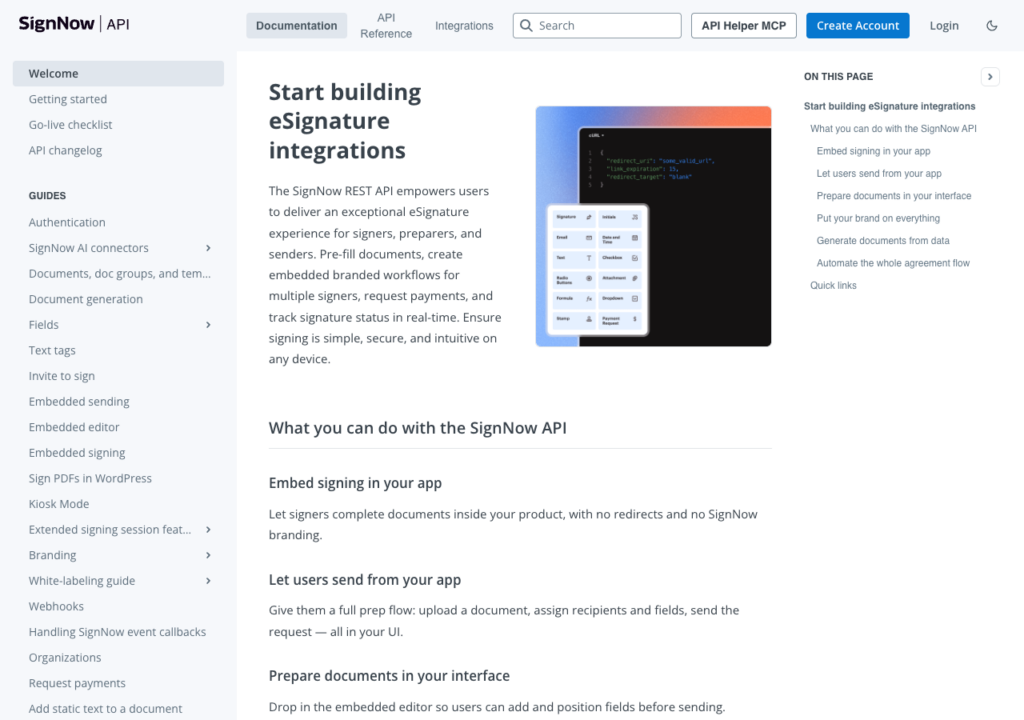
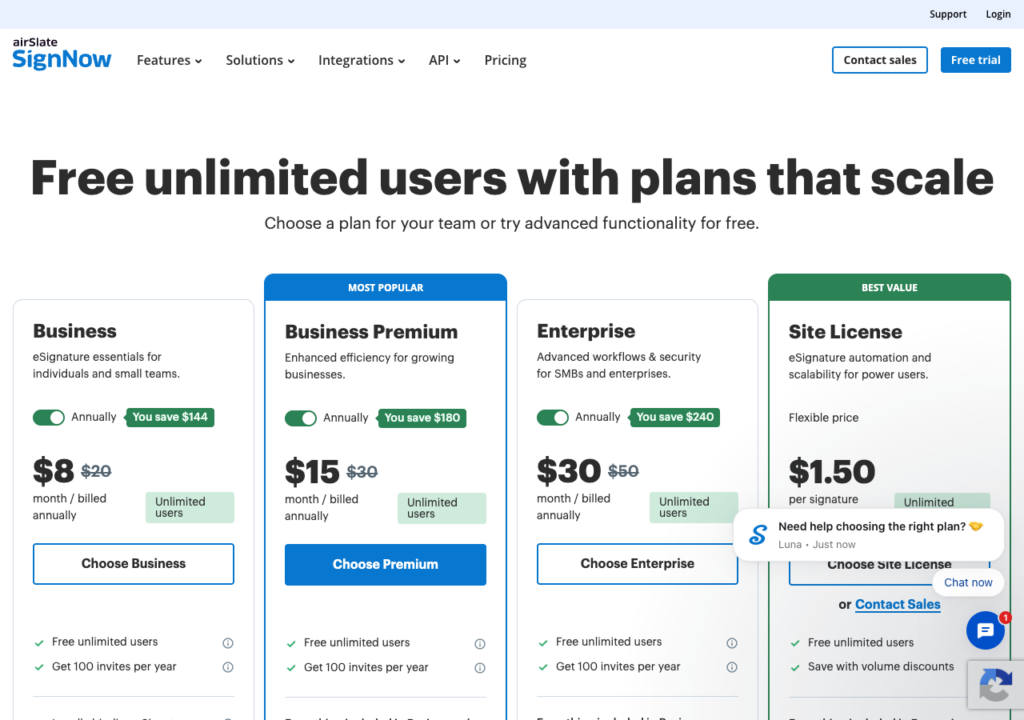
SignNow’s per-user plans (Business, Business Premium, Enterprise) cover sending, branding, and workflow features, but full API access and embedded signing sit behind a separate, custom-quoted Site License plan rather than any of those self-serve tiers.

You can embed both signing and sending with SignNow’s API.

Key features at a glance

FeatureDetails
CoversEmbedded signing and sending, document generation from .docx templates, and webhooks, documented across the full REST API. Hosted.
Embedded signingFull API access, including embedded signing, requires the Site License plan. Business, Business Premium, and Enterprise plans do not include it.
WebhooksDocumented event callbacks for signing status.
SandboxFree developer account with a Development mode application, up to 500 signature invites without an active trial or subscription.
PricingBusiness $8/month, Business Premium $15/month, Enterprise $30/month, billed annually per user with 100 invites/year included. Full API access needs the Site License plan, billed per signature invite from $1.50, custom-quoted through sales. See SignNow pricing for current rates.
SDKsNode.js, C#, Java, Python, PHP.
Rate limitsPer application: 500 requests/hour in Development, 1,000 requests/hour by default in Live.
Compliance claimsSOC 2 Type II, ISO 27001, PCI DSS, CCPA, HIPAA via BAA, 21 CFR Part 11. AES and QES on Enterprise. See SignNow’s eSignature compliance page for details.

Where it fits

SignNow’s branding and workflow features scale through ordinary per-user plans, but production API access, including embedded signing, is a sales-led Site License conversation.

Best for

Teams already planning to negotiate a volume-based API contract who want per-signature pricing rather than a flat monthly tier.

Review the API docs and pricing page to confirm current terms.

The per-user plans don’t include full API access. For that, you’ll need a separately quoted Site License.

SignWell API

SignWell takes a pure usage-pricing approach, charging per API document with no seats and no monthly minimum.

The rate drops with volume, so cost tracks actual usage rather than a fixed tier.

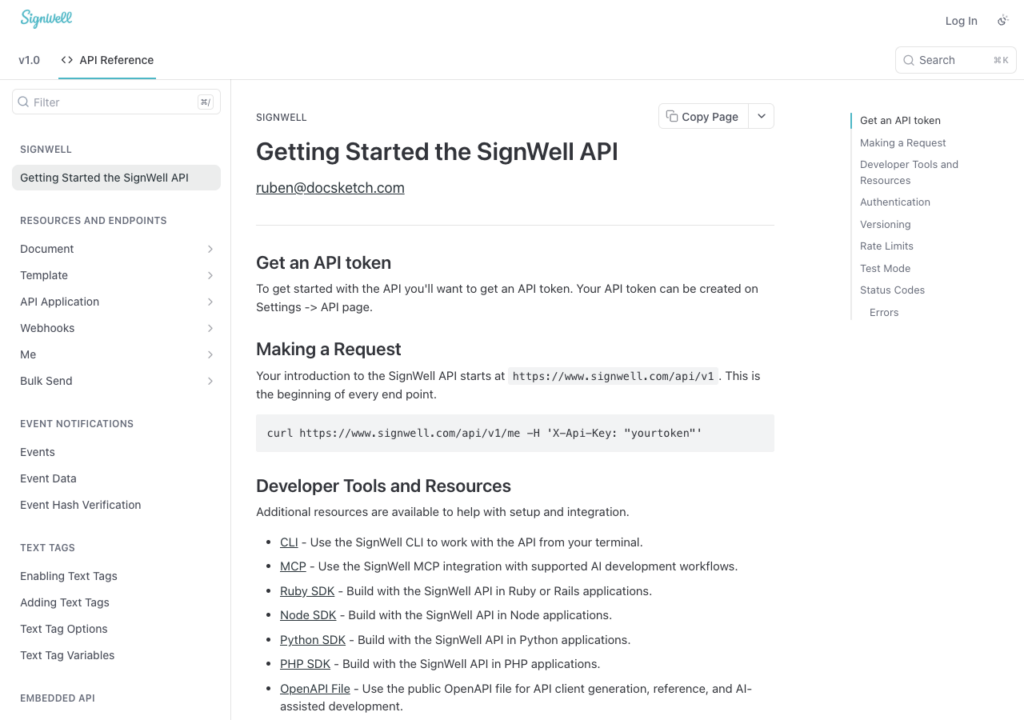
SignWell’s getting-started guide walks you through the API token setup and a first request.

Key features at a glance

FeatureDetails
CoversSigning, requesting, and template editing through the API, with white-label embedding. Hosted.
Embedded signingAvailable on the API usage plan, including embedded signing, requesting, and template editing.
WebhooksYes, with hash verification.
SandboxUnlimited test usage on free developer account. Production documents: 3/month free, 25/month once a card is added. Confirm eligibility before relying on the free allowance.
PricingFrom $0.85 per API document, falling to $0.20 and lower with volume. No seats or monthly minimum. See SignWell API pricing for current per-document rates and the volume calculator.
SDKsRuby, Node.js, Python, PHP, plus CLI and MCP server support.
Rate limitsPer token: 100 requests/minute general, 30 requests/minute for creation endpoints, 20 requests/minute for test endpoints.
Compliance claimsESIGN, UETA, eIDAS, SOC 2 Type II, HIPAA with BAA. See SignWell’s security page for details.

Where it fits

Per-document pricing means a product sending 10 documents one month and 200 the next pays only for actual usage.

The free allowance is inconsistent (25/month advertised, 3/month card-free), so confirm which applies.

Best for

Low or spiky document volumes with no minimum commitment. Review the developer docs and the pricing page.

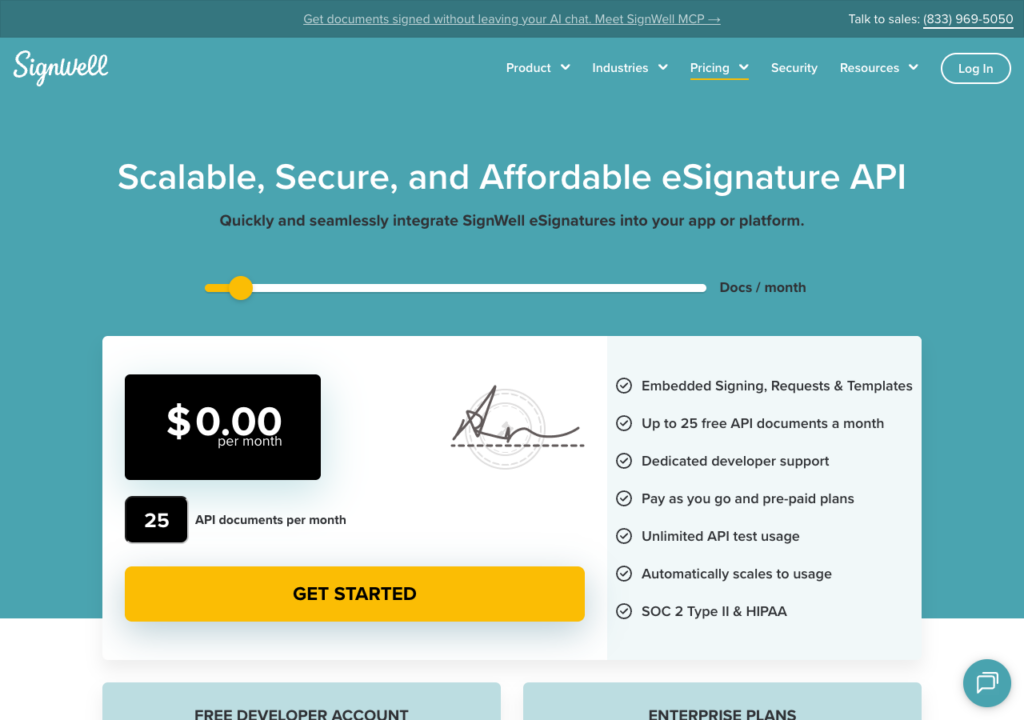
SignWell advertises 25 free API documents a month once you add a card.

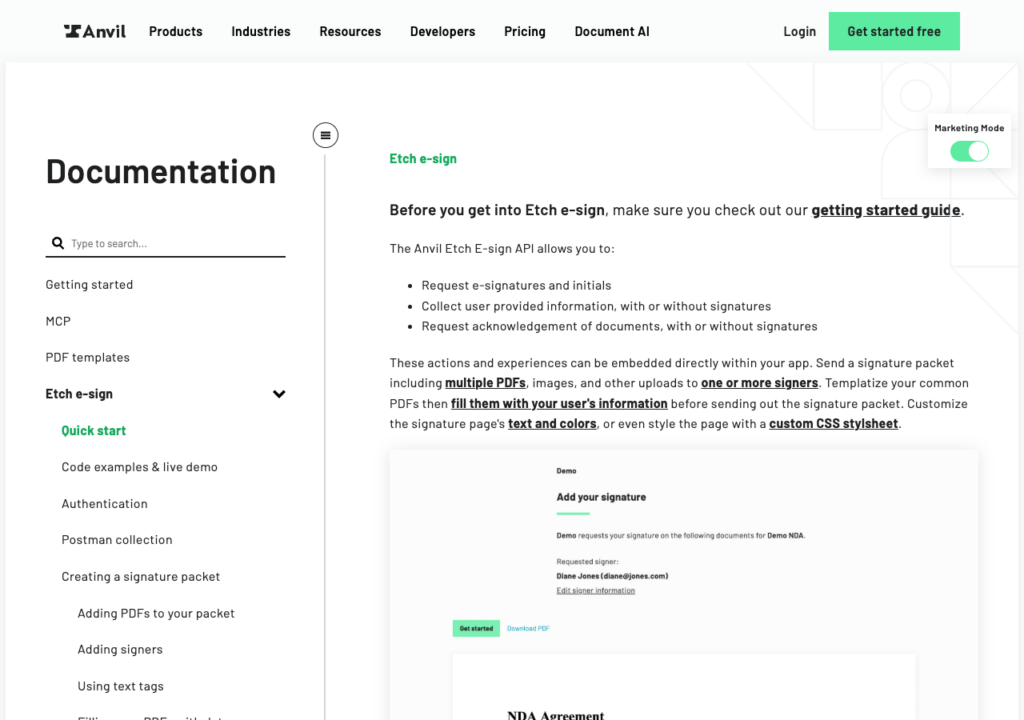
Anvil Etch E-Sign API

Anvil Etch charges $1.50 per packet only when every party has signed, so a stalled packet costs nothing.

With embedded signing on the free plan too, Anvil is the only API here where you pay only for flows that finish.

Anvil Etch e-sign API docs listing signature, data collection, and acknowledgment requests above a sample signing page

Anvil’s Etch E-Sign API documentation page.

Key features at a glance

FeatureDetails
CoversE-signatures, PDF filling, document generation, and Workflows on the same platform. Hosted.
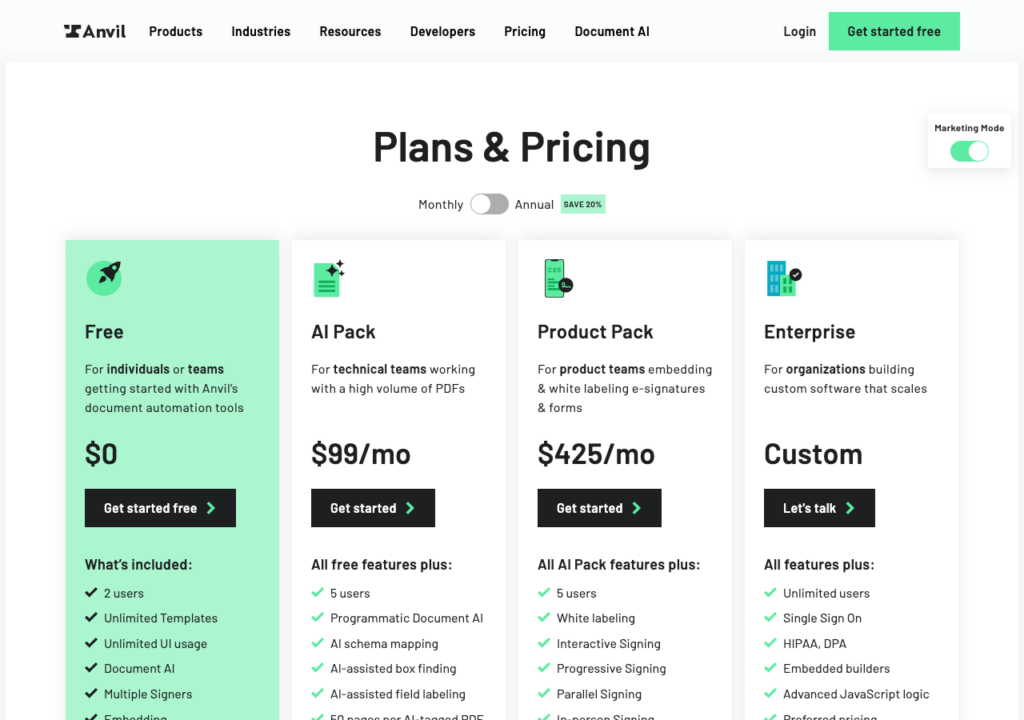
Embedded signingEvery plan, including Free. White-labeled signing pages from Product Pack ($425/month, or $340/month billed annually).
WebhooksYes, with optional payload encryption.
SandboxUnlimited free test mode with watermarked documents.
Pricing$1.50 per packet, billed only when every party signs, with 25 starter packets once a card is added. See Anvil pricing for current rates and subscription options.
SDKsNode.js, Python, .NET. Go is community-supported. REST plus GraphQL.
Rate limitsProduction: 4 requests/second on Free or pay-as-you-go, 40 requests/second on subscriptions. Development: 4 requests/second on all plans.
Compliance claimsSOC 2 Type II, eIDAS, GDPR, UETA, ESIGN. HIPAA with a BAA on Enterprise. See Anvil Etch’s security and compliance page for details.

Where it fits

At a 30% abandonment rate, send-based billing charges every envelope while Anvil charges only the 70% that complete.

Its 4-requests/second free-tier production cap is the tightest here; a subscription lifts it to 40/second but adds a monthly fee.

Best for

Products with high signing-flow abandonment, where paying only on completion changes the cost model. Review the API docs and the pricing page.

White-labeled signing starts with Anvil’s Product Pack at $425 per month on monthly billing.

DocuSign eSignature REST API

DocuSign is the largest eSignature platform by market presence and the one most likely to appear in enterprise procurement.

Its REST API covers hosted envelopes, templates, PowerForms, and bulk send; DocuSign Federal separately offers FedRAMP Moderate and provisional DoD IL4 authorization.

DocuSign's developer plans and pricing page showing Starter at $50/month, Intermediate at $300/month, Advanced at $480/month, and Enhanced plans by quote, alongside a free developer account

DocuSign lists Starter at $50/month, Intermediate at $300/month, and Advanced at $480/month.

Key features at a glance

FeatureDetails
CoversHosted envelopes and templates. PowerForms and API bulk send from Advanced. Government-cloud deployment is a separate sales discussion.
Embedded signingEnhanced plans only (sales-led, five-user minimum). Embedded sending is available on every plan.
WebhooksAccount-, envelope-, and recipient-level Connect. Recipient-level access from Advanced. Retries extend across a 15-day span.
SandboxFree developer account with no expiry. Envelopes are not legally valid. Production requires a Go-Live review.
PricingStarter $50/month billed annually (from 40 envelopes/month), Intermediate $300/month, Advanced $480/month, Enhanced by quote. Billed per envelope sent. See DocuSign developer plans and pricing for current rates.
SDKsC#, Java, Node.js, PHP, Python, Ruby, iOS, Android.
Rate limitsAccount burst cap: 500 calls per 30 seconds, applied to both the developer/demo and production environments, within a 3,000-calls-per-hour baseline. One GET status check per envelope per 15 minutes.
Compliance claimsISO 27001/27017/27018, PCI DSS, SOC 1/2 Type II. Enhanced lists AES/QES and sales-led HIPAA BAA/Part 11 options. Federal-cloud authorizations (FedRAMP Moderate, DoD IL4) are separate from commercial plans. See DocuSign’s compliance certifications page for the full list.

Where it fits

The developer sandbox never expires, and its 8 official SDKs cover more platforms than any API here.

Embedded signing needs the Enhanced plan (five-user minimum); BoldSign, Dropbox Sign, Anvil, and Foxit offer it self-serve instead. GET endpoints allow only one status check per envelope every 15 minutes, making webhooks mandatory in practice.

Best for

Government buyers with procurement requirements that specify FedRAMP or DoD IL4 authorization.

Start with the plans and pricing page; the rate-limit figures above come from DocuSign’s own developer blog, linked in the key features table.

DocuSign's "From the Trenches: API rate limits" documentation page stating a 3,000 calls per hour default and a 500-call 30-second burst limit, applied to both the developer (demo) and production environments

DocuSign’s default limit is 3,000 calls per hour, with a 500-call cap per 30 seconds. Status polling for the same envelope is limited to once every 15 minutes.

Adobe Acrobat Sign API

Adobe Acrobat Sign’s REST API v6 covers agreements, library templates, bulk sending via MegaSign, and webhooks, though production access and embedded signing go through Adobe sales rather than a self-serve tier.

Adobe's Acrobat Sign API Overview developer documentation page listing agreement creation, signed-document retrieval, and webhook capabilities

Adobe’s REST API v6 lets you create agreements, retrieve signed documents, and set up webhooks.

Key features at a glance

FeatureDetails
CoversAgreements, library templates, bulk sending (MegaSign), and webhooks through REST API v6. Hosted.
Embedded signingDocumented in the developer guide. Production embedding requires an Acrobat Sign Solutions or Embed (OEM) partner program agreement.
WebhooksYes, through the webhook APIs.
SandboxFree Developer Edition. Test documents carry a “test” label.
PricingSales-led. Sent agreements consume transactions. Confirm allowances and terms in your contract. See Acrobat Sign Solutions for current options.
SDKsAdobe labels its older SDKs obsolete. Use REST v6 and the current Postman samples.
Rate limitsPlan-dependent. GET polling capped at 3 requests/minute for Global, Enterprise, and Developer tiers, or 3 per 3 minutes for other tiers. Polling limits don’t establish total throughput.
Compliance claimsAdobe’s compliance list, filtered to Acrobat Sign Solutions for enterprise, lists SOC 2 Type 2, SOC 3, ISO 27001, ISO 27017, ISO 27018, HIPAA ready, FDA 21 CFR Part 11 ready, and PCI DSS 4.0. Deployment and contract scope vary by product tier.

Where it fits

The API automates signing from CRMs for organizations already running Acrobat Sign, and MegaSign handles bulk sending to thousands of recipients.

Production access and embedded signing both require a sales-led Solutions license, and its 3-requests/minute GET polling limit is the tightest here.

Best for

Organizations that already license Acrobat Sign and want to automate existing workflows. Start with the developer guide and the free Developer Edition.

Adobe's Acrobat Sign Developer landing page offering a free Developer Edition with getting-started, quickstart, and REST API reference links

You can try Acrobat Sign’s API with a free Developer Edition before committing to a paid plan.

Adobe's Acrobat for business e-Sign page listing a consumer-plan price and directing medium and large businesses toward Acrobat Sign as a standalone, sales-reached product

To embed Acrobat Sign in a production app, you’ll need to arrange access through Adobe sales.

DocuSeal

DocuSeal is open source under AGPL-3.0, with a Pro tier adding embedding, white labeling, and a per-document fee.

The core API and webhooks are open-source, but embedded signing and the React, Vue, Angular, and JavaScript embed components require Pro, even when self-hosted.

DocuSeal's API Reference documentation page listing submission endpoints for sending, uploading, and downloading signed PDFs, with language SDK tabs across the top

DocuSeal uses submission endpoints to send documents and retrieve signed PDFs.

Key features at a glance

FeatureDetails
CoversSigning and form building. AGPL-3.0 core with mandatory UI attribution terms. Embedded signing on Pro. Hosted and self-hosted options.
Embedded signingPro tier, with React, Vue, Angular, and JavaScript components.
WebhooksForm, submission, and template events (available under the OSS license).
SandboxFree, unlimited API and embedding sandbox.
PricingPro: $20/user/month plus $0.20 per completed document. Same fee structure applies on Pro self-hosted. See DocuSeal pricing for current rates. Volume discounts are available.
SDKsFront-end embed components (React, Vue, Angular, JavaScript). Confirm server SDK availability before planning your integration.
Rate limitsNot published as of 7 Oct 2026.
Compliance claimsCloud: SOC 2 Type II and ISO 27001. HIPAA requires a BAA and activation in the HIPAA-compliant cloud tier. See DocuSeal’s security page for details.

Where it fits

The $0.20 per-document fee, combined with the $20 Pro seat, is the lowest-cost model here for moderate user counts and high volume.

AGPL-3.0 requires releasing modifications under the same license if you distribute one, so proprietary products should review terms with legal (a commercial license is available).

Best for

Teams that want a low per-document fee now, with the option to self-host later. Review the API docs and pricing.

DocuSeal's Pricing page showing Basic at $0/user/month and Pro at $20/user/month, with Pro including unlimited signature requests, Zapier and webhooks, and API and embedding

DocuSeal Pro combines a $20 monthly seat fee with a $0.20 charge per completed document.

Documenso

Documenso is open source under AGPL-3.0, with a REST API, an official TypeScript/Node.js SDK, and a self-hosted option.

Embedded signing is a Teams-plan feature; removing Documenso’s own branding needs the higher Platform tier.

Documenso's API Reference documentation page showing the v2 base URL, Authorization header requirement, and a deprecation notice that documents and templates are being replaced by an envelopes model

Documenso’s v2 REST API is moving from separate documents and templates to a unified envelopes model.

Key features at a glance

FeatureDetails
CoversDocuments, templates, recipients, fields, and webhooks through the v2 REST API (being consolidated into a unified “envelopes” model). Hosted and self-hosted options.
Embedded signingTeams plan and above, through the EmbedDirectTemplate component or signing tokens for documents created via the API. White-label embedding (no Documenso branding) requires the Platform plan.
WebhooksDocument, recipient, and template lifecycle events, with signature verification.
SandboxSeparate staging environment that mirrors production; requires its own account and a test card to try paid-plan features.
PricingTeams: $40/month billed yearly (5 users included, additional users $8/month), with API access and embedded signing. Platform: $250/month billed yearly, with unlimited API access and white-label embedding. See Documenso pricing for current rates and the Fair Use Policy.
SDKsOfficial TypeScript/Node.js SDK (@documenso/sdk-typescript) plus a React embed package. The REST API itself is language-agnostic.
Rate limits1,000 requests/minute per IP across /api/v1, /api/v2, and /api/v2-beta; organization-level limits can apply below that. Responses include X-RateLimit-* headers and a Retry-After value on 429s.
Compliance claimsSOC 2: compliant. 21 CFR Part 11 and HIPAA: compliant, but gated behind the Enterprise license. ISO 27001: planned, not yet certified. See Documenso’s compliance documentation for details.

Where it fits

The AGPL-3.0 core keeps a self-hosted path open if you outgrow the hosted tiers; a commercial license removes the modification-disclosure terms.

Compliance is split by plan, since SOC 2 applies broadly, but 21 CFR Part 11 and HIPAA require the Enterprise license, not the self-serve Teams or Platform tiers.

Best for

Teams that want an open-source, self-hostable alternative to a closed-source API, and can self-serve on Teams or Platform rather than needing Enterprise-tier compliance from day one. Review the developer docs and pricing.

The GitHub repository for @documenso/sdk-typescript, Documenso's official TypeScript/Node.js SDK, showing its MIT license and recent release history

The official TypeScript/Node.js SDK’s GitHub repository (MIT-licensed, separate from the AGPL-3.0 server).

Documenso's Pricing page showing Free at $0, Individual at $25/month, Teams at $40/month, and Platform at $250/month, each billed yearly

Documenso’s Teams plan includes embedded signing at $40/month; white-label embedding requires Platform at $250/month. Both prices are billed yearly.

Check which plan includes embedded signing

Every API here can technically embed a signing experience; the plan decides whether you can ship it to real users.

DocuSign gates it behind Enhanced (sales-led, 5-user minimum), Dropbox Sign requires Standard at $250/month, DocuSeal requires a Pro seat at $20/user/month, Documenso requires Teams at $40/month, and SignNow requires the quoted Site License.

Foxit eSign API includes it on every plan, including the free Developer plan. White-label branding often sits behind a still-higher plan, such as Dropbox Sign’s Premium, Anvil’s $425/month Product Pack, or Documenso’s $250/month Platform tier.

How billing triggers change your cost model

Vendors here bill at 4 points in the envelope lifecycle.

Foxit charges per envelope created, so cost accrues whether the signer completes, declines, or never opens it.

DocuSign, Adobe Acrobat Sign, BoldSign, and SignWell charge when it’s sent; SignNow’s Site License bills per signature invite similarly.

Dropbox Sign charges per signature request, close to send-based; Anvil and DocuSeal charge only when signing is completed; Documenso’s flat subscription doesn’t move with volume.

A 30% abandonment rate under send-based billing means paying for envelopes that generate no signed document. See Credits Explained, BoldSign’s API page, and Anvil pricing for the respective billing models.

Sandbox caps and rate limits you will hit first

Sandboxes aren’t identical here. BoldSign deletes sandbox documents after 14 days, so re-create test envelopes each run; DocuSign’s developer account never expires; Documenso tests through a separate staging environment.

VendorPublished limit
Dropbox Sign10 requests/minute in test mode
SignNow500 requests/hour per application in Development, 1,000 requests/hour by default in Live
SignWell100 requests/minute for general requests, 30/minute for document or template creation, and 20/minute in test mode
Adobe Acrobat Sign3 identical GET requests/minute on Global, Enterprise, and Developer tiers; 3 per 3 minutes on other tiers
DocuSignDo not poll the same envelope or API object more than once every 15 minutes
Documenso1,000 requests/minute per IP, plus organization-level windows

Dropbox Sign’s cap will slow fast-firing test suites. DocuSign’s rule matters most, since checking status after each signer action would violate it, so use webhooks wherever supported.

Confirm any unpublished limit before sizing your integration.

Match the API to your compliance requirements

A compliance badge doesn’t tell you whether an API’s default signing flow meets your requirements.

Work with legal to identify the signature level needed, including whether QES applies, and how the API captures consent and preserves the signing record.

For Foxit eSign API, the security and compliance documentation covers signature standards, consent capture, and audit trails. QES requires identity-validation services, so confirm the applicable plan with Foxit.

Best eSignature APIs FAQs

Start with the constraint that will block you in production, not the feature list. Check which plan includes embedded signing, what triggers billing, and whether compliance claims cover your plan tier. Then compare sandbox access, SDKs, and rate limits against your expected volume.

Foxit eSign API includes embedded signing on every plan, including the free Developer plan, so you can build and test in-app signing before you pay. Anvil Etch also includes embedding on its free plan. Most other vendors gate embedded signing behind a paid or sales-led plan, so check plan details before you build.

It depends on the billing trigger. Some vendors bill when you create or send an envelope, so declined or abandoned envelopes still count. Others bill only when every party signs, so estimate your costs at your expected completion rate.

Not always. Several vendors limit HIPAA, 21 CFR Part 11, or QES to specific plans or enterprise licenses. Confirm which plan meets your requirement, and work with legal to check how the API captures consent and preserves the signing record.

Choosing the right eSignature API

Start from the constraint that will actually block you in production, not the feature list.

A free or low-cost embedded-signing requirement rules out DocuSign and SignNow, narrowing the field to Foxit, BoldSign, Dropbox Sign, Anvil, and the two open-source options.

High abandonment rates favor Anvil’s completion-based billing or DocuSeal’s per-document model, since neither charges for a signature that never happens.

A regulated workflow needing 21 CFR Part 11 or HIPAA should check whether that’s included at its plan tier or gated behind an enterprise license, since several vendors here split that exact line.

For a product that already generates or converts PDFs and needs to send the result for signature, Foxit eSign API keeps eSign, PDF Services, and Document Generation on one developer account and one billing relationship, with embedded signing available from the free Developer plan. Create a free developer account to try it, or start with whichever API above matches your billing model, compliance requirements, and embedding needs.

Explore More Blogs
PDF icons, a cloud, and an AI icon linked to a monitor showing a JSON tool call, illustrating a PDF MCP server

10 best PDF MCP servers for AI agents in 2026

Not every PDF MCP server can do what your agent needs. This guide compares 10 options, from free local readers to cloud APIs that convert, edit, and secure files, so you can match the server to the job. See where each one sends your documents, what a full workflow costs, and which security gaps to close before you connect.

Cover for best eSignature API comparison showing Foxit API pricing tiers beside DocuSign developer plans

10 best eSignature APIs for developers in 2026

The cheapest eSignature API plan may not include the signing flow you need. This guide compares 10 eSignature APIs on embedded signing, billing triggers, sandbox limits, and compliance. Use it to build a shortlist that fits your workflow and budget.

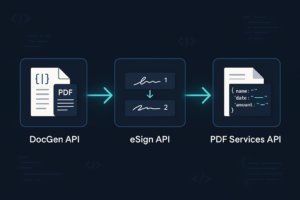
Contract lifecycle management API pipeline diagram linking DocGen, eSign, and PDF Services APIs with arrows

How to build contract lifecycle workflows with an API

Most teams automate signatures and stop there, leaving drafting, approvals, and data entry manual. This guide shows you how to automate contract workflows with an API, chaining Foxit DocGen, eSign, and PDF Services through eSign webhooks. You get working Python code that takes every contract from template to structured data without a single manual hand-off.

API Webinars

Explore Real-World Use Cases, Live Demos, and Best Practices.
Our technical team walks through practical applications of Foxit APIs with live Q&A, hands-on demos, and clear integration strategies. Whether you're comparing tools or actively building, these sessions are designed to help you move faster with fewer roadblocks

What You'll Learn