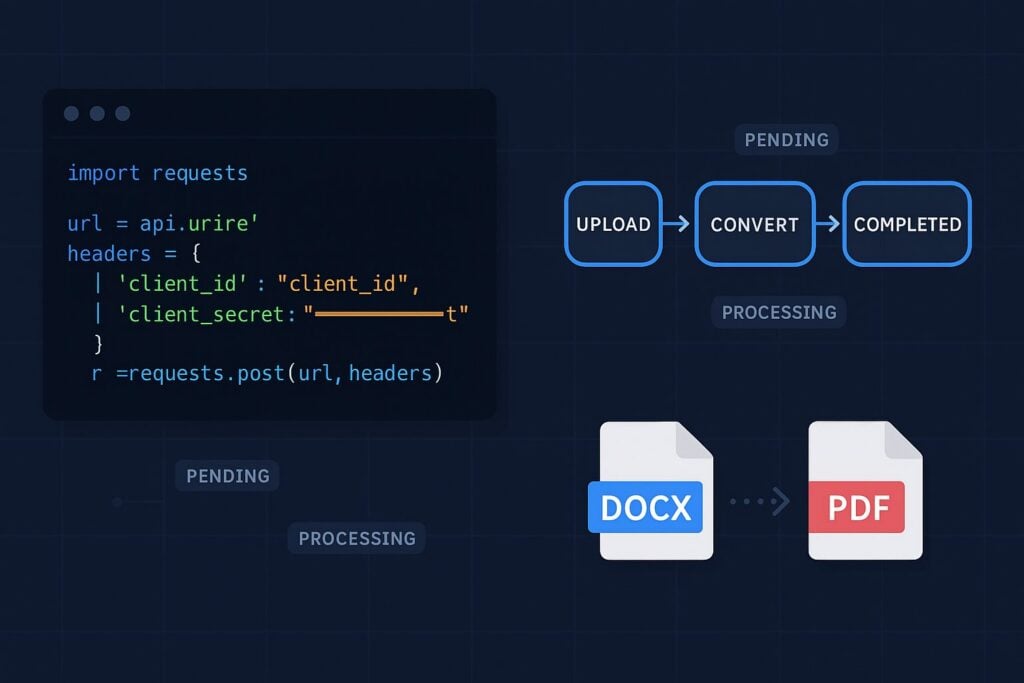
Automated document pipelines demand conversion tooling that accepts a file, queues a job, and returns clear status at every step. The Foxit PDF Services API gives you exactly that: a four-endpoint async flow covering upload, convert, poll, and download. Each step returns a typed payload, the task model exposes four explicit states with a numeric progress field, and error codes map cleanly to distinct recovery paths.
This tutorial walks through every step of that flow in Python 3 with the requests library, plus cURL equivalents for each call. You’ll have a runnable convert.py script you can drop into a pipeline today.
Prerequisites
Before you run a single line of this tutorial, get the following in place. Each item links to its canonical install or setup guide.
- Python 3.8 or newer — verify with
python3 --version. The script uses only standard library modules plus one external package, so any modern 3.x will do. - pip — bundled with Python 3.4+. Verify with
python3 -m pip --version. - A virtual environment — isolates project dependencies so they don’t collide with system Python or other projects. See the venv tutorial for platform-specific activation commands.
- The
requestslibrary — the only third-party dependency in this walkthrough. Installed inside the venv below. - A code editor — Visual Studio Code with the Python extension is a solid default, but PyCharm, Sublime Text, or any editor you like will work.
- cURL — pre-installed on macOS and most Linux distros. Windows users can install from the official site or use WSL.
- A Foxit Developer account — register for free (no credit card required). The Foxit Developer Portal provisions a default application with your
CLIENT_IDandCLIENT_SECRETimmediately after signup.
Set up the project workspace:
mkdir foxit-docx-to-pdf && cd foxit-docx-to-pdf
python3 -m venv .venv
source .venv/bin/activate   # Windows: .venv\Scripts\activate
pip install requests
Export your credentials as environment variables so the script never sees them as hardcoded strings:
export CLIENT_ID=your_client_id_here
export CLIENT_SECRET=your_client_secret_hereimport os
CLIENT_ID = os.environ.get("CLIENT_ID")
CLIENT_SECRET = os.environ.get("CLIENT_SECRET")
BASE_URL = "https://na1.fusion.foxit.com"All four API calls go to https://na1.fusion.foxit.com. The developer portal also offers a live sandbox and pre-built Postman collections if you want to verify calls in a GUI before scripting.
For a sample DOCX to work with right away, download input.docx directly from the foxitsoftware/developerapidemos GitHub repository and save it to your working directory.
How the Auth Model Works
The Foxit PDF Services API authenticates through named request headers. Pass client_id and client_secret directly on every call:
headers = {
    "client_id": CLIENT_ID,
    "client_secret": CLIENT_SECRET,
}json_headers = {
"client_id": CLIENT_ID,
"client_secret": CLIENT_SECRET,
"Content-Type": "application/json",
}The API expects the raw key/secret pair in those named headers. Wrapping credentials in an Authorization: Bearer header instead returns 400, since the required client_id and client_secret headers are missing.
Step 1 and Step 2: Upload the DOCX and Initiate Conversion
Step 1: Upload the DOCX File
POST /pdf-services/api/documents/upload accepts the file as multipart/form-data and returns a documentId that every subsequent call needs.
import requests

def upload_doc(file_path: str) -> str:
    url = f"{BASE_URL}/pdf-services/api/documents/upload"
    headers = {
        "client_id": CLIENT_ID,
        "client_secret": CLIENT_SECRET,
    }
    with open(file_path, "rb") as f:
        files = {"file": (os.path.basename(file_path), f)}
        response = requests.post(url, headers=headers, files=files)
    response.raise_for_status()
    return response.json()["documentId"]
cURL equivalent:
curl -X POST "https://na1.fusion.foxit.com/pdf-services/api/documents/upload" \
  -H "client_id: $CLIENT_ID" \
  -H "client_secret: $CLIENT_SECRET" \
  -F "[email protected]"
Uploaded files carry a 100 MB cap and are automatically deleted after 24 hours. A documentId scopes to the current upload session and expires with the source file, so treat it as ephemeral.
Step 2: Initiate the PDF Conversion
POST /pdf-services/api/documents/create/pdf-from-word accepts a JSON body with the documentId and returns a taskId. The API handles 10 to 10,000+ conversions per day across production pipelines, queuing jobs asynchronously to avoid blocking the connection until the PDF is ready.
import json

def convert_to_pdf(document_id: str) -> str:
    url = f"{BASE_URL}/pdf-services/api/documents/create/pdf-from-word"
    headers = {
        "client_id": CLIENT_ID,
        "client_secret": CLIENT_SECRET,
        "Content-Type": "application/json",
    }
    payload = {"documentId": document_id}
    response = requests.post(url, headers=headers, data=json.dumps(payload))
    response.raise_for_status()
    return response.json()["taskId"]
cURL equivalent:
curl -X POST "https://na1.fusion.foxit.com/pdf-services/api/documents/create/pdf-from-word" \
  -H "client_id: $CLIENT_ID" \
  -H "client_secret: $CLIENT_SECRET" \
  -H "Content-Type: application/json" \
  -d '{"documentId": "<your_document_id>"}'
The endpoint returns 202 Accepted, confirming the job is queued. It also accepts .doc, .rtf, .dot, .dotx, .docm, .dotm, and .wpd files through the same documentId input, so legacy Word formats work through the same pipeline.
Step 3: Polling the Task Status
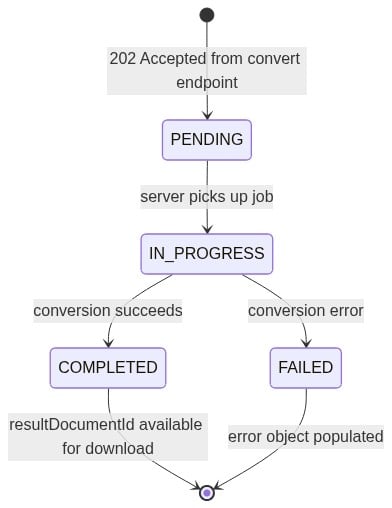
GET /pdf-services/api/tasks/{task-id} returns four fields you need to act on in your polling loop:
status: one ofPENDING,IN_PROGRESS,COMPLETED, orFAILEDprogress: int32, 0 to 100resultDocumentId: populated when status reachesCOMPLETEDerror: populated when status reachesFAILED
The task state machine advances in one direction: PENDING to IN_PROGRESS, then to either COMPLETED or FAILED.
import time

def poll_task(task_id: str, max_attempts: int = 30) -> str:
    url = f"{BASE_URL}/pdf-services/api/tasks/{task_id}"
    headers = {
        "client_id": CLIENT_ID,
        "client_secret": CLIENT_SECRET,
    }
    for attempt in range(max_attempts):
        response = requests.get(url, headers=headers)
        response.raise_for_status()
        data = response.json()
        status = data.get("status")
        progress = data.get("progress", 0)
        print(f"Attempt {attempt + 1}: status={status}, progress={progress}%")
        if status == "COMPLETED":
            return data["resultDocumentId"]
        if status == "FAILED":
            raise RuntimeError(f"Conversion failed: {data.get('error')}")
        time.sleep(2)
    raise TimeoutError(f"Task {task_id} did not complete in {max_attempts} attempts")
Two-second polling intervals work across a wide range of document sizes, and polling more aggressively only consumes rate limit budget without affecting conversion time.
Step 4: Downloading the Converted PDF
GET /pdf-services/api/documents/{documentId}/download fetches the finished PDF. The path parameter in the API reference reads {documentId}, but the value you pass here is the resultDocumentId from the completed poll response. The server assigns that ID to the generated PDF output at conversion time, making it the correct identifier to use at this step.
Stream the response to disk with stream=True and iter_content(chunk_size=8192). Buffering a large PDF fully into memory before writing it causes problems on high-volume pipelines.
def download_result(result_document_id: str, output_path: str) -> None:
    url = f"{BASE_URL}/pdf-services/api/documents/{result_document_id}/download"
    headers = {
        "client_id": CLIENT_ID,
        "client_secret": CLIENT_SECRET,
    }
    with requests.get(url, headers=headers, stream=True) as response:
        response.raise_for_status()
        with open(output_path, "wb") as f:
            for chunk in response.iter_content(chunk_size=8192):
                if chunk:
                    f.write(chunk)
The cURL equivalent uses the --output flag to write directly to disk:
curl -X GET "https://na1.fusion.foxit.com/pdf-services/api/documents/<result_document_id>/download" \
  -H "client_id: $CLIENT_ID" \
  -H "client_secret: $CLIENT_SECRET" \
  --output output.pdf
To verify the output, check response.headers.get("Content-Type") for application/pdf, or inspect the first four bytes of the written file for the %PDF magic bytes if your pipeline requires format validation.
Error Handling for Production
The Foxit PDF Services API documentation covers 400, 404, 413, and 500 across the four endpoints. The 401 appears on authentication failures as a practical case even though it’s absent from the documented example responses. Each status code points to a specific root cause with a concrete recovery path:
- 400: malformed request body or unsupported file type. Validate the input file path and extension before calling
upload_doc(). - 401: credential misconfiguration. Verify that CLIENT_ID and CLIENT_SECRET are exported in your shell and that the header names are lowercase
client_idandclient_secret. - 404: the
documentIdhas expired. The server deletes uploaded files after 24 hours, so the convert and download endpoints return 404 for anydocumentIdpast that window. Re-upload the source file and restart from the upload step. An expired or unknowntaskIdon the poll endpoint behaves differently: it returns HTTP 200 withstatus: "FAILED"and anerrorobject whosemessagereads"task is not exist". The poll loop’sFAILEDbranch already catches that case. - 413: file exceeds the 100 MB upload cap. Pre-check with
os.path.getsize()before uploading, or split the document. - 500: transient server error. Apply exponential backoff with a ceiling of 3 retries (wait times of 1s, 2s, and 4s).
def call_with_retry(fn, *args, max_retries: int = 3, **kwargs):
    for attempt in range(max_retries + 1):
        try:
            return fn(*args, **kwargs)
        except requests.HTTPError as e:
            code = e.response.status_code
            if code == 400:
                raise ValueError(
                    "Bad request. Confirm the input is a supported Word format."
                ) from e
            if code == 401:
                raise PermissionError(
                    "Authentication failed. Check CLIENT_ID and CLIENT_SECRET env vars."
                ) from e
            if code == 404:
                raise FileNotFoundError(
                    "Document or task expired (24h TTL). Re-upload and retry."
                ) from e
            if code == 413:
                raise OverflowError(
                    "File too large. The upload cap is 100 MB."
                ) from e
            if code == 500 and attempt < max_retries:
                wait = 2 ** attempt  # 1s, 2s, 4s
                print(f"Server error. Retrying in {wait}s ({attempt + 1}/{max_retries})")
                import time
                time.sleep(wait)
                continue
            raise
Pipeline authors should treat documentId values as ephemeral: each one expires with its source file after 24 hours, so pipeline code that caches documentId values between sessions will see 404s on every convert call, and re-uploading is always the correct recovery path.
The Complete Script
Set your environment variables, then run python convert.py input.docx output.pdf:
import os
import json
import time
import sys
import requests

CLIENT_ID = os.environ.get("CLIENT_ID")
CLIENT_SECRET = os.environ.get("CLIENT_SECRET")
BASE_URL = "https://na1.fusion.foxit.com"


def call_with_retry(fn, *args, max_retries: int = 3, **kwargs):
    for attempt in range(max_retries + 1):
        try:
            return fn(*args, **kwargs)
        except requests.HTTPError as e:
            code = e.response.status_code
            if code == 400:
                raise ValueError(
                    "Bad request. Confirm the input is a supported Word format."
                ) from e
            if code == 401:
                raise PermissionError(
                    "Authentication failed. Check CLIENT_ID and CLIENT_SECRET env vars."
                ) from e
            if code == 404:
                raise FileNotFoundError(
                    "Document or task expired (24h TTL). Re-upload and retry."
                ) from e
            if code == 413:
                raise OverflowError(
                    "File too large. The upload cap is 100 MB."
                ) from e
            if code == 500 and attempt < max_retries:
                wait = 2 ** attempt  # 1s, 2s, 4s
                print(f"Server error. Retrying in {wait}s ({attempt + 1}/{max_retries})")
                time.sleep(wait)
                continue
            raise


def upload_doc(file_path: str) -> str:
    url = f"{BASE_URL}/pdf-services/api/documents/upload"
    headers = {"client_id": CLIENT_ID, "client_secret": CLIENT_SECRET}
    with open(file_path, "rb") as f:
        files = {"file": (os.path.basename(file_path), f)}
        r = requests.post(url, headers=headers, files=files)
    r.raise_for_status()
    return r.json()["documentId"]


def convert_to_pdf(document_id: str) -> str:
    url = f"{BASE_URL}/pdf-services/api/documents/create/pdf-from-word"
    headers = {
        "client_id": CLIENT_ID,
        "client_secret": CLIENT_SECRET,
        "Content-Type": "application/json",
    }
    r = requests.post(url, headers=headers, data=json.dumps({"documentId": document_id}))
    r.raise_for_status()
    return r.json()["taskId"]


def poll_task(task_id: str, max_attempts: int = 30) -> str:
    url = f"{BASE_URL}/pdf-services/api/tasks/{task_id}"
    headers = {"client_id": CLIENT_ID, "client_secret": CLIENT_SECRET}
    for attempt in range(max_attempts):
        r = requests.get(url, headers=headers)
        r.raise_for_status()
        data = r.json()
        status = data.get("status")
        print(f"[{attempt + 1}/{max_attempts}] status={status}, progress={data.get('progress', 0)}%")
        if status == "COMPLETED":
            return data["resultDocumentId"]
        if status == "FAILED":
            raise RuntimeError(f"Conversion failed: {data.get('error')}")
        time.sleep(2)
    raise TimeoutError(f"Task {task_id} did not complete after {max_attempts} attempts")


def download_result(result_document_id: str, output_path: str) -> None:
    url = f"{BASE_URL}/pdf-services/api/documents/{result_document_id}/download"
    headers = {"client_id": CLIENT_ID, "client_secret": CLIENT_SECRET}
    with requests.get(url, headers=headers, stream=True) as r:
        r.raise_for_status()
        with open(output_path, "wb") as f:
            for chunk in r.iter_content(chunk_size=8192):
                if chunk:
                    f.write(chunk)


def convert_docx_to_pdf(input_path: str, output_path: str) -> None:
    print(f"Uploading {input_path}...")
    document_id = call_with_retry(upload_doc, input_path)
    print(f"Uploaded. documentId={document_id}")

    print("Initiating conversion...")
    task_id = call_with_retry(convert_to_pdf, document_id)
    print(f"Queued. taskId={task_id}")

    print("Polling for completion...")
    result_document_id = call_with_retry(poll_task, task_id)
    print(f"Completed. resultDocumentId={result_document_id}")

    print(f"Downloading to {output_path}...")
    call_with_retry(download_result, result_document_id, output_path)
    print("Done.")


if __name__ == "__main__":
    if len(sys.argv) != 3:
        print("Usage: python convert.py <input.docx> <output.pdf>")
        sys.exit(1)
    convert_docx_to_pdf(sys.argv[1], sys.argv[2])
The Foxit PDF Services API also supports merging, compression, linearization, and OCR through additional endpoints. All of them share the same host and header-based auth pattern, so the functions you’ve built here extend naturally as your pipeline grows.
Create your free Foxit developer account and run your first conversion in under five minutes, with no credit card required at signup.
DOCX to PDF API FAQ
Does the Foxit PDF Services API support formats other than .docx?
Yes. The /pdf-services/api/documents/create/pdf-from-word endpoint accepts .doc, .docx, .rtf, .dot, .dotx, .docm, .dotm, and .wpd. The same four-step flow applies for all of them.
How long are uploaded files retained?
Uploaded documents are automatically deleted after 24 hours. Treat documentId values as ephemeral and re-upload whenever you need to convert a file after that window.
What happens if I poll the task endpoint faster than every 2 seconds?
Faster polling consumes rate limit budget without affecting conversion speed. The server determines conversion time based on document complexity and queue load, so polling intervals below 2 seconds add no throughput benefit.
Can I run multiple DOCX-to-PDF conversions in parallel?
Yes. Each upload returns an independent documentId and each conversion returns an independent taskId. Run concurrent conversions by launching multiple threads or async tasks, with each one tracking its own taskId. Python’s concurrent.futures.ThreadPoolExecutor is a straightforward way to manage this.
Where do I get my CLIENT_ID and CLIENT_SECRET?
From the Foxit Developer Portal dashboard, under the default application created at signup. Both values are available immediately after account creation.
Does the API require an OAuth token exchange?
The API authenticates through named request headers. Pass client_id and client_secret directly on every request, and the server reads those credentials on each call.