<

PDF Translation with Verifiable Quality: Build a Confidence-Scored Pipeline with Foxit API and Straker.ai

Most machine translation tools hand back a translated PDF with no signal about which parts to trust — a real problem for contracts, medical forms, and regulatory filings. This guide shows how to build a pipeline that scores every segment before the final render, using Foxit for structural extraction and layout-preserving rendering and Straker.ai for translation plus per-segment quality scoring.
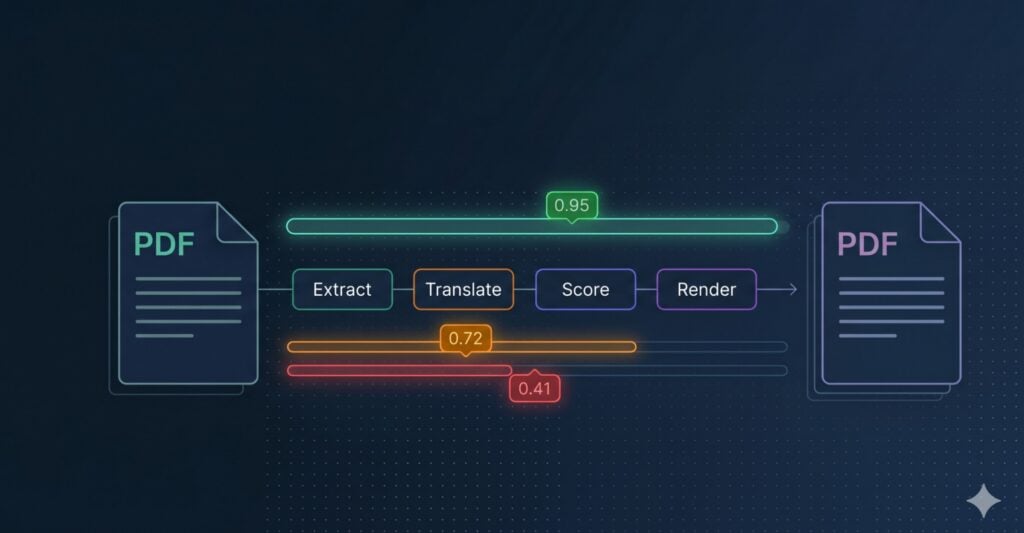
Architecture diagram of a PDF translation API pipeline using Foxit and Straker.ai with per-segment confidence scoring.

Most machine translation tools give you a translated file and nothing else. They do not tell you which parts are correct and which parts are wrong. For a simple blog post, that is fine. For a contract, a medical form, or a legal notice, it is a real problem. A bad translation can sit in the final PDF for days before anyone notices, often only after the document has already been signed or sent.

Teams today are translating more documents, into more languages, and faster than ever. Legal, finance, healthcare, HR, and insurance teams all deal with PDFs where one wrong word can cause a lot of damage: a broken contract, a failed audit, or even a safety issue. Most translation tools were not built to catch these mistakes. They just move text from one language to another. When quality checks happen at all, they usually mean a person reading the final PDF line by line and hoping they spot the errors.

This article shows how to build a better setup. You will learn how to build a PDF translation pipeline that gives every segment a quality score before the final PDF is created. Instead of hoping the translation is right, the pipeline tells you which parts to trust, which parts to review, and which parts to send back to a human translator. All of this happens automatically on every run.

Architecture at a Glance

Before going deeper, it helps to see the full pipeline in one picture. The diagram below traces a source PDF through every stage: extract, translate, score, route, and render. Each box is a single responsibility handled by a single service, with the routing layer acting as the glue you control.

High-level PDF translation API architecture showing source PDF flowing through Foxit structural extract, Straker AI translate and score, routing layer for accept/flag/reject, Foxit layout-preserving render, and final translated PDF.

The pipeline has two external services:

  • Foxit PDF Translation API handles anything PDF-specific. It pulls the structured text out of the source document with element IDs attached, then renders the final PDF back in the original layout (multi-column text, tables, font substitution, image positions) using the approved translations.
  • Straker AI translates each source segment AND scores the translation in the same request. It returns the target text, a numeric score on a 0.0 to 1.0 scale, and a categorical label (bestgoodacceptablebad) for every element ID. This step is pluggable, so you can swap Straker for DeepLGoogle Cloud TranslationAWS Translate, or an in-house NMT if you already have a contract with one of them. The contract between this step and the rest of the pipeline is a flat dict of element IDs to translated text plus per-segment scores.

and one piece of code you own:

  • Routing layer is your business logic. It reads the score, decides whether the segment auto-accepts, flags for human review, or escalates to a translator, and then hands the approved set to Foxit’s render call.

With the shape of the pipeline on the table, the rest of the article works through each piece in order, starting with why per-segment quality scoring is worth the integration effort in the first place.

The Quality Gap

You ship a translated PDF to a legal team. Three days later, compliance flags a clause in the German version. The term “indemnification” was rendered as “Entschädigung” (compensation) rather than “Freistellung” (hold harmless). Your MT pipeline returned a 200 status. Nobody’s alerting on that delta.

Raw machine translation output carries no quality signal by default. Every segment comes back translated, and your pipeline treats them identically regardless of whether the model was confident or guessing. For marketing copy that’s an acceptable tradeoff, but for a loan covenant, a clinical trial protocol, or a regulatory filing, a 95%-accurate translation can still be contractually or legally dangerous because the 5% failure may concentrate precisely in the high-stakes clauses.

A confidence score, in the translation QA context, is a per-segment numeric signal from a verification engine. It tells you how reliable each translated unit is on a scale your system can act on programmatically. High-confidence segments auto-accept, medium-confidence ones queue for post-edit review, and low-confidence segments escalate directly to a human translator before they ever reach the final document.

The compound problem for PDFs specifically is that most translation pipelines strip document structure before the MT engine even sees the text. The extraction step flattens multi-column layouts, collapses table cells, and drops font metadata. By the time you get a translated output, you’ve lost both layout fidelity and any quality signal. The rendered PDF looks wrong and you have no programmatic way to know which segments caused it.

Foxit’s PDF Translation Trial API extracts structured text from a source PDF with element IDs preserved, so the layout blueprint travels alongside the text through the entire workflow. You hand the source segments to Straker AI, which returns the translated text plus a per-segment numeric score and a quality label in a single call. (If you already run DeepL, Google Cloud Translation, AWS Translate, or an in-house NMT Engine, you can drop it in at this step without changing the rest of the pipeline.) Your routing logic decides which segments pass, which get flagged, and which escalate to human review. Foxit’s render endpoint then re-assembles the PDF in the original layout using the accepted translations, giving you a layout-preserved translated PDF with a documentable quality trail attached to every segment.

How the Pipeline Works

Foxit and Straker are two independent APIs that you wire together. Foxit owns PDF structure, extracting structured text keyed by element ID and re-rendering the final PDF in the original layout. Straker AI handles translation and per-segment quality scoring in a single request, returning the translated text alongside a numeric score and a quality label. You own the routing decision that sits between the scores and the render call.

The pipeline runs in seven steps:
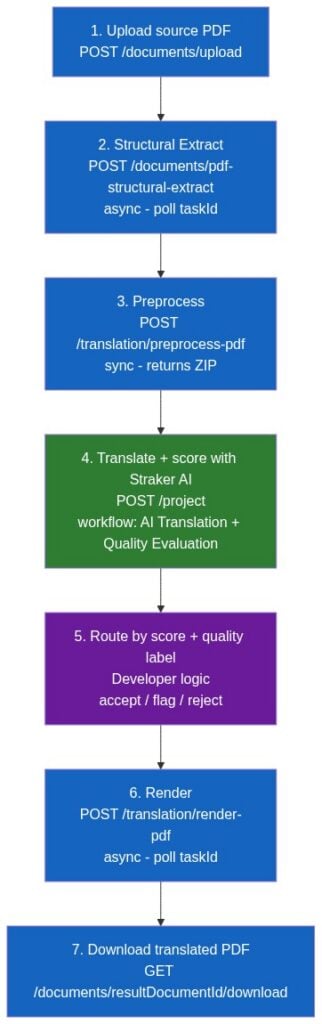
Seven-step PDF translation API pipeline: upload source PDF, structural extract, preprocess, translate and score with Straker AI, route by score, render, and download the translated PDF.

Foxit covers steps 1-3 and 6-7 (PDF structure and rendering). Straker AI covers step 4, producing translations and per-segment quality scores in one round-trip. Step 5 is your business logic.

The Foxit PDF Translation API defines steps 2, 3, and 6. The upload and download calls use the general PDF Services endpoints. Straker AI is a separate API at https://api-verify.straker.ai. You submit XLF 1.2 files containing source segments and Straker returns the translated target_text per segment plus a numeric score (0.0 to 1.0) and a quality label (bestgoodacceptablebad). Because Foxit’s ExtractedText.json is a flat { "elementId": "text" } map, and XLF trans-unit IDs round-trip through Straker’s external_id field unchanged, the element IDs Foxit emits are the same IDs that come back with translations and scores attached. That alignment is what makes programmatic routing possible.

One clarification for readers who’ve seen the Foxit-Straker partnership announcement: that partnership covers Foxit eSignature Services, enabling end users to translate and sign documents in the eSign product. That’s an end-user feature. The PDF Translation Trial API used here is a separate developer surface. Its OpenAPI spec (v2.2.0) contains zero Straker references, and the preprocess-pdf documentation explicitly instructs developers to “translate the text in ExtractedText.json using your preferred translation tool.” You wire the two APIs together manually. This tutorial uses Straker AI as the default translation engine because it produces translations and quality scores in the same call, but you can substitute DeepL, Google Cloud Translation, AWS Translate, or your own NMT at step 4 without changing the Foxit calls.

Credentials and Setup

Get your Foxit credentials at app.developer-api.foxit.com/pricing. The free Developer plan gives you 20 AI credits per month with no credit card and no sales call required. Once you’ve signed in, your Client ID and Client Secret appear in the developer dashboard. Every Foxit API call requires both in the request headers as client_id and client_secret (lowercase snake_case). Export them in your shell as FOXIT_CLIENT_ID and FOXIT_CLIENT_SECRET so the code below reads them from the environment rather than hard-coding secrets.

For Straker, sign up at straker.ai/ai-platform/verify for API access. Straker issues a UUID-style API token that you send as a bearer token on every call (Authorization: Bearer <your-token>). The API lives at https://api-verify.straker.ai and its full reference is published at api-verify.straker.ai/docs. Export your token as STRAKER_API_KEY for the code below. You can confirm the token works and check your balance with a quick GET /user/balance. Both services offer trial access, so you can build and test the full pipeline before any procurement conversation.

Before you finalize your language matrix, check both APIs for supported languages. Foxit’s render endpoint accepts 23 target language codes (enzhzh_twfrdeesitptnljakothvihiruartrplsvnonbda, and fi). Straker AI identifies languages by UUID rather than ISO code. You fetch the full list with GET /languages and look up the UUID for your target (for example, 917FF728-0725-A033-1278-33025F49CA40 is French (France), 917FF7D8-9107-0BF8-97EE-065C20F453DE is German). The intersection of the two sets determines your production language coverage.

If you already have a contract with DeepL, Google Cloud Translation, AWS Translate, or an in-house NMT service, you can swap that engine in at step 4. The pipeline contract upstream (Foxit element IDs mapped to source strings) and downstream (a dict of {element_id: {score, quality, target_text}} feeding the router) does not change. The code below uses Straker AI by default because the same API returns the translation and the quality signal in one call.

Building the PDF Translation Pipeline

The complete seven-step pipeline runs in Python using requestsjsonzipfileos, and the standard-library xml.etree.ElementTree for building XLF. The first snippet covers Foxit steps 1-3 (upload, structural extraction, and preprocessing).

import requests
import json
import zipfile
import io
import time

FOXIT_BASE = "https://na1.fusion.foxit.com/pdf-services/api"
HEADERS = {
    "client_id": "YOUR_CLIENT_ID",
    "client_secret": "YOUR_CLIENT_SECRET"
}

def poll_task(task_id: str) -> dict:
    """Poll GET /tasks/{task_id} until COMPLETED or FAILED."""
    while True:
        r = requests.get(f"{FOXIT_BASE}/tasks/{task_id}", headers=HEADERS)
        r.raise_for_status()
        data = r.json()
        status = data.get("status")
        if status == "COMPLETED":
            return data
        if status == "FAILED":
            raise RuntimeError(f"Task {task_id} failed: {data.get('error')}")
        # PENDING or IN_PROGRESS: wait and retry
        time.sleep(3)

# Step 1: Upload source PDF
with open("source.pdf", "rb") as f:
    upload_resp = requests.post(
        f"{FOXIT_BASE}/documents/upload",
        headers=HEADERS,
        files={"file": ("source.pdf", f, "application/pdf")}
    )
upload_resp.raise_for_status()
source_document_id = upload_resp.json()["documentId"]

# Step 2: Structural Extract (async - must complete before preprocess)
extract_resp = requests.post(
    f"{FOXIT_BASE}/documents/pdf-structural-extract",
    headers=HEADERS,
    json={"documentId": source_document_id}
)
extract_resp.raise_for_status()  # 202 Accepted
extract_task_id = extract_resp.json()["taskId"]

extract_result = poll_task(extract_task_id)
extracted_doc_id = extract_result["resultDocumentId"]

# Step 3: Preprocess (synchronous - returns 200, no polling needed)
preprocess_resp = requests.post(
    f"{FOXIT_BASE}/documents/translation/preprocess-pdf",
    headers=HEADERS,
    json={"documentId": extracted_doc_id}
)

# Errors from preprocess-pdf per the Foxit spec:
#   400 VALIDATION_ERROR      - "Document ID is required"
#   500 INTERNAL_SERVER_ERROR - "Failed to preprocess document"
preprocess_resp.raise_for_status()
preprocess_result_id = preprocess_resp.json()["resultDocumentId"]

# Download the ZIP containing ExtractedText.json and StructureInfo.json
zip_resp = requests.get(
    f"{FOXIT_BASE}/documents/{preprocess_result_id}/download",
    headers=HEADERS
)
zip_resp.raise_for_status()

with zipfile.ZipFile(io.BytesIO(zip_resp.content)) as zf:
    extracted_text = json.loads(zf.read("ExtractedText.json"))
    # StructureInfo.json: do not modify - the render step requires it untouched
    # structure_info = json.loads(zf.read("StructureInfo.json"))

# extracted_text is now {"elementId1": "original text", "elementId2": "original text", ...}

The preprocess step is synchronous, which means you get a 200 OK directly with the resultDocumentId. No polling required. The ZIP it produces contains two files: ExtractedText.json maps every element ID to its original text, and StructureInfo.json carries the full layout blueprint (bounding boxes, font metadata, column positions). You pass StructureInfo.json to the render step unmodified. Modifying it breaks the render because it’s the mechanism that makes layout preservation possible.

The second snippet covers steps 4-7, calling Straker AI to translate and score every segment in one round-trip, routing by score, rendering the translated PDF, and downloading the result. Straker’s AI Translation and Quality Evaluation workflow accepts a source-only XLF and returns a translated target_text per segment alongside the numeric score and the quality label, so the same response feeds both the translation choice and the routing decision.

import xml.etree.ElementTree as ET

STRAKER_BASE = "https://api-verify.straker.ai"
STRAKER_TOKEN = "STRAKER_API_KEY"
STRAKER_HEADERS = {"Authorization": f"Bearer {STRAKER_TOKEN}"}

# Straker identifies languages by UUID. Look these up once via GET /languages
# and cache them. Full list: https://api-verify.straker.ai/languages
STRAKER_LANG_FRENCH = "917FF728-0725-A033-1278-33025F49CA40"
STRAKER_LANG_GERMAN = "917FF7D8-9107-0BF8-97EE-065C20F453DE"

# Workflow UUID for "AI Translation and Quality Evaluation". Fetch the full
# list of workflows once via GET /workflow and cache the UUID for the one you
# want; this workflow produces both the translation and the per-segment score.
STRAKER_WORKFLOW_AI_TRANSLATE_AND_EVAL = "390b47a9-d5dc-46ae-92e2-56c43d128c44"


def build_xlf_1_2_source_only(source_lang: str, target_lang: str,
                              sources: dict) -> bytes:
    """
    Build a minimal XLF 1.2 document with source segments and empty targets.
    trans-unit/@id preserves Foxit's element IDs; Straker surfaces the same
    value as `external_id` on the segments it returns, so the keys round-trip.
    """
    ns = "urn:oasis:names:tc:xliff:document:1.2"
    ET.register_namespace("", ns)
    xliff = ET.Element(f"{{{ns}}}xliff", {"version": "1.2"})
    file_el = ET.SubElement(xliff, f"{{{ns}}}file", {
        "source-language": source_lang,
        "target-language": target_lang,
        "datatype": "plaintext",
        "original": "foxit-extract",
    })
    body = ET.SubElement(file_el, f"{{{ns}}}body")
    for element_id, source_text in sources.items():
        unit = ET.SubElement(body, f"{{{ns}}}trans-unit", {"id": element_id})
        ET.SubElement(unit, f"{{{ns}}}source").text = source_text
        ET.SubElement(unit, f"{{{ns}}}target")  # empty - Straker fills it in
    return b'<?xml version="1.0" encoding="UTF-8"?>\n' + ET.tostring(xliff, encoding="utf-8")


# Step 4: Translate and score every segment with Straker AI in one call.
def translate_and_score_with_straker(sources: dict, source_lang_code: str,
                                     target_lang_uuid: str) -> dict:
    """
    Submit source-only XLF to Straker's AI Translation + Quality Evaluation
    workflow. Returns a dict keyed by Foxit element ID ->
    {"score": float|None, "quality": str, "target_text": str}.
    """
    xlf_bytes = build_xlf_1_2_source_only(source_lang_code, "fr", sources)

    # 4a. Create the project on the AI Translation + Quality Evaluation
    # workflow. confirmation_required=false commits the token cost
    # immediately; set to true to review cost and call POST /project/confirm
    # before processing begins.
    create_resp = requests.post(
        f"{STRAKER_BASE}/project",
        headers=STRAKER_HEADERS,
        files={"files": ("segments.xlf", xlf_bytes, "application/xliff+xml")},
        data={
            "languages": target_lang_uuid,
            "title": "Foxit PDF translation batch",
            "workflow_id": STRAKER_WORKFLOW_AI_TRANSLATE_AND_EVAL,
            "confirmation_required": "false",
        },
    )
    create_resp.raise_for_status()
    project_id = create_resp.json()["project_id"]

    # 4b. Poll the project until it reports COMPLETED.
    while True:
        status_resp = requests.get(
            f"{STRAKER_BASE}/project/{project_id}", headers=STRAKER_HEADERS
        )
        status_resp.raise_for_status()
        project = status_resp.json()["data"]
        if project["status"] == "COMPLETED":
            break
        if project["status"] in ("FAILED", "PROCESSING_FAILED", "CANCELED"):
            raise RuntimeError(f"Straker project {project_id} failed")
        time.sleep(3)

    # 4c. Fetch the per-segment translations + scores. file_uuid is returned
    # in the project payload.
    file_uuid = project["source_files"][0]["file_uuid"]
    seg_resp = requests.get(
        f"{STRAKER_BASE}/project/{project_id}/segments/{file_uuid}/{target_lang_uuid}",
        headers=STRAKER_HEADERS,
    )
    seg_resp.raise_for_status()

    results = {}
    for seg in seg_resp.json()["segments"]:
        element_id = seg["external_id"]  # matches the Foxit key we packed into XLF
        t = seg["translation"]
        results[element_id] = {
            "score": t["score"],          # float 0.0 to 1.0, or None
            "quality": t["quality"],      # "best" | "good" | "acceptable" | "bad"
            "target_text": t["target_text"],  # Straker's translation
        }
    return results

scored = translate_and_score_with_straker(
    extracted_text,
    source_lang_code="en",
    target_lang_uuid=STRAKER_LANG_FRENCH,
)

# Step 5: Route by score and quality label (developer-controlled business logic).
HIGH_THRESHOLD = 0.85
LOW_THRESHOLD = 0.65

accepted = {}
flagged_for_review = {}
rejected = {}

for element_id, verdict in scored.items():
    score = verdict["score"] or 0.0
    if verdict["quality"] == "best" or score >= HIGH_THRESHOLD:
        accepted[element_id] = verdict["target_text"]
    elif verdict["quality"] == "bad" or score < LOW_THRESHOLD:
        rejected[element_id] = {"original": extracted_text[element_id],
                                 "score": score, "quality": verdict["quality"]}
    else:
        flagged_for_review[element_id] = {"translation": verdict["target_text"],
                                           "score": score, "quality": verdict["quality"]}

# Build the render payload. Foxit's render expects every key from the original
# ExtractedText.json. Accepted segments use the scored translation; flagged and
# rejected segments fall back to the original source text so the layout is not
# broken by missing keys. In production, replace the fallback with human-
# reviewed text once it is available, or hold the render step until review
# completes.
render_payload = {}
for element_id, original_text in extracted_text.items():
    if element_id in accepted:
        render_payload[element_id] = accepted[element_id]
    else:
        render_payload[element_id] = original_text

# Step 6: Render (async)
# translatedFile is the modified ExtractedText.json with translated values, same keys
translated_json_bytes = json.dumps(render_payload).encode("utf-8")

render_resp = requests.post(
    f"{FOXIT_BASE}/documents/translation/render-pdf",
    headers=HEADERS,
    data={
        "sourceDocumentId": source_document_id,
        "preprocessResultDocumentId": preprocess_result_id,
        "targetLanguage": "fr"
        # Optional: "pageRangeStart": 1, "pageRangeEnd": 10
    },
    files={"translatedFile": ("ExtractedText.json", translated_json_bytes, "application/json")}
)

# Errors from render-pdf per the Foxit spec:
#   400 VALIDATION_ERROR    - "Either translatedFile or translatedTextDocumentId must be provided"
#   400 VALIDATION_ERROR    - "Unsupported target language: xx"
#   500 RENDER_START_FAILED - "Failed to start render: service unavailable"
render_resp.raise_for_status()
render_task_id = render_resp.json()["taskId"]

render_result = poll_task(render_task_id)
output_doc_id = render_result["resultDocumentId"]

# Step 7: Download translated PDF
pdf_resp = requests.get(
    f"{FOXIT_BASE}/documents/{output_doc_id}/download",
    headers=HEADERS
)
pdf_resp.raise_for_status()
with open("translated_output.pdf", "wb") as f:
    f.write(pdf_resp.content)

print(f"Done. Accepted: {len(accepted)}, Flagged: {len(flagged_for_review)}, Rejected: {len(rejected)}")

The render call is multipart/form-data. You pass sourceDocumentId (the original PDF’s document ID from step 1), preprocessResultDocumentId (from step 3), targetLanguage (one of the 23 supported codes), and translatedFile (the modified ExtractedText.json with translated values and original keys). The alternative is uploading the translated JSON first via the upload endpoint and passing its ID as translatedTextDocumentId instead. At least one of the two must be present, or you’ll get a 400 VALIDATION_ERROR.

The render operation is asynchronous. It returns 202 Accepted immediately with a taskId, and the actual rendering runs in the background on Foxit’s side. You must poll GET /tasks/{taskId} on a fixed interval, every 3 seconds is the recommended cadence, until the status flips to COMPLETED before you try to download the output. Skipping the poll, or treating the initial 202 response as if it were a finished render, will cause the program to crash and interrupt the rest of the pipeline because the result document is not yet written when the task is still IN_PROGRESS. The poll_task helper from the first snippet already implements this loop with a 3-second time.sleep between checks and surfaces a FAILED status as a RuntimeError, so reuse it here rather than reading render_resp.json() directly. The same polling discipline applies to the structural extract step (step 2), which is also asynchronous.

Scoring and Routing

Straker AI generates both the translation and the quality signal in this pipeline. Foxit’s responses carry document IDs and task statuses; the translation choice and the per-segment score are entirely Straker’s contribution.

Each segment in the /project/{id}/segments/{file_id}/{language_id} response carries three values you care about. target_text is Straker’s translation. score is a float between 0.0 and 1.0 (it may be null for segments where the model has no confidence signal). quality is a categorical label Straker assigns alongside the numeric score (bestgoodacceptable, or bad). You can route on either signal, or combine them. The table below shows a combined policy calibrated for compliance-sensitive documents. These are starting points; your production system should calibrate per language pair and domain, since a French legal contract demands different thresholds than a Spanish marketing brochure.

Straker verdictActionRationale
quality == "best" or score >= 0.85Auto-accept, include in renderHigh confidence output; suitable for fully automated workflows
quality in ("good", "acceptable") or 0.65 - 0.84Flag segment by element ID for post-edit reviewMedium confidence; a human reviewer checks the flagged segments before the final render runs
quality == "bad" or score < 0.65Reject segment, escalate to human translatorLow confidence output; the model is unreliable for this segment

The element ID key structure matters here. Foxit’s ExtractedText.json keys are packed into XLF trans-unit IDs, and Straker surfaces the same value in its response’s external_id field. That means every entry in your flagged_for_review dictionary carries enough information for a reviewer to open the source document, find the exact element by ID, and return an approved translation. You write the approved translation back into the same key, then trigger the render step. This produces a documentable audit trail. For every element ID in the output PDF, you can show the original text, Straker’s translation, the Straker score and quality label, and whether a human approved it. In regulated industries (finance, legal, healthcare), that’s the evidence your compliance team needs to sign off on an automated localization workflow, and it aligns with ISO 18587, the international standard for post-editing of machine translation output.

Straker AI can also route low-confidence output to expert reviewers automatically when configured through the Straker platform. Check straker.ai/ai-platform/verify for the workflow configuration options.

Layout Preservation

Foxit’s render step preserves multi-column text flow, embedded table cell structure, images at their original positions, headers and footers, and font substitution for target-language character sets. That means CJK scripts (Japanese, Chinese, Korean) render correctly with appropriate glyph substitution, and Arabic output renders right-to-left without manual post-processing.

StructureInfo.json is what makes this possible. When the preprocess step runs, it produces both the text map (which you hand to Straker) and the layout blueprint (which you hand back to Foxit unmodified at render time). The render engine maps translated text back to the original element positions using this blueprint, reflowing text within the same bounding boxes. Because the structure data travels alongside the text through the entire pipeline, Foxit never needs to reconstruct the layout from scratch.

Generic MT pipelines export raw text, losing all spatial relationships, translate it, then attempt to rebuild the PDF from nothing. Tables merge into continuous text, columns collapse to a single flow, and CJK font substitution fails because the rebuilding step has no record of what fonts were originally in use.

Limitations to Test

Text expansion is the first limitation worth stress-testing. English to German translation typically increases text length by 20-35%, and English to Arabic can run even longer. Foxit’s render engine handles reflow within bounding boxes, but extreme length changes in tight table cells or narrow columns may overflow. Test with your actual document types before you commit to a production deployment.

Complex layout edge cases are the second limitation. Overlapping text boxes, embedded SVG charts with text labels, and PDFs with non-standard encoding may produce imperfect renders. The structural extraction step covers standard PDF text elements well, but edge-case layouts require manual review of the rendered output before you sign off on the pipeline for a given document class.

Try It Now

Sign up for Foxit’s free Developer plan and a Straker AI account, grab credentials for both, and run the pipeline from the section above against a real document. An invoice, a multi-page contract, or a regulatory filing works well for testing because each has tables, mixed-column layouts, and high-stakes text segments.

After the render completes, verify four things in the output PDF:

  • Tables retain cell structure
  • Multi-column text flows correctly in the target language
  • Images remain in their original positions
  • Fonts render correctly for the target script

Cross-reference the confidence scores from Straker against the rendered segments to calibrate your production thresholds. You may find that legal terminology in German warrants a 0.90 auto-accept threshold while product description text in French is fine at 0.80.

The complete Foxit Translation Trial API reference covers the full parameter list and response schema for preprocess-pdf and render-pdf. The Foxit Structural Extraction Trial API reference documents the structural extract endpoint. Straker’s translation and scoring API documentation lives at straker.ai/ai-platform/verify.

Looking ahead, Straker’s dashboard lists a native Foxit integration as Coming Soon (no release date announced at the time of writing), described as a workflow to translate PDF contracts with Foxit, verify them with experts, and finalize them for signing. When it ships, it’s likely to compress several of the manual steps above into a single call. The underlying mechanics (structural extract, translation, per-segment scoring, routing, render) will remain the same logical stages, so the pipeline you build today stays a useful mental model for reasoning about the native version when it arrives.

For production-scale implementation patterns and how Straker’s translation and verification layer integrates into enterprise localization pipelines, register for the upcoming joint Foxit + Straker.ai webinar with Lee Konstanty from Straker. Get your Foxit API credentials | Get started with Straker AI

PDF Translation API FAQ

A PDF translation API with confidence scoring is a service that translates PDF documents and returns a per-segment quality signal alongside each translation. Instead of handing back a single translated file, the API tells you which segments are high-confidence (safe to auto-accept), which are medium-confidence (queue for human review), and which are low-confidence (escalate to a translator). This pipeline combines Foxit’s PDF Translation Trial API for structural extraction and layout-preserving rendering with Straker.ai for translation and scoring in a single call.

The pipeline runs in seven steps: upload the source PDF to Foxit, run structural extraction to get element-ID-keyed text, preprocess to produce ExtractedText.json and StructureInfo.json, send segments to Straker AI’s “AI Translation and Quality Evaluation” workflow which returns translated text plus a 0.0–1.0 score and a quality label, route each segment programmatically by score, then call Foxit’s render endpoint to rebuild the PDF in the original layout. Foxit owns PDF structure, Straker owns translation and scoring, and your code owns the routing decision.

For marketing copy, raw machine translation output is usually fine. For contracts, medical forms, clinical trial protocols, or regulatory filings, a 95%-accurate translation can still be legally dangerous because the 5% failure may land on a high-stakes clause — like “indemnification” rendered as “Entschädigung” (compensation) instead of “Freistellung” (hold harmless). Per-segment confidence scores let you route low-confidence segments to human reviewers before they reach the final document, producing the audit trail compliance teams need under standards like ISO 18587.

Yes. The translation step is pluggable. The contract upstream — Foxit element IDs mapped to source strings — and downstream — a dict of element IDs to translated text feeding the render call — does not change if you swap the engine. DeepL, Google Cloud Translation, AWS Translate, or an in-house NMT engine all work. The trade-off is that Straker AI returns translation plus quality score in one call, while other engines require a separate verification step if you want confidence signals.

Foxit’s preprocess step produces two files: ExtractedText.json with element-ID-keyed text, and StructureInfo.json with the full layout blueprint (bounding boxes, font metadata, column positions, image locations). You modify only ExtractedText.json with translations and pass StructureInfo.json to the render endpoint untouched. The render engine reflows translated text within the original bounding boxes, handles font substitution for CJK and Arabic scripts, and preserves multi-column layouts, tables, and image positions — without rebuilding the PDF from scratch.

Foxit’s render endpoint accepts 23 target language codes: en, zh, zh_tw, fr, de, es, it, pt, nl, ja, ko, th, vi, hi, ru, ar, tr, pl, sv, no, nb, da, and fi. Straker AI identifies languages by UUID rather than ISO code, fetched via GET /languages. Your production language coverage is the intersection of both sets — check both APIs before finalizing your language matrix.

A reasonable starting policy for compliance-sensitive documents: auto-accept segments with quality == “best” or score >= 0.85, flag for post-edit review at 0.65–0.84 or quality in (“good”, “acceptable”), and reject for human translation at score < 0.65 or quality == “bad”. These are starting points — calibrate per language pair and domain. A French legal contract may warrant a 0.90 auto-accept threshold while a Spanish marketing brochure is fine at 0.80. Run the pipeline against a representative sample of your real documents and tune from there.

Explore More Blogs
Architecture diagram of a PDF translation API pipeline using Foxit and Straker.ai with per-segment confidence scoring.

PDF Translation with Verifiable Quality: Build a Confidence-Scored Pipeline with Foxit API and Straker.ai

Most machine translation tools hand back a translated PDF with no signal about which parts to trust — a real problem for contracts, medical forms, and regulatory filings. This guide shows how to build a pipeline that scores every segment before the final render, using Foxit for structural extraction and layout-preserving rendering and Straker.ai for translation plus per-segment quality scoring.

Foxit PDF Structural Extraction API engine extracting tables, forms, and text from scanned PDFs.

Extract Anything from Any PDF: Inside Foxit’s Advanced Extraction Engine

Basic PDF extraction libraries break on scanned documents, complex tables, and form fields, leaving downstream pipelines starved of clean data. Foxit’s PDF Structural Extraction API combines OCR, layout recognition, and AI parsing to return all twelve PDF element types as structured JSON, ready for RAG, BI, and CRM workflows.

API Webinars

Explore Real-World Use Cases, Live Demos, and Best Practices.
Our technical team walks through practical applications of Foxit APIs with live Q&A, hands-on demos, and clear integration strategies. Whether you're comparing tools or actively building, these sessions are designed to help you move faster with fewer roadblocks

What You'll Learn