Seven Google Document AI processors hit end-of-life on 30 June 2026. Google is retiring the Enterprise Document OCR, Expense, Custom classifier, Custom splitter, Invoice, Pay slip, and Bank statement parsers, and processor versions follow a rolling schedule where each version is deprecated six months after a newer one ships.
For many teams, the deprecation notice does more than prompt a migration ticket. It opens a broader question about whether Google Document AI is still the right foundation for the extraction stack, and what the credible Google Document AI alternatives actually look like once you compare them on implementation detail rather than feature lists.
This article gives you the technical specifics to make that call, comparing the Foxit PDF Structural Extraction API and Google Document AI across five dimensions that drive the real build-vs-switch decision, covering integration overhead, extraction architecture, output schema, document and language coverage, and data residency.
Five axes for evaluating Google Document AI alternatives
Any extraction API comparison lives or dies on the criteria it uses. These five dimensions cover what a production engineering team actually cares about, going well beyond a proof-of-concept benchmark.
Integration complexity measures how many external dependencies you must provision before your first call returns data. A tool that requires a GCP project, service account, IAM role grants, and billing enablement adds meaningful friction before a single byte of document gets processed. For teams with CI/CD pipelines and strict access-control policies, every new cloud dependency is a potential blocker.
Extraction architecture covers how the API reads a document internally, including what happens when a file mixes scanned pages, machine-typed text, and embedded tables in the same document.
Output schema determines how much post-processing your downstream systems require. A flat token list forces you to reconstruct document structure yourself, while a pre-labeled semantic taxonomy reduces that burden before the data reaches your RAG pipeline or BI dashboard.
Document and language coverage sets the practical ceiling on what you can run through the API in production. Language breadth matters especially for multi-region workloads processing invoices or contracts in non-Latin scripts.
Data residency encompasses where documents travel during processing, how long they remain on third-party infrastructure, and what audit evidence you can produce for compliance reviews. For regulated industries, this dimension often decides the question before the others are evaluated.
Integration setup and authentication overhead
Getting to a first call on Google Document AI requires a GCP project, a service account with an IAM role assignment (at minimum roles/documentai.apiUser), billing enablement on the project, and an environment variable pointing to a downloaded service account JSON key. Teams outside the GCP ecosystem absorb all of that as onboarding cost before any extraction runs.
Foxit’s path is shorter. Create a free developer account at the Foxit Developer Portal, retrieve your client_id and client_secret from the default application, and attach them as two HTTP headers on every request. The entire setup takes minutes and requires nothing from GCP.
Prerequisites
To run the code below you need Python 3.8+, the requests library installed into an isolated virtual environment with pip, an editor such as VS Code with the Python extension (PyCharm or Sublime Text work equally well), and a free Foxit developer account from app.developer-api.foxit.com/sign-up to supply the two credential values. Scaffold the workspace in one shot:
mkdir foxit-extract && cd foxit-extract && python3 -m venv .venv && source .venv/bin/activate && pip install requestsExtraction then follows a four-step asynchronous workflow, annotated at each step:
export FOXIT_CLIENT_ID="your_client_id"
export FOXIT_CLIENT_SECRET="your_client_secret"
Extraction then follows a four-step asynchronous workflow, annotated at each step:
import os
import requests
import time

BASE_URL = "https://na1.fusion.foxit.com/pdf-services/api"
HEADERS = {
    "client_id": os.environ["FOXIT_CLIENT_ID"],          # lowercase snake_case, not Authorization: Bearer
    "client_secret": os.environ["FOXIT_CLIENT_SECRET"]
}

# Step 1: Upload the document (multipart/form-data, field name "file", max 100 MB)
with open("contract.pdf", "rb") as f:
    upload_resp = requests.post(
        f"{BASE_URL}/documents/upload",
        headers=HEADERS,
        files={"file": f}
    )
document_id = upload_resp.json()["documentId"]

# Step 2: Start structural extraction
extract_resp = requests.post(
    f"{BASE_URL}/documents/pdf-structural-extract",
    headers=HEADERS,
    json={"documentId": document_id}
)
task_id = extract_resp.json()["taskId"]

# Step 3: Poll every 2 seconds until COMPLETED (statuses are uppercase)
result_doc_id = None
for _ in range(60):
    status_resp = requests.get(
        f"{BASE_URL}/tasks/{task_id}",
        headers=HEADERS
    )
    payload = status_resp.json()
    if payload["status"] == "COMPLETED":
        result_doc_id = payload["resultDocumentId"]
        break
    if payload["status"] == "FAILED":
        raise RuntimeError(f"Extraction failed: {payload}")
    time.sleep(2)

if result_doc_id is None:
    raise TimeoutError("Extraction did not complete within 120 seconds")

# Step 4: Download the ZIP archive containing StructureInfo.json
result_resp = requests.get(
    f"{BASE_URL}/documents/{result_doc_id}/download",
    headers=HEADERS
)
with open("extraction_result.zip", "wb") as out:
    out.write(result_resp.content)
Authentication uses lowercase snake_case header names on every call. The upload endpoint accepts multipart/form-data with the PDF file under the field name file, with a 100 MB size limit per document.
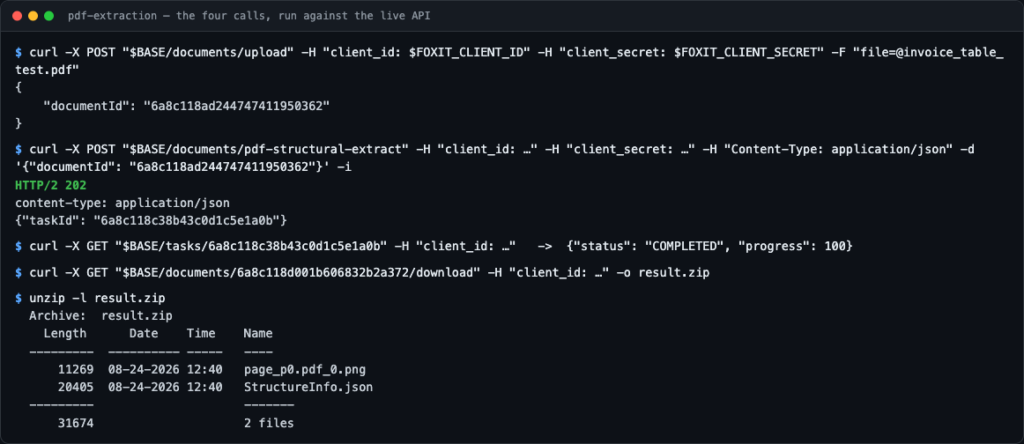
The four calls against the live API. Note the 202 on the extract call and the COMPLETED status before any download is attempted.
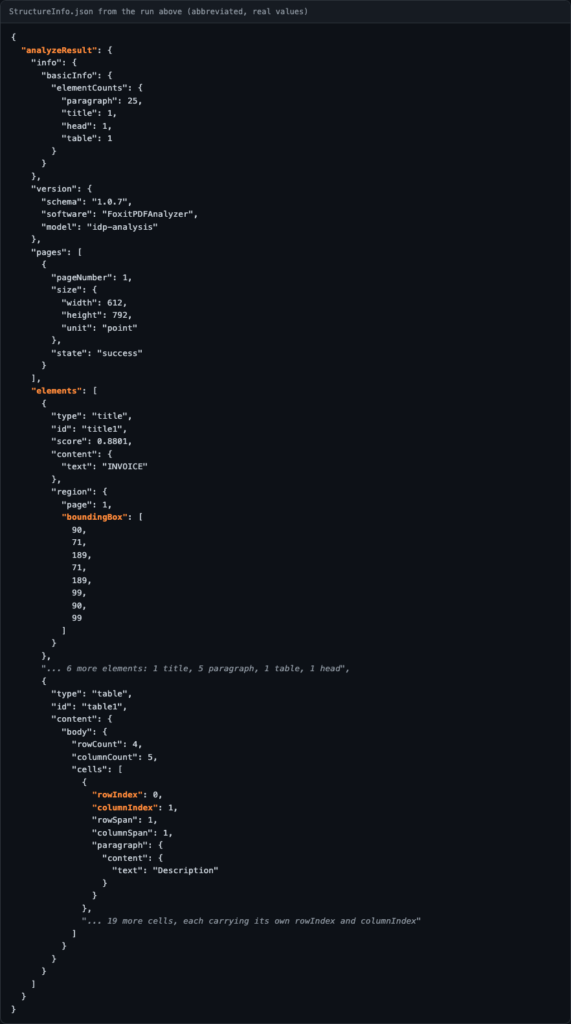
The response shape from that run. Every element sits under analyzeResult, and text elements carry region.boundingBox as an eight-number polygon rather than a four-number rectangle. A table element is the exception, since its region comes back empty and its geometry sits in a regions array instead.
The table below puts both platforms side by side on the integration and output dimensions:
| Dimension | Google Document AI | Foxit PDF Structural Extraction API |
|---|---|---|
| Account setup | GCP project, service account, IAM role, billing | Free developer account, no credit card |
| Authentication | Service account JSON key via GOOGLE_APPLICATION_CREDENTIALS | client_id and client_secret as HTTP headers |
| Call pattern | Synchronous or async depending on processor | Four-step async (upload, extract, poll, download) |
| Output format | Document proto (blocks, paragraphs, tokens) | StructureInfo.json with 12 semantic element types |
| Cloud dependency | GCP-native; Vertex AI integration available | Cloud-agnostic, any stack |
| Language coverage | Varies by processor | 200+ languages via dedicated OCR layer |
Common mistakes and troubleshooting
Four failure modes account for most of the time lost on a first integration. Only the first one reports itself clearly; the other three surface as exceptions in your own code rather than as API errors.
- Sending an
Authorization: Bearerheader : PDF Services authenticates with two separate lowercase headers,client_idandclient_secret. There is no token exchange step and no OAuth flow to implement. This is the one mistake the API names outright, returning HTTP 400 with{"allow": false, "reason": "Missing credentials: provide both 'client_id' and 'client_secret' headers."}. - Treating the extract call as synchronous :
pdf-structural-extractreturns HTTP 202 with ataskId, never the result. Read the status fromGET /tasks/{taskId}, which also returns aprogresspercentage, and note that the values are uppercase (PENDING,IN_PROGRESS,COMPLETED,FAILED). Comparing against lowercase strings produces a poll loop that never exits, which is why the sample above also breaks out onFAILEDand caps its attempts. - Reading
region.boundingBoxon every element : text elements such astitle,head, andparagraphcarryregionas{page, boundingBox}, but atableelement returns an emptyregionand puts its geometry in aregionsarray instead. A loop that assumes one shape raisesKeyErroron the first document containing a table. - Indexing
elementsat the JSON root : every result nests underanalyzeResult, sodata["elements"]raisesKeyErrorwhiledata["analyzeResult"]["elements"]works. The same applies to uploads above the 100 MB per-document limit, which fail at the upload step rather than during extraction.
Extraction architecture, output format, and document coverage
Google Document AI’s processing model is processor-centric. You select a processor type (Invoice Parser, Form Parser, Document OCR), and the service returns a Document proto containing position-anchored blocks, paragraphs, and tokens. Semantic meaning depends on which processor you deployed, so a Form Parser and an Invoice Parser return structurally similar protos but with different field-level annotations.
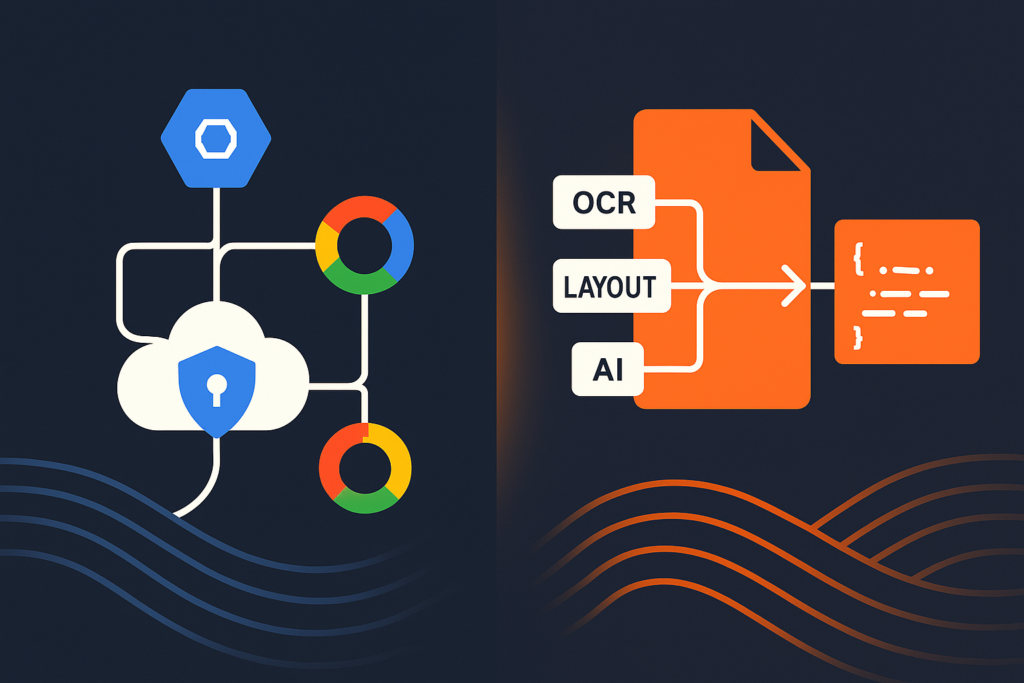
Foxit’s PDF Structural Extraction API runs three coordinated layers on every document, regardless of document type. The OCR layer handles rasterized content across more than 200 languages. The layout recognition layer maps spatial relationships and table cell grids, resolving multi-column text blocks, overlapping text-image regions, stamped signatures on top of text fields, and engineering drawing annotations. The AI parsing layer then classifies content semantically, assigning each element a type from a fixed taxonomy of twelve labels.

The rendered pipeline. Every document takes the same path, so there is no processor to choose per document type.
Those twelve types appear in StructureInfo.json inside the returned ZIP archive, covering title, head, paragraph, table, image, headerFooter, form, hyperlink, footnote, sidebar, annotation, and formula. Each element carries its reading-order position and spatial coordinates, so the structure your downstream system receives reflects how a human would read the original document rather than raw storage order.
The practical delta shows up in RAG pipeline integration. Google Document AI’s Document proto gives you text and coordinates, but your pipeline needs a post-processing step to decide what each block means semantically. With StructureInfo.json, you filter to table elements, iterate rows, and pass the content directly to your embedding model, because the semantic classification happened upstream.
The output schema comparison below clarifies where each platform puts the interpretive work:
| Schema dimension | Google Document AI (Document proto) | Foxit (StructureInfo.json) |
|---|---|---|
| Structure model | Hierarchical, covering pages, blocks, paragraphs, and tokens | Flat list of semantically typed elements with spatial metadata |
| Semantic labels | Field-level labels tied to specific processor selection | 12 fixed element types, processor-independent |
| Table representation | Cell tokens within a table block | Dedicated table element type with cell grid coordinates |
| Reading order | Implicit (coordinate ordering required client-side) | Explicit, preserved in element sequence |
| Formula support | Limited | Dedicated formula element type |
Document coverage on both platforms is broad. Foxit processes scanned PDFs, image-based PDFs, multi-page contracts, invoices, and form-heavy documents. The layout layer handles edge cases that trip up simpler OCR tools, including stamped signatures overlapping text fields, mixed raster-vector pages, and footnote regions that appear spatially disconnected from their reference markers.
Data privacy and ecosystem independence
Regulated workloads ask two questions before any technical evaluation, starting with where the document goes and what audit evidence you can produce.
Foxit’s API compliance page documents SOC 2 Type II independent audit, HIPAA-aligned features with Business Associate Agreement (BAA) support, and GDPR-supporting features including redaction, anonymization, and secure metadata handling. Foxit’s AI service documentation states that input documents and results are held temporarily and deleted within 24 hours. If your organization requires a BAA, Foxit can provide one.
Google Document AI routes all processing through GCP infrastructure. Teams subject to data residency requirements need to select the appropriate GCP region, review Google’s data processing addendum, and confirm their cloud agreement covers the specific data types being processed. That review is standard for teams already operating within GCP, but it adds a compliance surface for teams that are not.
Foxit’s API is cloud-agnostic. Your team calls it from any existing stack, passing two credential headers, and extracts documents without spinning up a GCP project, provisioning a storage bucket, or accepting GCP billing terms. For teams evaluating outside GCP, that independence cuts both technical and commercial risk from the decision.
When to use Google Document AI and when to use Foxit
The right choice depends on your existing infrastructure and what your extraction output needs to do.
| Scenario | Best fit | Key reason |
|---|---|---|
| Teams already deep in GCP who want Vertex AI integration | Google Document AI | Native Vertex AI pipeline support and Google-managed processor versions reduce ops overhead |
| High-volume PDF processing outside the GCP ecosystem | Foxit | Cloud-agnostic with credit-based pricing, with no GCP billing or IAM dependency |
| Workloads with strict data residency or BAA requirements | Foxit | SOC 2 Type II audit, HIPAA-aligned features with BAA support, and GDPR-supporting features |
| Teams that need semantic element classification ready for downstream consumption | Foxit | StructureInfo.json delivers 12 pre-labeled element types without a client-side post-processing step |
The fourth scenario is worth walking through in detail. Your team has a contract review pipeline that needs to extract all tables and footnotes from multi-page PDFs and push them into a downstream system. With the Foxit API, the workflow runs like this:
- Upload the PDF to
/pdf-services/api/documents/uploadand receive adocumentId. - POST to
/pdf-services/api/documents/pdf-structural-extractwith thedocumentIdand receive ataskId. - Poll
/pdf-services/api/tasks/{taskId}every two seconds untilstatusequalsCOMPLETED. - Download the result ZIP from
/pdf-services/api/documents/{resultDocumentId}/downloadand parseStructureInfo.json.
Once you have StructureInfo.json, filtering to table and footnote elements is a single-pass list comprehension. The labeled elements arrive with spatial coordinates and reading order intact, so your downstream system receives structured, ordered data ready for indexing, embedding, or display, with no second model call, no coordinate sorting, and no block-level classification required.
Teams running active Vertex AI pipelines in GCP, with processors not among the seven being retired, have no technical reason to switch. For everyone else, the four API calls above give you a working extraction against your own documents in minutes.
Google Document AI FAQ
What is Google Document AI?
Google Document AI is a managed cloud service for document parsing and data extraction, built on GCP processors. You select a processor type (such as Invoice Parser, Form Parser, or Document OCR), send a document via the API, and receive a structured Document proto containing text, coordinates, and field-level annotations. All processing runs on Google Cloud Platform infrastructure.
How does the Foxit PDF Structural Extraction API differ from Google Document AI?
Foxit’s API runs three coordinated processing layers on every document (OCR, layout recognition, and AI parsing) regardless of document type, while Google Document AI uses a processor model where semantic classification depends on the specific processor you select. The output schemas also differ. Foxit returns StructureInfo.json inside a ZIP archive with twelve pre-labeled element types preserving reading order and spatial relationships, while Google Document AI returns a Document proto with hierarchical blocks, paragraphs, and tokens that require client-side semantic interpretation. Foxit is also cloud-agnostic and needs no GCP project, while Google Document AI is GCP-native.
What are Foxit’s data-handling and compliance commitments for the extraction API?
Foxit’s API compliance page documents SOC 2 Type II independent audit, HIPAA-aligned features with Business Associate Agreement (BAA) support, and GDPR-supporting features including redaction, anonymization, and secure metadata handling. Foxit’s AI service documentation states that input documents and results are held temporarily and deleted within 24 hours. Foxit does not claim HIPAA certification or GDPR certification, and the API compliance page does not state that documents are never stored, so teams with specific retention requirements should review the documentation directly and request a BAA where applicable.
What output format does the Foxit PDF Structural Extraction API return?
The API returns a ZIP archive containing StructureInfo.json. That file classifies every element in the document using one of twelve labeled types, including title, head, paragraph, table, image, headerFooter, form, hyperlink, footnote, sidebar, annotation, and formula. Each element includes spatial coordinates and reading-order position, so the structure your downstream system receives reflects how a human would read the original document. Table elements carry cell grid coordinates, making row-level data extraction straightforward without additional parsing.
Can I try the Foxit PDF Structural Extraction API without a paid plan?
Yes. Create a free developer account at app.developer-api.foxit.com/sign-up. No credit card is required. Once you register, your client_id and client_secret are available immediately in the Developer Portal, and you can run extractions against your own documents using the API Playground or the downloadable Postman collection.
How does Foxit handle scanned or image-based PDFs?
Foxit’s OCR layer processes rasterized content across more than 200 languages, so scanned PDFs and image-based documents (including TIFFs) are processable without pre-conversion. The layout recognition layer then maps spatial relationships and resolves edge cases such as multi-column text blocks, overlapping text-image regions, and footnote regions that appear spatially disconnected from their reference markers.
Which document types does Google Document AI support after the June 2026 deprecations?
After 30 June 2026, Google is retiring the Enterprise Document OCR, Expense, Custom classifier, Custom splitter, Invoice, Pay slip, and Bank statement processors. Remaining processors (including Form Parser and Document OCR for non-deprecated versions) continue to operate on their own rolling deprecation schedule, where each version is deprecated six months after a newer one ships. Teams relying on any of the seven retired processors need to migrate before that date.
Conclusion
Across all five axes, the practical difference between Google Document AI alternatives comes down to how much infrastructure you take on to reach a first result. Foxit requires two credential headers. Google’s setup adds a GCP project, service account, IAM configuration, and billing enablement before you process a single document. Foxit’s three-layer extraction model (OCR, layout recognition, AI parsing) delivers semantic classification across every document type without processor selection. StructureInfo.json‘s twelve labeled element types reduce client-side post-processing compared to Google’s Document proto. Both platforms handle the major document types, and Foxit’s 200-plus language OCR covers non-Latin scripts across all document categories. Foxit’s SOC 2 Type II audit, HIPAA-aligned BAA support, and GDPR-supporting features give regulated teams a documented compliance baseline, and the cloud-agnostic model means your team runs document extraction without taking on GCP billing, IAM governance, or ecosystem lock-in.
Create a free developer account at app.developer-api.foxit.com/sign-up, no credit card required, and run the four-step extraction against your own document today.