You’ve inherited a document workflow built on Word macros, save-as duplication, and a shared drive folder someone named “FINAL_v3.” Every time a contract needs to go out, someone opens the master template, manually replaces the client name and date, exports to PDF, and emails it. Scaled to one deal a week, that works. Scaled to a thousand deals a quarter, it breaks down in ways that are hard to trace and painful to fix.
Document generation APIs make the relationship between input data and output document deterministic. This article covers how that pipeline is structured, what the token contract between template and data looks like, and what the actual API call looks like from a POST request to a decoded file.
What Document Generation Is
Document generation is the programmatic production of populated, formatted documents from a template and a structured data source. Three components are always present: a template (the structure and placeholders), a data payload (the values to inject), and a rendering engine (the API that merges the two and produces the final file).
These components map cleanly onto a separation of concerns. The template owner controls layout, language, and branding. The data owner controls what goes in each field. The rendering engine enforces the merge contract between them. When that separation holds, changing the template doesn’t require a code change, and changing the data schema requires only a template update.
Document generation occupies a distinct category from the adjacent tools that crowd the same search space. E-signature platforms collect binding signatures on completed documents. Document management systems store, version, and retrieve files. OCR and extraction tools pull structured data out of existing documents. Document generation puts data in.
Why Manual Document Workflows Break Under Load
Manual Word-based workflows fail in three predictable ways when volume grows.
Version drift happens when templates live in shared folders across teams. One team updates the disclaimer text, another adds a new liability clause, and a third is still using a version from Q3. After six months, your organization has five variants of the same contract template producing inconsistent output, with no reliable way to identify which version generated any given document.
Merge errors compound at scale. Copy-paste and mail-merge workflows both require human coordination of field-by-field substitution. When an invoice ships with the previous client’s name, or a renewal letter shows last year’s rates, the error traces back to a single manual step that had no validation layer. A 0.5% error rate is invisible at 20 documents a month. At 4,000 documents a month, it means 20 wrong documents going out the door.
Audit trail absence creates compliance exposure. A manually assembled document carries no machine-readable record of what data produced it or when. When a regulator asks which policy documents were generated from the October 2024 rate table, the answer requires a manual search through email threads and file name timestamps.
Programmatic generation makes each of these problems tractable. The same JSON payload processed against the same template version always produces the same output, and every generation event is a logged API call with a traceable input and output. The document generation software market is valued at $4.05B in 2025 and projected to grow at a 9.2% CAGR through 2035, driven by enterprise automation and compliance requirements that manual workflows can’t satisfy at scale.
How Template-Driven Generation Works: Tokens, Loops, and Conditionals
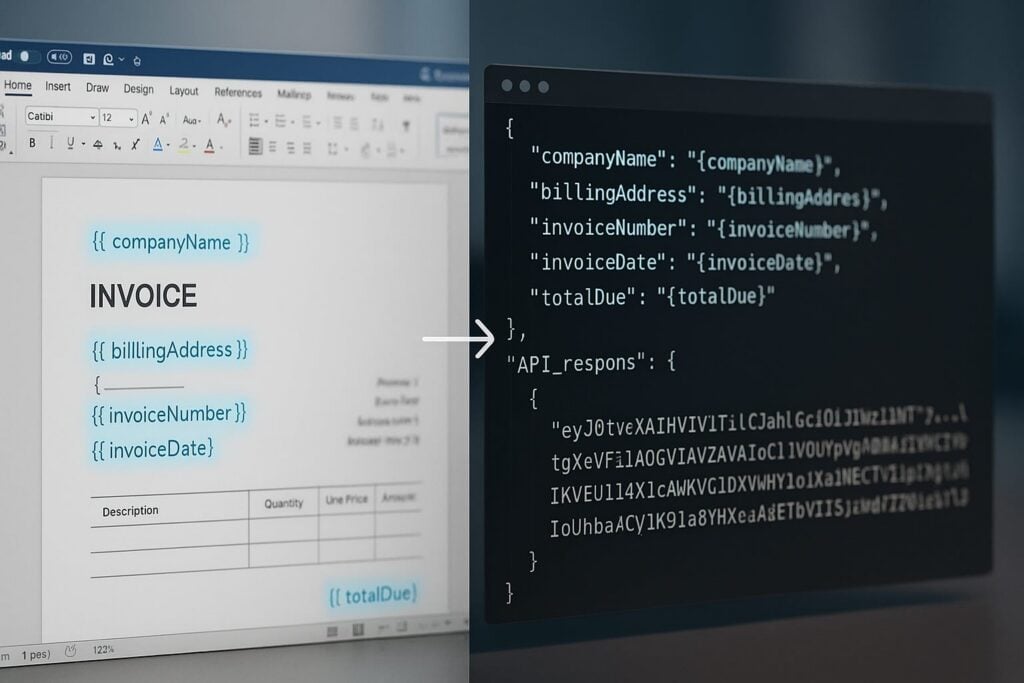
Foxit’s DocGen API uses standard Microsoft Word as the template authoring environment. Template authors work in Word, inserting double-bracket placeholders whose key names map directly to keys in the JSON payload supplied at generation time. This keeps template ownership with the people who understand the document content, with no proprietary editor and no additional software license required.
The basic token syntax covers three common cases:
{{ companyName }}renders the string value ofcompanyNamefrom the payload{{ invoiceDate \@ MM/dd/yyyy }}applies a Word date picture string to the raw date value (the leading\@is required; the friendly form without it renders blank){{ totalDue \# "$#,##0.00" }}formats a numeric value as currency using a Word numeric picture string (a friendly keyword like\# Currencyis unsupported and renders blank)
A minimal JSON payload for a template containing those three tokens would be:
{
"companyName": "Meridian Analytics",
"invoiceDate": "2025-06-15",
"totalDue": 8250.0
} The rendering engine walks the template, matches each token to the corresponding key in the payload, and writes the formatted value into the output. Template authors work entirely in Word, while the engine handles token resolution, format application, and output assembly.
Repeating sections use loop delimiters to produce table rows that repeat for each element in a JSON array. Placing {{TableStart:lineItems}} before a table row and {{TableEnd:lineItems}} after it tells the engine to emit one row per object in the lineItems array. Both delimiters must sit in cells of the same Word table row. Inside that loop, {{ROW_NUMBER}} auto-increments across rows, and a footer row immediately below the loop can use {{=SUM(ABOVE) \# "$#,##0.00"}} to compute and format a column total, so a ten-line invoice produces a correctly numbered, fully summed table with no post-processing.
Conditional content uses Word’s native Field Code View (opened with ALT + F9) to write IF-field conditions that show or hide text blocks based on data values. A clause that should appear only when contractType equals "enterprise" lives inside a field condition, and the rendering engine evaluates it at generation time. There’s no separate scripting layer and no custom expression language to learn.
The three components converge at a single API endpoint: your base64-encoded DOCX template and JSON data payload go in together, and the generated document comes back in the same HTTP response.

The API Pipeline: From POST Request to Final Document
The Foxit DocGen API compresses the generation pipeline into a single synchronous call. You POST to one endpoint with your template and data, and you receive the generated document in the same HTTP response, with no separate template upload step, no job ID to poll, and no webhook to configure for individual document generation.
Before building a generation workflow, you can use the Analyze Document API to scan a DOCX template and return a list of all embedded tokens, which confirms the token-to-key mapping before you commit to a data schema. That’s a single POST to a separate endpoint on the same host, and it returns a structured list of placeholder names and their types.
For the generation call itself, the dev-tier endpoint is:
POST https://na1.fusion.foxit.com/document-generation/api/GenerateDocumentBase64
Authentication passes your client_id and client_secret as custom HTTP headers alongside Content-Type: application/json. You retrieve both credentials from the dashboard at account.foxit.com/site/sign-up after activating your free developer plan, with no OAuth exchange and no session setup required before your first call.
The request body takes three fields:
base64FileStringis your DOCX template, base64-encoded. Keep the source.docxunder 4 MB (the practical ceiling for a single request) since base64 encoding inflates the payload by roughly 33%. If a template runs large, embedded images are usually the cause, so compress them through Word’s Picture Format settings before exporting.documentValuesis the JSON object whose keys map to token names in the templateoutputFormatis the string"pdf"or"docx", lowercase and exact (the API returns HTTP 500 for any other value, including"PDF"or"DOCX")
For an invoice template with a lineItems array, the full curl command carries your base64-encoded DOCX, the matching data object, and your credentials in the request headers:
curl -X POST "https://na1.fusion.foxit.com/document-generation/api/GenerateDocumentBase64" \
-H "client_id: YOUR_CLIENT_ID" \
-H "client_secret: YOUR_CLIENT_SECRET" \
-H "Content-Type: application/json" \
-d '{
"base64FileString": "BASE64_ENCODED_DOCX_HERE",
"documentValues": {
"companyName": "Meridian Analytics",
"invoiceDate": "2025-06-15",
"totalDue": 8250.00,
"lineItems": [
{ "description": "Platform License", "quantity": 1, "unitPrice": 8250.00 }
]
},
"outputFormat": "pdf"
}' The API returns a synchronous JSON response carrying a human-readable message, the fileExtension for naming the output file, and the base64FileString containing the generated document:
{
"message": "PDF Document Generated Successfully",
"fileExtension": "pdf",
"base64FileString": "JVBERi0xLjQK..."
} message gives you a status string for logging. fileExtension tells you whether you received "pdf" or "docx", which lets you construct the output filename programmatically without parsing the message string. base64FileString is the generated document. Your application decodes that value and routes the resulting bytes to storage, email delivery, a document management system, or whatever downstream step your workflow requires.
For teams evaluating the API before writing integration code, the Foxit developer portal includes a Postman collection with GenerateDocumentBase64 preconfigured. You can load the collection, paste your credentials and a test template, send the request, and confirm the response structure before writing a single line of application code. Foxit also provides SDKs for Node.js, Python, Java, C#, and PHP if you prefer a language-native integration path over raw HTTP.
Where Organizations Are Actually Using This
Five industries where the template-to-API pipeline produces direct operational value:
Insurance carriers face renewal cycles that generate thousands of policy documents each quarter. They pull policyholder data from their CRM, pass it as a JSON payload to the generation API, and produce populated renewal packets without manual assembly. Each document reflects current policy terms from the system of record, cutting the per-document preparation time from minutes of human work to milliseconds of API latency.
Healthcare providers need patient intake packets and HIPAA disclosure forms ready before each appointment. Clinics pull patient demographic and consent data from their EHR system, generate the packet at appointment scheduling time, and deliver it to the patient portal. The data source is the live EHR record, so the document always reflects current information.
Government agencies and courts produce case-related documents (orders, notices, motions) with fixed structure and variable case data. API-based generation means each document draws directly from structured court records, reducing transcription errors and producing a machine-readable audit trail that links every output document to the specific data that created it.
High-tech and SaaS companies trigger NDA and quote generation directly from their CRM or CPQ tools. A deal record in Salesforce or HubSpot becomes the JSON payload, and the generation API produces a finalized, formatted document without a manual drafting step. The document lands in the deal room minutes after the pricing conversation closes.
Education institutions generate hundreds or thousands of admission offer letters during enrollment periods. Student data from the Student Information System becomes the payload, and each letter reflects the correct program, scholarship amount, and enrollment deadline for that individual student. What a staff member would take days to produce manually runs as a scheduled batch job.
What to Evaluate When Choosing a Document Generation API
Output format coverage deserves attention before you commit to an API. Receiving both PDF and DOCX from the same endpoint matters when your workflow requires human review before a document is finalized. PDF suits direct delivery. DOCX suits draft-and-review cycles where a lawyer or editor needs to modify the generated document before it goes to signature. APIs that produce only PDF force you to finalize at generation time, which eliminates the review step entirely.
The execution model determines whether an API fits your latency requirements. Synchronous APIs return the document in the same HTTP response, which works for real-time generation triggered by a user action or a CRM event. Asynchronous APIs accept a job and require polling or a webhook to retrieve the result, which works better for batch jobs processing thousands of documents in a run. Confirm which model the API offers before you design your integration, because retrofitting from synchronous to async (or vice versa) affects how you handle errors, retries, and downstream routing. Foxit’s DocGen API is synchronous, so individual requests resolve in a single HTTP round trip.
Template portability determines your long-term maintenance cost. A template stored as a standard DOCX file is editable by anyone with Word, version-controllable in Git, and portable across environments. A template stored in a proprietary format requires the vendor’s editor for every update, and losing access to that editor means losing the ability to maintain your own document logic. Word-based templates also let business users own content changes without involving a developer.
Compliance posture matters as soon as your documents contain PII, PHI, or financial data. Confirm the provider’s certifications before sending real records through the API. SOC 2, GDPR compliance, and HIPAA certification are the relevant checks for most enterprise document workflows. A provider’s architecture (multi-tenant SaaS vs. single-tenant hosted) also affects how you address data residency requirements.
Developer onboarding cost is a real selection criterion. A free tier with immediate credential access, a working Postman collection, and SDK support for your language stack lets your team validate fit in hours. A procurement process that requires a sales conversation before you can run a test extends your evaluation cycle by weeks. Foxit’s developer plan is free, credit-card-free, and gives you dashboard access and credentials immediately, so your team can make an informed build-vs-buy decision based on a working integration rather than a demo.
Getting Started: Generate Your First Document Today
A working end-to-end generation pipeline takes under an hour to set up:
Go to account.foxit.com/site/sign-up and activate a free Developer plan. Dashboard access and credentials are immediate, with no credit card and no sales call required.
Retrieve your Client ID and Client Secret from the dashboard.
Grab a ready-to-use template, or author your own. Download
invoice_simple.docxfor the smallest possible smoke test, orinvoice_table.docxif you want the full loop,{{ROW_NUMBER}}, and{{=SUM(ABOVE)}}round-trip. To build your own instead, open Microsoft Word, add two or three{{ tokenName }}placeholders, and save as DOCX. Base64-encode the file usingbase64 -i template.docxon macOS or Linux, or[Convert]::ToBase64String([IO.File]::ReadAllBytes("template.docx"))in Windows PowerShell.Open the Postman collection linked on the Foxit API page, load the
GenerateDocumentBase64request, paste your base64-encoded template intobase64FileString, and add a JSON object todocumentValueswith keys matching your placeholder names. SetoutputFormatto"pdf"and send the request. Copy thebase64FileStringvalue from the JSON response and decode it. You now have a generated PDF.
From this point, connecting to a real data source is the only remaining step. Pull a record from your CRM, a row from your database, or a response from an upstream API, map its fields to the token names in your template, and pass the result as documentValues. That connection makes the pipeline production-ready, and every document it generates becomes a deterministic, auditable function of the data that produced it.
Activate your free Foxit Developer plan (no credit card, no sales call) and run your first document generation call in minutes at account.foxit.com/site/sign-up.

Document Generation Pipeline FAQ
What is document generation?
Document generation is the programmatic production of populated, formatted documents from a template plus a structured data source. Three components are always present: a template holding the layout and placeholders, a JSON data payload holding the values, and a rendering engine that merges the two into a final PDF or DOCX. The same payload against the same template always produces the same output, which makes the process deterministic and auditable.
How is document generation different from e-signature or OCR tools?
They occupy adjacent but distinct categories. E-signature platforms like DocuSign collect binding signatures on documents that already exist. Document management systems store, version, and retrieve files. OCR and extraction tools pull structured data out of existing documents. Document generation does the opposite — it puts data in, producing a new populated document from a template. Many workflows chain them: generate a contract, then route it for signature.
What does a Foxit DocGen API request and response look like?
You POST to GenerateDocumentBase64 with three fields: base64FileString (your base64-encoded DOCX template), documentValues (the JSON object whose keys match your tokens), and outputFormat ("pdf" or "docx", lowercase). Authentication uses client_id and client_secret headers. The synchronous response returns a message, a fileExtension, and a base64FileString containing the generated document, which your app decodes and routes downstream.
How do you create repeating table rows in a document generation template?
Use loop delimiters. Place {{TableStart:lineItems}} before a Word table row and {{TableEnd:lineItems}} after it, with both delimiters in cells of the same row. The engine emits one row per object in the lineItems array. Inside the loop, {{ROW_NUMBER}} auto-increments, and a footer row can use {{=SUM(ABOVE) \# "$#,##0.00"}} to compute and format a column total — so a ten-line invoice renders fully numbered and summed with no post-processing.
Can the document generation API return both PDF and DOCX?
Yes. The Foxit DocGen API returns either format from the same endpoint based on the outputFormat value. PDF suits direct delivery where the document is final at generation time. DOCX suits draft-and-review cycles, where a lawyer or editor needs to modify the generated file before it goes to signature. APIs that emit PDF only force you to finalize at generation and eliminate that review step.