Dropbox Sign API (formerly HelloSign) puts embedded signing behind its Standard plan, at $250 a month billed yearly for 100 signature requests a month. White-label branding requires Premium and a custom quote.
If those plan gates or growing signing volume no longer fit your product, switching APIs means more than changing a URL.
In this article, we compare 8 Dropbox Sign API alternatives based on their features, pricing, usage limits, and migration requirements. None was verified as a drop-in replacement for Dropbox Sign, so plan to rewrite requests, callbacks, and the embedded client.
Top picks by reason for switching
For PDF generation followed by signing, our eSign API keeps both steps on one account. The other picks below address pay-per-use billing, prepaid credits, white labeling, self-hosting, and government requirements.
If you are leaving because… | Pick | Why it fits |
You generate, convert, or merge PDFs before signing them | Foxit eSign API | Embedded signing and sending on every plan, with 5 credits per envelope from the same pool as PDF Services and Document Generation |
Per-request cost at moderate volume | BoldSign API | $30 a month including 40 envelopes, then $0.75 per envelope sent, with embedded signing and templates on the API plan |
You want no monthly minimum | SignWell API | Per-document pricing starting at $0.85 and falling with volume, down to $0.20 or lower for high-volume or custom plans, and the first 25 documents a month are free with a card on file |
Quotas that reset every month | Zoho Sign API | $0.35 per API envelope (5 credits at $0.07), bought in blocks, and credits do not expire while the Zoho Sign account remains active |
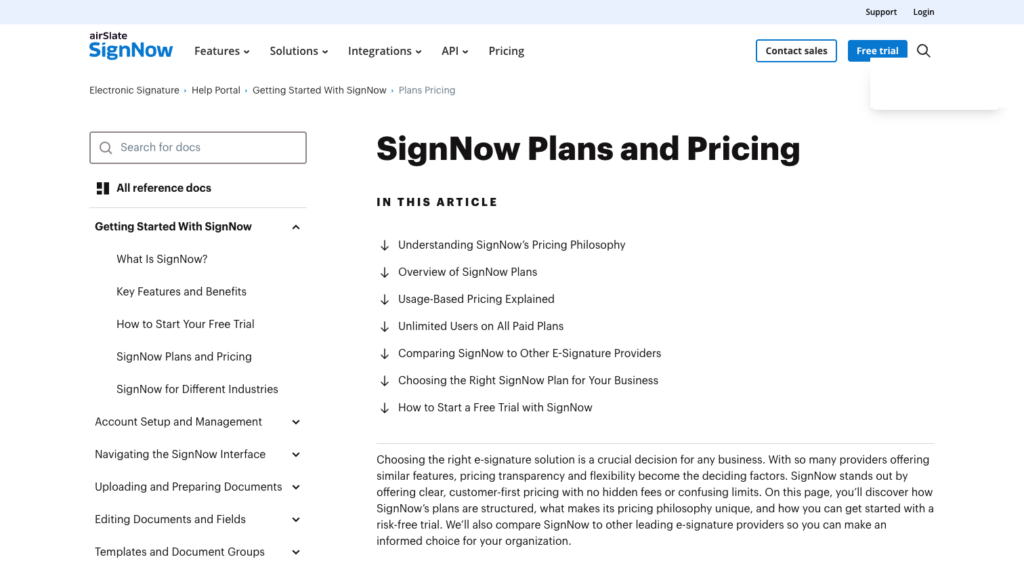
White-label signing without an enterprise quote | SignNow API | Professional includes embedded signing and sending and white labeling, from $84 a month billed annually for 500 invites a year |
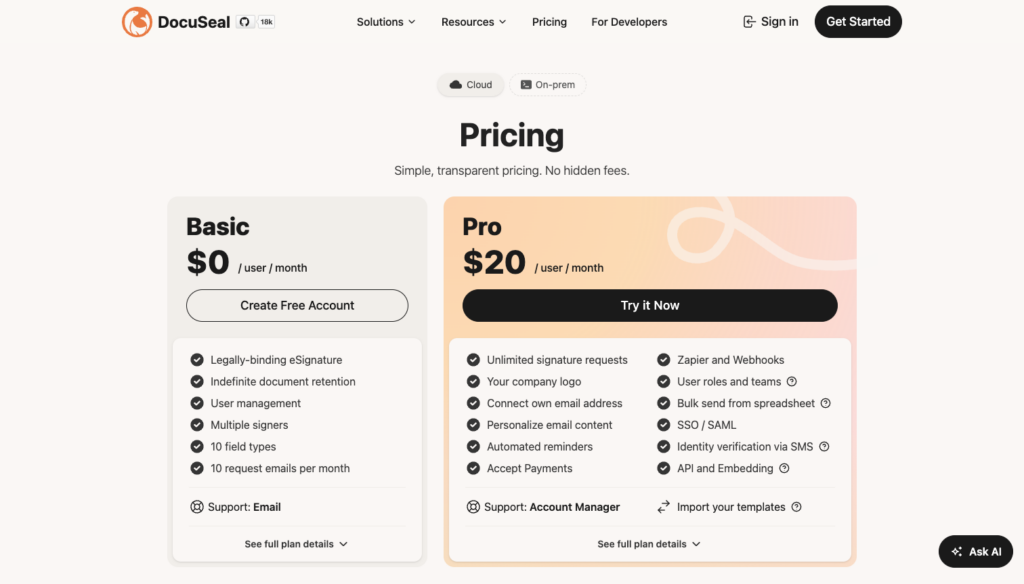
Paying for signatures that never complete | DocuSeal | $0.20 per completed document plus a $20/month Pro seat, with a self-hostable AGPLv3 core carrying additional attribution terms |
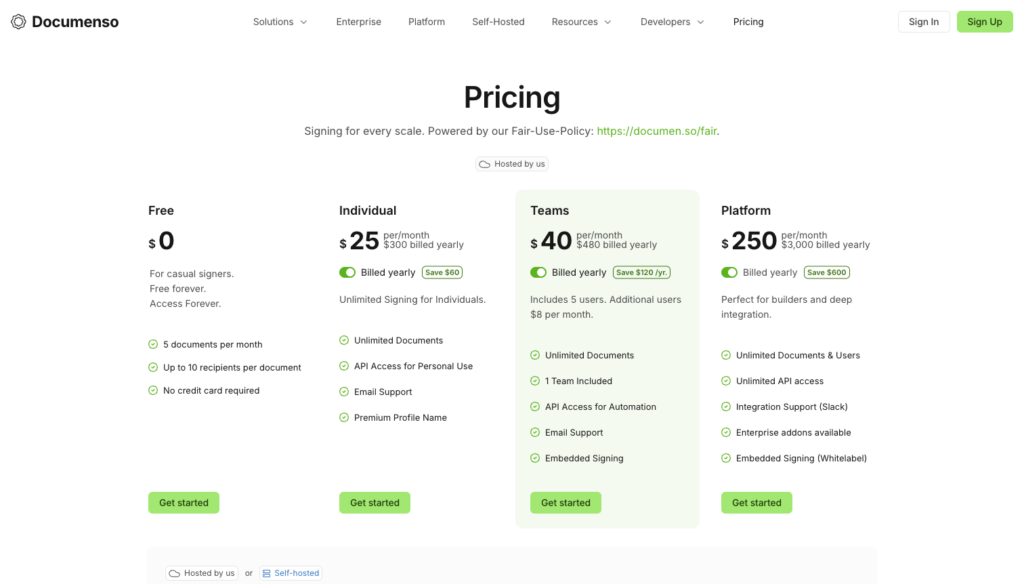
Per-request pricing altogether | Documenso | Flat cloud plans under a fair-use policy: Teams at $40/month billed yearly for internal workflows, and Platform at $250/month billed yearly for embedding in an external product |
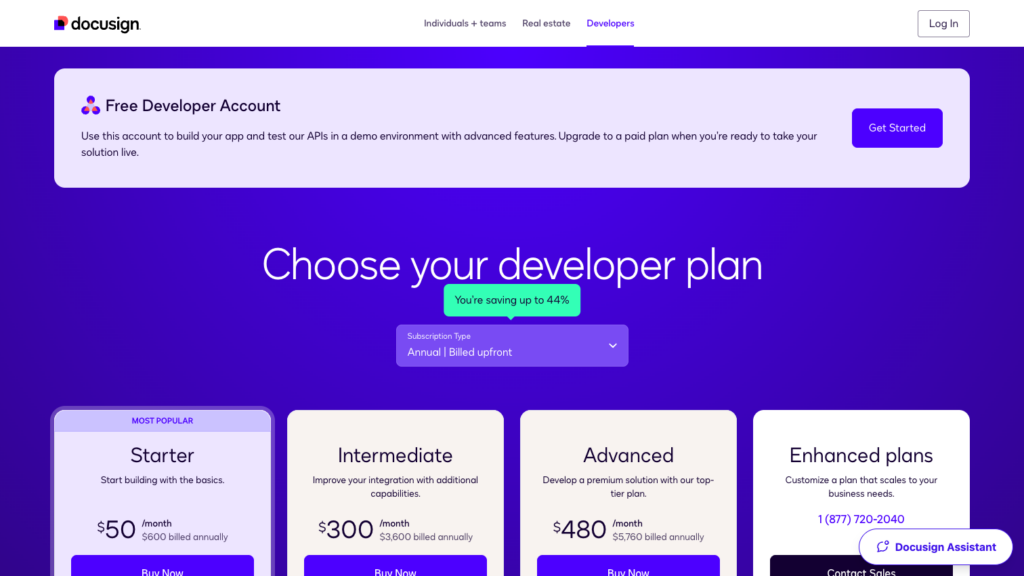
Enterprise procurement or government requirements | Docusign eSignature REST API | Federal eSignature and CLM offering with reported FedRAMP Moderate and provisional DoD IL4 authorization; embedded signing requires an Enhanced developer plan. |
Most of these APIs support embedded signing, templates, and webhooks. The entries below explain the plan limits and migration work that distinguish them.
If your product generates PDFs before sending them for signature, you can test that flow on the free Foxit Developer plan while you compare the other options below.
What the Dropbox Sign API gives you today
The table below separates annual and monthly billing for Dropbox Sign’s API plans.
Plan | Signature requests a month | Billed yearly | Billed monthly | What the plan adds |
Essentials | 50 (tiers at 100, 250, 500) | $900 a year ($75/month) | $100 a month | Non-embedded sending; 5 templates |
Standard | 100 (tiers at 250, 500) | $3,000 a year ($250/month) | $300 a month | Embedded signing and requesting, bulk send, OAuth, branding; 15 templates |
Premium | From 100 | Custom quote | Custom quote | Embedded templates, premium branding (white-label), data residency, multiple domains; QES as an add-on |
Test mode | Not applicable | Free | Free | Watermarked, not legally binding, 10 requests a minute |
Standard 250 runs $5,400 a year or $540 billed monthly. Standard 500 runs $7,500 a year or $750 monthly. Essentials 500 is $5,400 a year.
What counts as one signature request. One bundle of documents sent together, regardless of the number of signers. Embedded and template sends count. Drafts count only when the sender continues.
Quota behavior. A request made after you exceed your quota returns HTTP 402 immediately, the same code used for an unpaid or under-credited account. Separately, exceeding your quota also automatically upgrades your subscription to the next plan tier, with a warning at 80 percent usage, so the account is never permanently capped. A request right at the threshold can still be 402 before the upgrade takes effect, but you are not locked out afterward.
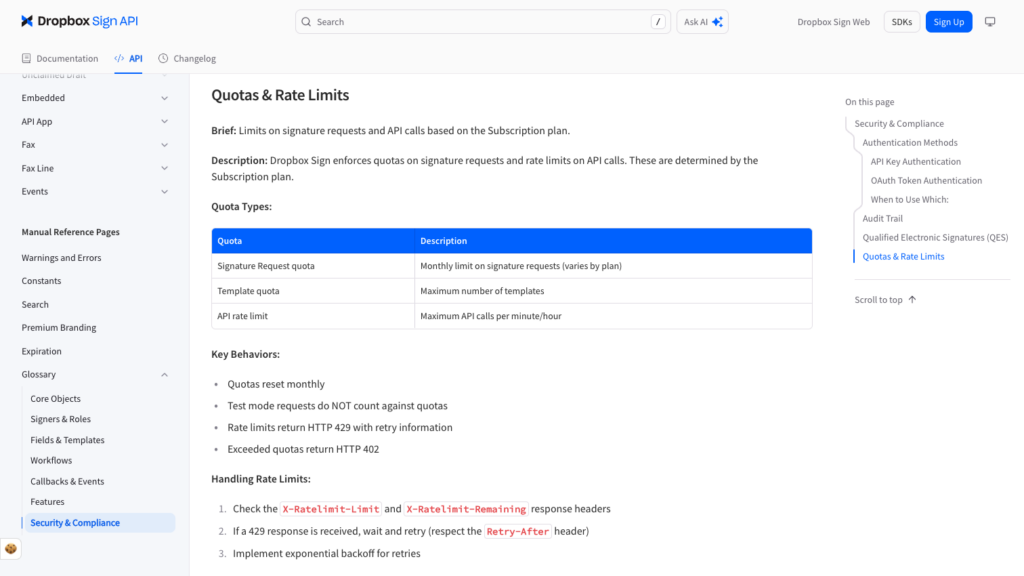
Rate limits. 100 requests a minute for standard calls; 25 a minute for sending, embedded creation, and file downloads; 10 a minute in test mode.
The callback contract. Respond with HTTP 200 and the literal body Hello API Event Received. Verify the event_hash HMAC. Expect up to 6 retries. The callback URL is cleared after 10 consecutive failures.
Changes to account for in an existing integration.
- HTTPS-only callbacks since December 1, 2024
- An April 24, 2024 security incident that forced API key and OAuth token rotation for affected accounts
- An October 6, 2026 change that rejects duplicate signer emails in grouped_signers requests
Before you compare anything, list what your integration uses today, including embedded signing, embedded requesting, templates, bulk send, OAuth, and branding. That list decides the plan you need everywhere else.
How we compared these alternatives
We compare each API on 8 criteria: coverage, embedded signing and plan requirements, pricing and billing unit, free and test use, webhooks, templates and fields, SDKs and limits, and migration work. Compliance claims are vendor-reported.
Vendors name the same object differently. Dropbox Sign calls it a signature request. BoldSign and SignWell call it a document. SignNow calls it a document plus an invite. DocuSeal calls it a submission. Documenso and Docusign call it an envelope. Foxit’s endpoint paths use “folder” for what the product surface calls an envelope. Each entry names the vendor’s own object on first use and notes when billing fires.
The 8 Dropbox Sign API alternatives in detail
Use each entry’s “Moving from Dropbox Sign” row to identify the equivalent objects and the main code changes.
Foxit eSign API
We build and maintain the Foxit eSign API. We compare it using the same criteria as the other alternatives.
Our eSign API sends envelopes (called “folders” in endpoint paths) for electronic signature, with embedded signing and sending available on every plan. One Developer Portal account covers eSign, PDF Services for PDF processing, and Document Generation API (DocGen API), with a shared credit pool.
Feature | Details |
Covers | Envelopes from PDF URLs or Base64 files, templates, ordered recipients, reminders, cancellation, activity history, and completed-file download. PDF Services and Document Generation on the same account and credits. Cloud only, with storage region chosen at eSign activation. |
Embedded signing | Embedded signing (one or all recipients) and embedded sending views on every plan, including the free Developer plan. The API also includes an endpoint to regenerate expired signing sessions, plus UI options including theme color and hiding controls. |
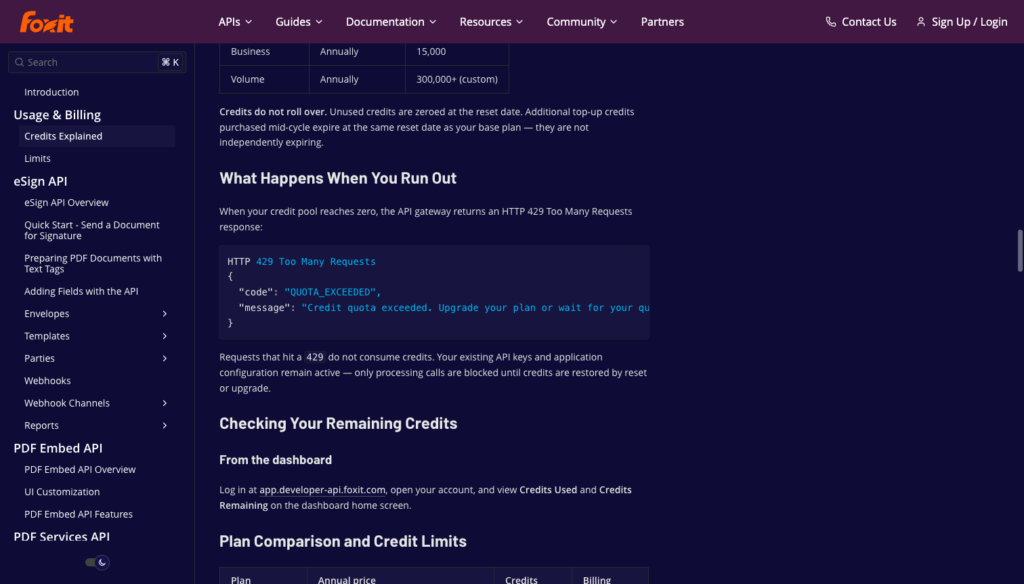
Pricing | See the Foxit API pricing page. 5 credits per envelope created through the API or the eSign UI; PDF Services and Document Generation operations cost 1 credit each from the same pool. Status checks, webhooks, uploads, and downloads use no credits. Running out of credits returns HTTP 429 with a QUOTA_EXCEEDED error code. Credits reset yearly and do not roll over. |
Free and test use | eSign trial access on the free Developer plan, which includes 500 shared credits a year. |
Webhooks | Webhook channels for API envelopes or the whole account, with events including folder_sent, folder_viewed, folder_signed, folder_cancelled, folder_completed, folder_executed, and folder_deleted. Optional HMAC-SHA-256 signature arrives as a query parameter. |
Templates and fields | Templates created through the API, with fields from text tags in the PDF or from x/y field objects. AcroForm fields can convert, and signer authentication is available by email, SMS, or voice access codes. |
SDKs and limits | REST with OAuth 2.0 client credentials and request samples for Shell, Ruby, Node.js, PHP, and Python. No separately installable eSign SDK was verified for this API version. Limits are 15 requests a minute in sandbox mode and 100 in production, per application. |
Moving from Dropbox Sign | A signature request becomes an envelope (folders/createfolder with sendNow: true), and the embedded URL comes back from envelope creation rather than a separate sign_url call. Callbacks become webhook channels verified by HMAC rather than answering Hello API Event Received, and text tags must be rewritten in Foxit syntax (e.g., ${signfield:1:y:name}). |
Where Foxit eSign API stands out
Embedded signing and sending are available on every plan. If you already generate PDFs with our PDF Services or Document Generation API, you can add signing under the same account and credit pool.
For workflow examples, see our n8n, Power Automate, and contract lifecycle management tutorials. Those tutorials use an older API setup, so follow the current API reference for authentication and endpoints.
Envelope creation returns embeddedSessionURL directly. If a session expires before a signer opens it, you can regenerate the session without creating another envelope.
What to consider
Our credits reset annually, so budget envelopes alongside PDF processing and generation. Startup’s 5,000 credits cover up to 1,000 envelopes a year, or about 83 a month, if no other operations use the pool.
This is our calculation, not a monthly allowance. Bulk sending is advertised on our eSign product page but has no documented operation in the current API reference; confirm API support with our team before relying on it.
Our eSign API is covered by SOC 2 Type II audits, meets ESIGN/UETA requirements, and supports eIDAS SES, AES, and QES. QES requires identity-validation services. We also support 21 CFR Part 11-compliant signature flows; confirm requirements for your workflow.
Best for
Products that generate or process PDFs and then send them for signature, where running both operations on one account and one credit pool reduces integration overhead.
Getting started
The Foxit eSign API reference covers envelope creation, text tags, and webhooks. You can send a test envelope from your own PDF on the free Developer plan.
BoldSign API
BoldSign is an eSignature platform with a dedicated API plan that includes embedded signing from the entry tier.
Feature | Details |
Covers | Documents (envelopes) with templates, embedded requesting, signing and template creation, custom fields, sender identities, text tags, and scheduled sends. Data centers in the US, EU, Canada, and Australia. |
Embedded signing | Included on the Enterprise API plan, which starts at $30 a month. |
Pricing | $30 a month including 40 envelopes, then $0.75 per envelope sent. Volume quotes on request. Bulk send, SMS delivery, ID verification, KBA, and QES are listed as add-ons. |
Free and test use | Free sandbox with full API access, with test documents watermarked and deleted after 14 days, and 50 requests an hour in the sandbox. |
Webhooks | Sent, Viewed, Signed, Completed, Declined, Expired, Revoked, and other events, with HMAC-SHA256 in the X-BoldSign-Signature header. Respond with 200 within 10 seconds, and expect 6 retries. |
Templates and fields | Templates with roles, text tags, and embedded template creation. |
SDKs and limits | .NET, Python, PHP, Java, and Node.js; 2,000 requests an hour in production per account. |
Moving from Dropbox Sign | A signature request becomes a document, and sign_url becomes an embedded signing link. Callbacks become HMAC-signed webhooks. No Dropbox Sign template importer was verified in the BoldSign sources reviewed. |
Where BoldSign API stands out
Embedded signing and embedded templates are available on the entry API plan, which means the $250 Standard gate from Dropbox Sign doesn’t carry over. BoldSign also reverses charges for revoked documents, which distinguishes it from vendors that bill on send regardless of outcome.
The sandbox provides full API access with watermarked documents, so you can build and verify an integration before any cost is incurred. Plan around the hourly request limit when your application sends requests in bursts.
What to consider
Envelopes are billed when sent. Revoked documents are reversed, but declined documents remain billed. BoldSign’s comparison page uses “no overages” language, though its plan detail lists bulk send, SMS, ID verification, KBA, and QES as add-ons that carry separate costs.
The sandbox limit of 50 requests an hour is tighter than production and may slow integration testing at pace. No Dropbox Sign template importer was documented in the sources reviewed, so templates need to be rebuilt in BoldSign.
Best for
SaaS products at moderate volume that need embedded signing on an entry-level API plan.
Getting started
The BoldSign free sandbox is available at the BoldSign developer portal.
SignWell API
SignWell is a document signing platform that structures its API pricing around per-document usage with no monthly minimum.
Feature | Details |
Covers | Documents with any number of files and signers, templates, embedded signing, requesting and template editing, bulk send, and white-label embedding. |
Embedded signing | Included in API usage pricing. |
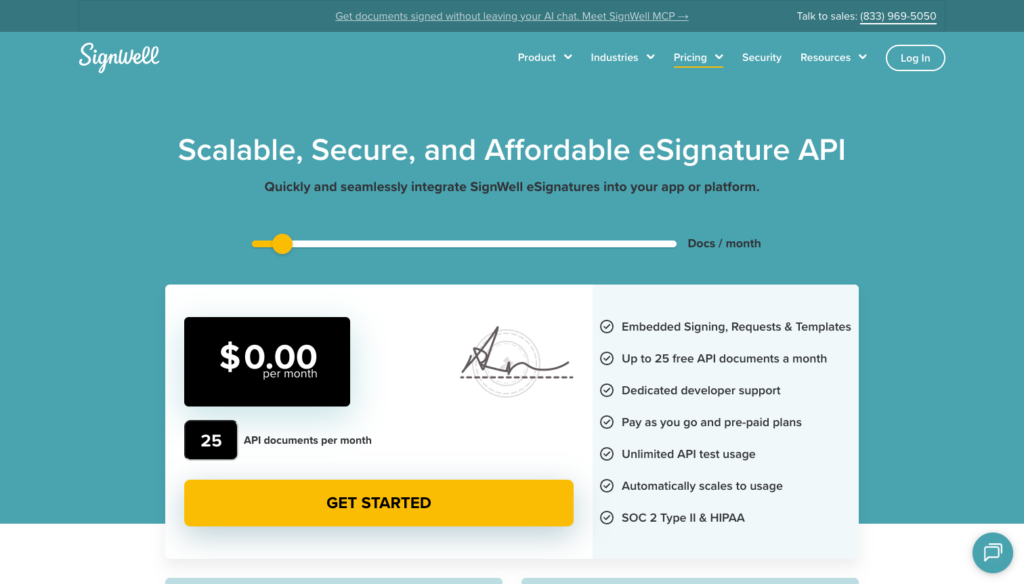
Pricing | Per API document, starting at $0.85 and decreasing with monthly volume. A live pricing calculator on SignWell’s own API pricing page shows the rate holding at $0.85 through roughly 200 documents a month, then dropping to $0.60 and holding there through at least 475 documents a month; SignWell’s published FAQ states the rate continues falling to $0.20 or lower for high-volume or custom plans, though the exact breakpoints above 500 documents a month aren’t published. 10% off when paid yearly. |
Free and test use | First 25 API documents a month are free with a card on file. A free developer account without a card gets up to 3 a month. Unlimited test mode. |
Webhooks | document_sent, document_viewed, document_signed, document_completed, document_declined, and other events, verified with HMAC-SHA256 keyed by the webhook ID. A webhook retry schedule was not found in the documentation reviewed. |
Templates and fields | Templates, with documents created from them through the API. |
SDKs and limits | An OpenAPI file, a CLI, and an MCP server, documented on SignWell’s developer resources page; no official Ruby, Node, Python, or PHP client libraries were confirmed in the current documentation. 100 requests a minute per token, 30 for document and template creation, 20 in test mode. |
Moving from Dropbox Sign | A signature request becomes a document, and embedded signing and requesting move to SignWell’s iFrames. Callbacks become webhooks with event-hash checks. No Dropbox-specific migration tooling was verified in the SignWell sources reviewed. |
Where SignWell API stands out
With a card on file, the first 25 API documents each month are free. For uneven volume, pay-per-document billing avoids buying a monthly request allowance you may not use.
The MCP server and CLI are useful for development and automation workflows beyond standard API integration. Embedded signing and white-label embedding are included without a plan upgrade.
What to consider
The free 25 requires a card on file, while the developer account without a card covers only 3 documents a month.
A webhook retry schedule was not documented in the sources reviewed, so plan to verify failure handling behavior before going live.
The published per-document rate below $0.60 applies to high-volume or custom agreements rather than a clearly published self-serve tier, so get a quote before modeling costs much past 500 documents a month.
Best for
Products with low or uneven volume that don’t want a monthly minimum.
Getting started
The SignWell API getting started guide is available at signwell.com.
Zoho Sign API
Zoho Sign offers an API-only plan built around prepaid credits, with no subscription fee or per-user charge.
The plan supports embedded sending and signing rather than app-based signing; branding and webhooks are still configured in the app.
Feature | Details |
Covers | An API-only plan with embedded sending and signing, templates, signer authentication (OTP, ID verification, KBA), and AI field detection. Branding, custom domains, white labeling, and webhooks are configured in the app. Signing through the app interface is disabled on this plan. |
Embedded signing | Included on the API-only plan. |
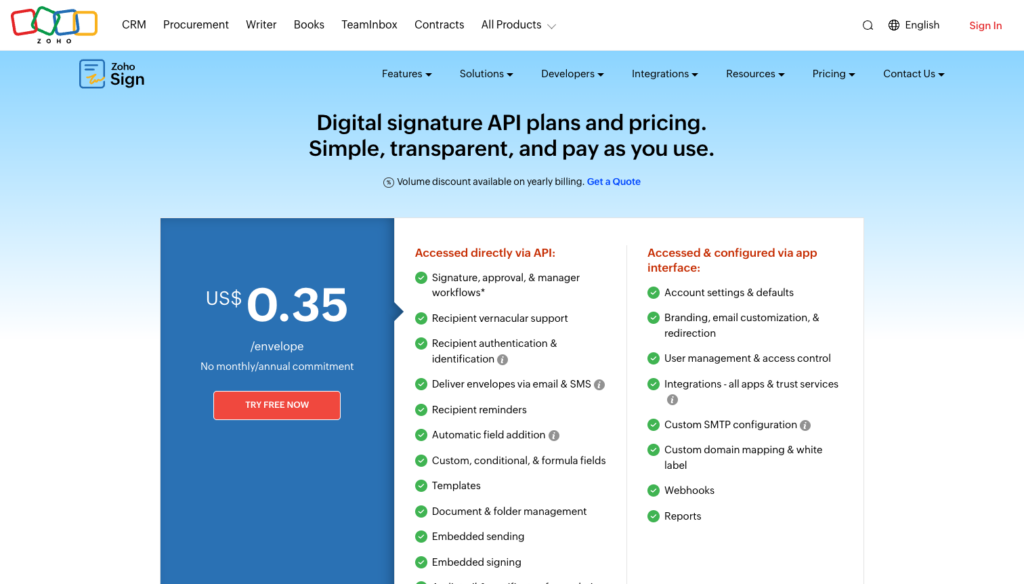
Pricing | Credits at $0.07 each, bought in blocks of 500 for $35. Each envelope sent through the API uses 5 credits ($0.35). SMS, authentication, and trust services use extra credits. No subscription or per-user fee. |
Free and test use | A 14-day Enterprise trial with up to 10 trial documents. Subscribers can send up to 50 watermarked test documents a month with testing=true. |
Webhooks | Configured in the Zoho Sign app, with optional HMAC-SHA256 verification using the X-ZS-WEBHOOK-SIGNATURE header. |
Templates and fields | Templates with up to 25 recipients and 40 documents per request, and bulk send up to 1,000 recipients per request. |
SDKs and limits | REST API with most calls limited to 50 a minute, template export to 2 a minute, and template import to 1 a minute. |
Moving from Dropbox Sign | Rebuild templates and field placement in Zoho Sign. Plan around the 50-calls-a-minute threshold. Credits don’t reset monthly, while Dropbox Sign quotas reset monthly by default, with yearly refresh available for an additional cost. |
Where Zoho Sign API stands out
Prepaid credits that don’t expire while the account remains active solve the month-end quota problem. A slow month doesn’t waste quota, and an unusually busy month draws down the same pool without triggering a permanent plan upgrade.
For batch sends, consider the 1,000-recipient limit alongside the 50-calls-a-minute API limit. AI field detection can reduce template setup work for complex layouts.
What to consider
The 50-calls-a-minute limit may require a queue for bursty workloads.Webhooks and branding are configured through the Zoho Sign app interface rather than through API calls, which adds a setup step outside the API integration. The trial is 14 days with 10 documents, giving limited time to validate a full flow.
Best for
Irregular volume paid from a prepaid budget, where month-to-month fluctuations make subscription tiers inefficient.
Getting started
The Zoho Sign API documentation and pricing are available at zoho.com/sign.
SignNow API
SignNow is an eSignature platform that includes white labeling in its self-serve Professional plan.
Dropbox Sign restricts premium branding to its custom-quote Premium tier, so SignNow removes that gate for teams that need a fully branded embedded signing experience without an enterprise sales cycle.
Feature | Details |
Covers | Documents and document groups with invites, templates, embedded signing and sending, white labeling, document generation, and bulk invites on the Professional plan. |
Embedded signing | Included on Professional. |
Pricing | Professional, billed annually: $84 a month (500 invites a year), $146 (1,000 invites), $250 (2,000 invites), and $500 (5,000 invites). For role-based document, document-group, and embedded invites, multiple signers in one invite count once and billing fires on send. A standalone document or document-group signing link is different: it bills once the last signer completes, not when the link is generated. Bulk and freeform invites have their own counting rules too. |
Free and test use | Watermarked Dev Mode. The pricing page advertises unlimited test invites, but API docs cap accounts without an active plan or trial at 500 invites. With an active plan or trial, Development invites do not consume the plan allowance. The live trial includes 250 invites. |
Webhooks | Event subscriptions for documents and invites, signed with your own secret in the X-SignNow-Signature header. |
Templates and fields | Templates, text tags, role-based invites, and prefilled fields. |
SDKs and limits | PHP, .NET, Java, Python, Node.js, and Android. Default 1,000 requests an hour per application in production, 500 in development. |
Moving from Dropbox Sign | A signature request becomes a document (or a group) plus an invite, and sign_url becomes an embedded invite link. Monthly request quotas become yearly invite pools. |
Where SignNow API stands out
White labeling is included in a self-serve Professional plan starting at $84 a month billed annually. Yearly invite pools also work well for products with predictable annual volume that doesn’t track neatly to calendar months.
A product sending contracts on renewal cycles often benefits more from an annual pool than a monthly quota that resets mid-campaign.
What to consider
Invites are counted yearly, and the plan grows with usage, so plan carefully around the counting rules for different invite types, especially signing links, which bill on completion rather than on send like every other invite type.
The default limit is 1,000 requests an hour, so budget calls across the full signing flow rather than treating that as a per-minute allowance.
Best for
Branded in-app signing at a predictable annual volume, where white labeling without a custom quote is a requirement.
Getting started
The SignNow developer portal and API documentation are available at signnow.com.
DocuSeal
DocuSeal is an open-source eSignature platform with an AGPLv3 core carrying additional attribution terms, and a paid cloud or on-premises Pro option. Its API covers template-based form submissions with a front-end embedding component.
Feature | Details |
Covers | Templates and submissions with a form builder, embedded signing through a web component plus React, Vue, and Angular wrappers, an embedded form builder, and an AGPLv3 open-source core with additional attribution terms, run in DocuSeal’s cloud (global or EU) or on-premises with Pro. |
Embedded signing | Pro, in the cloud or on-premises. |
Pricing | Pro seat: $20 per user a month or $200 a year, plus $0.20 per completed document for API and embedded signing. On-premises Pro: $240 per user a year. Cloud add-ons: 20 SMS per month included, then $0.20 per SMS; ID verification $2 per verification; QES $2 to $4 per signature. On-premises SMS uses your own provider. |
Free and test use | Free, unlimited test mode in a separate account with its own API keys. |
Webhooks | Form, submission, and template events (form.viewed, form.started, form.completed); HMAC-SHA256 verification through the X-Docuseal-Signature header. |
Templates and fields | Text tags in the form {{Field Name;role=Signer1;type=date}}; documented template import from DocuSign. A Dropbox Sign importer was not verified. |
SDKs and limits | Front-end embedding components plus JavaScript/TypeScript, Python, Ruby, PHP, Java, C#, and Go API libraries. A numeric API rate limit was not published as of this check. |
Moving from Dropbox Sign | A signature request becomes a submission, and a signer becomes a submitter. Rebuild templates and replace the hellosign-embedded client with DocuSeal’s component. |
Where DocuSeal stands out
The $0.20 usage charge applies only to completed documents, so abandoned requests don’t incur that per-document fee. The Pro seat fee still applies. Self-hosting gives you control of the infrastructure, with paid API and embedding requirements to factor in.
The front-end embedding components for React, Vue, and Angular reduce the integration surface compared to building a raw iframe wrapper, and the separate test-mode account with its own API keys keeps test and production environments cleanly separated.
What to consider
A Pro seat is required for API access and embedding, so a $20 monthly seat fee applies even at low volume. The AGPLv3 core carries additional attribution terms that legal should review before self-hosting.
A numeric API rate limit was not published in the sources reviewed, so test throughput limits during evaluation. DocuSeal documents template import from DocuSign, but a Dropbox Sign importer was not verified in the sources reviewed.
Best for
Teams that prefer completion-based usage charges and need a self-hosting option.
Getting started
The DocuSeal documentation and free test mode are available at docuseal.com, and the open-source repository is on GitHub.
Documenso
Documenso is an AGPL-3.0 open-source document signing platform with hosted plans and a self-hosting option.
Its API is transitioning from individual document and template endpoints to a unified envelope model.
Feature | Details |
Covers | Documents and templates unified under an “envelopes” model, with embedding SDKs for React, Vue, Svelte, Angular, Solid, and Preact, plus server SDKs for TypeScript and Python (with a Go SDK also listed), all on an AGPL-3.0 codebase available hosted or self-hosted. |
Embedded signing | Teams and above for internal workflows; Platform for an external commercial product beyond moderate testing. White-label embedding on Platform; the embedded editor on Enterprise or as a Platform add-on. |
Pricing | Flat plans billed yearly with unlimited documents under a fair-use policy: Individual $25 a month, Teams $40 (5 users, then $10 a user), Platform $250. |
Free and test use | A free plan with 5 documents a month; a separate staging environment for API testing. |
Webhooks | The X-Documenso-Secret header carries your plain secret for verification. Comparing it in constant time is required; it’s a plain string comparison, not an HMAC signature. |
Templates and fields | Templates with recipients and fields; the older document and template creation endpoints are deprecated in favor of envelopes, with a documented cutover date for removing the legacy endpoints. |
SDKs and limits | 1,000 requests a minute per IP is the global ceiling across the whole API. An organization’s own plan can carry a separate, lower limit per user or API token, which triggers a 429 before the global ceiling is ever reached. |
Moving from Dropbox Sign | A signature request becomes an envelope, so build against the new envelope endpoints rather than the deprecated document and template endpoints. |
Where Documenso stands out
Flat subscriptions with unlimited documents under the fair-use policy make cost predictable regardless of volume fluctuations within the plan’s intended use case.
Teams sending hundreds of internal agreements a month pay $40 a month on the Teams plan.The embedding SDK library covers 6 front-end frameworks, which reduces integration work for products with diverse front-end stacks.
The open-source AGPL-3.0 Community Edition gives engineering teams the option to inspect the full signing stack, contribute to the project, or self-host for infrastructure control.
What to consider
The fair-use policy on unlimited documents is real; high volume or commercial embedding in an external product requires the Platform plan at $250 a month.
The webhook verification uses a plain secret string rather than HMAC, so constant-time comparison is essential to avoid timing attacks. The API is in transition, with older endpoints deprecated, so building against the new envelope endpoints now avoids a future forced migration.
Design for the lower of the two: the 1,000-requests-a-minute global per-IP ceiling, and whatever organization-level limit your plan carries, since either can trigger a 429 first.
Best for
High volume on a fixed budget, or teams that want to inspect or own the full stack.
Getting started
The Documenso documentation, staging environment, and open-source repository are available at documenso.com and on GitHub.
Docusign eSignature REST API
Docusign offers an eSignature API and a separate federal offering for government requirements.
The federal offering is a reason to consider it when procurement requirements rule out simpler self-serve options.
Feature | Details |
Covers | Envelopes, templates, PowerForms, API bulk send (Advanced plan and above), and Connect webhooks. A segregated government-cloud offering through Docusign Federal. |
Embedded signing | Enhanced plans only, which are sales-led with a 5-user minimum. Embedded sending is available on every plan. |
Pricing | Starter $50 a month billed annually or $75 monthly, from 40 envelopes a month; Intermediate $300 or $450, from 100 envelopes a month; Advanced $480 or $720, from 100 envelopes a month with higher-tier features; Enhanced by quote. An envelope counts once sent, whether or not it is signed. |
Free and test use | A free developer account in the demo environment; production requires a go-live review. |
Webhooks | Docusign Connect at account and envelope level, with an HMAC option. Recipient Connect, for events on envelopes received by your organization’s users, is included from the Advanced plan. |
Templates and fields | Templates with recipient roles; tabs placed by coordinates or anchor text. |
SDKs and limits | C#, Java, Node.js, PHP, Python, and Ruby SDKs. Default 3,000 requests an hour per account. Bursts of 500 calls per 30 seconds in production (200 in the developer environment). At most one GET status check per envelope per application every 15 minutes. |
Moving from Dropbox Sign | A signature request becomes an envelope, and a signer becomes a recipient. Callbacks move to Connect, and you’ll need to plan for the Enhanced tier if your product embeds signing today. |
Where Docusign eSignature REST API stands out
Docusign reports FedRAMP Moderate authorization and provisional DoD IL4 authorization for its federal eSignature and CLM offerings. Check Docusign Federal’s authorization scope against your agency’s requirements before choosing a deployment.
The SDK coverage across C#, Java, Node.js, PHP, Python, and Ruby is broad, and the demo environment with full API access gives developers a complete integration surface before go-live review.
What to consider
Embedded signing requires a sales-led Enhanced plan with a 5-user minimum, so you can’t self-serve into embedded signing the way you can with BoldSign, Foxit, or SignWell. Billing starts when an envelope is sent, whether or not the signer completes.
The 15-minute polling floor on envelope status checks requires webhook-first event handling for real-time flows.
Best for
Enterprises with procurement support or products sold into government environments that require FedRAMP Moderate or DoD IL4 authorization.
Getting started
The Docusign developer account and documentation are available at developers.docusign.com. For government requirements, contact Docusign Federal sales.
What changes when you move off the Dropbox Sign API
Whichever alternative you pick, plan for these 6 areas of migration work.
What to plan for in a migration
Authentication and SDK. Replace Dropbox Sign’s credentials and client code with the new vendor’s supported authentication flow. Foxit uses OAuth client credentials and bearer tokens. BoldSign uses an API-key header; SignNow supports API keys or OAuth 2.0 access tokens, both in an Authorization: Bearer header. Docusign uses OAuth 2.0 with JWT or authorization-code grants. Replace hellosign-node-sdk, hellosign-python-sdk, or equivalent packages with the vendor’s available SDK or a direct REST client.
Payloads and field placement. Signer fields and text tags are vendor-specific. Dropbox Sign tags follow its own syntax; Foxit tags follow the ${signfield:party:required:name} pattern; DocuSeal tags follow {{Field Name;role=Signer1;type=date}}; Docusign uses coordinate-based tabs or anchor text strings. Every migration rewrites the field definitions in source PDFs or in the API payload.
Templates. No Dropbox Sign template importer was verified among the reviewed vendors. DocuSeal documents importing DocuSign templates, but that’s a separate migration path. Plan to rebuild templates from scratch in the new vendor’s system. For integrations with many templates, this is a project in itself.
Webhook handler. The verification contract differs across every vendor. Dropbox Sign requires the literal response body Hello API Event Received plus HMAC validation of event_hash. BoldSign expects a 200 response within 10 seconds and validates the X-BoldSign-Signature HMAC header. Documenso uses a plain secret in X-Documenso-Secret that must be compared in constant time. For Foxit, verify the HMAC-SHA-256 signature received as a query parameter on the webhook URL.Replacing the handler means changing both the response format and the signature verification logic.
Embedded client. The hellosign-embedded library manages the iframe lifecycle for Dropbox Sign, handles domain verification, and emits events like sign and cancel. Each alternative uses its own mechanism. Foxit and SignWell use URLs mounted in standard iframes, BoldSign generates an embedded link you render in an iframe, DocuSeal ships framework components for React, Vue, and Angular, and Documenso providesSDKs for 6 front-end frameworks. Allowed domains must be re-registered wherever the vendor requires it.
Go-live gates. Dropbox Sign requires app approval before production embedded traffic. Docusign requires a go-live review. SignNow gates production on an active subscription or trial. For the other vendors, confirm how to activate production access and provision credentials. Factor any review timeline into your migration schedule.
Run both integrations in parallel until all requests sent through Dropbox Sign have completed or expired. Cancel the Dropbox Sign subscription only after open requests have cleared.
Mapping Dropbox Sign objects to the Foxit eSign API
Here’s how Dropbox Sign’s main objects map to our eSign API. This is a concept map, not a payload converter.
Dropbox Sign API | Foxit eSign API | What changes |
signature_request/send | Create Envelope (folders/createfolder) with sendNow: true | Documents arrive as PDF URLs or Base64; recipients are parties with a sequence |
send_with_template | Create Envelope from Template (templates/createFolder) | Rebuild templates in Foxit eSign first |
create_embedded plus GET /embedded/sign_url | createEmbeddedSigningSession: true returns embeddedSessionURL | The URL comes back at creation; regenerate expired sessions through the API |
unclaimed_draft (embedded requesting) | createEmbeddedSendingSession: true | Users prepare and send inside an embedded sending view |
Dropbox Sign text tags | Foxit text tags such as ${signfield:1:y:name} | Rewrite the tag syntax in your source PDFs |
Callbacks answered with Hello API Event Received | Webhook channels with folder_* events | Return a fast 2xx and verify the HMAC signature |
signature_request_all_signed and signature_request_downloadable | folder_completed, then folder_executed about 5 to 10 seconds later | Download final files after folder_executed |
signature_request_declined | folder_cancelled | Declines and cancellations share one event |
GET /signature_request/files | Download Envelope Files and Get Envelope Activity History | Audit history is a separate call |
Monthly signature-request quota by default; yearly refresh costs extra | 5 credits per envelope from a yearly pool | Budget envelopes per year, shared with PDF calls |
Compare billing triggers and quota rules
Dropbox Sign sells monthly request quotas by default, with yearly quotas available for an additional cost. Confirm the auto-upgrade and HTTP 402 behavior described earlier.
BoldSign and Docusign bill when an envelope or document is sent, whether or not it completes.
SignWell bills documents per month with no minimum, on a graduated per-document rate. Foxit bills 5 credits when an envelope is created from a yearly pool.
DocuSeal bills $0.20 per completed document. Zoho Sign deducts prepaid credits that don’t expire while the account remains active.
SignNow sells yearly invite pools and grows the plan as usage grows.
Documenso charges a flat monthly or annual subscription with unlimited documents under a fair-use policy.
Under send-based or creation-based billing, uncompleted requests still cost money. BoldSign reverses charges for revoked documents but not for declined documents.
DocuSeal’s completion-based billing means abandoned requests incur no per-document fee, though the Pro seat fee still applies.Under subscription billing (Documenso), volume within the fair-use policy has no per-unit cost.
Compare when billing occurs and what happens at quota, not just the headline rate. Abandoned requests and uneven monthly volume can change the total cost.
What stays behind in Dropbox Sign
Signed files and audit trails. Download signed documents with their audit trails before the subscription ends. The files endpoint returns a PDF with the audit trail appended or a ZIP of separate files, depending on the parameter you pass. Audit trail settings can also generate a separate trail document if your account is configured that way.
Export takes time. File downloads sit in the 25-requests-a-minute rate tier. Exporting 10,000 completed requests at one call each takes at least about 7 hours (10,000 requests at 25 per minute equals 400 minutes). The Dropbox Sign Team sync to cloud storage is a Premium feature, so lower-tier accounts need to export manually through the API. Build this into your migration timeline as its own project with a dedicated script.
In-flight requests. Keep the old Dropbox Sign integration running until every open request either completes or expires. Embedded sign_url links expire after 60 minutes or on first access and must be regenerated while the Dropbox Sign integration remains active.
Retention. Canceling the subscription downgrades the account to free after the billing period ends. Signed documents remain accessible on a free account. Confirm API access levels and any contractual retention requirements before canceling. Deleting the account permanently deletes its documents with no recovery path.
Treat the archive export as its own project with its own timeline, separate from the migration to the new API.
Archive before you cancel.
Use the files endpoint to download signed documents and audit trails. At 25 requests a minute, a large archive can take hours to export. Canceling a subscription leaves documents on a free account; deleting the account permanently removes them. Confirm contractual retention requirements, and export signed files and audit trails before the subscription ends.
Where Foxit eSign API fits
Our eSign API fits products that generate or process PDFs before sending them for signature. You can keep the generate-then-sign workflow on one account with a shared credit pool, rather than integrating separate document-processing and signing vendors.
Each envelope created uses 5 credits. Billable PDF Services processing calls and document-generation operations use 1 credit each; status checks, webhooks, uploads, and downloads use no credits.
Embedded signing and sending are available on every plan.
Our free Developer plan includes 500 shared annual credits and trial access to eSign, so you can evaluate the workflow before buying a paid plan. Confirm QES identity-validation and 21 CFR Part 11 workflow requirements with our team.
Create a free Foxit developer account, activate the eSign trial, and send your first envelope through the eSign API.
What else to know before you switch from the Dropbox Sign API
These questions cover the naming, API, and licensing distinctions that can affect your choice.