
When a Docparser integration starts costing more time than it saves, 2 things are usually responsible. Supplier layouts change, and you’re back in the rules editor patching a parser that worked fine last month. Or the parsing step lives in Docparser’s infrastructure, and you can’t version it, test it, or observe it the same way you do the rest of your code.
Docparser is a hosted document parser. You upload PDFs, Word files, or images, define parsing rules for each document layout, and get the extracted fields back as JSON, CSV, Excel, or XML.
DocparserAI now creates those rules automatically through its SmartAI Parser, so rule maintenance alone is a weaker reason to leave than it used to be. The better question is how much control you need over the extraction step, and what happens when the output reaches your ERP, CRM, accounting system, or database.
Other common triggers for a switch:
- Docparser says it is not HIPAA certified and does not support health data use cases
- Each parsing credit covers 1 document of up to 5 pages, so longer documents or growing volume change the bill
- Some teams want the extraction step inside their own code rather than a third-party app
In this article, we compare 8 Docparser alternatives based on their features, pricing, usage limits, and deployment options.
The list covers hosted parsers that work much like Docparser, schema extraction APIs, workflow platforms with review built in, an open-source option, and building the extraction step yourself on our PDF Services API.
Our top picks by reason for switching
An extraction API replaces the parsing step of a Docparser integration. Field mapping, validation, review, and retries stay in your code unless the platform you pick handles them. For teams building their own PDF-processing backend, the right tool depends on how much of that stack you want to own.
| If you are leaving Docparser because… | Pick | Why it fits |
| You want the extraction step inside your own code | Foxit PDF Services API | Structural Extraction returns typed elements and tables as JSON, Export PDF Form Data returns form values, 1 credit per request regardless of page count within supported limits, on the same credit pool as OCR, conversion, and redaction |
| You want the closest hosted replacement, templates included | Parseur | Template and AI engines in one mailbox, webhooks and an OpenAPI 3.1 API, 1 credit per page, SOC 2 Type II audit completed September 2026 |
| You want template, GPT, and pretrained parsers on one per-page budget | Parsio | Template parser at 1 credit a page, GPT parser at 2, pretrained AI parser at 3; Growth is $149 a month for 5,000 credits |
| You want to define your JSON fields as a schema | DocuPipe | JSON Schema-based extraction, optional per-field citations, webhook events for every stage, BAA on Business |
| You want pay-as-you-go extraction APIs with no contract | Extend | Parse, Extract, Classify, and Split APIs from 0.5 credits a page at $0.01 a credit, 10,000 free credits, zero data retention on request on every plan |
| Your documents need validation and an approval trail | Docsumo | AI document reviewer, validations, classification and splitting, audit logs, SOC 2 Type II and a BAA on request, priced by quote |
| You want extraction inside a larger approval workflow | Nanonets | Workflow blocks for extraction, classification, validation, and export, billed per block run from $0.02 to $0.30 |
| Documents must stay on your own servers | Unstract | AGPL-3.0 open-source platform you can self-host with your own LLM, plus a managed Document Studio at $499 a month on monthly billing |
What Docparser gives you today
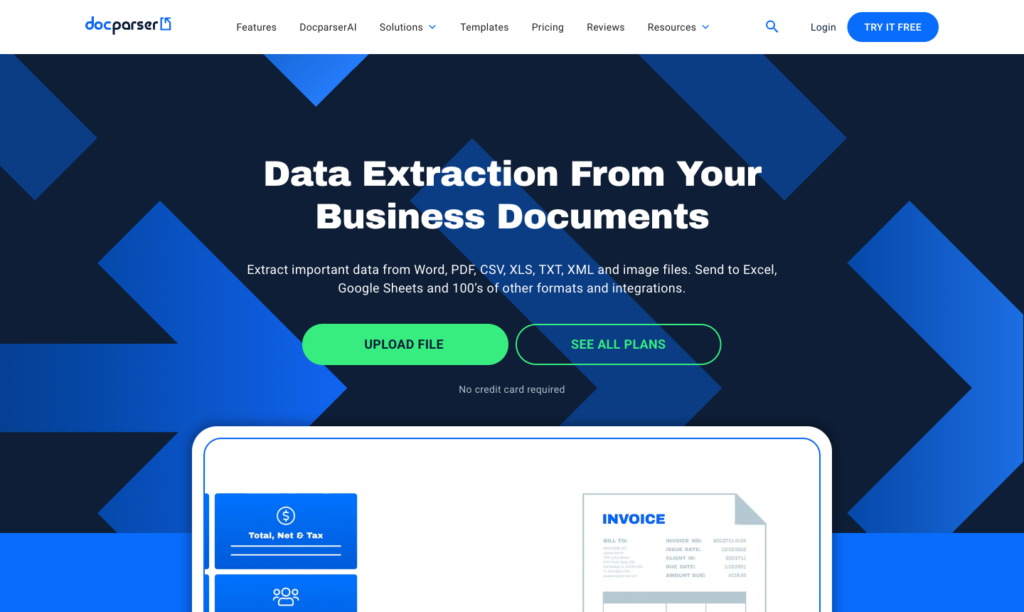
Docparser’s homepage, with DocparserAI in the top navigation.
| Plan | Billed monthly | Billed yearly | Parsing credits | Parsers | Notable inclusions |
| Starter | $39 a month | $32.50 a month | 100 a month, or 1,200 a year | 15 | Smart Checkboxes, premium templates, PDF, Word, and image input, Excel, CSV, JSON, and XML downloads |
| Professional | $74 a month | $61.50 a month | 250 a month, or 3,000 a year | 50 | Smart Tables, teams and managed users, multifactor authentication |
| Business | $159 a month | $133 a month | 1,000 a month, or 12,000 a year | 500 | Priority parsing, Parser Version Control, and Multi-Layout Parsers included |
| Enterprise | Quote | Quote | Custom | Unlimited | Extended Document Retention and a white-labeling license |
Checked in November 2026.
Each parsing credit covers 1 document with up to 5 pages. Longer documents use 1 credit for every 5 pages on Docparser’s parsing credit grid, so price your real page mix before you compare. A 14-day free trial requires no credit card.
Add-ons on monthly billing
Lower plans can add multifactor authentication at $5.95 a month, Parser Version Control at $9.95, Extended Document Retention at $19.95, and Multi-Layout Parsers at $29.95.
How parsing works
Each document type has its own parser. Its parsing rules include pre-built data rules for dates, email addresses, and invoice and PO numbers; document-type filters; custom rules; table and repeating-pattern extraction; and image pre-processing that can rotate pages.
DocparserAI’s SmartAI Parser creates rules automatically and lists handwriting and checkbox recognition.
The API
Docparser exposes a REST API at api.docparser.com, authenticated with an API key over HTTP Basic Auth.
You upload a multipart file, base64 content, or a public URL to a parser ID and pass through your own remote_id. Then check status and fetch results per document or per parser as nested object JSON or flat JSON.
The Advanced Webhook pushes results as soon as parsing finishes, and re-parse and re-integrate endpoints exist. The results endpoints allow 60 calls a minute for 1 document and 30 for multiple documents. Official PHP and Node.js clients are MIT licensed, and the Python client is third party.
Integrations
Docparser connects directly to Google Sheets, Google Drive, Box, Dropbox, OneDrive, Excel on OneDrive, and Salesforce, plus Zapier and other integration platforms.
Data and compliance
Retention is set per parser from 0 to 180 days. The service runs on AWS across at least 2 availability zones, with data encrypted in transit and at rest. GDPR transfers rely on Standard Contractual Clauses, with a DPA on request. Docparser says it’s not HIPAA certified and doesn’t support health data use cases. Docparser and its email sibling Mailparser belong to SureSwift Capital.
When to stay
Staying on Docparser makes sense if your parsers are stable, your documents are mostly 2 to 5 pages, and you don’t need health data compliance or in-code control of the extraction step.
Before you switch
Export 20 to 50 recent results per parser in object format and treat their field names and types as the JSON contract any replacement has to keep. That list drives every decision in the sections below.
The 8 Docparser alternatives in detail
Every entry uses the same 8 feature-table rows. The rows cover how it extracts, output and schema control, API and webhooks, pricing, free allowance, limits, deployment and data, and moving from Docparser.
Each price includes the engine or mode because costs can vary severalfold within the same vendor (Parsio’s template or GPT parser, DocuPipe’s standard effort or citations, Extend’s Light or Performance).
The “Moving from Docparser” row names the biggest change for an existing integration, and the section after the entries puts those changes side by side.
Foxit PDF Services API
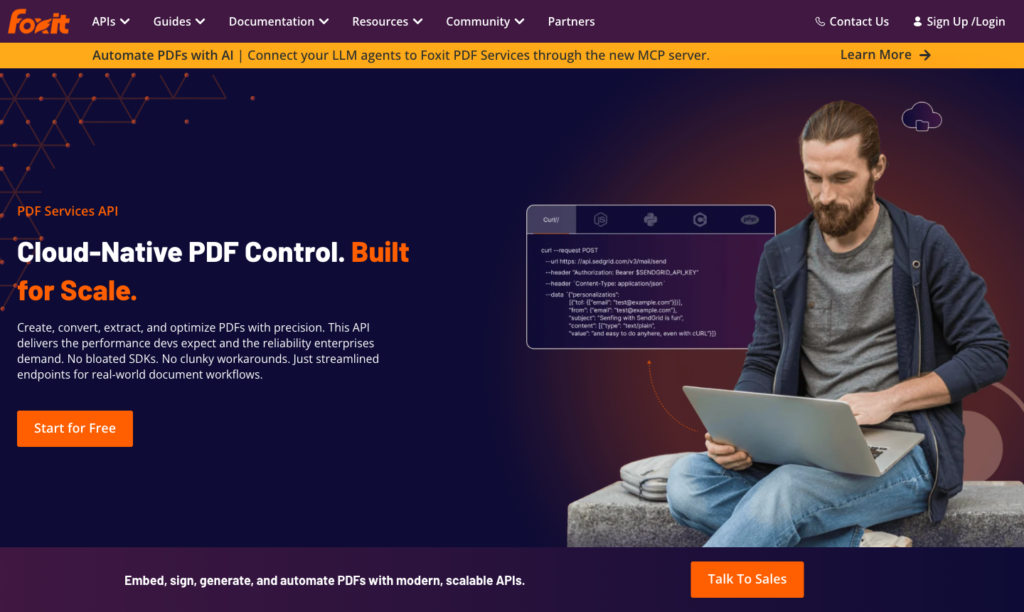
Our PDF Services API product page, with the Start for Free button that opens the Developer plan.
This is our own developer API, and extraction runs as code in your application, not in a rules editor someone else hosts.
| Feature | Details |
| How it extracts | PDF Structural Extraction (Trial) returns 12 element types in reading order (title, head, paragraph, table, image, headerFooter, form, hyperlink, footnote, sidebar, annotation, formula) with bounding boxes and table cell relationships. Export PDF Form Data returns fillable-form values. PDF to Excel returns tables as XLSX. PDF to Markdown and PDF to Text return text. The OCR endpoint makes scanned PDFs searchable. |
| Output and schema control | A ZIP with a JSON file following schema v1.0.7, plus extracted images and table renditions. No schema-based field extraction, no prebuilt invoice model, and no rules UI. You map elements to your JSON fields in code, as our invoice and contract tutorials show. |
| API and webhooks | REST, and your backend authenticates every call with the client ID and client secret from the console. The workflow is asynchronous: upload, start the operation, poll the task, and download the result. PDF Services has no completion webhook. Tutorials cover an n8n document pipeline and a CRM-to-eSign flow in Power Automate, and our MCP server exposes PDF processing tools to AI agents. |
| Pricing | 1 credit per successful request, regardless of page count within supported limits. Uploads, polling, and downloads are free. Startup is $1,750 a year for 5,000 credits, Business $4,500 a year for 15,000, Volume by quote. Credits reset yearly with no rollover. See our pricing page for more info. |
| Free allowance | 500 credits a year on the Developer plan, no credit card required. |
| Limits | 100 MB upload. Rate limits apply per application, lower in sandbox than in production, and exceeding one returns HTTP 429. Once the credit pool runs out, calls return HTTP 403, including uploads and task polling, until the pool resets or you upgrade, so treat a 403 on a valid credential pair as an exhausted pool. A retried request with the same request_id is not billed twice. |
| Deployment and data | Cloud only. A delete endpoint removes uploaded and generated files. Our cloud-hosted PDF APIs are covered by SOC 2 Type II audits, and we support HIPAA BAAs. |
| Moving from Docparser | Parsing rules become code. Keep your Docparser field names as the keys your mapping function returns. Scanned PDFs need the OCR endpoint first, then Structural Extraction on the result, so 2 credits per scanned document. Replace the Advanced Webhook with task polling and your own push to downstream systems. |
Checked in November 2026.
Where Foxit PDF Services API stands out
The extraction step lives in your code and version control, so a supplier layout change becomes a code change you can test, review, and roll back.
Per-request billing charges 1 credit whether you’re processing a 2-page invoice or a 50-page bank statement, within supported limits. That cost structure favors long documents, where per-page tools charge more as page counts rise.
Extraction also sits next to OCR, conversion, compression, and redaction on one credit pool and one account. A pipeline that needs to convert an Office file to PDF before extraction, then redact a value after extracting it, can do both without adding a second vendor or a second set of credentials.
What to consider
There is no schema extraction, rules UI, or review screen. Mapping, validation, and review are yours to build. Structural Extraction on an image-only scan still completes but returns no usable text. A scanned page of plain text comes back with page state "fail" and no elements key, and a scanned table can come back with state "success" as a table element that has row and column counts but no cells. A state check alone passes that empty table, so run the OCR endpoint first on any scan. Structural Extraction on the OCR output returns the table with its cells populated.
Our PDF Structural Extraction API is currently in trial and uses schema version v1.0.7. The API may change, so validate responses against the schema your application expects.
Best for
It’s best for developer teams that want the parsing step as code in their own backend, particularly when processing long or structured PDFs and fillable forms in pipelines that also convert, OCR, or redact.
Getting started
To get started, create a free Foxit developer account to try Structural Extraction on your own PDFs.
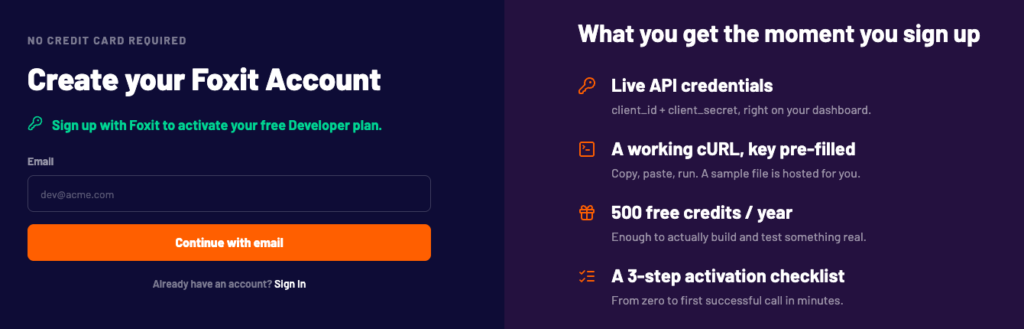
The sign-up form that activates the free Developer plan.
After sign-in, copy the client ID and client secret from the console.
Parseur
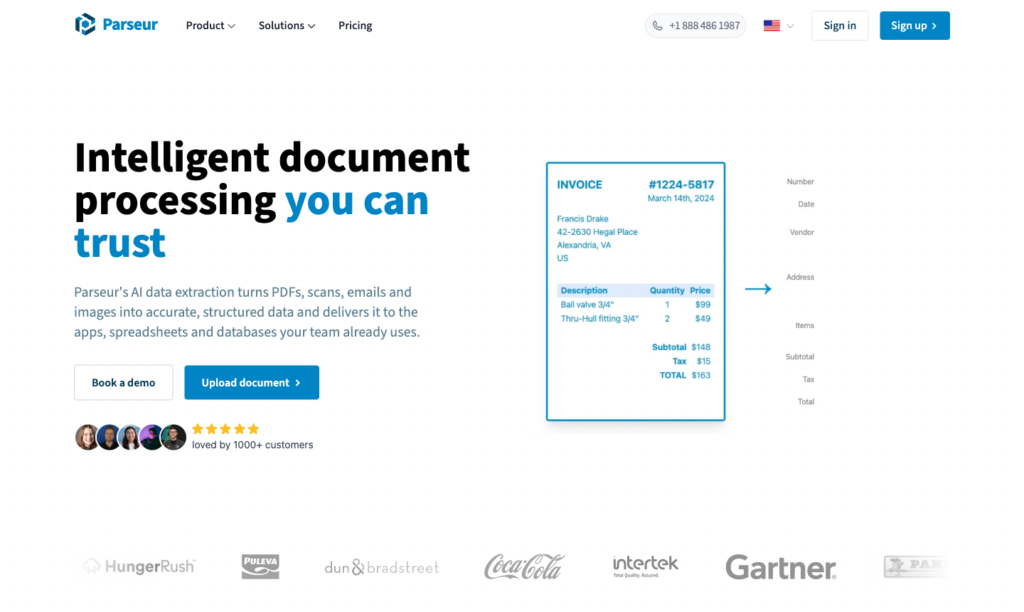
Parseur’s homepage, with an invoice mapped to extracted fields.
Parseur is the closest day-to-day substitute for a Docparser workflow. It runs both a template engine and an AI engine in the same mailbox, accepts documents by email, upload, or API, and exports results through webhooks.
| Feature | Details |
| How it extracts | An AI engine (fields you describe) and a template engine (point-and-click templates for fixed layouts) in the same mailbox, with OCR for scans. Documents arrive by email forwarding, upload, or API. |
| Output and schema control | Fields are defined per mailbox and exported as JSON, CSV, or Excel. The API can create mailboxes, set fields and AI instructions, and read a mailbox’s schema, but templates are created only in the visual editor. |
| API and webhooks | An OpenAPI 3.1 specification. Endpoints to upload binary or email documents, reprocess, skip, copy, and delete documents, and to create, enable, and disable webhooks. Zapier, Make, and Power Automate on every plan. |
| Pricing | 1 credit per page. An email or a spreadsheet counts as 1 page. Billed monthly: Micro $49 for 100 pages, Mini $89 for 300, Starter $129 for 1,000, Premium $269 for 3,000, Pro $499 for 10,000. Billed yearly: Starter $1,188 and Premium $2,388. Credits are spent only the first time a document is processed, and reprocessing is free. |
| Free allowance | 20 pages a month, with 90-day retention. |
| Limits | At 100% of the monthly quota, new documents are marked “Quota exceeded” until you buy credits, upgrade, or renew. Advanced post-processing and multi-user accounts start on the Scale tier (Pro and above). |
| Deployment and data | Hosted service. Retention is set per mailbox down to 1 day. Process then Delete removes a document once its data is sent, and plan maximums run from 90 days to unlimited. Parseur completed a SOC 2 Type II audit in September 2026 and says your data is never used to train AI models that serve anyone else. Parseur does not sign BAAs and is not HIPAA compliant at the time of writing. |
| Moving from Docparser | Create one mailbox per Docparser parser and reuse your field names. Rebuild fixed-layout rules as templates in the editor, or describe fields for the AI engine. Point uploads and the webhook at Parseur, and change the forwarding address for email intake. |
Checked in November 2026.
Where Parseur stands out
Because both engines share a mailbox, you can run templates on fixed layouts and describe fields in plain language for variable ones without maintaining 2 separate tools.
Email-first intake is a natural fit for AP workflows where invoices arrive as attachments, and an email body counts as 1 page. Reprocessing is free while you tune fields, which saves time during the initial migration.
Parseur’s OpenAPI 3.1 specification gives you typed request and response shapes and makes generating a client straightforward. Creating mailboxes and setting field instructions through the API means you can automate parser provisioning for multi-tenant setups.
What to consider
Per-page billing means a 5-page invoice costs 5 credits, where Docparser charges 1. At higher page counts, that delta grows.
Templates cannot be created through the API, only in the visual editor, so automated parser deployment has a manual step. Advanced post-processing starts on the Scale tier, so transformations and formatting happen in your own code on lower plans.
Parseur does not sign BAAs and is not HIPAA compliant at the time of writing, so health data is off the table.
Best for
It’s best for teams that want a like-for-like hosted parser, particularly when documents arrive as email attachments.
Getting started
To get started, use the Parseur free tier (20 pages a month) and the API documentation.
Parsio
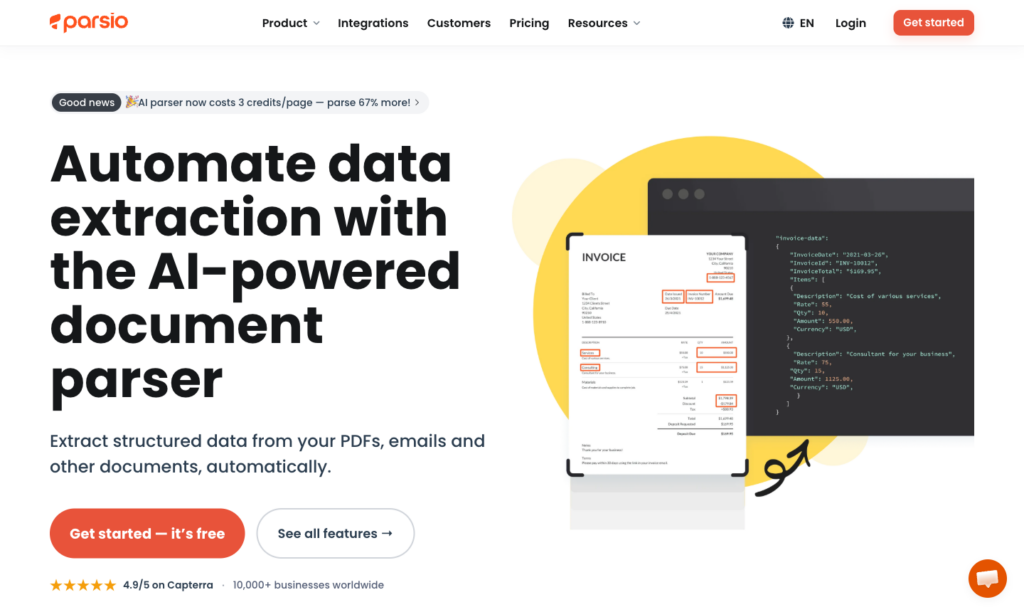
Parsio’s homepage, showing an invoice turned into JSON.
Parsio gives you 4 extraction engines on one credit pool, which lets you match the engine to the document type rather than the other way around.
| Feature | Details |
| How it extracts | Parsio runs 4 engines: a template parser for fixed layouts, a GPT-powered parser driven by a prompt, a pretrained AI parser for 15+ document types, and an OCR converter that returns text only. |
| Output and schema control | Structured fields per mailbox, exported to Excel, CSV, JSON, or Google Sheets. Advanced post-processing with an AI code assistant reshapes fields before export. |
| API and webhooks | A public API and webhooks, plus Zapier, Make, and n8n. |
| Pricing | Credits renew monthly and are shared across parsers. Template parser: 1 credit a page. GPT parser: 2 credits a page. AI parser: 3 credits a page. OCR converter: 1 credit a page. A page uses credits only the first time it is parsed. Billed monthly: Starter $29 for 100 credits, Growth $149 for 5,000, Business $299 for 12,000. Billed yearly: $290, $1,490, and $2,990. |
| Free allowance | 30 credits a month, with 30-day retention. |
| Limits | Retention is configurable from 1 to 180 days within the plan maximum: 30 days on Free, 90 on Starter and Growth, 180 on Business. |
| Deployment and data | Hosted on Hetzner compute in Germany, with documents in encrypted Amazon S3 storage. Parsio says your data never trains AI models and that every AI vendor signs a no-training clause. GDPR is supported with a DPA available. The ISO 27001 and SOC 2 certifications it cites belong to its infrastructure providers, not to Parsio itself. No HIPAA or BAA statement on the security page. |
| Moving from Docparser | The template parser maps most directly to Docparser rules on fixed layouts, and the GPT parser replaces rules with a prompt. Switch the upload call and the webhook URL. |
Checked in November 2026.
Where Parsio stands out
A single credit pool covers all 4 engines, so you can run the template parser on predictable supplier invoices and the GPT parser on unusual layouts without separate accounts or separate billing.
On the Growth plan, the template parser works out to about $0.03 per page when all 5,000 credits are used (our calculation from list prices).
Advanced post-processing with an AI code assistant runs before export, which means computed fields and format transforms happen server-side rather than in your integration layer.
What to consider
GPT and AI parsers cost 2 and 3 times the template parser, so a mailbox that mixes engines will burn through credits faster than a straight page count suggests.
Per-page credits also mean long documents cost more than on Docparser’s 5-page credit. The compliance claims rely on Hetzner’s and Amazon’s certifications, not Parsio’s own audits. Parsio publishes no HIPAA or BAA terms, so ask before sending health data.
The same team builds Airparser, an AI parser at 1 credit per page with human-in-the-loop review and an MCP server (yearly-billed plans from $33 a month for 100 credits). It doesn’t get its own entry here, but consider it if you want human review without stepping up to a full workflow platform.
Best for
It’s best for high-volume mailboxes of mostly fixed layouts, plus some variable documents, on a tight per-page budget.
Getting started
To get started, sign up for the Parsio free tier, which includes 30 credits a month. Connect it to n8n or Zapier to test your existing webhook handler.
DocuPipe
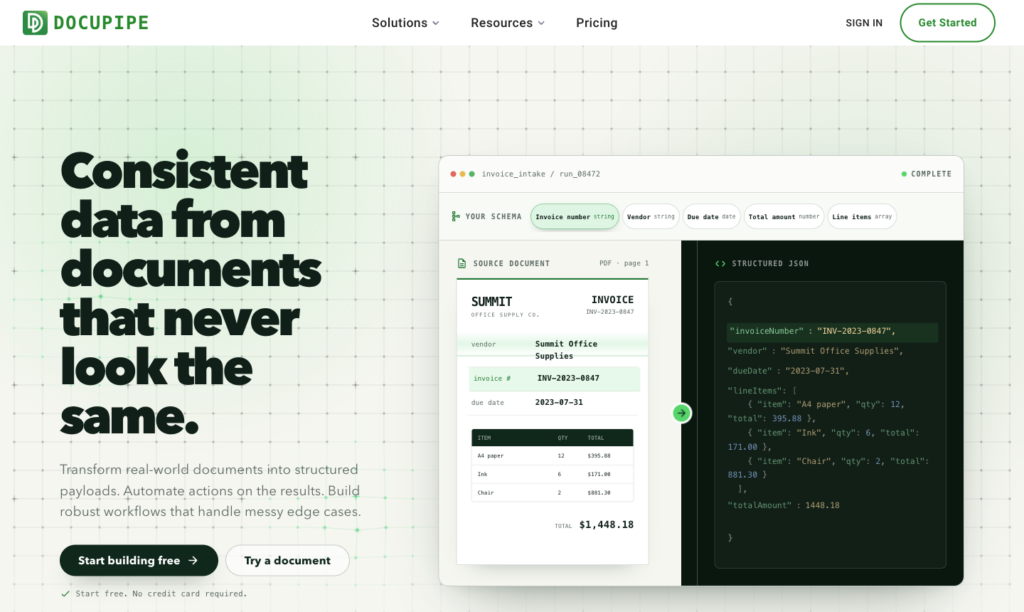
DocuPipe’s homepage, with a schema, a source invoice, and the structured JSON side by side.
DocuPipe (formerly DocuPanda) structures extraction around a JSON Schema you define once, so every document returns exactly the same fields regardless of layout variation.
| Feature | Details |
| How it extracts | Parse (OCR, tables, checkboxes), then Standardize against a schema you write or auto-generate, run by the V3 agentic engine. Classify, Split, and Review are separate steps. |
| Output and schema control | Schemas use JSON Schema, so every document returns the same fields. Results come as JSON, XML, or Excel. Standardization with citations adds a bounding box and a confidence value per field. |
| API and webhooks | REST at app.docupipe.ai with the API key in an X-API-Key header. Webhook events for every stage, including document.processed and standardization.processed with matching error events. Workflow endpoints upload and standardize in one POST. Make.com modules, and n8n and Power Automate through webhooks. |
| Pricing | Parse: 1 credit a page. Standardize: 2 credits a page (4 at high effort, 3 with citations). Review: 2 credits a page. Classify: 0.1 credits. Split: 0.2 credits. Minimum of 1 credit per document per operation. Billed monthly: Starter free with 100 credits, Business $99 with 2,500 credits and overage at $0.08 a credit, Premium $499 with 20,000 credits and overage at $0.05. Yearly billing saves up to 20%. |
| Free allowance | 100 credits a month on Starter, plus 200 credits at sign-up. |
| Limits | Subscribed non-enterprise accounts refill 1,800 rate-limit tokens a minute (a POST costs 10, a GET costs 1), about 3 uploads a second. Starter stops at its credit limit, and paid plans continue at the overage rate unless you switch overage off. |
| Deployment and data | Hosted, with geographic data residency and a BAA from Business, and on-premises deployment on Enterprise. DocuPipe says it is ISO 27001 certified and HIPAA and GDPR compliant. |
| Moving from Docparser | Write one schema per Docparser parser using your existing field names, route documents with Classify instead of separate parser IDs, and point your webhook consumer at standardization.processed.success. |
Checked in November 2026.
Where DocuPipe stands out
The schema is your downstream JSON contract, written once and enforced across every layout. When a supplier introduces a new invoice template, the same schema applies and the model adapts without a rules update.
Citations give reviewers a bounding box and a confidence score for each extracted value at 3 credits a page, so they can trace values back to the source during exception handling.
A BAA is available from the $99 Business plan, which is accessible enough for small teams with health data requirements.
Webhook events fire for every processing stage, including errors, so your integration can react to classification, parsing, and standardization results without polling.
What to consider
Parse plus standardize at standard effort costs 3 credits per page, so a 2-page invoice uses 6 credits. High effort doubles the standardization cost to 4 credits per page.
Citations add 1 credit per page to the standard-effort standardization cost. Model-based extraction still needs a validation layer on your side, because the schema controls the shape of the output but not whether the values are correct.
Best for
It’s best for teams that want to keep exact JSON field names across many supplier layouts without maintaining rules.
Getting started
To get started, sign up for the DocuPipe free tier, which gives 100 credits a month plus 200 at sign-up. The schema documentation explains how to define the fields you extract.
Extend
Extend’s homepage, with its Python SDK install command.
Extend separates parsing and extraction into API calls with their own per-page prices, so you can choose the precision-cost trade-off for each document type.
| Feature | Details |
| How it extracts | Separate Parse, Extract, Classify, Split, and Edit APIs, plus Agentic OCR. Parse handles tables, checkboxes, images, charts, and handwriting across 35+ file types. |
| Output and schema control | Extraction runs as its own step after parsing. Studio and Evals let you test an extraction setup before release. Composer and Review Agent are available on every plan; Review Agent adds 1 credit a page. |
| API and webhooks | REST APIs per step, chained with Workflows. |
| Pricing | Pay as you go at $0.01 a credit. Parse: Light 0.5 credits a page, Performance 2, Auto 0.5 to 2. Extract (billed on top of parsing): Light 0.7 credits a page, Performance 3, Operator-1 5. Classify: 0.5 credits. Split: from 0.5 credits. Growth and Enterprise use custom per-credit pricing. |
| Free allowance | 10,000 credits, worth $100, to start. |
| Limits | On pay as you go: 60 concurrent documents or 500 concurrent pages, whichever comes first. Growth starts at 180 documents and 3,500 pages. |
| Deployment and data | US or EU cloud. Zero data retention on request on every plan. BAA is an add-on on pay as you go and included with Growth. Your own VPC and hybrid deployments with Enterprise. Extend lists SOC 2, HIPAA, and GDPR. |
| Moving from Docparser | Extract runs Parse automatically, so a single Extract call bills both the parse and the extract charge. Budget for both. |
Checked in November 2026.
Where Extend stands out
Zero data retention is available on request on every plan, including pay as you go, so your legal team controls what persists on a third-party server.
Evals let you catch regressions when you change an extraction setup, so a fix for one supplier’s layout doesn’t quietly break field output for another. The 10,000 free credits give you enough runway to run a real volume of documents before you commit.
Per-page pricing with named modes gives you a clear cost projection before you send a single document. Light at 1.2 credits per page (parse plus extract) handles most clean digital PDFs, and Performance at 5 credits per page handles harder documents.
What to consider
Parsing and extraction are billed separately, and the mode you choose changes the per-page cost roughly fourfold.
There is no rules editor in the Docparser sense. Extend is built for developers who write extraction logic, not point-and-click rule builders. Zero data retention is not on by default, so request it before sending sensitive documents.
Best for
It’s best for developers who want to pay per page with no commitment and need to test extraction changes before they ship.
Getting started
To get started, claim the 10,000 free credits and use Evals to validate your extraction setup on your own documents before connecting it to production.
Docsumo
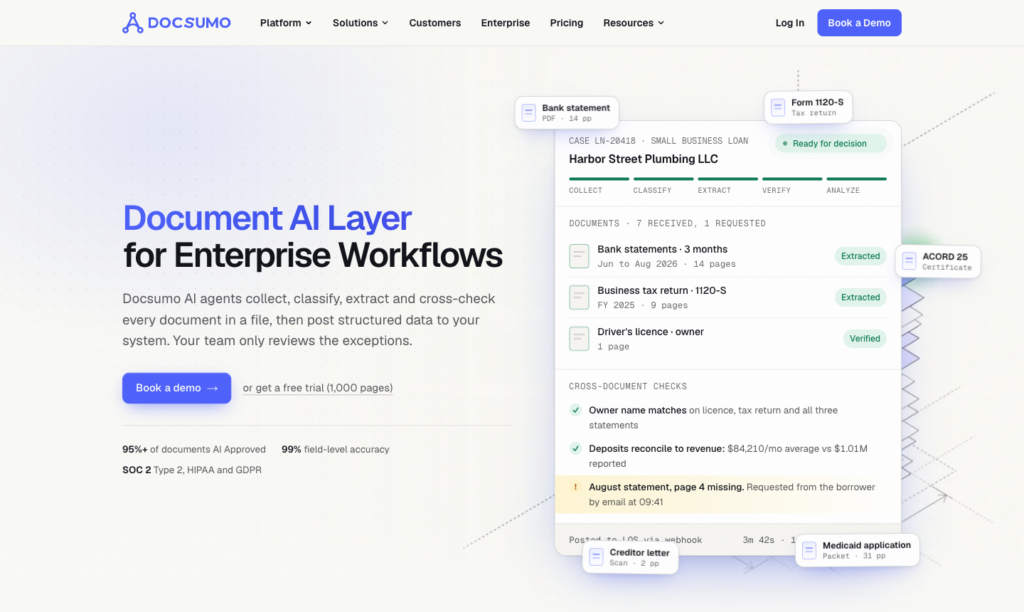
Docsumo’s homepage, showing a loan case with extracted documents and cross-document checks.
Docsumo goes beyond parsing by adding a review screen, validation rules, and an audit trail. This moves some of the work you currently do downstream into the tool.
| Feature | Details |
| How it extracts | Pre-trained document AI models plus AI prompting and refinement, field and table extraction, and continuous learning. Business adds auto-classification and splitting. |
| Output and schema control | Fields per document type. Business adds AI-transform for validations, classification, and categorization. Enterprise adds cross-document validations and master data lookup. |
| API and webhooks | Webhooks, APIs, and Excel downloads on every plan, plus pre-built integrations. |
| Pricing | Business and Enterprise are priced by quote on pages per month or year, plus the workflow steps you use. Monthly credits reset each month, and annual plans get their full credit up front. |
| Free allowance | A 14-day trial with up to 1,000 pages and 10 users, set up with you on a short call. |
| Limits | Volume, steps, and terms are agreed in the quote. |
| Deployment and data | Hosted on AWS and Google Cloud. Docsumo lists SOC 2 Type II, ISO 27001, HIPAA, and GDPR on every plan, signs BAAs, and says documents and extracted data are not used to train shared or third-party models. Delete in the app or by API. |
| Moving from Docparser | Setup starts with an onboarding call rather than self-serve parsers. Validations take over the checks your Docparser filters did. |
Checked in November 2026.
Where Docsumo stands out
The review screen and validation rules handle exceptions by routing a document that fails a confidence check to a human reviewer rather than passing a wrong value to your ERP.
Classification and splitting handle mixed document packets, which suits lenders or insurers who receive a single upload containing multiple document types. Compliance coverage, including a BAA on request, is on every plan rather than gated to enterprise.
What to consider
There is no self-serve price, so you can’t estimate cost before a sales call. That makes it harder to compare against per-page alternatives for a specific workload.
If you need fields from 1 or 2 stable layouts with no review workflow, Docsumo is a heavier platform than the job requires.
Best for
It’s best for lending, insurance, or healthcare teams whose extraction needs human review and an audit trail.
Getting started
To get started, book the 14-day trial, which includes up to 1,000 pages and starts with an onboarding call.
Nanonets
Nanonets’ homepage, with the $50 free-credit offer under Get started for free.
Nanonets organizes extraction as a workflow of blocks, where each block (extract, classify, validate, export) is billed as a separate run.
That structure makes it straightforward to add validation and approval steps without custom code.
| Feature | Details |
| How it extracts | Workflows built from blocks: data extraction, classification, validation, formatting, and export. Growth adds generative AI blocks, barcode and signature detection, and custom Python blocks. Separate developer APIs parse, extract to your schema, split, and chunk documents. |
| Output and schema control | Fields are defined in the workflow, with validation blocks before export. The Extract API returns data in the schema you specify. |
| API and webhooks | API access, email integration, and cloud storage connectors on Starter. ERP and database integrations on Growth. |
| Pricing | Billed per block run: simple operations $0.02, standard AI $0.10, complex AI (data extraction and generative AI) $0.30. Nanonets says a typical invoice workflow runs 4 to 6 blocks per document. Starter opens with $50 in free credits, then $100 a month for 100 credits (1 credit = $1), and credits never expire. Growth offers volume discounts of up to 40%. |
| Free allowance | $50 in credits, no card required. |
| Limits | Up to 3 users on Starter. Whether a multi-page document counts as 1 extraction run or 1 per page is not published. |
| Deployment and data | Enterprise adds private cloud or on-premises deployment and data residency in the US, EU, or APAC. Nanonets lists SOC 2, HIPAA, GDPR, and ISO, with HIPAA and SOC 2 compliance listed under Enterprise. Retention and training terms are not published. |
| Moving from Docparser | Rebuild each parser as a workflow. Validation and approval blocks replace manual checks, and every added block adds a run charge. |
Checked in November 2026.
Where Nanonets stands out
Validation and approvals live inside the same workflow as extraction, so an invoice that fails a cross-field check routes to a reviewer without you building a separate queue.
Starter carries no platform or seat fees, so you pay only for what runs. On-premises deployment is available on Enterprise if data residency is a hard requirement.
What to consider
Cost per document depends on how many blocks run. An invoice workflow with 1 extraction block at $0.30 and 3 simple blocks at $0.02 runs $0.36 per document.
HIPAA and SOC 2 are listed under Enterprise. Starter is capped at 3 users.
Best for
It’s best for operations teams that want extraction, validation, approval, and ERP export in one tool.
Getting started
To get started, use the $50 in free credits and build a sample invoice workflow to verify per-document cost before committing.
Unstract
Unstract’s homepage, with LLMWhisperer, its text-extraction service, in the top navigation.
Unstract is the only tool in this list you can run on your own servers under an open-source license, with your own choice of LLM.
| Feature | Details |
| How it extracts | Prompt Studio and Agentic Prompt Studio define each field as a prompt over text from LLMWhisperer, Unstract’s text-extraction service, using the LLM you choose. Human-in-the-loop review is included, and LLMChallenge and single-pass extraction target reliability. |
| Output and schema control | JSON built from your prompts. Agentic Prompt Studio can draft the schema and prompts for you. |
| API and webhooks | API deployments expose an extraction workflow as a REST endpoint for your application. ETL pipelines with connectors, an MCP server, and a CLI are also available. |
| Pricing | Managed Document Studio, billed monthly: Starter $499 for 5,000 pages with overage at $0.10 a page; Growth $2,249 for 25,000 pages with overage at $0.09. Billed yearly, Starter is $416 a month for 60,000 pages a year. Enterprise is priced by quote. The open-source edition has no license fee, and you supply the LLM, embedding model, vector database, and text extraction. |
| Free allowance | A 14-day trial with LLMWhisperer Free and Azure OpenAI GPT-4o with 1M tokens. Prebuilt API Hub endpoints for bank statements, tables, and invoices have a free tier. |
| Limits | Starter and Growth run a single environment. SOC 2 Type II, ISO 27001, HIPAA, and a DPA come only with Enterprise. |
| Deployment and data | Managed cloud, on-premises Enterprise in your VPC, or the self-hosted AGPL-3.0 edition (v0.204.0 released 10 November 2026). Unstract says it never trains on customer data. |
| Moving from Docparser | Rules become prompts. An API deployment replaces the parser upload URL. In self-hosted setups, you run and pay for the LLM yourself. |
Checked in November 2026.
Where Unstract stands out
Self-hosting the AGPL-3.0 edition with a self-hosted LLM keeps documents inside your infrastructure. Your choice of LLM means you can swap models as costs and capabilities shift. Human-in-the-loop review is included on every managed tier rather than an add-on.
What to consider
AGPL-3.0 terms apply if you modify Unstract and offer it over a network, so check with your legal team before shipping a modified version as part of a commercial product.
Self-hosting means operating an LLM stack, including provisioning the model, handling failures, and monitoring latency.
The managed product costs $499 a month on monthly billing or $416 a month billed yearly, and compliance certifications (SOC 2 Type II, HIPAA) are Enterprise-only.
Best for
It’s best for teams that can self-host extraction and model dependencies when documents must stay on their own infrastructure.
Getting started
To get started, self-host the AGPL-3.0 edition from GitHub, or try the managed version. The 14-day managed trial starts without a credit card.
What changes when you move off Docparser
Each category handles different stages of a Docparser integration. You write and maintain the code for any stages it doesn’t handle.
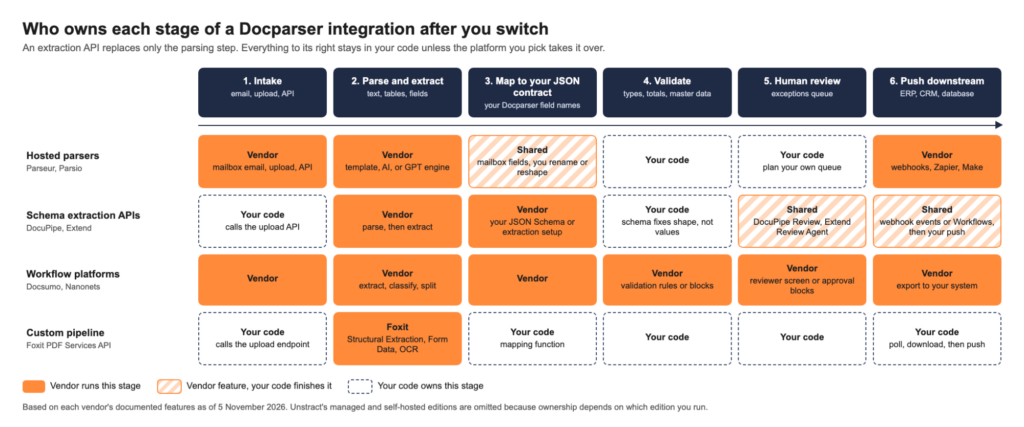
Who owns each stage after the switch. In the custom pipeline, your code handles every stage except extraction.
Keep your downstream JSON fields
| Docparser today | Hosted parsers (Parseur, Parsio) | Schema extraction APIs (DocuPipe, Extend) | Custom pipeline on Foxit PDF Services API |
| One parser per layout, picked by the PARSER_ID in the upload URL | One mailbox per document type; Parseur’s API can create mailboxes and set fields | One schema per document type; DocuPipe’s Classify can route each document to its schema | Your code chooses the mapping function per document type |
| Parsing rules, filters, and table rules | Templates for fixed layouts, AI fields or prompts for variable ones | Field names and descriptions inside the schema | Functions that read paragraph, table, and form elements and return your fields |
| Results as nested object or flat JSON | Mailbox fields exported as JSON, CSV, or Excel | Exactly the fields the schema defines | Whatever your mapping function returns |
| remote_id carried from upload to results | Store your own ID beside the vendor’s document ID | Store your own ID beside the vendor’s document ID | Store your own ID beside the taskId and resultDocumentId |
| The Advanced Webhook pushes results | Webhooks, which Parseur also manages through its API | DocuPipe webhook events per stage; Extend Workflows chain the steps | Poll the task, download the result, then push to your downstream systems |
| Fillable PDF forms parsed with rules | AI or template fields | Schema fields | Export PDF Form Data returns values keyed by form field name, with no OCR |
| Re-parse and re-integrate endpoints | Parseur reprocesses for free; Parsio bills a page only the first time | A new run bills again | A new request is a new credit, and a retry with the same request_id is not billed twice |
On our API, the extraction result arrives through 4 asynchronous calls, and your mapping function sits between the downloaded result and your downstream systems.
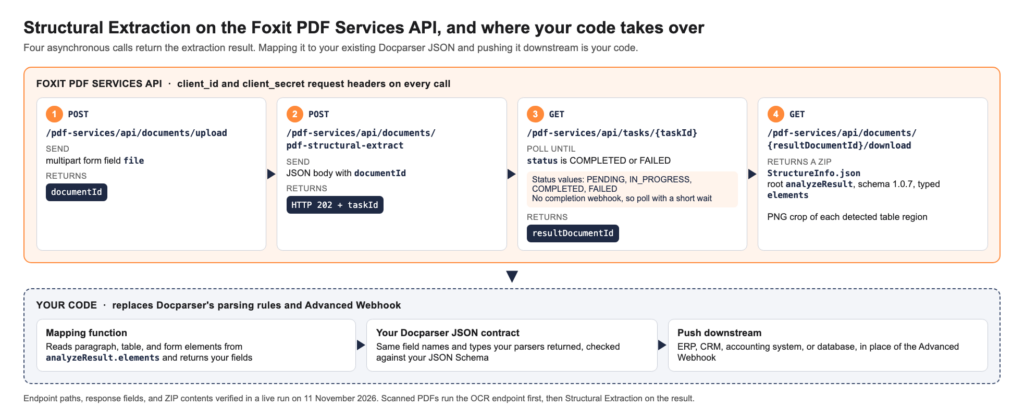
The 4 PDF Services calls and the code you own after them. Task polling replaces Docparser’s Advanced Webhook.
Freeze the contract first
Write down the field names and types from the results you exported earlier as a JSON Schema. DocuPipe accepts JSON Schema directly. With our API, use the same schema to validate your mapping output.
Formats the rules gave you
Docparser’s data-specific rules normalized dates and invoice numbers. Recreate that as format constraints or post-processing. Airparser runs Python post-processing on every plan, Parsio offers advanced post-processing with an AI code assistant, and Parseur’s advanced post-processing starts on its Scale tier.
Layout routing
Parser IDs and Multi-Layout Parsers handled routing. Replace them with classification (DocuPipe, Extend, Docsumo) or route by sender, mailbox, or filename in your own code.
The validation you now own
Docparser checked part of the output for you. After the move, these checks run in your own code unless the tool you pick handles them.
Type and format checks
Validate every result against the JSON Schema before it reaches the ERP or database, whichever tool produced it.
Cross-field checks
Check that line items sum to the subtotal, subtotal plus tax equals the total, dates fall within the expected range, and the supplier exists in your master data. Docsumo Enterprise offers master data lookup; check other tools’ validation and lookup integrations before assuming you need to build it yourself.
Evidence for each value
DocuPipe’s citations add a bounding box and confidence per field at 3 credits a page instead of 2, and our Structural Extraction returns a bounding box per element. Use them to show reviewers where a value came from, and route failed checks to review.
Human review
Human review is built in on Docsumo (AI document reviewer), Nanonets (approval blocks), Unstract (human-in-the-loop on every managed tier), DocuPipe (Review at 2 credits a page), and Airparser. On Parseur, Parsio, and our API, plan your own review queue.
Retries and duplicates
Docparser’s status endpoint lists failed jobs. On our API, a 429 means you’ve hit the per-application rate limit.
A 403 on a valid credential pair means the credit pool is empty, and a retry with the same request_id is not billed twice. DocuPipe recommends webhooks over polling and backoff when you must poll.
Run the old and new pipelines side by side on the same documents and compare the JSON field by field before you cut over.
What 1,000 2-page invoices a month cost
All figures are list prices on the plan named, based on 1,000 invoices at 2 pages each. These are our calculations, not vendor-provided estimates.
| Option and plan | Billing unit | Units for this workload | Monthly cost at list price |
| Docparser Business, billed monthly | 1 credit per document of up to 5 pages | 1,000 credits | $159, or $133 billed yearly |
| Foxit PDF Services API Business, billed yearly | 1 credit per request | 12,000 extraction credits a year; 24,000 with separate OCR on scanned PDFs | $375 (12,000 of 15,000 yearly credits); scans with separate OCR need a Volume quote |
| Parseur Premium, billed monthly | 1 credit per page | 2,000 credits | $269, or $199 billed yearly |
| Parsio Growth, billed monthly | 1 credit a page on the template parser, 2 on the GPT parser | 2,000 or 4,000 credits | $149 on either parser, or about $124 billed yearly |
| DocuPipe Business, billed monthly | 3 credits a page for parse plus standardize | 6,000 credits | About $379, made of $99 plus 3,500 overage credits at $0.08 |
| Extend, pay as you go | Credits per page by mode at $0.01 a credit | 2,400 credits on Light, 10,000 on Performance | $24 on Light or $100 on Performance, after free credits; excludes add-ons |
| Docsumo | Pages, by quote | 2,000 pages | Quote only |
| Nanonets Starter | $0.02 to $0.30 per block run | 1,000 extraction runs plus other blocks | About $300 for 1 extraction run per invoice at $0.30, before other blocks |
| Unstract Document Studio Starter, billed monthly | Pages, 5,000 included | 2,000 pages | $499; self-hosted edition has no license fee, but you pay for the LLM and infrastructure |
Checked in November 2026.
How we priced it
List prices in USD, each invoice counted as 1 document and 2 pages. Figures for yearly-billed plans are the yearly price divided by 12.
Short documents
Docparser’s credit covers up to 5 pages, so per-page billers cost more as pages per document rise. At 2 pages, Docparser Business sits in the middle of this table.
Our row
At this volume, extraction leaves 3,000 of the Business plan’s 15,000 yearly credits for conversion, compression, or redaction calls in the same pipeline.
Commitment
Our paid plans are yearly credit pools that reset each year, payable yearly or monthly (Business is $431 a month billed monthly), while most tools here use monthly credits or pay as you go.
Price your real mix of pages per document, scans, and layouts. Per-page credits favor single-page documents, Docparser’s per-document credit favors documents of 2 to 5 pages, and per-request credits favor long ones.
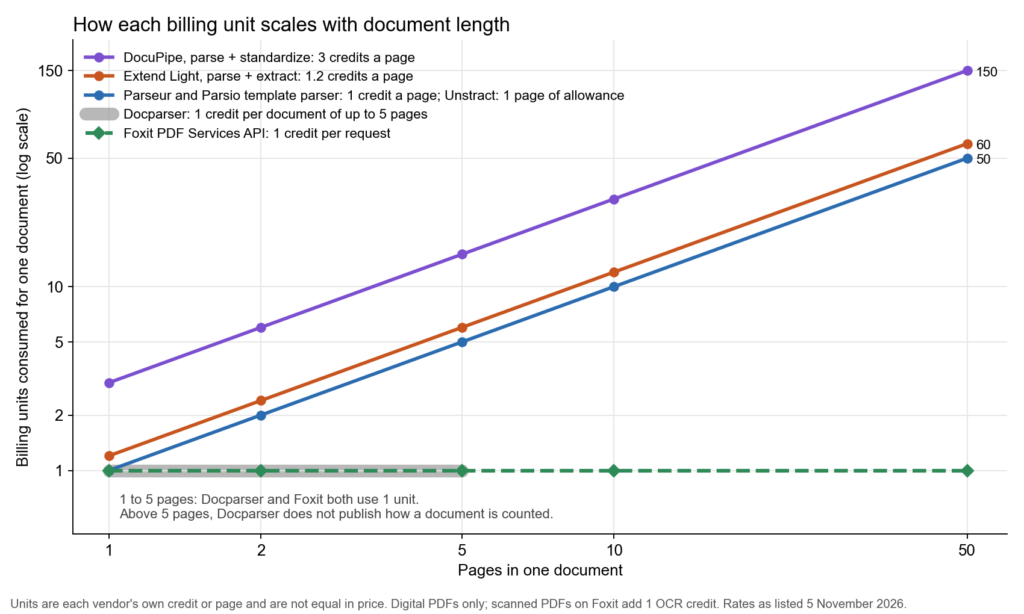
How each billing unit grows with page count. Per-page lines climb with every page, while the per-request line stays at 1. Units are each vendor’s own and differ in price.
Where your documents go after you upload them
Retention, training, and deployment terms often decide a switch before price does. Regulated documents need a clear answer on all 3 before you can compare field accuracy.
All cells are vendor claims.
| Tool | Retention | Training on your data | Private deployment |
| Docparser (baseline) | 0 to 180 days per parser, with longer retention available through the Extended Document Retention add-on | Docparser says it does not use or re-use your documents or extracted data | No; runs on AWS |
| Foxit PDF Services API | A delete endpoint removes uploaded and generated files | Not published | No; cloud only |
| Parseur | Per mailbox, down to 1 day; Process then Delete removes a document once its data is sent | Never used to train AI models that serve anyone else | Hosted service |
| Parsio | Configurable from 1 to 180 days within plan limits | Never trains AI models, with a no-training clause covering every AI vendor | Hosted on Hetzner in Germany, documents in encrypted Amazon S3 |
| DocuPipe | Data retention policies from Business | Not published | On-premises on Enterprise, with geographic data residency from Business |
| Extend | Zero data retention on request on every plan, with custom retention from Growth | Not published | Your own VPC or hybrid on Enterprise; US or EU cloud |
| Docsumo | Kept as long as needed to provide the service, with deletion available in the app or by API | Not used to train shared or third-party models | Hosted on AWS and Google Cloud |
| Nanonets | Not published | Not published | Private cloud or on-premises on Enterprise, with data residency in the US, EU, or APAC |
| Unstract | Your infrastructure when self-hosted | Never trains on customer data | Self-hosted AGPL-3.0 edition, or on-premises Enterprise in your VPC |
Checked in November 2026.
Retention you set vs. retention you get
Docparser, Parseur, and Parsio let you set retention per parser or mailbox down to 0 or 1 day. Set the shortest window your reprocessing needs allow.
Self-hosting is a license decision too
Unstract’s open-source edition is AGPL-3.0, which means modifications you offer over a network must be released under the same license. The other private options here are enterprise contracts.
If documents must stay in your own environment. Unstract’s self-hosted edition is the only option here you can run on your own servers without an enterprise contract. DocuPipe and Unstract offer on-premises Enterprise deployments, Extend offers your own VPC or hybrid, and Nanonets offers private cloud, all as Enterprise contracts. Our PDF Services API is cloud only.
Which accuracy claims can you trust?
Most pages that rank for “docparser alternatives” come from extraction vendors, including this one, so treat their comparisons as vendor positioning rather than independent tests.
Claims to qualify
DocparserAI’s SmartAI Parser lists handwriting and checkbox recognition. Treat vendor-run tests of it as vendor results rather than independent benchmarks.
Rules vs. models
Rules apply fixed extraction logic. Model-based extraction handles layout changes but still needs a validation layer, because model output can be plausible and wrong in ways a rule never would be.
Independent benchmarks
We found no independent benchmark that tests Docparser against the tools in this list.
Run 50 to 100 of your own documents (scans, multi-page tables, your most common suppliers) through Docparser and 2 shortlisted tools, and compare field by field against values you have checked by hand. That’s the only test that reflects your actual documents.
Choosing your Docparser replacement
These 4 questions narrow the list:
- Where should the extraction step live? In a template or AI editor (Parseur, Parsio), in a schema (DocuPipe, Extend), in a workflow with review built in (Docsumo, Nanonets), in prompts you can run on your own servers (Unstract), or in your own code (our PDF Services API).
- How long are your documents? The billing unit matters more than the headline price, so reprice your real page mix against the cost table above.
- Where must the documents go? Health data and self-hosting requirements remove options before price or accuracy does.
- Who owns validation and review? Whatever the tool doesn’t check, your code does, so count that work as part of the switch.
Where Foxit fits
Our PDF Services API covers extraction through several routes. Structural Extraction (Trial) returns typed elements and tables in reading order as JSON (schema v1.0.7). Export PDF Form Data returns fillable-form values keyed by field name. PDF to Excel pulls tables into XLSX. PDF to Markdown and PDF to Text convert content for LLM steps. The OCR endpoint makes scanned PDFs searchable before you extract.
Those extraction routes share a credit pool with the rest of the API. Convert an Office file to PDF before extraction, compress the PDF before storing it, redact a value after extracting it, generate a document from a template, and send it for signature, all on one account and one set of credentials. Our n8n tutorial and Power Automate tutorial show how to chain those operations, and our MCP server gives AI agents direct access to the same tools.
If you want a rules UI, email-inbox parsing, or a built-in review screen, a hosted Docparser alternative from this list fits better. Our API fits when the extraction step belongs in your code, alongside your other document operations.
Our Developer plan gives you 500 credits a year at no cost, so you can try Structural Extraction on your own documents before committing to a paid plan. Our invoice extraction tutorial, structural data tutorial, and contract metadata tutorial show what the mapping code looks like on real documents.
Start with the results you exported from Docparser. Run the same PDFs through Structural Extraction, write the mapping function that returns your existing field names, and compare the 2 outputs field by field before you move any production traffic.
What else to know before you replace Docparser
A few questions consistently come up when developers evaluate this switch.