If your Textract bill is higher than expected, check which API you’re calling before switching vendors.
For invoice fields, AnalyzeExpense costs $0.01 per page, compared with $0.07 for AnalyzeDocument with Forms, Tables, and Queries enabled.
At 100,000 single-page invoices a month, that’s $1,000 vs. $7,000 (our arithmetic from AWS list prices, US East). Check that AnalyzeExpense returns the fields your pipeline needs before changing APIs.
There are real reasons to leave, though. Textract reads printed text in more than 40 languages, but Forms key-value extraction covers only 6 of them, and handwriting, Queries, AnalyzeExpense, and AnalyzeID are English only.
AnalyzeID reads only US passports and US driver’s licenses. Synchronous calls take a single page, and Amazon Augmented AI (A2I), the human-review integration for Textract, closed to new customers on 30 Jul 2026. Some teams also want schema-based extraction, a specific data-residency posture, or pricing that doesn’t compound by feature combination.
In this article, we compare 8 Amazon Textract alternatives based on their extraction features, pricing, usage limits, deployment options, and migration requirements.
Some return document structure; others extract named fields. The right replacement depends on which Textract APIs your pipeline uses.
Our top picks by reason for switching
The best alternatives to Amazon Textract depend on why you’re leaving.
Azure Document Intelligence and Google Document AI cover the broadest set of Textract workflows, with prebuilt models at $10 per 1,000 pages on Azure and the Custom Extractor at $30 per 1,000 pages on Google, while the Foxit PDF Services API, Mistral OCR, and Amazon Bedrock Data Automation offer different billing models that favor long documents, high volume, or staying on AWS.
For teams that can’t move documents off their own infrastructure, Docling is the only open-source option here you can run with no vendor contract.
Because AnalyzeExpense already matches or undercuts most options here on 1-page invoices, the strongest arguments for switching are language coverage, schema extraction, data terms, or long-document pricing rather than invoice cost reduction.
Each API appears once, under the reason it fits best. List prices in US regions at first pricing tier.
If you are leaving Textract because… | Pick | Why it fits |
Long PDFs get billed per page at the selected feature-combination rate | 1 credit per successful PDF Services processing call within supported limits; scans need OCR before structural extraction. Credits are shared with other Foxit APIs, but eSign uses 5 credits per envelope. | |
You want comparable models for common Textract workflows | Prebuilt invoice, receipt, ID, bank statement, tax and mortgage models at $10 per 1,000 pages, query fields, and about 300 printed languages | |
Your documents are handwritten, or need field extraction beyond English | OCR for more than 200 languages including handwriting and a generative Custom Extractor at $30 per 1,000 pages | |
You want to stay on AWS | Blueprint fields with confidence scores at $0.04 a page for up to 30 fields, through your AWS account, with IAM and Amazon S3 integration | |
Per-page cost at high volume | OCR 4.1 at $4 per 1,000 pages, or $2 with the Batch API, with schema annotations at $5 per 1,000 annotated pages | |
Every extracted value needs evidence for review | Per-field citations with bounding boxes (except Turbo) and 0-1 confidence scores, from 8 credits a page (about $0.012 on pay-as-you-go) | |
Mixed document packets, or extraction inside your own VPC | Extract at $20 per 1,000 pages including parsing, Split and Classify endpoints, hybrid and full VPC deployments on Enterprise | |
Documents cannot leave your own servers | MIT-licensed, runs locally or air-gapped, Docling Serve REST API, schema extraction through DocumentExtractor |
If per-request pricing could work for your document mix, you can test it on a free Foxit developer account before deciding.
What Amazon Textract gives you today
The table below uses US East (N. Virginia) list prices from the AWS Price List API feed published 27 Oct 2026. Synchronous and asynchronous calls cost the same.
Textract API or feature | What it returns | Per 1,000 pages, first 1M a month | Above 1M pages a month | Free tier, first 3 months |
DetectDocumentText | Lines and words with confidence and geometry | $1.50 | $0.60 | 1,000 pages a month |
AnalyzeDocument Tables | Tables, cells, merged cells, table titles and footers | $15 | $10 | 100 pages a month |
AnalyzeDocument Forms | Key-value pairs and selection elements | $50 | $40 | 100 pages a month |
AnalyzeDocument Queries | Answers to questions you write (English) | $15 | $10 | 100 pages a month |
Forms and Tables together | Key-value pairs, selection elements and tables in a single call | $50 | 100 pages a month | |
Forms, Tables and Queries together | All 3 in a single call | $70 | $55 | 100 pages a month |
Layout | Titles, headers, paragraphs, lists, figures | $4, free with Forms, Tables or Queries | $3 | 100 pages a month |
Signatures | Signature locations | $3.50, free with Forms, Tables, Queries or Layout | $1.40 | 1,000 pages a month (Signatures only) |
AnalyzeExpense | Invoice and receipt fields and line items (English) | $10 | $8 | 100 pages a month |
AnalyzeID | US passports and US driver’s licenses (English) | $25 for the first 100,000 pages | $10 above 100,000 | 100 pages a month |
AnalyzeLending | Mortgage packages classified, split and extracted | $70 | $55 | 2,000 pages a month |
Custom Queries (adapters) | Queries tuned on your own documents | $25 | $15 | Not available |
How billing works. AnalyzeDocument bills each page at the rate for the feature combination you request, and Forms with Tables bills as the sum of the 2 feature rates, $65 per 1,000 pages. Every AnalyzeDocument response includes OCR. The free tier covers new AWS customers for 3 months.
What are the limitations of Amazon Textract? Synchronous calls take a single-page PDF or TIFF up to 10 MB. Asynchronous PDF/TIFF jobs read up to 3,000 pages and 500 MB from Amazon S3, announce completion on Amazon SNS, and keep results for 7 days by default.
Text detection, Tables, Signatures, and Layout support more than 40 languages, including Arabic, Chinese, Japanese, Korean, and Hindi. Forms covers only English, German, French, Spanish, Italian, and Portuguese.
Handwriting, Queries, AnalyzeExpense, and AnalyzeID are English only, and AnalyzeID reads only US passports and US driver’s licenses. Textract reads horizontally aligned text only, and XFA PDFs and password-protected PDFs are unsupported. Default quotas in US East (N. Virginia) are 10 transactions a second for AnalyzeDocument, 25 for DetectDocumentText, and 5 for AnalyzeExpense.
Data use. AWS may store and use Textract document inputs to improve Textract and other AWS AI services, and may store some of that content in another region, unless you set an AWS Organizations AI services opt-out policy. Textract is HIPAA eligible and compliant with PCI, ISO, and SOC, available in 18 regions including both AWS GovCloud (US) regions.
Human review. Amazon A2I is no longer open to new customers as of 30 Jul 2026, and existing users can keep it. Textract itself is unaffected by that announcement, and AWS shipped a text-detection model update for DetectDocumentText and AnalyzeDocument on 30 Jun 2025.
Before comparing alternatives, list the Textract APIs your pipeline calls, with monthly pages for each. That list tells you whether a cheaper Textract API (often AnalyzeExpense in place of AnalyzeDocument) already solves the cost problem, and if not, which alternative can replace each call and what it will cost.
The 8 Amazon Textract alternatives in detail
In each entry’s feature table, the Covers row maps the API to Textract’s jobs (OCR, Tables, Forms, Queries, Signatures, Layout, AnalyzeExpense, AnalyzeID, AnalyzeLending), and the Moving from Textract row names the biggest change you’ll make in your code.
Foxit PDF Services API
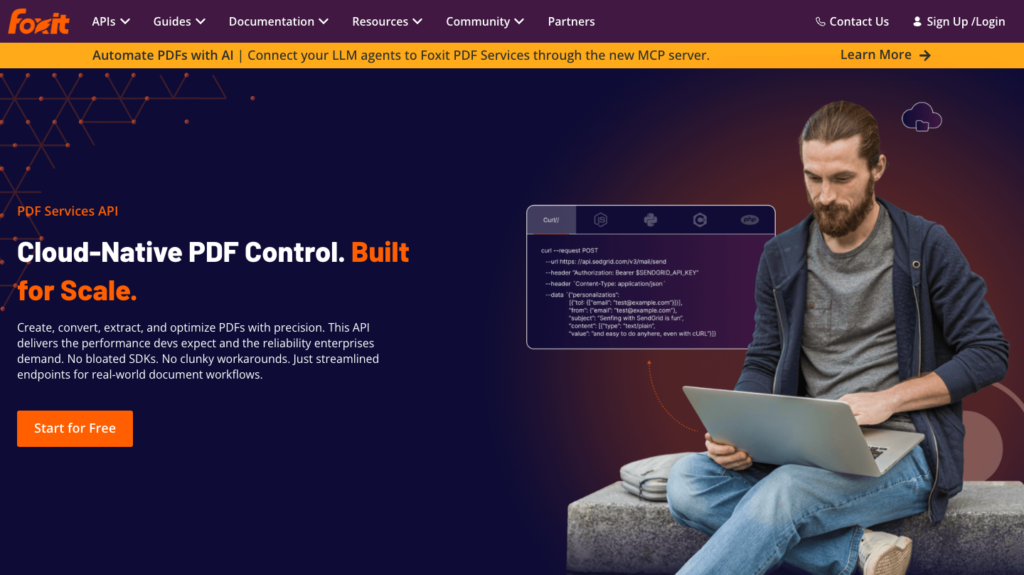
Our PDF Services API product page, which covers conversion, extraction and optimization from one REST API.
The Foxit PDF Services API is our REST API for PDF conversion, OCR, extraction, redaction and form handling.
Feature | Details |
Covers | OCR (Perform OCR endpoint), layout and tables through PDF Structural Extraction (Trial), tables to Microsoft Excel workbooks (XLSX) through PDF to Excel, fillable-form values through Export PDF Form Data, plus Markdown through PDF to Markdown and PDF to text. No counterpart for Queries, Signatures, AnalyzeExpense, AnalyzeID or AnalyzeLending. |
Field extraction | No schema-based extraction and no prebuilt invoice or ID models. Structural Extraction returns 12 element types in reading order (title, head, paragraph, table, image, headerFooter, form, hyperlink, footnote, sidebar, annotation, formula), where text elements carry an 8-number bounding polygon and a confidence score, and table elements carry their polygon under regions and their confidence under scores, returned as cell grids. Export PDF Form Data returns JSON keyed by the PDF’s form field names, reading interactive fields rather than key-value pairs printed on a scan. |
OCR and languages | The Perform OCR endpoint takes a list of OCR language codes in its languages setting, such as en-US. Structural Extraction returns no text on image-only PDFs unless you run the OCR endpoint first, so scanned documents take 2 credits in total. Handwriting support is not documented. |
Pricing | 1 credit per successful request, regardless of page count or file size within supported limits (Credits Explained). Developer (plan pricing): 500 credits/year (free). Startup: $1,750/year (5,000 credits, $0.35/credit). Business: $4,500/year (15,000 credits, $0.30/credit). Volume: by quote. Credits reset yearly with no rollover. |
Free allowance | 500 credits a year on the Developer plan. |
Limits | 100 MB upload. Per application: 15 requests a minute in sandbox, 100 in production. Asynchronous: upload, start the operation, poll the task, download the result. Page limit per request is not published. |
Deployment and data | Cloud only, through one global API gateway. A delete endpoint removes uploaded and generated files. Our cloud-hosted PDF APIs are covered by SOC 2 Type II audits, and we support HIPAA BAAs. Our MCP server (v1.1.2), built on the Model Context Protocol, exposes pdf_structural_analysis, pdf_extract and pdf_ocr tools. |
Moving from Textract | Upload the file instead of pointing at S3, poll the task instead of waiting for SNS, parse an elements array instead of Blocks and Relationships, and send your client ID and client secret as request headers instead of signing requests with IAM. |
Where Foxit PDF Services API stands out is per-request pricing. A 50-page digital statement costs 1 credit where Textract bills all 50 pages at the selected feature-combination rate.
On the Business plan with all 15,000 annual credits used, that works out to $0.30 per request, which is less than Textract Tables above roughly 20 pages and less than Forms with Tables from about 5 pages (our arithmetic from list prices, not an equivalent-output benchmark).
Extraction also sits on the same credit pool as conversion, redaction, eSign and document generation, so a pipeline that already converts, signs or redacts consolidates billing in one place. For fillable PDFs, Export PDF Form Data returns exact field values without any OCR layer.
What to consider. Our PDF Structural Extraction API is currently in Trial and uses schema version v1.0.7. The API may change, so validate responses against the schema your application expects. There’s no key-value detection on scanned forms, no Queries counterpart and no prebuilt invoice or ID model, so a team replacing AnalyzeExpense or AnalyzeID will need to pick a different option.
Scanned documents take 2 credits (OCR then extraction), equivalent to $0.60 to $0.70 at full use of the Business or Startup annual credit pool, respectively. That is 60 to 70 times AnalyzeExpense’s $0.01 per page, without the same prebuilt invoice fields.
Credits reset annually with no rollover; mid-cycle top-ups are available and expire at the same reset date. Our retention period for uploaded files is not published, so call the delete endpoint after each job. We don’t use the documents you submit to train AI models unless you authorize it.
Best for. Long, structured PDFs (statements, contracts, reports) and fillable forms in pipelines that also convert, OCR, redact or sign documents.
Getting started. A free Foxit developer account includes 500 credits a year, enough to test PDF Structural Extraction on a few of your own long documents.
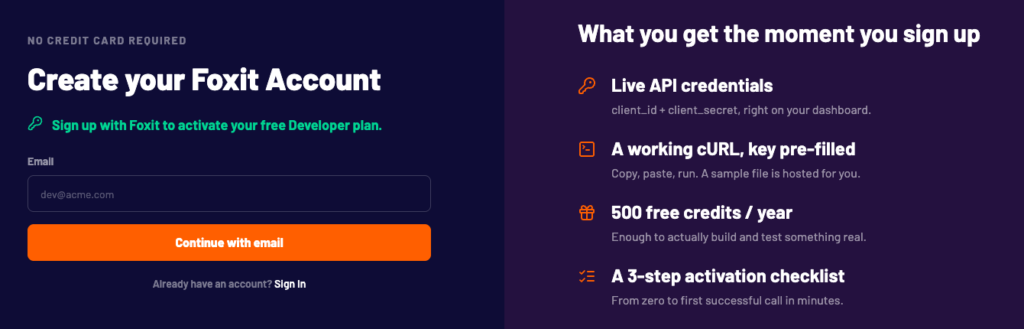
Our developer sign-up page, where a new account comes with live API credentials and 500 free credits a year.
Azure Document Intelligence
Azure Document Intelligence product page, now listed under Foundry Tools and Azure Content Understanding.
Azure Document Intelligence (first Form Recognizer, then Azure AI Document Intelligence) is Microsoft’s document analysis service in Foundry Tools (API v4.0, 2024-11-30), now part of Azure Content Understanding.
Feature | Details |
Covers | Read (OCR), Layout (tables, selection marks, key-value pairs with keyValuePairs feature), prebuilt invoice, receipt, ID, bank statement, check, pay stub, contract, US tax and US mortgage models, query fields, and custom classification for splitting packets. Counterparts exist for OCR, Tables, Forms, Queries, AnalyzeExpense, AnalyzeID and AnalyzeLending workflows. Signature detection is supported by custom neural and custom template models. |
Field extraction | Prebuilt models return named fields with confidence scores and polygons. Custom template, custom neural and custom generative models cover layouts the prebuilt models miss. Query fields extend Layout and most prebuilt models, similar to Textract Queries. |
OCR and languages | Read and Layout cover about 300 printed languages and 12 handwritten languages in v4.0 (language support). |
Pricing | East US pay-as-you-go, per 1,000 pages (from the Azure Retail Prices API, checked 5 Nov 2026): Read $1.50, then $0.60 above 1 million. Layout and prebuilt models cost $10, custom extraction or custom generative extraction costs $30, add-ons cost $6, and query fields cost $10. Batch costs the same as standard. Azure cloud commitment tiers start at $190/month for 20,000 prebuilt pages. |
Free allowance | 500 pages/month on the F0 tier, which analyzes only the first 2 pages of each document (4 MB cap, 1 request/second). |
Limits | S0: 500 MB and 2,000 pages per analysis; 15 analyze requests/second by default, adjustable. Submit, then poll the operation, plus a batch API. |
Deployment and data | Azure regions. v4.0 containers cover Read and Layout only, including disconnected tiers (prebuilt invoice, receipt and ID containers are supported in v3.1). Inputs and results are deleted 24 hours after analysis completes, or earlier through the Delete Analyze Result API. |
Moving from Textract | Forms become Layout key-value pairs or a prebuilt model; Queries become query fields; AnalyzeExpense becomes the invoice and receipt models; AnalyzeID becomes the ID model; Custom Queries adapters become custom models. S3 and SNS give way to URL or Azure Blob Storage input and polling. |
Where Azure Document Intelligence stands out is the breadth of prebuilt counterparts for Textract’s most-used workflows. The prebuilt invoice and receipt models price at $10 per 1,000 pages, matching AnalyzeExpense.
Handwriting covers 12 languages where Textract reads handwriting only in English, and the prebuilt invoice model supports many locales where AnalyzeExpense is English only. For teams that can’t call a cloud API from every environment, v4.0 containers cover Read and Layout without a network connection.
What to consider. The v4.0 container images cover only Read and Layout, so if you need containerized invoice, receipt or ID extraction, you’re on v3.1.
The free tier reads only 2 pages per document, which means a 20-page invoice returns 2 pages during evaluation. Content Understanding‘s LLM-powered analyzers (GA with API 2025-11-01, from $5 per 1,000 pages for Standard content extraction plus contextualization and model tokens) are worth evaluating alongside the prebuilt models.
Best for. Teams moving invoices, receipts, IDs and tax forms off Textract that want like-for-like prebuilt models, or that already run on Azure.
Getting started. Azure Document Intelligence quickstart.
Google Document AI
Google Document AI product page, which positions it as a processor platform for extracting, classifying and splitting documents.
Google Document AI is Google Cloud’s document understanding platform, with a range of prebuilt parsers, a Layout Parser, a Form Parser and a generative Custom Extractor built on Gemini. Its OCR reads more than 200 languages, including handwriting.
Feature | Details |
Covers | Enterprise Document OCR, Layout Parser, Form Parser (key-value pairs, checkboxes, tables), Custom Extractor, prebuilt Invoice, Expense, Bank statement, Pay slip, W2, US driver license, US passport and ID proofing parsers, and custom classifiers and splitters. Counterparts for OCR, Tables, Forms, Queries, AnalyzeExpense, AnalyzeID and lending packets. |
Field extraction | Custom Extractor defines up to 150 labels by schema (generative with Gemini, or trained), at the same prediction price. Versions v1.5 and v1.5-pro are GA, while v1.5.1, v1.6, v1.6-pro, v3.1-lite and v3.5 are Public Preview. Prebuilt parsers and Form Parser return entities and key-value pairs with confidence and bounding boxes. |
OCR and languages | Enterprise Document OCR reads printed and handwritten text in more than 200 languages, and handwriting support varies by language. |
Pricing | Per 1,000 pages (Document AI pricing, checked 5 Nov 2026): OCR $1.50 (then $0.60 above 5 million); Layout Parser $10; Form Parser and Custom Extractor $30 (then $20 above 1 million). Invoice and Expense parsers cost $0.10 per document (up to 10 pages); ID parsers $0.10 per document; Bank statement $0.75 per document; Pay slip and W2 $0.30 per document. |
Free allowance | The first 1,000 Enterprise Document OCR pages are free. |
Limits | Online requests: up to 15 pages (30 in imageless mode where supported, 10 for Expense, 2 for ID parsers) and 40 MB. Batch caps pages per document by processor (OCR and Layout 500, Custom Extractor and Invoice 200, Form Parser 100, Bank statement 30). Most batch jobs finish 12 to 24 hours after they start running, excluding queue time. |
Deployment and data | US and EU multi-regions plus limited-access regions; VPC Service Controls and customer-managed keys. Online document data is processed in memory and not persisted to disk, and batch documents are deleted after processing, with a 1-day failsafe TTL. Document AI models are not trained on customer data. Custom Extractor v1.6 and v1.6-pro use the Vertex AI global endpoint and are not data-residency compliant, while v3.1-lite supports US and EU multi-region endpoints. |
Moving from Textract | Queries and Custom Queries become Custom Extractor fields; AnalyzeExpense becomes the Invoice or Expense parser; S3 input becomes Cloud Storage for batch; SNS gives way to long-running operation polling. Google deprecated Document AI’s human-in-the-loop review on 16 Jan 2024, so you’ll need to build your own review step. |
Where Google Document AI stands out is handwriting in many languages, where Textract reads handwriting only in English, plus a generative Custom Extractor that defines fields by schema without training data.
What to consider. Per-document parser pricing means a 1-page invoice costs $0.10 through the Invoice parser, which is 10 times AnalyzeExpense. Online page limits vary by processor (up to 15 pages, or 30 in imageless mode where supported), so longer documents go through batch with 12-24 hour turnaround. The newest Custom Extractor versions (v3.5, v3.1-lite) are Preview, and data-residency support varies by version. Human review is deprecated, so budget for your own queue.
Best for. Multilingual or handwritten documents, or pipelines already on Google Cloud.
Getting started. Document AI quickstart.
Amazon Bedrock Data Automation
Amazon Bedrock Data Automation product page, part of Amazon Bedrock and covering documents, images, audio and video.
Amazon Bedrock Data Automation (BDA) is an AWS-managed service for extracting structured data from documents.
It lets teams add schema-defined fields while reusing IAM and S3 rather than moving to another cloud provider.
Feature | Details |
Covers | Standard output (text, Markdown, HTML or CSV tables at page, element or word level, with bounding boxes and summaries) and custom output through blueprints, plus document splitting and routing across up to 40 document blueprints per project. Blueprints can stand in for Forms, Queries, AnalyzeExpense, AnalyzeID and AnalyzeLending. AWS catalog blueprints reference a US driver license and a W-2. |
Field extraction | Blueprints define typed fields (strings, numbers, booleans, arrays and tables) with natural-language normalization and validation instructions. Document fields return confidence scores and page references. Up to 100 leaf fields per blueprint. |
OCR and languages | English, German, Spanish, French, Italian and Portuguese, printed and handwritten. Vertical text is not supported. |
Pricing | Standard output $0.010/page, custom output $0.040/page for 1 to 30 fields, plus $0.0005/page for each field above 30, and blueprint optimization $0.010 per example page. |
Free allowance | No BDA-specific free tier published as of 5 Nov 2026. |
Limits | Asynchronous: PDF, TIFF, JPEG, PNG, DOC and DOCX up to 500 MB, up to 3,000 pages with splitting on; 25 concurrent document jobs by default in most regions, 5 in Mumbai, Singapore, Canada (Central), Spain and London. Synchronous: up to 10 pages and 50 MB, 60 requests/minute. |
Deployment and data | AWS-managed service available through your account, including in GovCloud (US-West). Asynchronous output goes to S3, and synchronous JSON can be inline or S3. BDA requires cross-region inference profiles, so requests and results may move outside your primary region while stored data stays there. Bedrock inputs and outputs are not used to train Amazon Nova, Amazon Titan or third-party models. |
Moving from Textract | IAM, S3 and your account stay the same. The Block parser gives way to blueprint JSON. Custom Queries adapters become blueprints. A2I is closed to new customers, so route low-confidence fields to your own review queue. |
Amazon Bedrock Data Automation lets you keep IAM and S3 while adding schema-defined fields with confidence scores. Custom output costs $0.04 per page for up to 30 fields, with an additional charge for each field above 30.
An AWS Builder Center guide to choosing an IDP service points to BDA for “net-new IDP projects” and to Textract with foundation models for “extending an existing Textract implementation.”
What to consider. Custom output at $0.04/page costs 4 times AnalyzeExpense per invoice page. The cross-region inference requirement adds a layer to residency reviews. BDA reads 6 languages, the same set as Textract Forms and far fewer than the 40-plus Textract supports for printed text, though unlike Textract it reads handwriting in all 6.
Best for. AWS-native teams starting a new extraction workload or adding document types without training adapters.
Getting started. What is Bedrock Data Automation, in the Amazon Bedrock user guide.
Mistral OCR
Mistral OCR product page, with sample tabs for contracts, tables, invoices and handwriting.
Mistral OCR is a dedicated OCR and document annotation API from Mistral AI. OCR 4.1 (mistral-ocr-latest, released 16 Jul 2026) returns per-page Markdown at $4 per 1,000 pages, with schema-based field extraction available through document annotations.
Feature | Details |
Covers | OCR to per-page Markdown, tables as Markdown or HTML, header and footer extraction, and blocks with bounding boxes and labels (including a signature label). Document AI annotations return JSON in your schema. Stands in for DetectDocumentText, Tables, Layout and, through annotations, Queries and AnalyzeExpense. Extraction uses a supplied schema. |
Field extraction | document_annotation fills a JSON schema for the whole document; bbox_annotation describes extracted figures. A second model, mistral-small-2603, generates the annotations after OCR. Per-field confidence is not documented for annotations; OCR confidence can be set at page, block or word level. |
OCR and languages | Reads more than 40 languages, and image input works even from low-quality or handwritten sources. |
Pricing | OCR 4.1: $4 per 1,000 pages standard, or $2 per 1,000 pages with the Batch API. Annotations: $5 per 1,000 annotated pages. OCR 3 remains available at $2 per 1,000 pages. OCR 4.0 retired 30 Sep 2026. |
Free allowance | A free mode is available with organization-level rate limits, and it may use inputs and outputs for training unless you opt out. |
Limits | 50 MB and 1,000 pages per document. Rate limits are set per organization. |
Deployment and data | Mistral API, Amazon SageMaker and Microsoft Foundry. Single-container self-hosting for enterprise customers. Zero data retention on /v1/ocr requires approved paid access and excludes batch files and /v1/files. Pay-as-you-go customers can opt out of training. |
Moving from Textract | Rewrite Queries as a JSON schema and line items as a schema array, parse Markdown and blocks instead of Blocks, and use the Batch API for asynchronous volume. |
Where Mistral OCR stands out is cost for OCR with tables. OCR 4.1 returns Markdown with tables at $4 per 1,000 pages, or $2 through the Batch API, well under Textract’s $15 per 1,000 pages for Tables. Annotations then add schema-based extraction to the same API call.
What to consider. OCR 4 is designed for high-throughput processing rather than real-time or latency-sensitive use, which matters if you currently call Textract synchronously. Models retire quickly (OCR 4.0 shipped 23 Jun 2026 and retired 30 Sep 2026, about 3 months later), so plan for version updates. Free mode may train on your documents unless you opt out.
Best for. High-volume invoice or form extraction where per-page cost is the primary constraint and a schema can replace Queries.
Getting started. Mistral OCR API documentation.
LlamaExtract (by LlamaIndex)
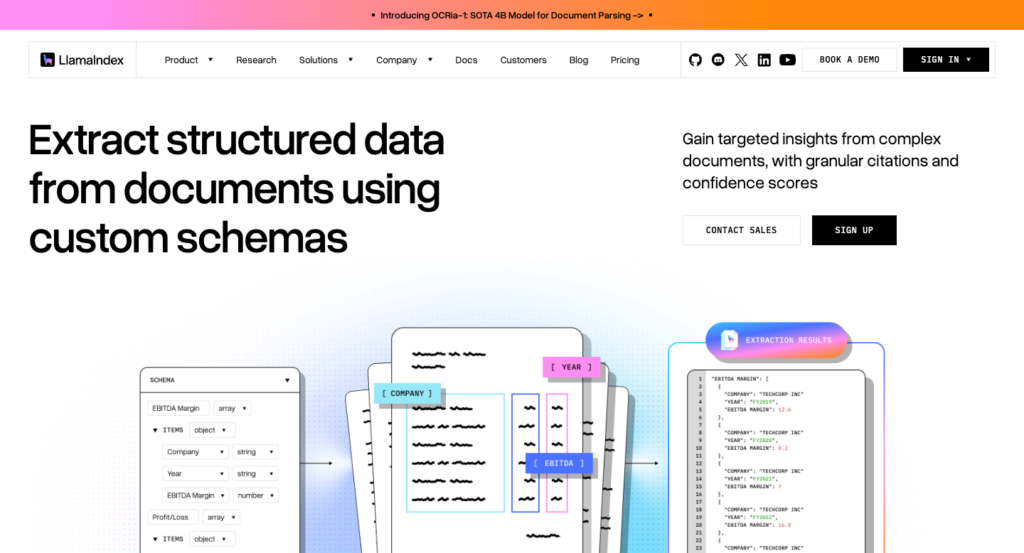
LlamaExtract product page, which maps a custom schema to extracted fields.
LlamaExtract is the hosted schema extraction service on LlamaIndex’s LlamaParse platform. Optional citations and confidence scores support field-level review; citation bounding boxes are available on the primary tiers, but not Turbo.
Feature | Details |
Covers | Schema extraction with JSON Schema or Pydantic (Zod in TypeScript), schemas generated from a prompt or a sample file, and a spreadsheet mode. Stands in for Forms, Queries and AnalyzeExpense through your schema. Extract v2 uses schemas you supply or generate. |
Field extraction | Up to 3,200 leaf fields on Cost-effective, Agentic and Agentic Plus, with large schemas on Cost-effective and Agentic requiring version 2.1 or later. Citations return the page, verbatim text and bounding boxes for each field (except Turbo, which has text-level citations only). Confidence is a 0-1 score per field. Both citations and confidence are off by default in the API and slow processing. |
OCR and languages | Primary tiers use LlamaParse OCR with more than 80 OCR language codes. Turbo prepares inputs without a separate Parse step. |
Pricing | $1.50 per 1,000 credits on pay-as-you-go ($0/month), or $1.25 per 1,000 on Pro ($500/month). Credits per page with default parsing: Cost-effective 8 (about $0.012, or $0.010 on Pro), Agentic 25 (about $0.0375, or $0.031), Agentic Plus 60 ($0.09, or $0.075), Turbo 35 (about $0.0525, or $0.044). |
Free allowance | 10,000 free credits a month on pay-as-you-go, about 1,250 Cost-effective pages (our arithmetic). |
Limits | 100 MB and 500 pages per extraction job. Concurrent extract jobs: 5 on pay-as-you-go, 20 on Pro, 100 on Enterprise. |
Deployment and data | Managed SaaS in North America or the EU. Enterprise deployments add single-tenant SaaS, bring-your-own-cloud (AWS, Azure or GCP) and self-hosting. Files are cached 48 hours unless you set do_not_cache. No training on customer data by default. SOC 2 Type II audited, with a HIPAA BAA for Enterprise. |
Moving from Textract | Queries become schema fields, Block geometry becomes per-field citations with boxes on the primary tiers, and confidence moves from Textract’s 0-100 scale to 0-1. |
Where LlamaExtract stands out is the field-level evidence model on the primary tiers, providing a citation box plus a confidence score per field. The Cost-effective tier costs about $0.012 a page on pay-as-you-go and $0.010 on Pro, close to AnalyzeExpense’s $0.01, so teams migrating invoice extraction pay a similar rate and gain citation support.
What to consider. The 500-page cap per extraction job is a real constraint for long documents. Citations and confidence scores are off by default in the API and can add processing time. Enable them when your review workflow needs the evidence, then measure the latency on your documents. Concurrency caps (5 concurrent extract jobs on pay-as-you-go) matter for burst workloads. You’ll need to supply or generate an extraction schema, which adds an upfront build step.
Best for. Teams replacing Queries or AnalyzeExpense with a schema that need field-level evidence for review queues.
Getting started. LlamaExtract documentation.
Reducto
Reducto home page, which presents it as a single platform for every document task.
Reducto is a document extraction API that includes parsing in the extraction price and supports mixed-document packets through its Split and Classify endpoints. Per-product pricing launched on 1 Sep 2026, with pay-as-you-go accounts moving on 1 Oct 2026.
Feature | Details |
Covers | Extract (JSON in your schema, parsing included), Deep Extract, Parse, Split, Classify and Edit. Stands in for Forms, Queries and AnalyzeExpense through schemas, and for AnalyzeLending-style packets through Split and Classify. You define the extraction schema. |
Field extraction | With citations on: normalized 0-1 page boxes for PDFs and images (the same convention as Textract’s BoundingBox), a high or low confidence label, and numeric extract and parse confidence. Some values have empty citation arrays. Extractions over 100 fields per page may carry a per-field surcharge that is not published. |
OCR and languages | Parsing reads scanned documents, and agentic mode handles handwritten or degraded text. Standard OCR covers 60+ languages. |
Pricing | Per 1,000 pages: Extract $20 and Deep Extract $40, both with parsing included; Parse r-1 $10 and Parse r-1 mini $1; Split $20; Classify $7.50. The batch queue takes 20% off Parse and Extract (12-hour completion), not Deep Extract. |
Free allowance | The Standard plan includes $150 in free usage, then list rates apply. Reducto also offers up to $5,000 in migration credits to teams switching processors (vendor offer). |
Limits | 100 MB direct upload (5 GB through presigned upload), no page limit on Standard, synchronous calls have a 15-minute hard timeout, and up to 1,000 requests/second per key (300 for job-status polling). Standard concurrency baselines of 500 pages in the US and 250 in the EU for r-1. |
Deployment and data | SaaS, with EU and Australian endpoints from Growth. Hybrid VPC and full VPC or on-premises on Enterprise. Results are generally available for 12 hours. From Growth up, zero data retention purges API artifacts within 24 hours (except Studio jobs and persist_results) and data is never used for training. The Standard plan training policy is not stated. Has completed a SOC 2 Type II audit and HIPAA BAAs on Growth and Enterprise. |
Moving from Textract | Normalized citation boxes need no coordinate conversion for PDFs and images. Queries become schema fields. AnalyzeLending-style packets map to Split, Classify and Extract. |
Where Reducto stands out is that parsing is included in the extraction price, so you’re not paying separately for a Parse step and an Extract step. Citation boxes use the same 0-1 normalized coordinates as Textract’s BoundingBox, which reduces the coordinate-conversion work during migration. The hybrid VPC option keeps files in your own storage while processing runs on Reducto’s GPUs.
What to consider. An unpublished per-field surcharge above 100 fields per page adds pricing risk for complex schemas. The Standard plan’s training policy is not stated, so confirm training terms before sending regulated documents.
Best for. Long or mixed packets (lending, insurance, logistics) that need splitting and extraction with citations, possibly inside a VPC.
Getting started. Reducto API documentation.
Docling
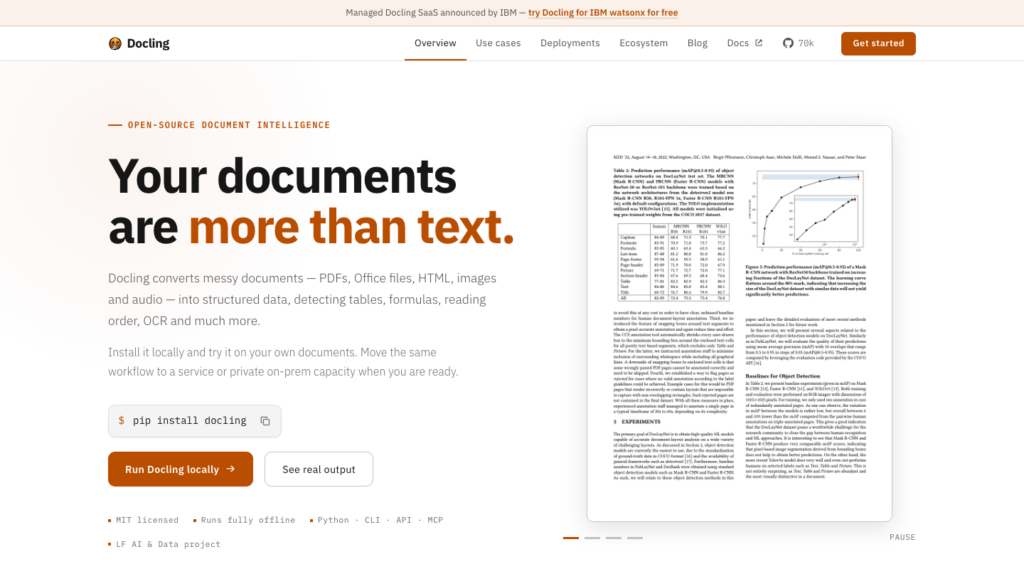
The Docling home page, which leads with a one-line pip install and local, offline use.
Docling is an open-source document parsing library from IBM Research, now an LF AI & Data project. Its MIT license allows production use at no cost.
Feature | Details |
Covers | Open-source parsing of PDF, Office, HTML and image files to Markdown and lossless JSON with layout, tables and reading order, plus schema extraction through DocumentExtractor. Docling Serve exposes a REST API. Stands in for DetectDocumentText, Tables, Layout and simple Queries-style fields. You supply the field-extraction template. |
Field extraction | DocumentExtractor takes a JSON, dict or Pydantic template and returns extracted data per page, using a vision-language model, on PDFs and images only. DocumentExtractor returns no per-field confidence or bounding boxes. |
OCR and languages | Pluggable OCR engines (RapidOCR, EasyOCR, Tesseract, OcrMac, Nemotron-OCR). Language coverage depends on the engine you choose. |
Pricing | Free under the MIT license (models carry their own licenses). You pay for compute; a GPU helps with the vision-language pipeline. |
Free allowance | Unlimited on your own hardware. |
Limits | Set by your hardware and configuration. |
Deployment and data | Runs locally or air-gapped. Docling Serve (v1.38.2) runs in containers. Docling for IBM watsonx is the managed option. An LF AI & Data project started at IBM Research. |
Moving from Textract | You replace a managed API with a service you run, so you own scaling, monitoring, OCR quality and model updates. |
Where Docling stands out is that with local models and remote services disabled, documents stay in your infrastructure, and there is no per-page software fee.
What to consider. You run and scale it yourself. DocumentExtractor works per page without built-in per-field confidence scores, so quality depends on the models and hardware you choose. Frequent releases mean pinning versions keeps production stable.
Best for. Documents that cannot leave your own servers or network.
Getting started. Docling on GitHub.
What changes when you move off Amazon Textract
Switching changes what you pay per document and which parts of your pipeline you rewrite, starting with cost.
What one document costs on each API
List prices as of November 5, 2026, using US regions and the first pricing tier where applicable. Each invoice is 1 page. These are calculations from list prices, not equivalent-output benchmarks: OCR-only rows do not include named invoice fields, and the statement column uses the mode shown in each cell.
API and mode | 1-page scanned invoice | 50-page digital statement | 100,000 invoices a month |
Amazon Textract, AnalyzeExpense | $0.01 | $0.075 (DetectDocumentText) | $1,000 |
Amazon Textract, Forms, Tables and Queries | $0.07 | $3.50 | $7,000 |
Foxit PDF Services API (Business) | 2 credits (OCR then Structural Extraction), or $0.60 on Business | 1 credit, or $0.30 on Business | Volume pricing by quote: 2.4 million credits a year for scanned invoices, or 1.2 million for digital PDFs, before any additional processing calls |
Azure Document Intelligence, prebuilt invoice | $0.01 | $0.50 (Layout) | $1,000, or $900 on the 100,000-page commitment tier |
Google Document AI, Invoice parser | $0.10 (Custom Extractor prediction $0.03) | $0.50 (Layout Parser) | $10,000 (Custom Extractor $3,000; custom-model hosting extra) |
Amazon Bedrock Data Automation, custom output | $0.04 | $0.50 (standard) | $4,000 (custom) |
Mistral OCR 4.1, OCR only | $0.004 | $0.20 | $400 |
LlamaExtract, Cost-effective (pay-as-you-go) | $0.012 | $0.60 | $1,200, or $1,000 on Pro |
Reducto, Extract | $0.02 | $1.00 | $2,000, or $1,600 with batch |
Docling, self-hosted | Your compute | Your compute | Your compute |
Foxit figures assume full use of the yearly credit pool (Business is $4,500 for 15,000 credits, $0.30 per credit; Startup works out to $0.35). Each successful PDF Services processing call costs 1 credit within supported limits, and each separate call in a batch uses 1 credit.
Invoices. At list price, AnalyzeExpense costs $0.01 per invoice page, matching or undercutting most options here. Azure’s prebuilt invoice model matches it at $0.01, and LlamaExtract’s Cost-effective tier comes close at about $0.012 on pay-as-you-go ($0.010 on Pro). Mistral’s OCR-only rate comes in lower still. Google’s Invoice parser costs 10 times more on 1-page invoices because it bills per document.
Long documents. Per-request billing changes the calculation. On digital PDFs, Foxit at $0.30 per request costs less than Textract Tables above roughly 20 pages and less than Forms with Tables from about 5 pages. On scanned documents (2 credits at $0.30 each), the crossovers shift to roughly above 40 pages and from about 10 pages. That comparison is price only, since Foxit returns document structure and form-field values, while Textract’s Forms feature detects key-value pairs on printed and scanned pages.
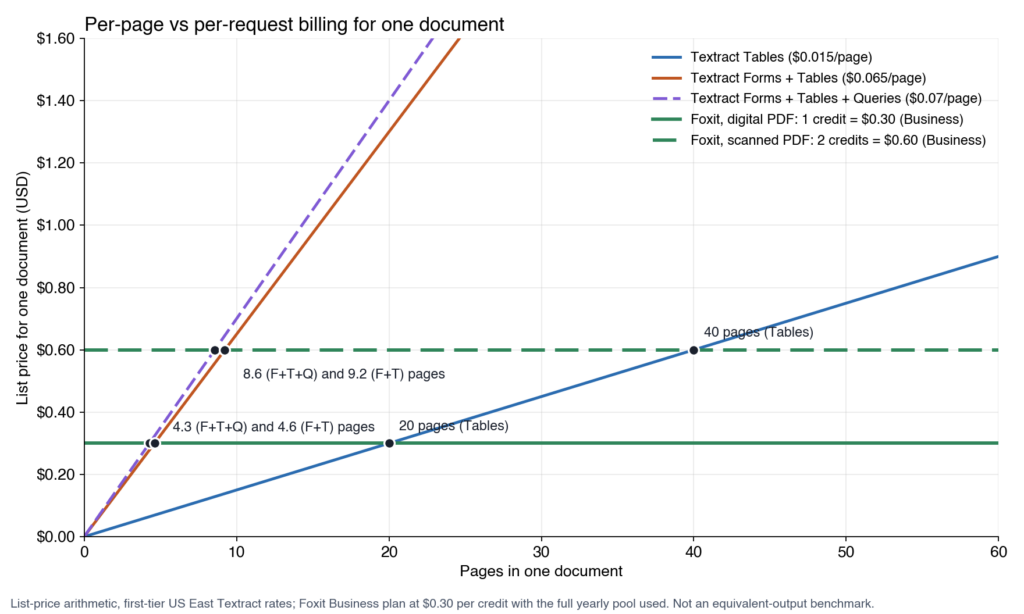
List-price arithmetic only. A digital PDF on Foxit costs less than both Forms lines from 5 pages and less than Tables above 20 pages; a scan costs less from 9 pages (Forms, Tables and Queries), 10 pages (Forms and Tables) and above 40 pages (Tables).
Volume. At 100,000 invoices/month, 1-page invoices consume 1.2 million credits/year for digital PDFs or 2.4 million for scans. Both are far beyond the 15,000 credits on the Business plan, so a Volume quote applies. At this scale, per-page APIs like AnalyzeExpense, Azure’s prebuilt models, or Mistral OCR are better matched to 1-page invoice volumes.
Commitment structure. Our credits reset annually and do not roll over. Top-ups expire on the same reset date. The examples here use annual plan prices at full credit utilization; the effective cost rises when credits go unused.
Price your real document mix before deciding, taking into account pages per document, scanned or digital, and which fields you need. Per-page billing favors short documents at high volume; per-request billing favors long ones.
Every migration rewrites the same parts
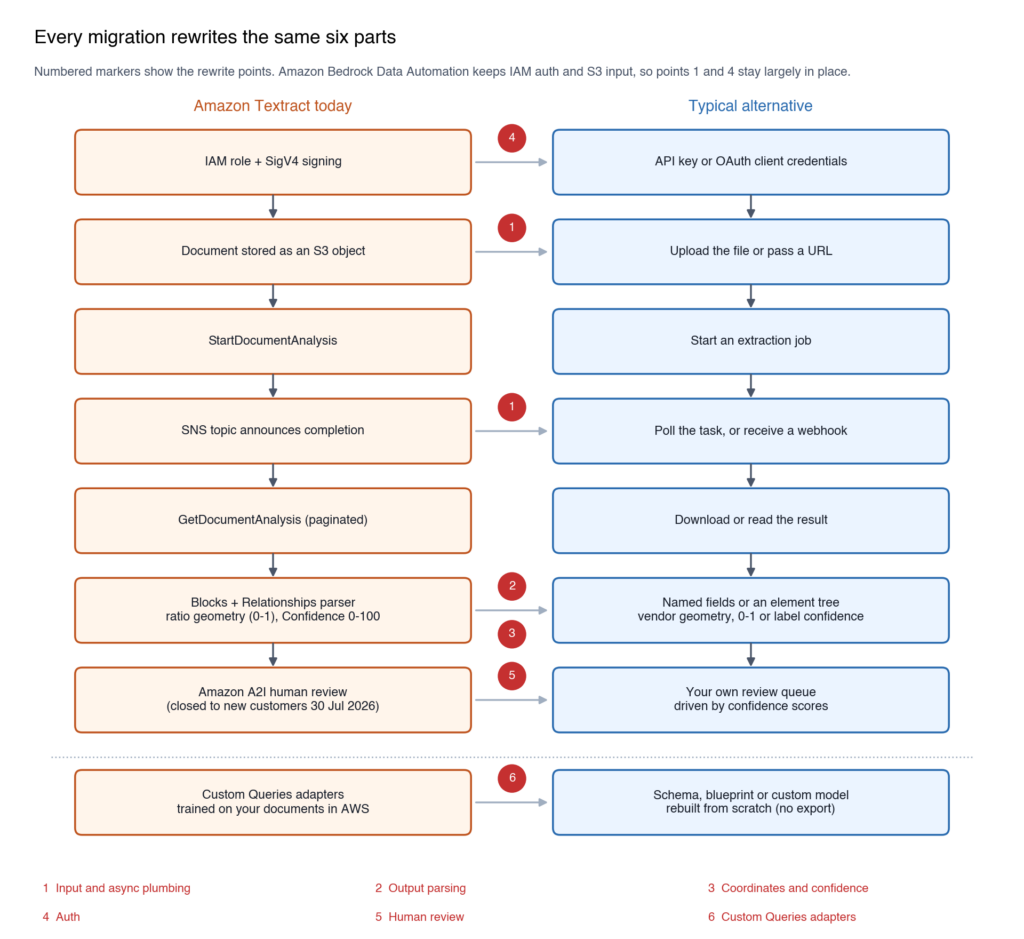
The 6 rewrite points every migration hits, from input and async plumbing to output parsing, coordinates and confidence, auth, human review and Custom Queries adapters.
Input and async plumbing. Textract’s asynchronous APIs read from S3 and announce completion on an SNS topic, with results kept 7 days unless you set an output bucket. Most alternatives take an upload or a URL and expect you to poll or receive a webhook. Foxit uses task polling, Azure uses operation polling, Google batch reads from Cloud Storage, and BDA keeps S3. Review your S3 paths, completion notifications, and output handling for the destination API. BDA keeps S3, but its job workflow still needs to be integrated.
Output parsing. Code that walks Blocks and Relationships (KEY_VALUE_SET to its value and words, TABLE to CELL, QUERY to QUERY_RESULT) gets replaced entirely. Schema extractors return named fields. Layout parsers return element trees. The parsing logic is new code in every case.
Coordinates and confidence. Textract’s BoundingBox values are ratios of page size (0 to 1), and Confidence runs from 0 to 100. Reducto’s citation boxes use the same 0-1 convention. LlamaExtract’s primary tiers return x, y, width, and height with page dimensions. Foxit’s Structural Extraction returns an 8-number polygon with page size reported in points. Confidence scales differ too, with LlamaExtract using 0-1 and Reducto adding high or low labels, so re-tune your review thresholds after migration.
Auth. Hosted alternatives commonly use API keys or OAuth client credentials instead of IAM and SigV4. BDA retains AWS authentication. For a self-hosted deployment, configure authentication for the service you expose.
Human review. A2I is closed to new customers. Google deprecated Document AI’s human-in-the-loop on 16 Jan 2024. For any destination, budget for your own review queue driven by confidence scores.
Custom Queries adapters. Adapters (5 to 2,500 training documents, at most 10 per account) stay in AWS. Rebuild them as schemas, blueprints, or custom models depending on your destination. There’s no export path.
The safest migration approach is to run both pipelines on the same sample of documents and compare fields one by one before cutting over.
Mapping Textract calls to the Foxit PDF Services API
To see those rewrite points on a real destination, this section maps Textract calls to our own API, then runs an extraction on a sample invoice. The mapping is conceptual, since Textract output doesn’t carry over automatically.
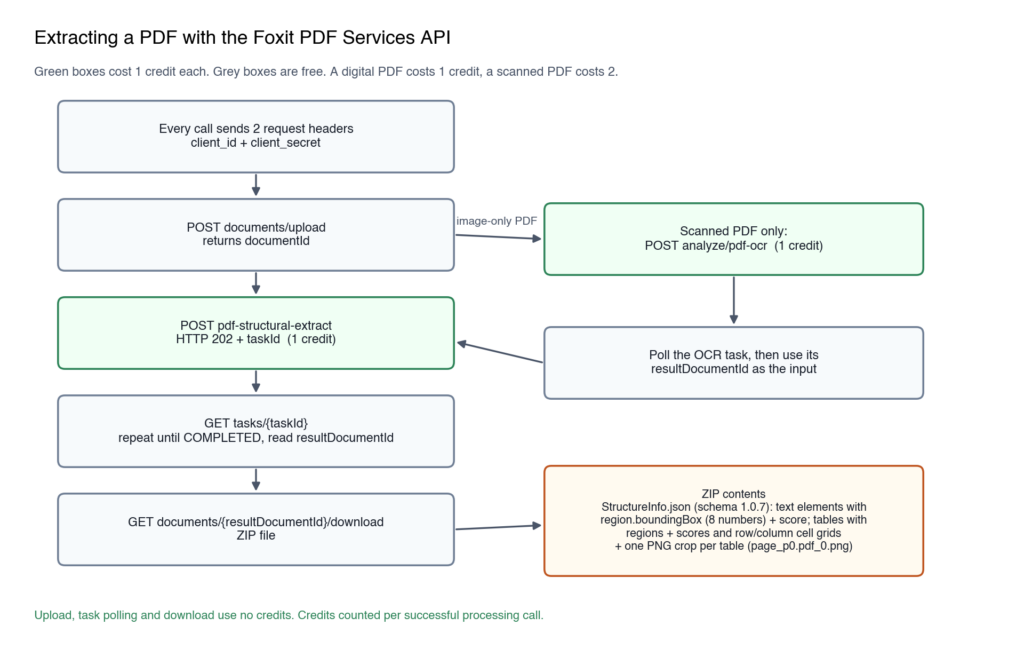
A digital PDF takes 1 billable call; a scanned PDF adds the OCR call first, for 2 credits in total.
Amazon Textract | Foxit PDF Services API | What changes |
DetectDocumentText | Perform OCR on PDF, then PDF to Text or PDF Structural Extraction | OCR returns a searchable PDF; text and structure come from a second call (1 credit each) |
AnalyzeDocument with Tables | PDF Structural Extraction (Trial) table elements, or PDF to Excel | Tables come back as cell grids with row and column indexes, or as an XLSX file |
AnalyzeDocument with Layout | PDF Structural Extraction, or PDF to Markdown | One call returns 12 element types in reading order; filter them in your code |
AnalyzeDocument with Forms, on fillable PDFs | Export PDF Form Data | JSON keyed by form field names, with no OCR involved |
Forms on scanned pages, Queries, AnalyzeExpense | No direct equivalent | Map elements to your fields in code, as our invoice extraction tutorial shows |
Signatures, AnalyzeID, AnalyzeLending | No equivalent | Keep them on Textract or choose another API from this list |
S3 input and SNS notification | Upload, start the operation, poll the task | Polling, uploads and downloads use no credits |
Blocks with ratio geometry and 0-100 confidence | An elements array where text elements carry a page, an 8-number polygon and a score, and table elements carry them under regions and scores | Convert coordinates and re-tune thresholds |
IAM and SigV4 | client_id and client_secret request headers | No request signing; the same 2 headers authenticate every PDF Services call |
Billed per page at the selected feature-combination rate | 1 credit per request | Within supported limits; scanned PDFs take 2 calls |
Prerequisites
To try the flow on your own account, you need:
- A bash shell: bash ships with macOS and Linux; on Windows, use WSL
- curl: the command-line HTTP client that makes every API call
- jq: the JSON processor that reads the API responses
- unzip: UnZip, which opens the result ZIP
- A Foxit developer account: a free Foxit developer account, whose Developer plan includes 500 credits a year
Once you’re signed in, the Make your first call card on the console dashboard shows your client ID and client secret, with a copy button beside each.
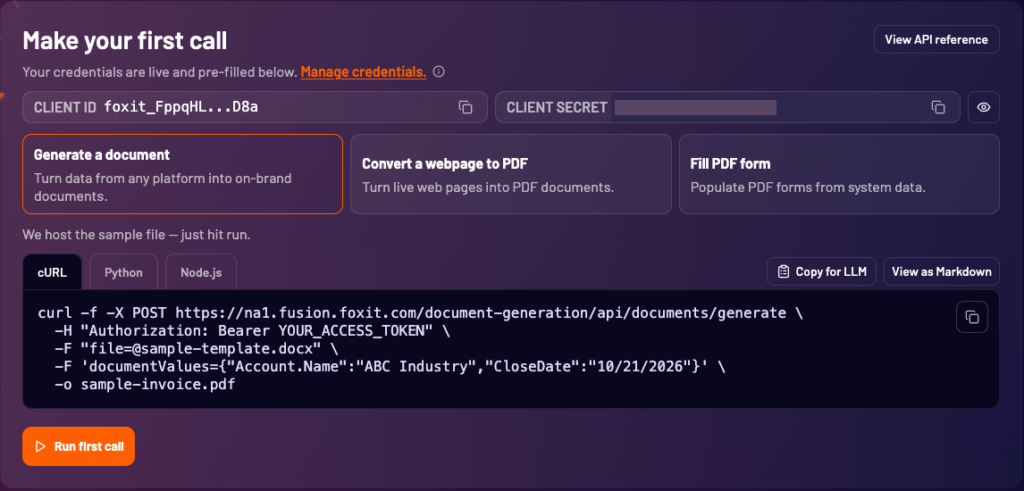
The Make your first call card, where the copy buttons beside CLIENT ID and CLIENT SECRET give you the 2 values the script reads.
The same dashboard tracks how many of your yearly credits you’ve used.
Run this block to create a working folder, download our extraction script, the sample digital invoice, the image-only scan of the same invoice and the fillable form, and export your credentials:
Text elements carry an 8-number boundingBox in points and a score. Table elements leave region empty and carry their polygon under regions and their confidence under scores, and they come back as a row and column grid with a PNG crop of the table region. The script saves the full extraction to out/StructureInfo.json, the table crop to .out/page_p0.pdf_0.png and the original ZIP to result.zip, all in your working folder.

The table crop from the result ZIP holds only the line-item table region, not a render of the whole page.
The same script covers the other routes. Run this command from your terminal to extract the image-only scan of the same invoice, which runs OCR before extraction: